1. Bubuka
Hatur nuhun pikeun meuliasing the Riptunes Portable CD Player with AM/FM Radio, Model CDB204. This device is designed for portable audio playback, offering versatile options including CD playback, AM/FM radio reception, and auxiliary input for external audio sources. Please read this manual thoroughly before operating the unit to ensure proper use and to maximize your listening experience.

Image 1.1: Riptunes Portable CD Player (Model CDB204) with an external device connected.
2. Émbaran Kasalametan
- Ulah ngalaan unit ka hujan atawa Uap pikeun nyegah seuneu atawa shock listrik.
- Ulah muka lomari. Rujuk ngalayanan ka tanaga anu mumpuni wungkul.
- Ulah nempatkeun unit deukeut sumber panas kayaning radiators, registers panas, kompor, atawa alat sejenna nu ngahasilkeun panas.
- Paké ngan kantétan / asesoris dieusian ku produsén.
- Cabut unit ieu nalika badai kilat atanapi nalika henteu dianggo kanggo waktos anu lami.
- Buang batré kalayan leres, nuturkeun aturan lokal. Ulah ngalaan batré ka panas kaleuleuwihan.
3. Eusi Paket
Punten parios yén barang-barang ieu kalebet kana pakét anjeun:
- Riptunes Portable CD Player (Model CDB204)
- Adaptor Daya AC
- Instruksi Manual
4. Produk Langkungview
Familiarize yourself with the controls and features of your Riptunes Portable CD Player.
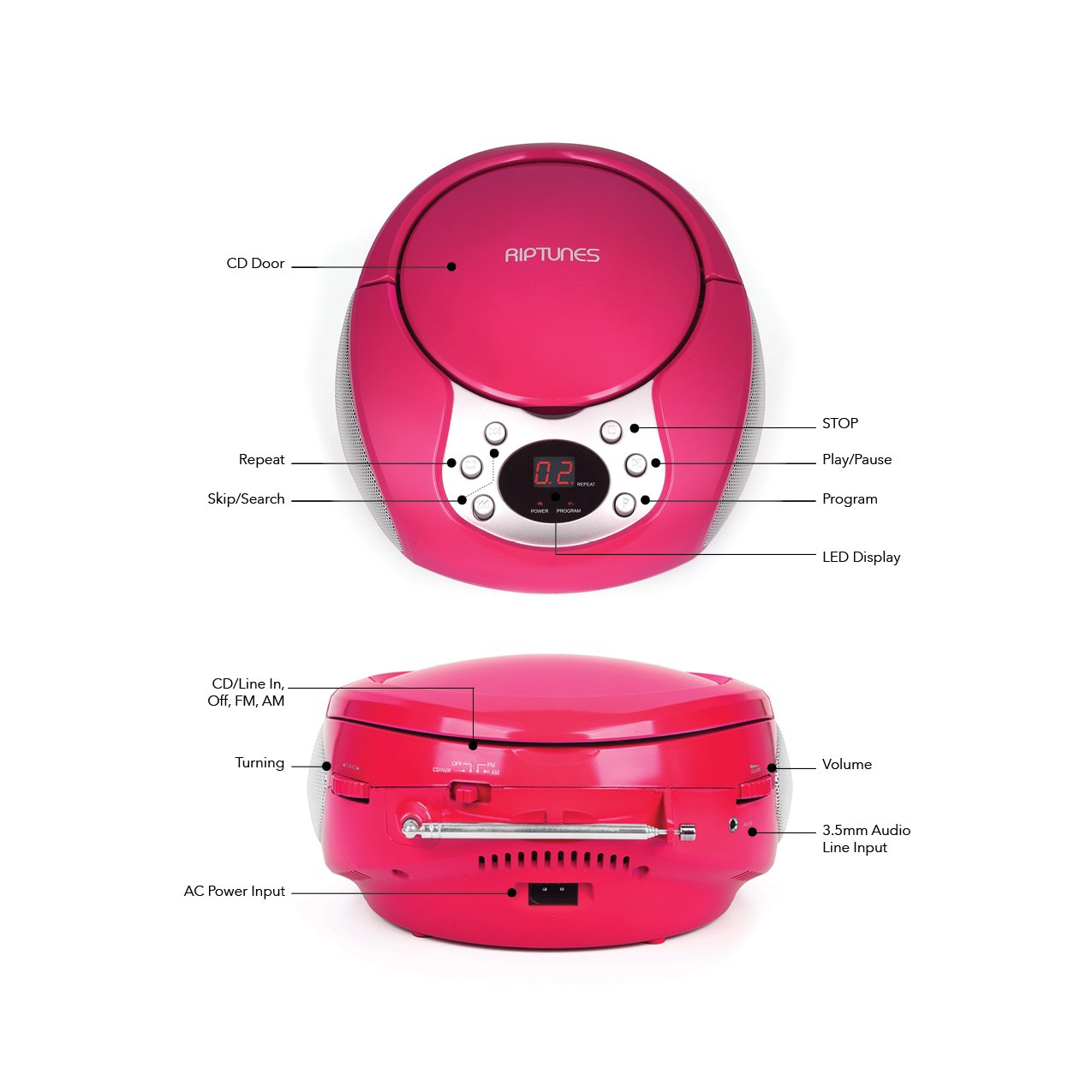
Image 4.1: Front and Side Panel Controls and Ports.
Kontrol Panel hareup:
- Panto CD: Open to insert or remove a CD.
- Témbong LED: Shows track number, radio frequency, or mode.
- POWER/PROGRAM Button: Press to turn the unit on/off. In CD mode, press to program tracks.
- PLAY/PAUSE (►/−−) Button: Press to start or pause CD playback.
- STOP (■) Button: Press to stop CD playback.
- SKIP/SEARCH (◀◀ / ►►) Buttons: Press to skip tracks on a CD. Hold to search within a track. In radio mode, press to tune.
- Tombol REPEAT: Press to repeat the current track or all tracks on a CD.
Side Panel Controls/Ports:
- FUNCTION Switch (CD/Line In-Off, FM, AM): Selects the operating mode (CD/Aux, FM Radio, AM Radio) and turns the unit off.
- Tombol VOLUME: Saluyukeun tingkat kaluaran audio.
- TUNING Dial: Adjusts the radio frequency in AM/FM mode.
- AUX IN Jack: Connects external audio devices using a 3.5mm audio cable.
- AC POWER INPUT Jack: Connects the supplied AC power adapter.
- Anteneu FM: Panjangkeun pikeun nampi panarimaan radio FM anu optimal.
5. Setélan
5.1 Powering Unit
The Riptunes Portable CD Player can be powered by either the included AC adapter or by batteries.
Operasi kakuatan AC:
- Ensure the FUNCTION switch is in the 'OFF' position.
- Insert the small end of the AC adapter into the AC POWER INPUT jack on the side of the unit.
- Plug the other end of the AC adapter into a standard AC wall outlet (120V ~ 60Hz).
Operasi batré:
Pikeun panggunaan anu gampang dibawa, alat ieu peryogi 6 batré ukuran 'C' (teu kalebet).
- Ensure the FUNCTION switch is in the 'OFF' position.
- Tangtukeun lokasi kompartemen batré dina handapeun unit.
- Open the battery compartment cover by sliding it off.
- Insert 6 'C' size batteries, observing the correct polarity (+/-) as indicated inside the compartment.
- Ganti panutup kompartemen batré aman.

Image 5.1: Battery Compartment on the underside of the unit.
5.2 Adjustment anteneu
For optimal FM radio reception, fully extend the telescopic FM antenna located on the side of the unit. For AM reception, the unit has a built-in antenna, so no external adjustment is needed, but you may need to reposition the unit for better signal.

Image 5.2: Unit with FM antenna extended.
6. Parentah Operasi
6.1 Playback CD
- Slide the FUNCTION switch to the 'CD/Line In-Off' position.
- Press the 'OPEN' button on the CD door to open it.
- Place a CD into the compartment with the label side facing up.
- Close the CD door firmly. The LED display will show '00' or the total number of tracks.
- Press the PLAY/PAUSE (►/−−) button to start playback. The track number will appear on the display.
- Adjust the VOLUME dial to your desired listening level.
- To pause playback, press the PLAY/PAUSE (►/−−) button. Press again to resume.
- Pikeun ngeureunkeun puteran, pencét tombol STOP (■).
- To skip to the next track, press the SKIP/SEARCH (►►) button.
- To go back to the beginning of the current track, press the SKIP/SEARCH (◀◀) button once. Press twice to go to the previous track.
- To search rapidly forward or backward within a track, hold down the respective SKIP/SEARCH button.
- Fungsi Ulang: Press the REPEAT button once to repeat the current track. Press again to repeat all tracks. Press a third time to cancel repeat mode.
- Fungsi Program: While the CD is stopped, press the PROGRAM button. The display will flash. Use the SKIP/SEARCH buttons to select your desired track, then press PROGRAM again to confirm. Repeat for up to 20 tracks. Press PLAY/PAUSE to start programmed playback.
6.2 AM / Operasi Radio FM
- Slide the FUNCTION switch to either 'FM' or 'AM' position.
- For FM reception, extend the telescopic antenna fully.
- Rotate the TUNING dial on the side of the unit to select your desired radio station. The frequency will be displayed on the LED screen.
- Adjust the VOLUME dial to your desired listening level.
- For optimal AM reception, you may need to rotate the entire unit to find the best signal.
6.3 Input Auxiliary (AUX IN)
- Slide the FUNCTION switch to the 'CD/Line In-Off' position.
- Connect one end of a 3.5mm audio cable (not included) to the AUX IN jack on the side of the unit.
- Sambungkeun tungtung kabel audio anu sanés ka jack headphone atanapi jack line-out alat audio éksternal anjeun (contona, smartphone, pamuter MP3).
- Turn on your external audio device and start playback.
- Adjust the VOLUME dial on the Riptunes unit and the volume on your external device to achieve the desired sound level.
7. Pangropéa
- beberesih: Ngusap unit ku kaén anu lembut sareng garing. Ulah make cleaners abrasive atawa pangleyur.
- Perawatan CD: Anggo CD ti sisi-sisina. Jaga supaya tetep bersih sareng bébas tina goresan. Anggo lawon anu lemes sareng henteu ngaganggu pikeun ngusap CD ti tengah ka luar.
- Panyimpenan: Upami teu dianggo salami lami, cabut batréna teras simpen unitna di tempat anu tiis, garing, sareng jauh tina sinar panonpoé langsung sareng suhu anu ekstrim.
8. Cara ngungkulan
| Masalah | Mungkin Cukang lantaranana | Solusi |
|---|---|---|
| Taya kakuatan | AC adapter not connected; Batteries depleted or incorrectly inserted; FUNCTION switch in 'OFF' position. | Ensure AC adapter is securely plugged in; Replace batteries or check polarity; Slide FUNCTION switch to 'CD/Line In-Off', 'FM', or 'AM'. |
| CD teu diputer | CD inserted incorrectly; CD is dirty or scratched; CD door not closed; FUNCTION switch not in 'CD/Line In-Off' mode. | Insert CD with label side up; Clean or replace CD; Close CD door firmly; Set FUNCTION switch to 'CD/Line In-Off'. |
| panarimaan radio goréng | FM antenna not extended; Unit position. | Fully extend FM antenna; Reposition the unit for better signal. |
| Taya sora ti AUX IN | Audio cable not connected properly; External device volume too low; FUNCTION switch not in 'CD/Line In-Off' mode. | Check audio cable connections; Increase volume on external device; Set FUNCTION switch to 'CD/Line In-Off'. |
9. Spésifikasi
- model: CDB204
- Sumber Daya: AC 120V ~ 60Hz atanapi 6 x batré ukuran 'C' (DC 9V)
- Kasaluyuan CD: CD, CD-R / RW
- Frékuénsi radio: FM, AM
- Konektipitas: 3.5mm AUX IN
- Ukuran (Kira-kira.): 12.48 x 11.46 x 7.09 inci (31.7 x 29.1 x 18 cm)
- Beurat (Kira-kira.): 2.68 pon (1.22 kg)
10. Garansi jeung Rojongan
Riptunes products are designed for reliability and performance. For warranty information, technical support, or customer service inquiries, please refer to the contact information provided with your purchase documentation or visit the official Riptunes websitus. Punten tahan bukti pameseran anjeun pikeun klaim garansi.


