Bubuka
The Crown CDi DriveCore Series represents an advancement in amplification technology, offering a blend of high performance, extensive features, and cost-effectiveness. Utilizing DriveCore technology, derived from Crown's installed sound amplifiers, the CDi 4|1200 provides streamlined functionality suitable for various large-sized installations, including cinemas, houses of worship, hotels, and cruise lines. This 4-channel amplifier includes network control and monitoring capabilities, high-level Digital Signal Processing (DSP), a user-friendly front-panel interface, and support for driving speaker loads up to 100Vrms without requiring a transformer. The entire CDi DriveCore line comes pre-loaded with JBL speaker tunings to facilitate quicker and easier installations.
Fitur konci
- Each output channel is capable of providing either 70V or 100V for high impedance applications.
- Recall presets, mute channels, monitor faults, and control amplifier power (on/off) through a combined GPIO/aux port.
- Through HARMAN’s HiQnet Audio Architect software, the CDi DriveCore can be controlled, configured, and monitored via a standard TCP/IQ network.
- Completely configure the amplifier using an intuitive front-panel interface.
Disetél
Sateuacan nyambungkeun amplifier, ensure all equipment is powered off. Carefully read all safety warnings. The CDi 4|1200 amplifier is designed for rack mounting in a standard 19-inch equipment rack. Ensure adequate ventilation around the unit to prevent overheating. Connect your audio sources to the input terminals and your speakers to the output terminals. Verify all connections are secure and correct for your system's impedance requirements (2/4/8 Ohm or 70V/100V direct output). For network control, connect an Ethernet cable to the network port on the rear panel.
Parentah Operasi
Sakali dina amplifier is securely installed and all connections are made, power on the unit. The front panel display provides access to various settings and monitoring functions. Use the navigation controls to browse menus and adjust parameters such as input sensitivity, output levels, DSP settings, and presets. For advanced configuration and monitoring, connect the amplifier to a network and use HARMAN’s HiQnet Audio Architect software. This software allows for comprehensive control over all amplifier functions, including routing, equalization, and system diagnostics. The amplifier supports both low impedance (2/4/8 Ohm) and high impedance (70V or 100V) speaker configurations, offering flexibility for diverse audio setups.
Pangropéa
To ensure optimal performance and longevity of your Crown CDi 4|1200 amplifier, regular maintenance is recommended. Keep the unit clean and free from dust accumulation, especially around the ventilation openings. Use a soft, dry cloth for cleaning. Do not use liquid cleaners or solvents. Ensure that the amplifier's ventilation fans are not obstructed and that there is sufficient airflow around the unit. Periodically check all cable connections for tightness and integrity. If the unit is stored for an extended period, ensure it is in a dry, temperature-controlled environment.
Pamérésan masalah
Upami anjeun mendakan masalah sareng anjeun amplifier, tingali léngkah-léngkah ngungkulan masalah umum ieu:
- Henteu aya kakuatan: Check the power cable connection to both the amplifier and the AC outlet. Ensure the outlet is live.
- Henteu aya Kaluaran Audio: Verify all input and output cables are correctly connected and secure. Check the source device for proper operation. Ensure the amplifier's channels are not muted and volume levels are appropriately set.
- Audio distort: Check input levels to ensure they are not too high, causing clipping. Verify speaker impedance matches the amplifier's settings. Inspect speaker cables for damage.
- Overheating: Pastikeun amplifier has adequate ventilation. Clear any obstructions from the fan vents. Reduce the load on the amplifier if it consistently overheats.
- Masalah Konektipitas Jaringan: Check Ethernet cable connections. Verify network settings on the amplifier and your control device. Ensure the HiQnet Audio Architect software is correctly configured.
For persistent issues, consult the full technical manual available on the Crown Audio website or contact Crown Audio support.
spésifikasi
| Ukuran barang L x W x H | 16 x 19 x 3.5 inci |
| Voltage | 100 volt |
| Produsén | Mahkota |
| Maksimum Suplai Voltage | 100 volt |
| Tipe Pamasangan | Permukaan Gunung |
| merek | Mahkota |
| Jumlah Saluran | 4 |
| Daya Kaluaran | 1200 Watt |
| Ngaran Jenis Pakét | Unit Tunggal |
| Spesifikasi Met | CE, FCC, RoHS, WEEE |
| Nomer Idéntifikasi Perdagangan Global | 00691991006944 |
| UPC | 691991006944 |
| Item Beurat | 20.1 pon |
| Dimensi produk | 16 x 19 x 3.5 inci |
| ASIN | B0767NQ32P |
| Nomer modél barang | CDi 4|1200 |
| Tanggal Kahiji Sadia | 19 Agustus 2017 |
| Kaluaran Wattage | 1200 Watt |
| Ukuran | 4-channel, 1200W |
Naon dina Box
- Crown CDi 4|1200 DriveCore Analog Power Amppangagung
Garansi sareng Rojongan
The MANUFACTURERS LIMITED PRODUCT WARRANTY for Crown Audio products applies only when the purchase is made from Crown Audio Authorized North American Dealers. For complete details regarding your warranty coverage and support options, please refer to the official Crown Audio website or contact an authorized dealer.
Gambar produk
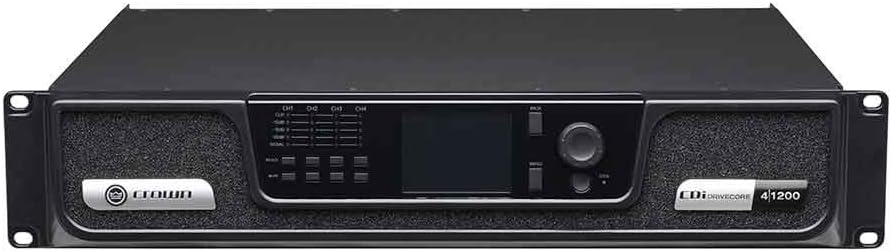
Gambar 1: Hareupeun view of the Crown CDi 4|1200 DriveCore Analog Power Amplifier, showing the display, controls, and branding.

Gambar 2: Tukangeun view of the Crown CDi 4|1200 DriveCore Analog Power Amplifier, displaying the power input, fan, input/output terminals, and network ports.
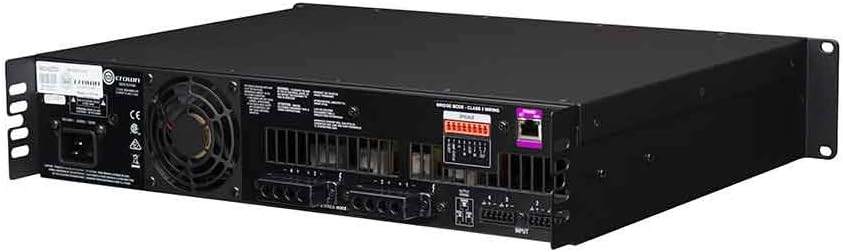
Gambar 3: Patukang tonggong view tina amplifier from the left side, highlighting the power input and cooling fan.

Gambar 4: Patukang tonggong view tina amplifier from the right side, showing the input and output connections, including the network port.
Video Produk Resmi
Video: An informational video introducing the Crown CDi DriveCore Series of amplifiers, highlighting key features such as DriveCore technology, network control, and versatile output options. The video features a representative discussing the product's benefits and applications in various installations.


