Bubuka
This manual provides essential information for the safe and efficient operation, installation, and maintenance of your Utilitech 2-Sone 70-CFM White Bathroom Fan. Please read all instructions carefully before installation and use. Keep this manual for future reference.
Émbaran Kasalametan
PERHATOSAN:
- Salawasna pegatkeun sambungan kakuatan dina panel layanan saméméh ngalayanan atawa meresihan unit.
- Pamasangan kedah dilakukeun ku tukang listrik anu mumpuni saluyu sareng sadaya kode listrik lokal sareng nasional.
- Do not use this fan in a kitchen. This fan is designed for bathroom ventilation only.
- Mastikeun grounding ditangtoskeun pikeun ngurangan résiko shock listrik.
- Never insert objects into the fan grille while the fan is operating.
- This product is designed for general ventilating use only. Do not use to exhaust hazardous or explosive materials and vapors.
Eusi pakét
Pariksa yén sadaya komponén aya sateuacan ngamimitian pamasangan:
- Utilitech 2-Sone 70-CFM Bathroom Fan Unit
- Panutup grille
- Instalasi Hardware (screws, mur kawat)
- Manual pangguna (dokumén ieu)
Setup sareng Instalasi
Follow these steps for proper installation of your bathroom fan. It is recommended to have a second person assist during installation.
Alat anu diperyogikeun:
- Obeng (Phillips sareng Flathead)
- Kawat Strippers
- Drill (if creating new opening)
- Pita Ukur
- Péso Utiliti atanapi Drywall Saw
- Kacamata Kasalametan jeung Sarung Tangan
Léngkah-léngkah pamasangan:
1. Pegatkeun Daya:
Before starting any work, turn off the power to the circuit at the main service panel. Verify power is off using a voltage panguji.
2. Prepare Opening:
If replacing an existing fan, remove the old unit. If installing in a new location, cut an opening in the ceiling that matches the fan housing dimensions (7.5 x 7.2 inches). Ensure there is sufficient clearance above the ceiling for the fan housing and ductwork.
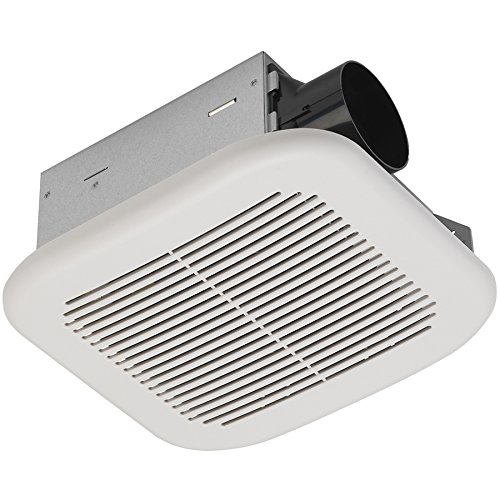
Image: The Utilitech 2-Sone 70-CFM Bathroom Fan unit, showing the white grille cover, the metal housing, and the circular duct connection port on the side.
3. Mount Fan Housing:
Insert the fan housing into the ceiling opening. Secure the housing to the ceiling joists using the provided mounting brackets and screws. Ensure the fan is level and securely fastened.
4. Connect Ductwork:
Connect appropriate ductwork (typically 4-inch round duct) to the fan's exhaust port. Secure the duct with duct tape or clamps to ensure an airtight seal. Route the ductwork to an exterior vent cap.
5. Kabel Listrik:
Remove the wiring cover plate on the fan housing. Connect the household electrical wires to the fan's wires according to the wiring diagram provided inside the fan's junction box. Typically, this involves connecting black to black (hot), white to white (neutral), and green/bare copper to green (ground). Use wire nuts to secure connections. Replace the wiring cover plate.
6. Install Grille Cover:
Once the fan is wired and secured, attach the grille cover. The grille typically has spring clips that fit into slots on the fan housing. Push the grille firmly until it snaps into place.
7. Restore Power:
Turn the power back on at the main service panel. Test the fan to ensure it operates correctly.
Parentah Operasi
The Utilitech 2-Sone 70-CFM Bathroom Fan is designed for simple operation. Once installed and wired to a wall switch (not included), simply toggle the switch to turn the fan ON or OFF. For optimal performance, operate the fan during and after showering or bathing to effectively remove moisture and odors from the bathroom.
Pangropéa
Regular maintenance ensures the longevity and efficiency of your fan.
Cleaning the Grille and Fan Housing:
1. Pegatkeun Daya:
Pareuman heula daya kipas dina pemutus sirkuit sateuacan diberesihan.
2. Remove Grille:
Gently pull down the grille cover to disengage the spring clips. Remove the grille from the fan housing.
3. Clean Grille:
Ngumbah panutup grille ku sabun hampang jeung cai. Bilas sacara saksama sareng ngantepkeun dugi ka garing sateuacan dipasang deui.
4. Clean Fan Housing and Blades:
Using a soft cloth or a vacuum cleaner with a brush attachment, carefully remove dust and debris from the fan motor, fan blades, and interior of the housing. Do not use abrasive cleaners or solvents.
5. Reattach Grille:
Once clean and dry, reattach the grille cover by aligning the spring clips with the slots and pushing it firmly into place.
6. Restore Power:
Hurungkeun deui kakuatan dina circuit breaker.
No lubrication is required for the fan motor. The motor is permanently lubricated.
Pamérésan masalah
Upami anjeun ngalaman masalah sareng kipas anjeun, konsultasi tabel di handap ieu sateuacan ngahubungi dukungan palanggan.
| Masalah | Mungkin Cukang lantaranana | Solusi |
|---|---|---|
| Fan teu beroperasi | Taya kakuatan pikeun kipas | Check circuit breaker or fuse. Ensure wall switch is ON. Verify wiring connections. |
| Kipas angin ribut | Loose mounting screws or ductwork; debris in fan blades; motor issue | Ensure fan housing is securely mounted. Check ductwork for obstructions or loose connections. Clean fan blades. If noise persists, motor may need replacement. |
| Gerakan hawa goréng | Blocked ductwork; dirty fan blades/grille; fan too small for room | Check ductwork for obstructions. Clean fan blades and grille. Ensure fan CFM rating is appropriate for bathroom size. |
| Kipas angin ngageter kaleuleuwihi | Improper mounting; unbalanced fan blade | Re-check mounting screws for tightness. Inspect fan blade for damage or debris causing imbalance. |
spésifikasi
| Fitur | Spésifikasi |
|---|---|
| merek | Utilitech |
| Nomer modél | 7111-04-L |
| Dimensi produk | 7.5 x 7.2 x 3.9 inci |
| Item Beurat | 4.7 pon |
| Kapasitas Aliran Udara | 70 Kaki Kubik Per Menit (CFM) |
| Tingkat Noise | 2.0 Sones (equivalent to 70 dB) |
| Voltage | 120 volt |
| Warna | Bodas |
| Tipe Kamar | Kamar mandi |
| Dianjurkeun Paké | Ventilasi |
Garansi sareng Rojongan
Utilitech products are manufactured to high-quality standards. For warranty information or technical support, please refer to the warranty card included with your purchase or contact Utilitech customer service. Keep your proof of purchase for warranty claims.
For further assistance, please visit the official Utilitech websitus atanapi ngahubungi layanan palangganna. Inpormasi kontak biasana tiasa dipendakan dina bungkus produk atanapi produsén websitus.


