Bubuka
Thank you for choosing the Sephia A11 Portable Bluetooth Speaker. This manual provides essential information for setting up, operating, and maintaining your speaker to ensure optimal performance and longevity. The Sephia A11 offers versatile connectivity options, including Bluetooth, USB, Micro SD, and AUX input, delivering clear and powerful audio in a compact design.
Naon dina Box
- Sephia A11 Bluetooth Speaker
- Kabel Ngecas
- Aux Kabel
- Manual pangguna (dokumén ieu)

Image: The Sephia A11 Portable Bluetooth Speaker, showcasing its sleek black design and front grille.
Produk Leuwihview
Familiarize yourself with the buttons and ports on your Sephia A11 speaker.
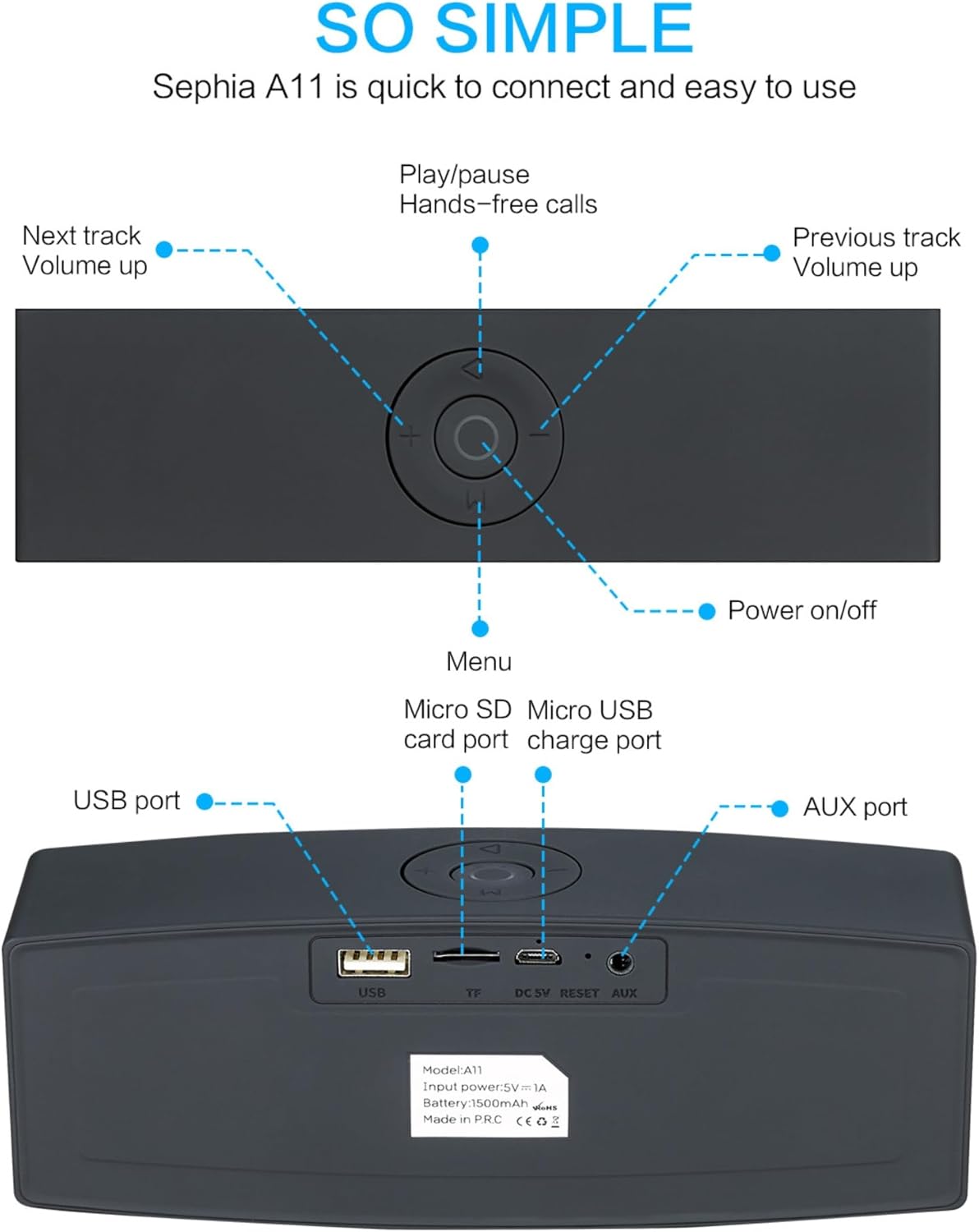
Image: Detailed diagram illustrating the top control panel and rear input/output ports of the Sephia A11 speaker.
Kontrol Luhur:
- Tombol Daya / Pareuman: Pencét jeung tahan pikeun ngaktipkeun atawa mareuman speaker.
- Tombol Puter/Reureuh: Press to play or pause audio. Also used for hands-free calls (answer/end).
- Previous Track / Volume Down Button (-): Pencét sakeudeung pikeun lagu samemehna, pencét lila pikeun ngurangan volume.
- Next Track / Volume Up Button (+): Pencét sakeudeung pikeun lagu salajengna, pencét lila pikeun ningkatkeun volume.
- Tombol Menu (M): Press to switch between input modes (Bluetooth, USB, Micro SD, AUX).
Palabuhan tukang:
- Port USB: For playing audio from a USB drive or charging external devices.
- Micro SD Card Slot (TF): Pikeun muterkeun audio tina kartu Micro SD.
- Micro USB Charge Port (DC 5V): Pikeun ngecas speaker.
- Tombol Reset: Pinhole leutik pikeun ngareset alat upami diperlukeun.
- Pelabuhan AUX: For wired audio connection using the provided 3.5mm AUX cable.
Disetél
1. Ngecas Speaker
- Connect the supplied charging cable to the Micro USB Charge Port (DC 5V) on the rear of the speaker.
- Sambungkeun tungtung nu sejen kabel ngecas ka adaptor kakuatan USB (teu kaasup) atawa port USB komputer.
- The charging indicator light will illuminate. Once fully charged, the light will change or turn off (refer to specific model behavior if indicated by LED). A full charge provides up to 8 hours of playtime.
2. Powering on / Pareum
- To power on, press and hold the Power On/Off button on the top panel until you hear an audible prompt or see an indicator light.
- Pikeun mareuman, pencét terus tahan tombol Daya Hurung/Pareum deui dugi ka speaker pareum.
3. Papasangan Bluetooth
- Ensure the speaker is powered on and in Bluetooth mode. If not, press the 'M' (Menu) button to switch to Bluetooth mode. The speaker will enter pairing mode, indicated by a flashing LED light and an audible prompt.
- Dina alat sélulér anjeun (smartphone, tablet, laptop), aktipkeun Bluetooth sareng milarian alat anu sayogi.
- Select "Sephia A11" from the list of found devices.
- Once successfully paired, the speaker will provide an audible confirmation, and the LED indicator will stop flashing.
- Spiker ieu gaduh jangkauan Bluetooth dugi ka 10 méter (33 kaki).
4. Wired Connections (AUX, USB, Micro SD)
- Input AUX: Connect one end of the supplied 3.5mm AUX cable to the AUX port on the speaker and the other end to the audio output of your device (e.g., MP3 player, computer). The speaker will automatically switch to AUX mode or can be selected using the 'M' button.
- Puterkeun USB: Selapkeun USB flash drive nu ngandung audio files kana port USB. Spéker bakal otomatis ngadeteksi sareng muterkeun audio files.
- Puterkeun Kartu SD Mikro: Lebetkeun kartu Micro SD anu ngandung audio files into the Micro SD (TF) slot. The speaker will automatically detect and play the audio files.
Ngoperasikeun Speaker
Playback Audio
- Puter / Reureuh: Press the Play/Pause button to toggle between playing and pausing audio.
- Penyesuaian volume: Long press the '+' button to increase volume, and long press the '-' button to decrease volume.
- Lagu Salajengna / Saméméhna: Short press the '+' button for the next track, and short press the '-' button for the previous track.

Image: A hand demonstrating how to interact with the top control buttons of the Sephia A11 speaker.
Leungeun-Free Telepon
- When a call comes in while connected via Bluetooth, press the Play/Pause button to answer the call.
- Pencét deui tombol Puter / Reureuh pikeun ngeureunkeun telepon.
- Mikropon internal ngamungkinkeun komunikasi anu jelas.
Pangropéa
- beberesih: Use a soft, dry cloth to clean the speaker's surface. Do not use abrasive cleaners, alcohol, or chemical solvents, as these may damage the finish.
- Panyimpenan: Simpen spéker dina tempat anu tiis sareng garing jauh tina sinar panonpoé langsung sareng suhu anu ekstrim.
- Perawatan batré: To prolong battery life, avoid fully discharging the speaker frequently. Charge the speaker regularly, even if not in use for extended periods.
- Tahan cai: spiker ieu teu waterproof. Hindarkeun paparan ka cai atanapi kalembaban anu kaleuleuwihan.
Pamérésan masalah
| Masalah | Mungkin Cukang lantaranana | Solusi |
|---|---|---|
| Speaker teu hurung. | batré lemah; Tombol daya teu tahan cukup lila. | Cas speaker pinuh. Pencét terus tahan tombol Daya salami 3-5 detik. |
| Taya sora tina speaker. | Volume low teuing; modeu input salah; Alat teu nyambung leres. | Increase speaker and device volume. Press 'M' button to select correct input mode. Re-pair Bluetooth or re-connect AUX/USB/SD. |
| Papasangan Bluetooth gagal. | Speaker henteu dina mode papasangan; Alat jauh teuing; gangguan. | Ensure speaker is in Bluetooth pairing mode (flashing LED). Move speaker closer to device. Turn off other Bluetooth devices. Try forgetting "Sephia A11" on your device and re-pairing. |
| Kualitas sora henteu saé. | Low battery; Device volume too high (distortion); Interference. | Charge the speaker. Adjust volume on both speaker and device. Move away from sources of interference. |
spésifikasi
| Ngaran modél | A11 |
| Diménsi | 18 x 7 x 5 cm |
| Beurat | 426 g |
| Téhnologi konektipitas | Bluetooth, USB, Micro SD, AUX |
| Speaker Kaluaran Power | 6 Watt (2 x panggerak 3W) |
| Réspon Frékuénsi | 20 Hz - 20 kHz |
| Jenis Batré | Litium Ion |
| Waktu maén | Nepi ka 8 jam |
| Rentang Bluetooth | Nepi ka 10 méter (33 suku) |
| Fitur husus | Bass Boost, Portable, Hi-Res Audio, Built-in Microphone, Shockproof |

Image: Visual representation of the Sephia A11 speaker's dimensions.
Garansi sareng Rojongan
The Sephia A11 Portable Bluetooth Speaker comes with a 12-garansi sasih ti tanggal dibeuli, ngawengku defects manufaktur. Punten tahan bukti pameseran anjeun pikeun klaim garansi.
For technical support, warranty inquiries, or further assistance, please refer to the contact information provided with your purchase or visit the official Sephia websitus.


