Bubuka
The Warm Audio WA-412 is a high-quality 4-channel microphone preamplifier and instrument direct input (DI) unit, designed to deliver the classic "American console" sound. This unit is renowned for its punchy low end and smooth, open top end, making it ideal for a wide range of audio recording applications. It features fully discrete socketed 6-pin opamps and custom-wound Altran USA input and output transformers, ensuring exceptional audio fidelity and performance.
This manual provides comprehensive instructions for the setup, operation, maintenance, and troubleshooting of your WA-412 unit. Please read it thoroughly to ensure proper use and to maximize the lifespan of your equipment.
Fitur konci
- 4 Saluran Mikropon Praamplifier + Instrument DI: Versatile inputs for various audio sources.
- 65dB of Gain: Ample gain for a wide range of microphones and instruments.
- +48 Volt Phantom Power: Essential for condenser microphones.
- -20dB Pad: Attenuates both microphone and instrument DI inputs to prevent clipping.
- Altran USA Custom Wound Transformers: Premium input and output transformers for superior sound quality and extended low-frequency response.
- Discrete Socketed 6-Pin Opamps: High headroom and low distortion characteristics, contributing to the classic console sound.
Produk Leuwihview
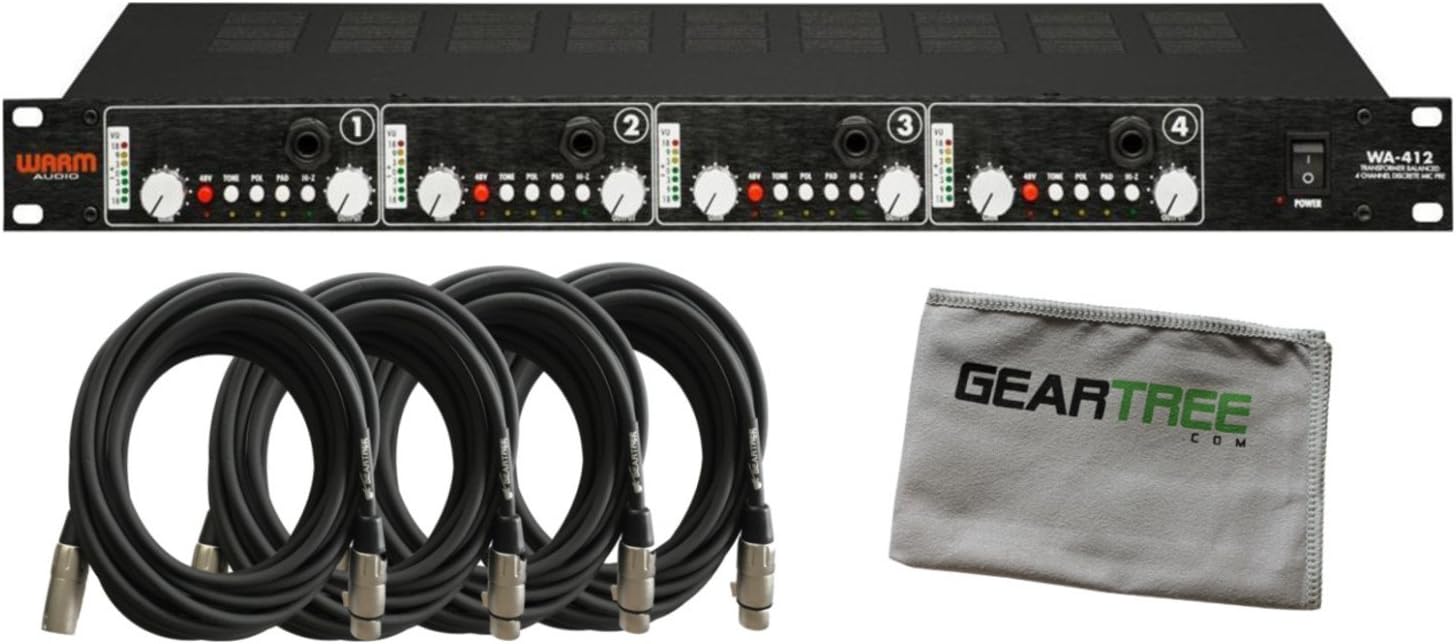
Gambar 1: Hareupeun view of the Warm Audio WA-412 4-channel microphone preamplifier, shown with the included Geartree cloth and four XLR cables. This image highlights the complete package.

Gambar 2: Pahareup-hareup view of the Warm Audio WA-412, showcasing the four individual channels, each with its own controls and VU meter. This perspective provides a clear view of the front panel layout.

Gambar 3: Tukangeun view of the Warm Audio WA-412, displaying the balanced XLR inputs and outputs for each of the four channels, along with the AC power inlet and voltage selector switch. This view is crucial for understanding connectivity.

Gambar 4: Internal view of the Warm Audio WA-412, revealing the custom-wound Altran transformers, discrete opamps, and circuit boards. This image illustrates the high-quality components used in the unit's construction.
Guide Setup
1. Unpacking jeung Inspection
Carefully remove the WA-412 from its packaging. Inspect the unit for any signs of damage that may have occurred during shipping. If any damage is found, contact your dealer immediately.
2. Rak Pamasangan
The WA-412 is designed for standard 19-inch rack mounting. Secure the unit using appropriate rack screws. Ensure adequate ventilation around the unit to prevent overheating.
3. Sambungan Daya
- Ensure the WA-412's power switch is in the OFF position.
- Pariksa voltage selector switch on the rear panel matches your local mains voltage (115V atawa 230V).
- Connect the supplied AC power cord to the WA-412's power inlet and then to a grounded AC outlet.
4. Sambungan Audio
The WA-412 features four independent channels, each with XLR inputs and outputs. Instrument DI inputs are located on the front panel.
- Input mikropon: Connect your microphone to the XLR INPUT on the rear panel of the desired channel using a balanced XLR cable.
- Instrument DI Input: For instruments, connect your instrument (e.g., guitar, bass) to the 1/4" TS DI INPUT on the front panel of the desired channel. Connecting a cable to the DI input automatically bypasses the rear XLR microphone input for that channel.
- Kaluaran: Connect the BALANCED OUTPUT XLR on the rear panel of each channel to your audio interface, mixer, or recording device's line input.
Parentah Operasi
Front Panel Controls (Per Channel)
- Knob GAIN: Adjusts the input gain for the microphone or DI input. Provides up to 65dB of gain.
- +48V Button: Engages phantom power for condenser microphones. The corresponding LED illuminates when active. Always ensure your microphone is connected before engaging phantom power.
- Tombol PAD: Engages a -20dB attenuation pad for both microphone and DI inputs. Use this when input signals are too hot and causing clipping. The corresponding LED illuminates when active.
- POL (Polarity) Button: Inverts the polarity (phase) of the input signal. Useful for phase alignment issues when using multiple microphones. The corresponding LED illuminates when active.
- VU Méter: Displays the output level of the channel. Aim for levels that peak around 0 VU for optimal signal-to-noise ratio without clipping.
- DI Input (1/4" TS): Front panel input for connecting instruments.
Léngkah Operasi Dasar
- Pastikeun sadaya sambungan aman sareng leres.
- Turn on the WA-412 using the POWER switch on the front panel.
- For microphones, engage +48V phantom power if using a condenser microphone.
- If the input signal is very strong, engage the PAD button to prevent overloading the preamp.
- Slowly increase the GAIN knob while monitoring the VU meter and your recording software/mixer. Adjust the gain until you achieve a healthy signal level without clipping.
- If necessary, use the POL button to correct any phase issues.
Pangropéa
- beberesih: Anggo kaén anu garing sareng lemes pikeun ngabersihan bagian luar unit. Hindarkeun pembersih abrasive atanapi pangleyur.
- Ventilasi: Ensure the ventilation slots are clear of dust and obstructions to maintain proper airflow and prevent overheating.
- Panyimpenan: Upami henteu dianggo kanggo waktos anu lami, simpen unit di tempat anu tiis sareng garing, jauh tina sinar panonpoé langsung sareng suhu anu ekstrim.
- Opamp Swapping: The WA-412 features socketed opamps. While designed for user-swapping, this should only be performed by experienced technicians or users familiar with electronic components. Always power off and disconnect the unit from the mains before attempting to swap opamps.
Pamérésan masalah
| Masalah | Mungkin Cukang lantaranana | Solusi |
|---|---|---|
| Taya kakuatan | Power cord disconnected; Power switch off; Incorrect voltage selection; Blown fuse. | Check power cord connection; Ensure power switch is ON; Verify voltage selector matches mains; Consult a qualified technician for fuse replacement. |
| Taya kaluaran audio | Incorrect cabling; Gain too low; Phantom power not engaged (for condenser mics); PAD engaged unnecessarily; Output connected to incorrect input on next device. | Verify all XLR and DI connections; Increase GAIN; Engage +48V for condenser mics; Disengage PAD if signal is weak; Ensure WA-412 output is connected to a line-level input on your mixer/interface. |
| Audio distorsi | Input signal too hot; GAIN set too high; PAD not engaged when needed. | Engage PAD; Reduce GAIN; Check input level from source. |
| Hum atawa noise | Ground loop; Faulty cable; Nearby electrical interference. | Ensure all equipment is on the same electrical circuit; Try different cables; Move unit away from power supplies or other noisy electronics. |
spésifikasi
| Fitur | Rincian |
|---|---|
| Ngaran modél | WA-412 |
| Saluran | 4 |
| Praamplifier Tipe | Discrete, Transformer Balanced |
| Keuntungan | Nepi ka 65dB |
| Input | 4 x XLR Microphone, 4 x 1/4" TS Instrument DI (front panel) |
| Kaluaran | 4 x XLR Balanced |
| Kakuatan Phantom | + 48V (switchable per channel) |
| Pad | -20dB (switchable per channel) |
| Pindah polaritasna | Yes (switchable per channel) |
| Transformers | Altran USA Custom Wound Input and Output Transformers |
| Opamps | Discrete Socketed 6-Pin Opamps |
| Sumber Daya | Corded Electric (115V/230V selectable) |
| Dimensi produk | 27 x 10 x 21 inci |
| Item Beurat | 38.5 pon |
| Warna | Hideung |
| Alat nu cocog | Guitar, Double Bass, Keyboard, Mandolin, Accordion, Viola, Harmonica, Banjo, Cello, Violin, Ukulele, Drum, All |
Garansi sareng Rojongan
Warm Audio products are designed for reliability and performance. For information regarding warranty coverage, technical support, or service, please visit the official Warm Audio websitus atanapi hubungi dealer resmi anjeun.
Sumberdaya Online:
- Warm Audio Official Websitus: www.warmaudio.com
- Product Support Page: (Refer to the official websitus pikeun kaca dukungan produk khusus)
For immediate assistance, please contact your point of purchase.


