1. Parentah Kasalametan penting
Please read all instructions carefully before operating the appliance and retain them for future reference. Failure to follow these instructions may result in electric shock, fire, or serious injury.
- Kasalametan listrik: Pastikeun catu daya cocog sareng voltage specified on the appliance. Do not operate with a damaged power cord or plug. Do not immerse the appliance, cord, or plug in water or other liquids.
- panempatan: Tempatkeun mesin és dina permukaan anu stabil sareng rata, jauh tina sinar panonpoé langsung, sumber panas, sareng gas korosif. Pastikeun ventilasi anu cekap di sakitar unit.
- Kualitas cai: Use only potable water. Do not fill with carbonated beverages or other liquids.
- Barudak jeung Pets: Keep the appliance out of reach of children and pets. Supervision is necessary when the appliance is used near children.
- Pangropéa: Unplug the appliance before cleaning or performing any maintenance. Do not attempt to repair the appliance yourself; contact qualified service personnel.
- Pamakéan: This appliance is intended for household and similar applications only. Do not use outdoors.
2. Eusi Paket
Pastikeun yén sadaya item anu didaptarkeun di handap kalebet kana pakét anjeun. Lamun aya item nu leungit atawa ruksak, mangga ngahubungan rojongan customer.
- TecTake Professional Ice Maker Unit
- Ember És
- És Scoop
- Manual pangguna (dokumén ieu)

Image: The TecTake Ice Maker with its lid open, revealing the removable ice bucket and the included ice scoop.
3. Produk Langkungview
Familiarize yourself with the main components of your TecTake Professional Ice Maker.

Gambar: Hareupeun view of the TecTake Professional Ice Maker, showcasing its sleek silver design and control panel.
Panél kontrol
The intuitive control panel provides status indicators and operation control.
- ADD WATER Indicator (Red): Cahayana nalika waduk cai peryogi ngeusian.
- FULL ICE Indicator (Red): Caang nalika karanjang és pinuh.
- ON/OFF Button (Green LED): Press to turn the ice maker on or off. The green LED indicates power is on.

Gambar: A lengkep view of the control panel, showing the 'ADD WATER' and 'FULL ICE' indicator lights, and the 'ON/OFF' button.
4. Setélan
4.1 Ngabongkar bungkusan
- Taliti miceun és maker tina bungkusan na.
- Cabut sadaya bahan bungkus, pita perekat, sareng labél.
- Inspect the appliance for any damage. Do not operate if damaged.
4.2 Nempatkeun
- Teundeun maker és dina permukaan datar, stabil, sarta tahan panas.
- Pastikeun aya sahenteuna 10 cm (4 inci) rohangan di sabudeureun unit pikeun ventilasi anu saé.
- Hindarkeun nempatkeun unit caket sumber panas (misalna oven, radiator) atanapi dina sinar panonpoé langsung, sabab ieu tiasa mangaruhan efisiensi produksi és.
4.3 First Use & Initial Cleaning
- Before first use, clean the interior of the ice maker. Remove the ice basket and wash it with warm water and a mild detergent. Rinse thoroughly.
- Wipe the interior with a soft cloth.
- Eusian waduk cai ku cai anu tiasa diinum dugi ka garis eusian MAX. Ulah overfill.
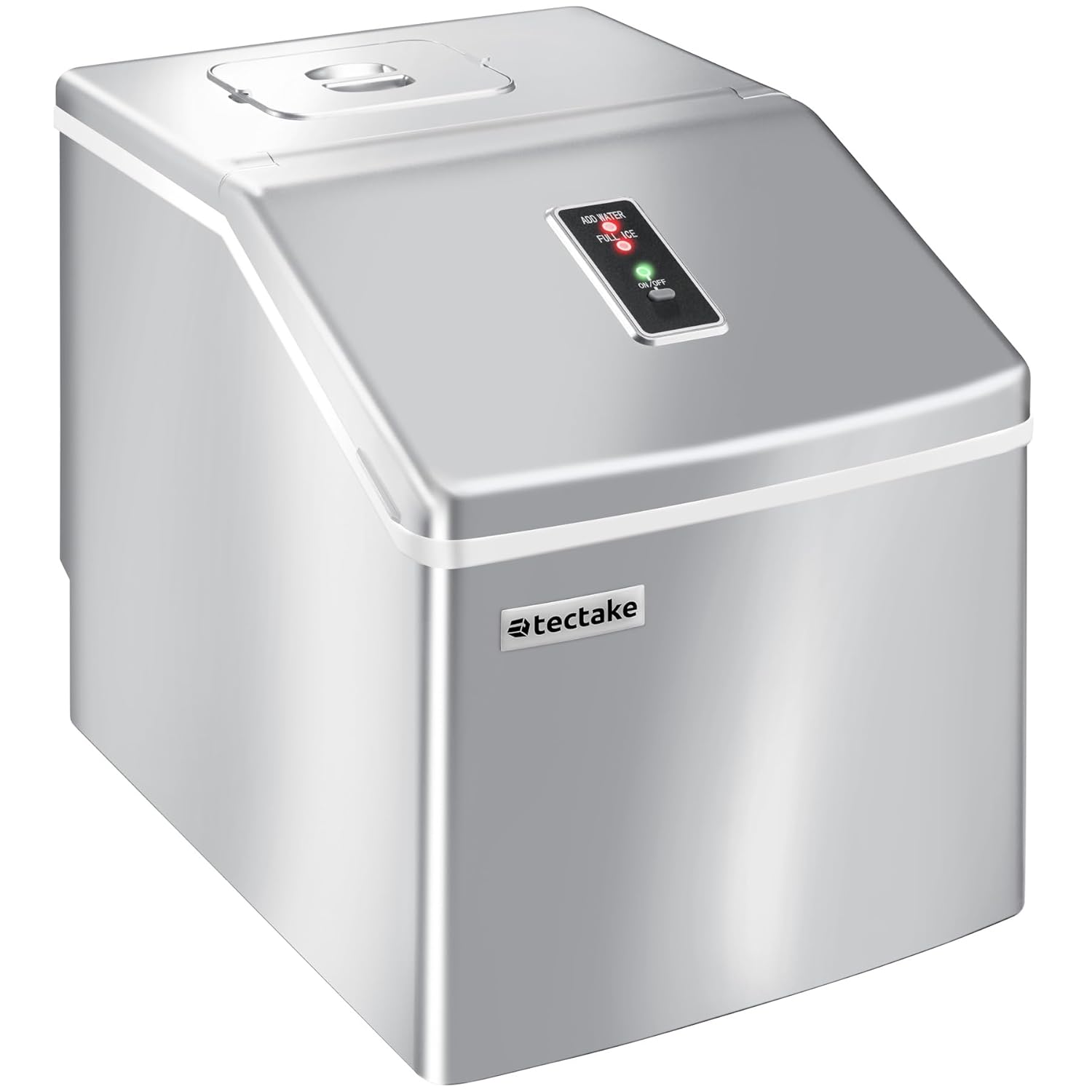
Image: Illustrates the process of filling the water reservoir of the ice maker with a bottle of water.
- Colokkeun kabel listrik kana stop kontak listrik grounded.
- Press the ON/OFF button to start the ice maker.
- Allow the unit to run for 3-4 cycles, discarding the first few batches of ice to ensure cleanliness.
- Drain the water from the reservoir (refer to Maintenance section for draining instructions) and refill with fresh water before regular use.
5. Parentah Operasi
5.1 Ngamimitian Produksi És
- Ensure the water reservoir is filled with potable water.
- Plug the ice maker into a suitable power outlet.
- Press the ON/OFF button. The green LED will illuminate, and the ice production cycle will begin.
5.2 Siklus Produksi És
The ice maker will automatically draw water from the reservoir into the ice-making tray. Ice cubes are formed on the freezing rods. Once formed, the ice cubes are released into the ice basket. Each cycle takes approximately 15 to 30 minutes, depending on ambient temperature and water temperature.

Gambar: A close-up view of freshly made clear ice cubes collected in the ice basket, ready for use.
5.3 Indikator Panel Control
- Lamun éta TAMBAHAN CAI indicator lights up red, the water level in the reservoir is too low. Refill the reservoir with water. The ice maker will automatically resume operation once water is added.
- Lamun éta és pinuh indicator lights up red, the ice basket is full. Remove ice from the basket. The ice maker will automatically resume operation once space is cleared.
5.4 Harvesting Ice
Use the provided ice scoop to remove ice cubes from the basket. For best results, transfer unused ice to a freezer for long-term storage, as the ice maker is not a freezer and ice may melt over time.
6. Pangropéa
Regular cleaning and maintenance will ensure optimal performance and extend the lifespan of your ice maker.
6.1 Ngabersihan Biasa
- Cabut colokan mesin és tina stop kontak sateuacan dibersihkeun.
- Leupaskeun karanjang és.
- Clean the interior liner, water reservoir, and ice basket with a soft cloth dampdikumbah ku cai haneut sareng deterjen anu hampang sareng henteu abrasif.
- Bilas sakabéh surfaces tuntas ku cai bersih.
- Usap garing nganggo kaén anu bersih, lemes.
- For stubborn stains, a solution of water and vinegar (1:1 ratio) can be used. Rinse thoroughly afterwards.
6.2 Draining Cai
To drain the water from the reservoir, locate the drain plug at the bottom of the unit. Place a container underneath and remove the plug to allow water to drain completely. Reinsert the plug firmly after draining.

Image: Shows the drain plug on the underside of the ice maker, indicating where to release water from the reservoir.
6.3 Panyimpenan
If the ice maker will not be used for an extended period, drain all water, clean the unit thoroughly, and ensure it is completely dry before storing. Store in a cool, dry place.
7. Cara ngungkulan
Sateuacan ngahubungi dukungan palanggan, mangga tingal tabel di handap ieu pikeun masalah umum sareng solusina.
| Masalah | Mungkin Cukang lantaranana | Solusi |
|---|---|---|
| Tukang és teu hurung. | Taya catu daya. | Pariksa naha kabel listrik dicolokkeun sacara aman kana stop kontak anu tiasa dianggo. Pariksa circuit breaker. |
| Indikator ADD AIR hurung. | Waduk cai kosong atawa lemah. | Eusian wadah cai ku cai nginum nepi ka garis MAX. |
| FULL ICE indicator is on. | És karanjang pinuh. | Cabut és tina karanjang. |
| És batu téh leutik atawa keruh. | Water temperature is too high; ambient temperature is too high. | Use colder water. Ensure the unit is in a cool, well-ventilated area. |
| Produksi és lambat. | High ambient temperature; poor ventilation. | Ensure adequate space around the unit for ventilation. Avoid direct sunlight or heat sources. |
| Unit nyieun sora anu teu biasa. | Sora operasi normal (compressor, pompa cai) atanapi unit henteu rata. | Ensure the unit is on a stable, level surface. If noise is excessive or unusual, contact support. |
8. Spésifikasi
Technical specifications for the TecTake Professional Ice Maker.
| Fitur | Spésifikasi |
|---|---|
| merek | TecTake |
| Nomer modél | 400162 |
| Ukuran (L x W x H) | 37 x 29 x 35.5 cm (14.57 x 11.42 x 13.98 inci) |
| Kapasitas Tangki Cai | 2.2 Liter |
| Kapasitas Produksi És | Approx. 13 kg per 24 hours |
| És Batu per Siklus | 24 |
| Waktu Siklus | Kira-kira. 15-30 menit |
| Voltage | 240 volt |
| Refrigerant | R600a |
| Bahan | palastik |
| Sertifikasi | Intertek GS certified (Certificate No. 22SHH0265-01) |

Image: The rear of the ice maker, displaying the product label with technical specifications and the cooling fan.
9. Garansi jeung Rojongan
TecTake products are manufactured with high-quality materials and undergo strict quality control. This product is covered by a standard manufacturer's warranty against defects in materials and workmanship from the date of purchase. Please refer to your purchase documentation for specific warranty terms and duration.
For technical support, troubleshooting assistance, or warranty claims, please contact TecTake customer service. Have your model number (400162) and purchase receipt ready when contacting support.
Dukungan Online: Kunjungi TecTake resmi websitus pikeun FAQs jeung sumber rojongan.
Inpormasi kontak: Refer to the contact details provided with your purchase or on the official TecTake websitus.


