1. Bubuka
The iCarsoft VAWS V1.0 is a professional and powerful vehicle fault diagnosis tool designed for Audi, VW, Seat, and Skoda vehicles. It features a 2.8-inch TFT LCD display and specialized diagnostic software to accurately identify and resolve complex vehicle issues. This manual provides detailed instructions for setting up, operating, maintaining, and troubleshooting your device.
2. Produk Langkungview
2.1 Komponén Alat
Familiarize yourself with the main components and controls of your iCarsoft VAWS V1.0 scanner.

Gambar 1: Hareup jeung tukang view of the iCarsoft VAWS V1.0 scanner with numbered components.
- Layar LCD: Némbongkeun hasil tés sareng pilihan ménu.
- Tombol BACK: Mulih ka ménu atawa layar saméméhna.
- Tombol UP: Moves the cursor upwards for selection.
- Tombol handap: Moves the cursor downwards for selection.
- LEFT Button: Moves the cursor to the left for selection.
- Tombol ENTER: Confirms a selection or action from a menu list.
- RIGHT Button: Moves the cursor to the right for selection.
- Function Button (F1): Used for specific functions as indicated on screen.
- Function Button (F2): Used for specific functions as indicated on screen.
- Function Button (F3): Used for specific functions as indicated on screen.
- Tombol Pitulung: Displays help information for test results or user operation.
2.2 Eusi pakét
Pariksa yén sadaya barang aya dina bungkus produk anjeun.
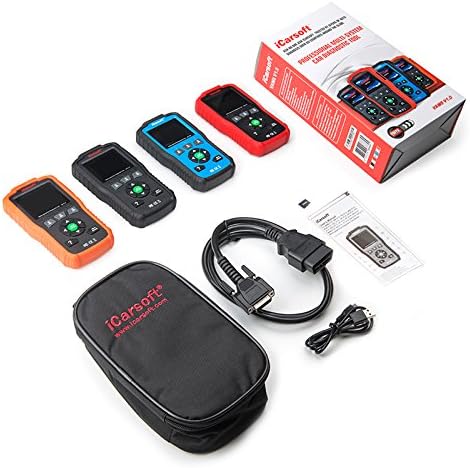
Gambar 2: The iCarsoft VAWS V1.0 scanner and its included accessories.
- iCarsoft VAWS V1.0 Diagnostic Scanner
- Kabel Koneksi OBD-II
- USB Cable for Updates
- Manual pangguna (dokumén ieu)
- Pelindung Mawa Case
3. Setélan
3.1 Mimiti Power-Up
The device is powered directly from the vehicle's OBD-II port. No external power source is typically required for basic operation.
3.2 Nyambungkeun ka Kandaraan
- Locate the vehicle's 16-pin Data Link Connector (DLC), usually found under the dashboard on the driver's side.
- Pastikeun ignition kendaraan aya dina posisi OFF.
- Connect the OBD-II cable from the scanner to the vehicle's DLC.
- Turn the vehicle's ignition to the ON position (engine off). The scanner should power on automatically.
3.3 Pamilihan Basa
Upon first use or after a reset, you may need to select your preferred language. Navigate through the menu using the UP/DOWN buttons and confirm with the ENTER button. Supported languages include English, German, Dutch, Spanish, and French.
4. Parentah Operasi
4.1 Napigasi Dasar
Use the directional arrow buttons (UP, DOWN, LEFT, RIGHT) to move through menu options. Press the ENTER button to select an option or confirm an action. The BACK button will return you to the previous screen or menu.
4.2 Fungsi diagnostik
The iCarsoft VAWS V1.0 offers a range of diagnostic capabilities:
- Read & Clear Trouble Codes: Access and clear Diagnostic Trouble Codes (DTCs) from various vehicle systems, including engine, transmission, Anti-lock Braking System (ABS), and airbags.
- Data Langsung: View real-time sensor data from the vehicle's ECU, which can assist in diagnosing intermittent issues.
- Full ECU Diagnosis: Perform a comprehensive scan of the Electronic Control Unit for a single vehicle brand.
- Oil Light/Service Reset: Reset the service lamp after performing an oil change or scheduled maintenance.
- Tés batré: Obtain the voltage of the vehicle's battery via the OBD port when the engine is running.
- Perpustakaan DTC: Look up definitions for DTCs directly on the device.
- Print Data Function: Record diagnostic data and generate customized test reports for printing via a connected computer.
5. Pangropéa
5.1 Apdet parangkat lunak
To ensure optimal performance and access to the latest vehicle data and features, regularly update the scanner's software. Updates are performed via USB 2.0 connection to a computer running Windows 10. Visit the official iCarsoft websitus kanggo pitunjuk apdet sareng unduhan parangkat lunak.
5.2 Beberesih sareng Panyimpenan
- Rapihkan alat dengan lembut, damp lawon. Ulah make cleaners abrasive atawa pangleyur.
- Store the scanner in its protective carrying case when not in use to prevent damage.
- Ulah ngalaan alat kana suhu anu ekstrim atanapi sinar panonpoé langsung salami waktos anu lami.
6. Cara ngungkulan
If you encounter issues with your iCarsoft VAWS V1.0 scanner, refer to the following common troubleshooting steps:
- Alat Teu Dihurungkeun: Ensure the OBD-II cable is securely connected to both the scanner and the vehicle's DLC. Verify the vehicle's ignition is in the ON position. Check the vehicle's fuse for the OBD-II port if the issue persists.
- Kasalahan Komunikasi: Confirm the vehicle's ignition is ON. Ensure the cable connection is stable. Try connecting to a different vehicle (if available) to rule out a vehicle-specific issue.
- Bacaan anu salah: Ensure the vehicle's make, model, and year are correctly selected in the scanner's menu (if prompted). Perform a software update to ensure the latest vehicle protocols are supported.
- Layar beku: Disconnect the scanner from the vehicle, wait a few seconds, and then reconnect. If the issue persists, perform a software update.
7. Spésifikasi
| Fitur | Spésifikasi |
|---|---|
| tampilan | 2.8" TFT LCD, 320*240 Pixels |
| Suhu Operasi | 0°C ~ 50°C (32°F ~ 122°F) |
| Suhu Panyimpenan | -20°C ~ 70°C (-4°F ~ 158°F) |
| Operasi Voltage | 9 ~ 18V |
| Operasi Ayeuna | 150mA @ 12V (Typical) |
| Konsumsi Daya | 1.8W (biasa) |
| Ukuran (L x W x H) | 187.5 x 101 x 32 mm (7.38 x 3.98 x 1.26 inci) |
| Item Beurat | 1.6 pon |
| Supported Operating System (for updates) | Windows 10 |
8. Garansi jeung Rojongan
iCarsoft products are designed for reliability and performance. For specific warranty details, please refer to the warranty card included with your product or visit the official iCarsoft website. For technical support, software updates, or further assistance, please visit the iCarsoft official websitus atanapi ngahubungan departemén layanan palanggan maranéhna.
Official iCarsoft Websitus: www.icarsoft.com


