1. Bubuka
Thank you for choosing the ipega PG-9070 Key Ring Breath Alcohol Tester. This compact and portable device is designed to accurately measure breath alcohol content (BAC) using advanced gas detection technology. It is compatible with both Apple iOS and Android devices (Android devices require OTG function support). This manual provides detailed instructions for safe and effective use of your new alcohol tester.

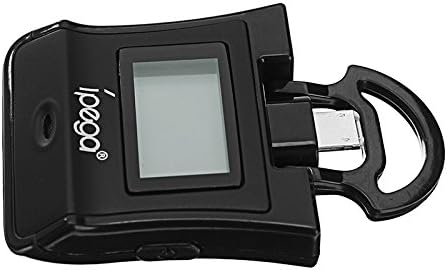
Gambar 1: Hareupeun view of the ipega PG-9070 Key Ring Breath Alcohol Tester. The device is black with a small LCD screen and the 'ipega' logo. A key ring attachment is visible at the top, which also houses the device connector.
2. Fitur konci
- Kasaluyuan 2-in-1: Designed for seamless connection with both Apple iOS and Android smartphones.
- Deteksi canggih: Utilizes new gas detection technology for accurate alcohol content measurement.
- Jelas tampilan: Features an LCD digital display with a color backlight for easy readability of results.
- Pencegahan gangguan: Equipped with a unique detector to minimize interference from non-alcohol gases like cigarette smoke, coffee, or soda.
- Voice Alarm Function: Provides an automatic buzzer alarm when detected alcohol content exceeds safe limits.
- Smartphone Powered: Conveniently powered directly by your connected smartphone, eliminating the need for separate batteries.
3. Setup jeung Pamakéan Awal
Before using your ipega PG-9070, please ensure your smartphone is compatible and ready.
- Sambungkeun Alat: Connect the ipega PG-9070 tester to your Apple or Android smartphone. Ensure the connector is fully inserted into your phone's charging port.
- Buka konci Alat Anjeun: Unlock your smartphone. The tester draws power directly from your phone.
- Activate the Tester: Press and hold the power switch on the tester until you hear a short buzzing alert. Simultaneously, the LCD screen will display a green matching indicator, signifying it is ready for the next step.
Gambar 2: Angled view of the ipega PG-9070 tester showing the extended connector, ready to be plugged into a smartphone. The device is compact and designed for portability.
4. Parentah Operasi
Follow these steps to perform a breath alcohol test:
- Warm-up Phase: After activation, the tester will enter a "warm up" state. A countdown from 10 to 0 will appear on the LCD screen. This indicates the preheating procedure is in progress. Wait for the countdown to complete.
- Prepare to Blow: Once the warm-up is finished, a 10-second countdown for blowing will begin. Position your mouth close to the designated pore (air hole) located on the tester.
- Blow into Sensor: Exhale steadily into the air hole and sensor for approximately 3 to 5 seconds. Ensure a continuous and consistent breath.
- View Hasil: After the blowing countdown finishes, the display screen will show your test result.
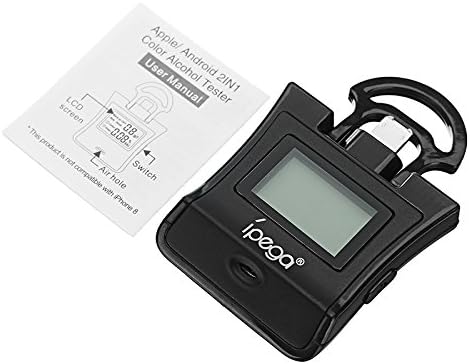
Figure 3: The ipega PG-9070 tester alongside its user manual, highlighting the air hole where breath samples are provided and the LCD screen for displaying results.
5. Nafsirkeun Hasil Tés
The ipega PG-9070 provides clear visual and auditory indicators for your test results:
- Layar Héjo: If no alcohol is detected, or the alcohol content is within normal limits, the LCD screen will remain green.
- Yellow Screen "Caution": The LCD screen will change to yellow and display "Caution" if the test report indicates a BAC between 0.02% (or 0.2g/l) and 0.05% (or 0.5g/l).
- Red Screen "Danger" & Buzzer Alarm: The LCD screen will turn red and display "Danger" with a continuous buzzer alarm if the test report indicates a BAC at or above 0.05% (or 0.5g/l), or at or above 0.08% (or 0.8g/l).
6. Perawatan sareng Pangropéa
To ensure the longevity and accuracy of your ipega PG-9070, follow these maintenance guidelines:
- Keep the device clean and free from dust and debris. Use a soft, dry cloth for cleaning the exterior.
- Hindarkeun ngalaan alat ka suhu anu ekstrim, sinar panonpoé langsung, atanapi kalembaban anu luhur.
- Ulah nyobian ngabongkar atanapi ngalereskeun alat nyalira. Ieu bakal ngabatalkeun garansi.
- Store the tester in a cool, dry place when not in use.
- Ensure the air hole is not obstructed before and during testing.
7. Cara ngungkulan
If you encounter issues with your ipega PG-9070, refer to the following common problems and solutions:
| Masalah | Mungkin Cukang lantaranana | Solusi |
|---|---|---|
| Alat teu hurung. | Not properly connected to smartphone; smartphone not unlocked; insufficient power from phone. | Ensure the tester is fully inserted into the phone's port. Unlock your smartphone. Check phone battery level. |
| Bacaan anu teu akurat atanapi henteu konsisten. | Improper blowing technique; recent consumption of food/drink; sensor contamination. | Ensure a steady, continuous blow for 3-5 seconds. Wait at least 20 minutes after eating/drinking before testing. Clean the air hole area gently. |
| Android device not recognizing tester. | Android device does not support OTG function. | Verify your Android device supports USB On-The-Go (OTG). Consult your phone's manual or manufacturer. |
| Alarm bel disada teu disangka-sangka. | High alcohol content detected; sensor malfunction. | Re-test after a short period. If the issue persists and you are certain of no alcohol consumption, contact support. |
8. Spésifikasi produk
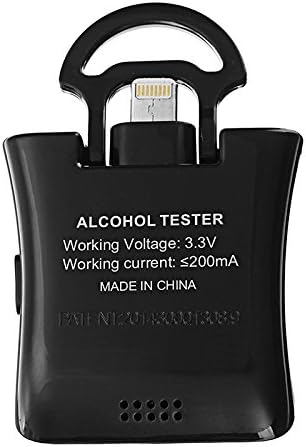
Gambar 4: Balik view of the ipega PG-9070 tester, displaying its working voltage jeung spésifikasi ayeuna.
| Spésifikasi | Rincian |
|---|---|
| Nomer modél | PG-9070 |
| Gawé Voltage | 3.3V |
| Gawé Ayeuna | ≤200mA |
| Kasaluyuan | iOS and Android (Android requires OTG function) |
| Téhnologi deteksi | New Gas Detection Technology |
| tampilan | LCD Digital Display with Color Backlight |
| Sumber Daya | Smartphone powered |
| Produsén | Cina |
| Kahiji Sadia | 23 Maret 2018 |
9. Émbaran jaminan
This ipega PG-9070 Key Ring Breath Alcohol Tester comes with a standard manufacturer's warranty against defects in materials and workmanship. Please retain your proof of purchase for warranty claims. The warranty does not cover damage caused by misuse, accidents, unauthorized repairs, or normal wear and tear. For specific warranty terms and conditions, please refer to the documentation included with your purchase or contact ipega customer support.
10. Rojongan Palanggan
For further assistance, technical support, or inquiries regarding your ipega PG-9070 Breath Alcohol Tester, please contact ipega customer service. Refer to the product packaging or the official ipega websitus pikeun inpo kontak paling up-to-date.
We are committed to providing you with a reliable and accurate product experience.


