1. Bubuka
This manual provides detailed instructions for the installation, operation, and maintenance of your GIGABYTE B360 HD3 motherboard. Designed to support 8th Generation Intel Core processors with an LGA1151 socket, this ATX form factor motherboard offers robust performance and essential features for a reliable computing experience. It includes support for Dual Channel Non-ECC Unbuffered DDR4 memory, multiple USB 3.1 Gen 2 ports, ultra-fast M.2 storage with PCIe Gen3 x4 and SATA interface, high-quality audio, and Intel Gigabit Ethernet.
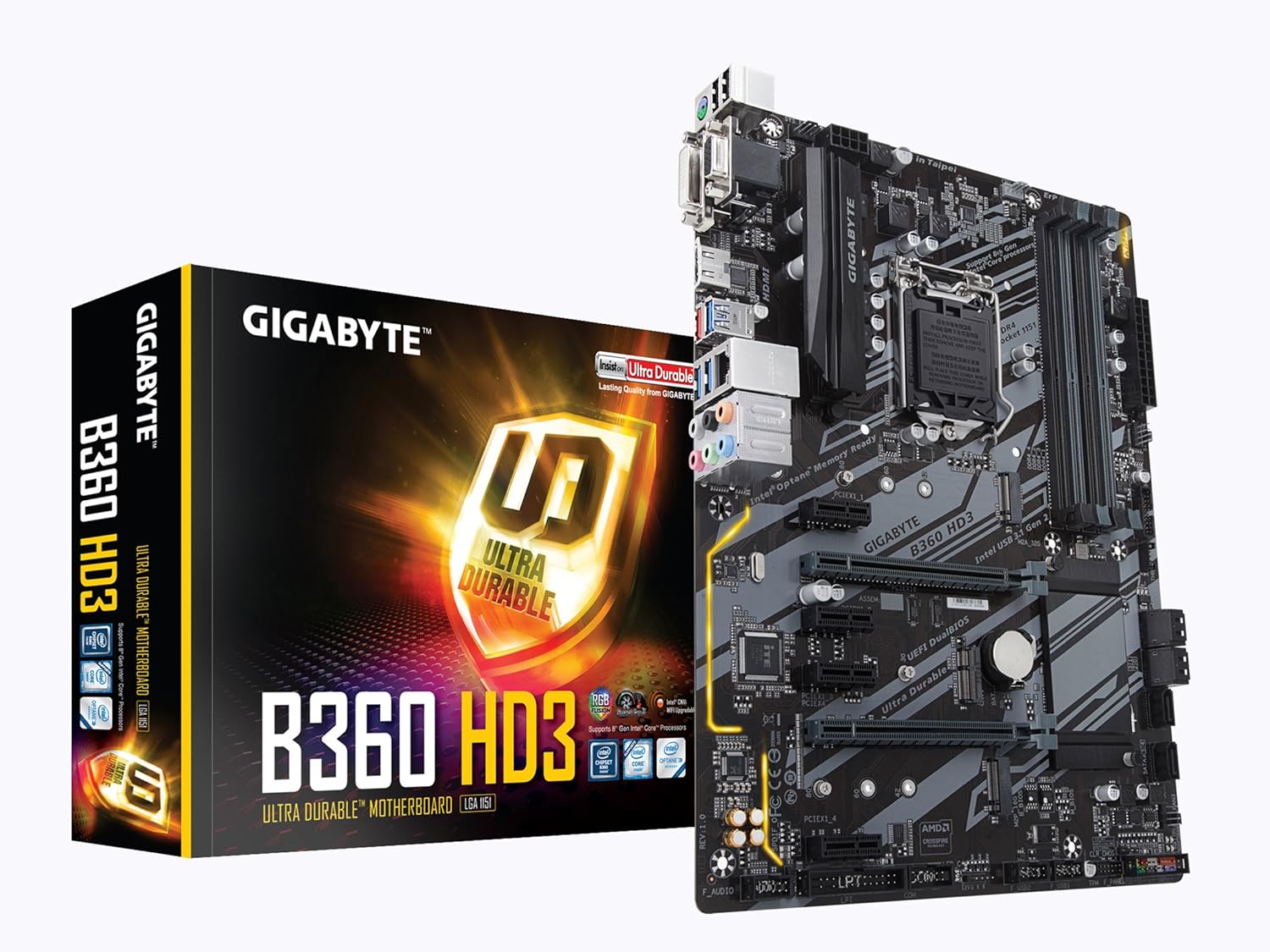
Figure 1: GIGABYTE B360 HD3 Motherboard and Retail Packaging
2. Fitur
- Rojongan prosésor: LGA1151 socket for 8th Generation Intel Core processors.
- Mémori: Dual Channel DDR4, 4 DIMMs, supporting up to 128GB of Non-ECC Unbuffered memory.
- Panyimpenan: Ultra-fast M.2 slot with PCIe Gen3 x4 & SATA interface, alongside multiple SATA 6Gb/s ports.
- Konektipitas USB: Multiple USB 3.1 Gen 2 (USB3.1) Type-A ports for high-speed data transfer.
- Dukungan Grafika: 2-Way Crossfire Multi-Graphics Support for enhanced visual performance.
- Audio: High Quality Audio Capacitors with Realtek ALC892 codec for 7.1-channel high definition audio.
- Jaringan: Intel Gigabit Ethernet (GbE) LAN with Internet Accelerator Software for optimized network performance.
- BIOS: GIGABYTE UEFI Dual BIOS for system stability and easy management.
- Faktor Bentuk: ATX Form Factor (305mm x 224mm) for broad case compatibility.
- Sistem operasi: Support for Windows 10 64-bit.
3. Eusi Paket
Pastikeun yén sadaya item anu didaptarkeun di handap aya dina pakét motherboard anjeun. Upami aya barang anu leungit atanapi rusak, hubungi pangecér anjeun.
- GIGABYTE B360 HD3 Motherboard
- Manual pamaké / Guide Instalasi Gancang
- Abdi / O Perisai
- Kabel SATA 6Gb/s
- M.2 Screws na Standoffs
- Driver CD/DVD (or download instructions)
4. Setélan
4.1. Pamasangan CPU
- Panggihan soket LGA1151 dina motherboard.
- Angkat tuas beban teras buka panutup soket CPU.
- Carefully align your 8th Generation Intel Core processor with the socket, ensuring the golden triangle on the CPU matches the triangle on the socket.
- Gently nempatkeun CPU kana stop kontak tanpa maksa eta.
- Tutupkeun panutup stop kontak teras pencét tuas beban ka handap dugi ka konci dina tempatna.

Gambar 2: Top-handap view of the GIGABYTE B360 HD3 Motherboard, highlighting the CPU socket area.
4.2. Pamasangan RAM
- The motherboard features 4 DDR4 DIMM slots. For optimal performance, install memory modules in pairs for dual-channel mode. Refer to the motherboard's Qualified Vendor List (QVL) on the GIGABYTE website for compatible memory.
- Buka klip dina kadua tungtung slot DIMM.
- Align kiyeu dina modul memori DDR4 jeung konci dina slot DIMM.
- Pencét pageuh dina kadua tungtung modul mémori dugi ka jepitan dipasang dina tempatna.
4.3. Pamasangan Panyimpenan
- M.2 SSD: Locate the M.2 slot. Insert your M.2 SSD at an angle and secure it with the provided screw and standoff.
- drive SATA: Connect your SATA hard drives or SSDs to the SATA 6Gb/s ports using SATA data cables. Ensure power cables from your power supply are also connected to the drives.
4.4. Pamasangan Kartu grafik
- Locate the primary PCIe x16 slot (often reinforced with Ultra Durable stainless steel).
- Align your graphics card with the slot and press down firmly until it clicks into place. Ensure the retention clip is engaged.
- Ngamankeun kartu grafik kana chassis anjeun kalawan screws.
- Sambungkeun sagala kabel kakuatan PCIe diperlukeun tina catu daya anjeun ka kartu grafik.
4.5. Sambungan Kakuatan
- Sambungkeun konektor kakuatan utama 24-pin ATX tina catu daya anjeun ka motherboard nu.
- Connect the 8-pin ATX 12V power connector to the motherboard.
4.6. Sambungan I/O Panel Hareup & Tukang
- Connect your chassis' front panel connectors (power button, reset button, HDD LED, power LED) to the corresponding pins on the motherboard. Refer to the motherboard diagram in the full manual for exact pin locations.
- Connect front panel USB 2.0 and USB 3.1 Gen 2 (Type-A) headers.
- Install the I/O shield into your chassis before mounting the motherboard.
- Connect peripherals (monitor, keyboard, mouse, speakers, Ethernet cable) to the rear I/O panel.

Figure 3: Rear I/O Panel of the GIGABYTE B360 HD3 Motherboard, showing various connectivity options.
5. Nyuping
5.1. BIOS / UEFI Setup
The GIGABYTE B360 HD3 features UEFI Dual BIOS, providing a user-friendly graphical interface for system configuration. To enter BIOS Setup, press the Hapus key during the Power-On Self-Test (POST). Here you can configure boot options, system clock, memory settings, and other hardware parameters.
5.2. Parangkat Lunak sareng Supir
After installing your operating system, install the necessary drivers from the provided driver CD/DVD or download the latest versions from the GIGABYTE official website. Utilize the GIGABYTE APP Center, which includes the Cloud Station Utility, to manage and optimize your system's performance and features.
6. Pangropéa
- Tetep Bersih: Regularly clean dust from your computer case and motherboard components using compressed air. Ensure proper airflow to prevent overheating.
- Pariksa sambungan: Periodically verify that all cables (power, data, peripherals) are securely connected.
- Apdet parangkat lunak: Keep your operating system, drivers, and BIOS/UEFI firmware updated to ensure optimal performance, stability, and security.
- Batré BIOS: The motherboard uses a CR2032 lithium-ion battery for the CMOS. If system time or BIOS settings are frequently lost, the battery may need replacement.
7. Cara ngungkulan
- Henteu aya kakuatan: Ensure all power cables (24-pin ATX, 8-pin ATX 12V) are firmly connected. Check power supply functionality.
- Henteu aya tampilan: Verify that the monitor is connected to the graphics card (or integrated graphics port) and powered on. Reseat the graphics card and RAM modules.
- Instabilitas Sistem / Kacilakaan: Check RAM modules for proper installation and compatibility (refer to QVL). Ensure CPU cooler is correctly installed and making good contact. Update drivers and BIOS.
- Masalah boot: Check boot order in BIOS. Ensure storage drives are detected and contain a valid operating system.
- Periferal Teu Dideteksi: Try connecting the peripheral to a different USB port. Ensure drivers are installed.
- For more detailed troubleshooting, consult the comprehensive user manual available on the GIGABYTE support websitus.
8. Spésifikasi
| merek | GIGABYTE |
| Ngaran modél | B360 HD3 |
| CPU Socket | LGA 1151 |
| Prosesor cocog | Intel Core generasi ka-8 |
| Tipe Chipset | Intel B360 |
| Téhnologi Mémori RAM | DDR4 |
| Mémori Jam Speed | 2133 MHz (nepi ka 4733 MHz OC) |
| Kamampuh RAM Max | 128 GB (4 DIMMs) |
| USB 2.0 palabuhan | 2 (judul internal) |
| USB 3.1 Gen 2 (Type A) | 3 |
| Panyimpenan Interface | M.2 (PCIe Gen3 x4 & SATA), SATA 6Gb/s |
| LAN | Intel GbE LAN |
| Audio | Realtek ALC892 (7.1-channel HD Audio) |
| Faktor Bentuk | ATX (305mm x 224mm) |
| Sistem operasi | Rojongan pikeun Windows 10 64-bit |
| Item Beurat | 2.18 pon |
| Dimensi produk | 12.01 x 8.86 x 0.79 inci |
9. Garansi jeung Rojongan
Kanggo inpormasi jaminan lengkep sareng dukungan téknis, mangga tingal GIGABYTE resmi websitus atanapi ngahubungan layanan palanggan maranéhna. Simpen bukti pameseran anjeun pikeun klaim garansi.


