1. Bubuka
The BESTEK MRJ2001 USB Surge Protector is designed to provide power and charging solutions for electronic devices. It features two AC outlets and two USB charging ports, making it suitable for various environments including home, office, and travel. This manual outlines the product's features, proper usage, safety precautions, and maintenance procedures.

Figure 1: The BESTEK MRJ2001 USB Surge Protector, showcasing its compact design, two standard AC power outlets, two USB charging ports, and the integrated power cord with a cable management strap.
2. Produk Langkungview
2.1 Fitur
- Desain kompak sareng portabel: Measures approximately 6.6 x 2.1 x 1.3 inches, making it easy to transport.
- Multiple Power Outlets: Equipped with two standard AC outlets and two smart USB charging ports (2.4A Max total output).
- Perlindungan Kasalametan Terpadu: Includes safeguards against over-current, overload, overvoltage, jeung sirkuit pondok.
- Konstruksi awét: Features a fire-retardant PC alloy ABS shell and a ruggedized cord with strain relief.
- Perlindungan lebu: USB ports include protective covers to prevent dust accumulation.
2.2 Komponén
The BESTEK MRJ2001 is designed with both external and internal features for functionality and safety.

Figure 2: An internal diagram of the BESTEK MRJ2001 USB Surge Protector, detailing its construction. Key components visible include the fire-retardant shell, AC sockets, USB ports with dust covers, surge protection components, and the strain relief protective structure for the cord.
- Sockets AC: Two standard AC outlets for powering devices.
- Palabuhan Ngecas USB: Two smart USB ports for charging mobile devices.
- USB Dust Cover: Protects USB ports from dust when not in use.
- Kabel listrik: Integrated 1.3-foot ruggedized cord.
- Surge Protection Components: Internal circuitry designed to protect against power surges.
- Strain Relief Protective Structure: Reinforces the cord connection for durability.
- Fire-retardant Shell: Luar casing made from PC alloy ABS for enhanced safety.
3. Setélan
To set up your BESTEK MRJ2001 USB Surge Protector:
- Uncoil the power cord from the surge protector.
- Plug the surge protector's power plug into a standard wall outlet.
- The power indicator light (if present) should illuminate, indicating the unit is receiving power.
4. Parentah Operasi
4.1 Ngagunakeun outlet AC
Plug your electronic devices directly into the two AC outlets on the surge protector. Ensure that the total power consumption of all connected devices does not exceed the maximum wattage rating of the unit (refer to specifications).
4.2 Ngagunakeun Port Ngecas USB
The two USB ports are designed for charging mobile devices such as smartphones and tablets. These are smart USB ports, which automatically detect your device's charging requirements to deliver optimal current up to 2.4A (total maximum output for both ports).

Figure 3: The BESTEK MRJ2001 USB Surge Protector in use, charging both a tablet and a smartphone via its two smart USB ports, demonstrating its multi-device charging capability.
- Buka panutup debu USB.
- Connect your device's USB charging cable to one of the USB ports.
- Sambungkeun tungtung kabel anu sanés ka alat anjeun.
- Alatna kedahna mimiti ngecas sacara otomatis.
5. Émbaran Kasalametan
The BESTEK MRJ2001 USB Surge Protector incorporates multiple safety features to protect your connected devices and the unit itself:

Figure 4: This image shows a smartphone actively charging through the surge protector. Below it, four icons visually represent the device's built-in safety features: overload protection, over-current protection, overvoltage panyalindungan, sarta panyalindungan pondok-circuit.
- Perlindungan Overload: Prevents damage from excessive power draw.
- Perlindungan leuwih-ayeuna: Safeguards against current exceeding safe limits.
- Overvoltage panyalindungan: Ngajaga alat tina voltasetage paku.
- Perlindungan sirkuit pondok: Otomatis mareuman daya upami aya hubungan pondok.
Pancegahan Kasalametan Penting:
- Do not exceed the maximum load capacity of the surge protector.
- Ulah dianggo dina lingkungan baseuh atanapi caket cai.
- Ulah ngabongkar atawa ngaropéa unit.
- Jauhkeun tina jangkauan barudak.
- Pastikeun colokan diselapkeun pinuh kana stop kontak témbok.
6. Pangropéa
To ensure the longevity and proper functioning of your surge protector:
- beberesih: Disconnect the unit from the power source before cleaning. Use a dry, soft cloth to wipe the exterior. Do not use liquid cleaners or abrasive materials.
- Panyimpenan: When not in use, store the surge protector in a cool, dry place, away from direct sunlight and extreme temperatures. The integrated cord strap can be used for neat storage.
- Pamariksaan: Periodically inspect the power cord and the unit for any signs of damage. If damage is found, discontinue use immediately.
7. Cara ngungkulan
If you encounter issues with your BESTEK MRJ2001 USB Surge Protector, refer to the following common solutions:
- Henteu Kakuatan pikeun Alat:
- Ensure the surge protector is securely plugged into a functioning wall outlet.
- Check if the wall outlet itself is receiving power by testing it with another device.
- Verify that the connected devices are properly plugged into the surge protector's outlets or USB ports.
- USB Devices Not Charging:
- Confirm that the USB cable is not damaged and is correctly connected to both the surge protector and the device.
- Test the USB cable with another power source to rule out cable issues.
- Ensure the total current draw for all USB devices does not exceed 2.4A.
- Surge Protector Feels Warm:
- It is normal for the unit to feel slightly warm during operation. However, if it becomes excessively hot, disconnect all devices and unplug the unit immediately. This may indicate an overload or malfunction.
8. Spésifikasi
Detailed technical specifications for the BESTEK MRJ2001 USB Surge Protector:
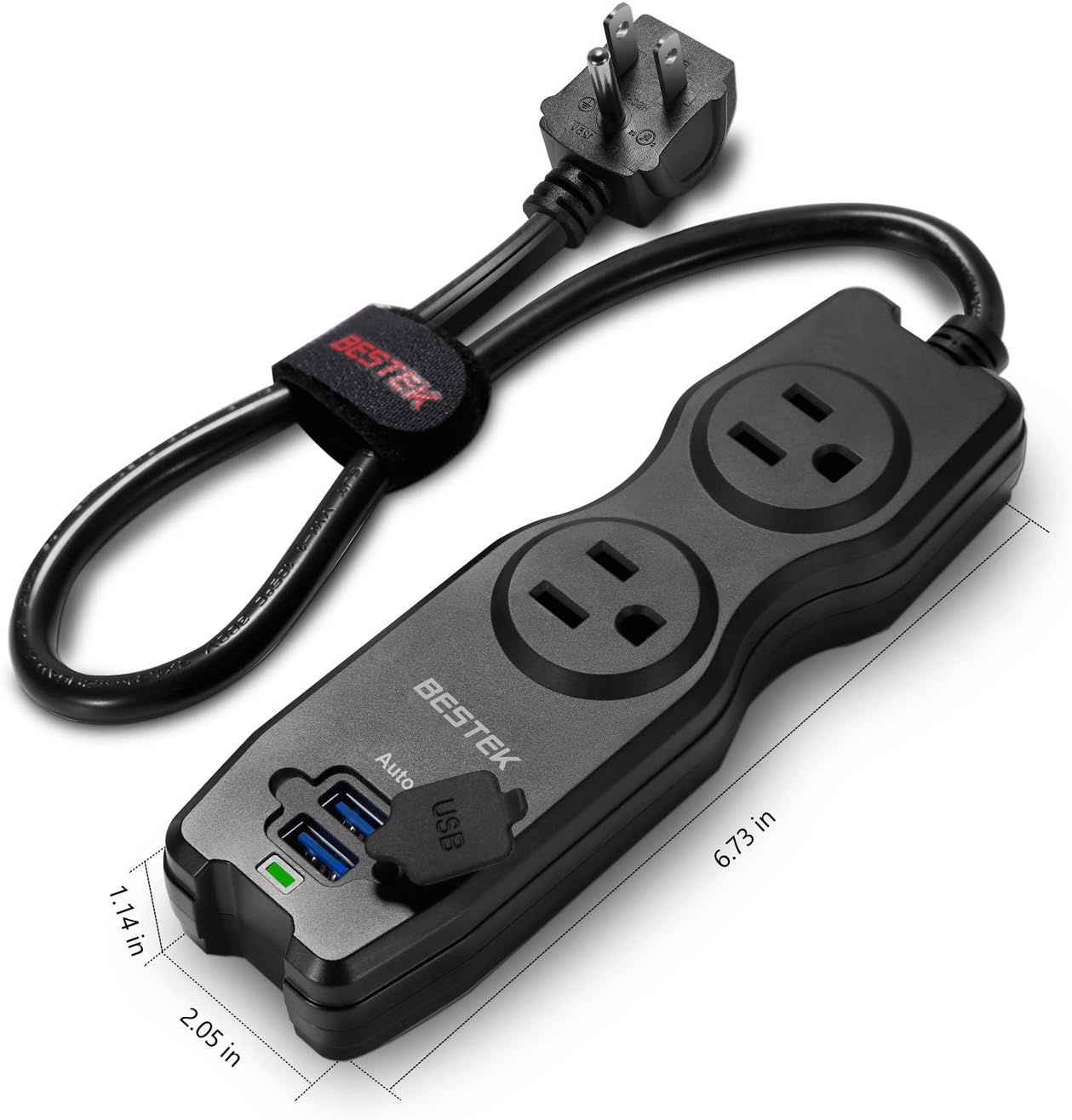
Figure 5: This image provides a visual representation of the BESTEK MRJ2001 USB Surge Protector's physical dimensions, indicating its length as 6.73 inches, width as 2.05 inches, and height as 1.14 inches, emphasizing its compact size.
| Spésifikasi | Nilai |
|---|---|
| Nomer modél | MRJ2001 |
| Dimensi produk | 6.7 x 2 x 1.3 inci |
| Item Beurat | 12.8 ons |
| Total outlet kakuatan | 2 outlet AC |
| Port ngecas USB | 2 Smart USB Ports (2.4A Max Total) |
| Voltage | 240 Volt (Input) |
| Panjang Tali | 1.3 suku (kira-kira 17 inci) |
| Fitur husus | 2-Outlet Travel Power Strip with Dual Smart USB Charging Ports |
| Produsén | BESTEK GLOBAL LLC |
9. Garansi jeung Rojongan
The BESTEK MRJ2001 USB Surge Protector comes with an 18-garansi sasih. For warranty claims, technical support, or any inquiries, please contact BESTEK customer service. Refer to the product packaging or the official BESTEK websitus pikeun inpo kontak.

Figure 6: The BESTEK MRJ2001 USB Surge Protector neatly packed into a backpack compartment alongside other travel essentials like sunglasses and a tablet, illustrating its ease of portability for travel or daily use.


