Produk Leuwihview
The STRONG Universal Wi-Fi Repeater 300 V2 is designed to extend the coverage and improve the signal strength of your existing Wi-Fi network. It operates at 2.4 GHz and offers data transfer rates up to 300 Mbps. This device is compatible with any standard Wi-Fi modem or router.

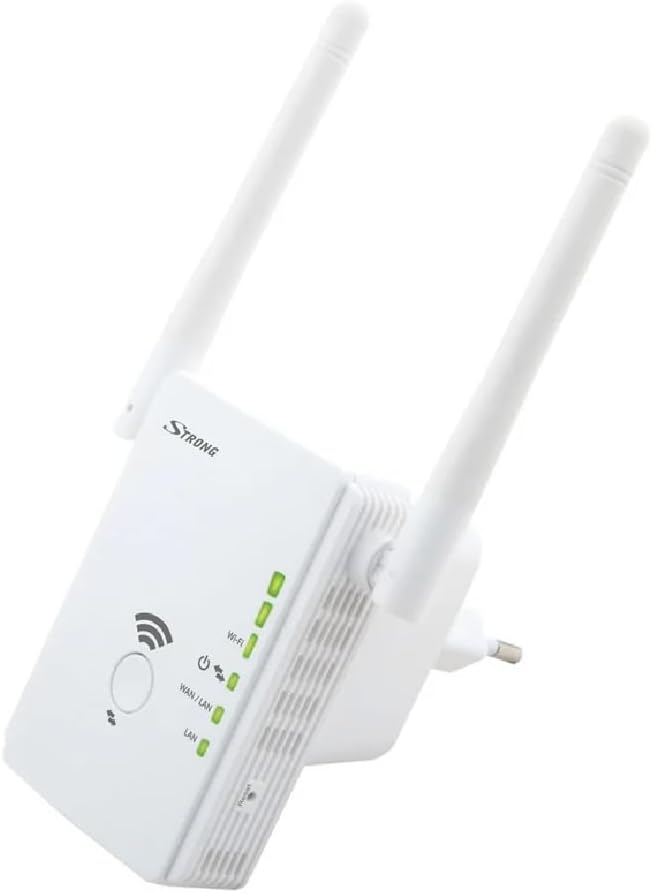
Gambar: Hareupeun view of the Strong Universal Wi-Fi Repeater 300 V2, highlighting its compact white design, two adjustable antennas, and LED indicator lights for Wi-Fi, WAN/LAN, and LAN status.
- Pangulang Wi-Fi Universal 300
- 300 Mbps @ 2.4 GHz
- 1x LAN port + 1x WAN/LAN port
- 2 adjustable external antennas for improved coverage, reliability, and stability
- Connect and Secure button for easy setup and WPA/WPA2 encryption for Wi-Fi security
Setup sareng Instalasi
Before beginning installation, ensure you have access to your existing Wi-Fi network name (SSID) and password. A detailed installation manual is included in the product packaging for step-by-step guidance.
Eusi pakét:
- STRONG Universal Wi-Fi Repeater 300 V2 unit
- Kabel Ethernet
- Manual instalasi
Léngkah-léngkah Persiapan Dasar:
- Daya Hurung: Plug the repeater into an electrical outlet within range of your existing Wi-Fi router. Wait for the power indicator light to stabilize.
- Connect to Repeater: On your computer or mobile device, connect to the repeater's default Wi-Fi network (usually named "STRONG_XXXX" or similar, as indicated in the manual).
- Konfigurasi: Buka a web browser and enter the default IP address or web address provided in the installation manual (e.g., 192.168.1.1 or strong.repeater). Follow the on-screen instructions to select your existing Wi-Fi network and enter its password.
- panempatan: Once configured, unplug the repeater and move it to a location between your router and the area where you need improved Wi-Fi coverage. Ensure the Wi-Fi signal indicator on the repeater shows a strong connection to your main router.
Gambar: Sisi view of the Strong Universal Wi-Fi Repeater 300 V2, illustrating the power plug and the mode selection switch (Repeater, Access Point).

Image: Visual representation of the repeater plugged into a wall socket, demonstrating its function in extending Wi-Fi signal coverage.
Modeu Operasi
The STRONG Universal Wi-Fi Repeater 300 V2 supports multiple operating modes to suit various networking needs:
- Modeu Repeater: This is the primary mode, extending your existing Wi-Fi network's coverage. The repeater connects wirelessly to your main router and rebroadcasts the signal.
- Modeu Access Point (AP): In this mode, the device connects to your router via an Ethernet cable and creates a new Wi-Fi network. This is useful for adding wireless capability to a wired network or creating a separate Wi-Fi hotspot.
You can switch between modes using the physical switch on the side of the device, as shown in the setup image, or through the web interface during configuration.

Image: Depiction of various devices (laptop, tablet, smartphone) connected, emphasizing the high-speed connection provided by the repeater for all your devices.

Image: The repeater positioned in a home environment, illustrating its role in providing optimal and secure Wi-Fi coverage throughout the house with its adjustable antennas.
Pangropéa
To ensure optimal performance and longevity of your STRONG Universal Wi-Fi Repeater 300 V2, consider the following maintenance tips:
- beberesih: Lap alat ieu lalaunan nganggo lawon anu lemes sareng garing. Ulah nganggo pembersih cair atanapi aerosol.
- Ventilasi: Ensure the device is placed in a well-ventilated area, away from direct sunlight or heat sources, to prevent overheating.
- Pembaruan firmware: périodik pariksa produsén urang website for any available firmware updates. Updating firmware can improve performance, add new features, and enhance security.
Pamérésan masalah
If you encounter issues with your Wi-Fi Repeater, try the following common troubleshooting steps:
- Henteu aya kakuatan: Pastikeun repeater dipasang pageuh kana stop kontak listrik anu tiasa dianggo. Pariksa naha lampu indikator daya hurung.
- No Wi-Fi Signal Extension:
- Verify that the repeater is within effective range of your main router.
- Confirm that you have entered the correct Wi-Fi password for your main network during setup.
- Try repositioning the repeater to a more central location between your router and the desired coverage area.
- Sambungan Lambat:
- Reduce interference by moving the repeater away from other electronic devices (e.g., microwaves, cordless phones).
- Ensure the repeater's antennas are adjusted for optimal signal reception.
- Cannot Access Setup Page:
- Ensure your device is connected to the repeater's Wi-Fi network.
- Coba mupus cache browser anjeun atanapi nganggo browser anu sanés.
- Refer to the installation manual for the correct default IP address or web alamat.
- Pabrik Reset: If issues persist, perform a factory reset. Locate the reset button (often a small pinhole) on the device and press and hold it for 5-10 seconds until the lights flash. This will revert the repeater to its default settings, requiring re-configuration.
For more detailed troubleshooting or specific issues, please consult the full installation manual or contact STRONG customer support.
spésifikasi
| Fitur | Rincian |
|---|---|
| merek | Kuat |
| Nomer modél | REPEATER 300V2 |
| Dimensi produk | 7 x 8.1 x 14.7 cm |
| Item Beurat | 130 g |
| Warna | Bodas |
| Tipe Wireless | 802.11bgn |
| Laju Mindahkeun Data | 300 Megabytes per detik |
| Frékuénsi Band Kelas | Jalur Tunggal (2.4 GHz) |
| Jenis Konéktipitas | 802_11_BGN |
| Palabuhan | 1x LAN, 1x WAN/LAN |
| Fitur husus | Mode Titik Akses |
Garansi sareng Rojongan
STRONG products are designed for reliability and performance. For support and warranty information, please refer to the details below:
- Garansi: This product typically comes with a manufacturer's warranty. Please refer to the warranty card included in your package or visit the official STRONG website for specific warranty terms and duration. (Note: Some promotional materials suggest a 4-year warranty for certain products.)
- Rojongan Palanggan: For technical assistance, frequently asked questions (FAQ), or to download the latest drivers and firmware, please visit the official STRONG support page.
- Sumberdaya Online: You can find additional information and support on the Toko anu Kuat di Amazon.

Image: Illustration of user interaction, representing the ease of setup and access to support resources.


