1. Bubuka
The Rockville RPG082K Dual 8" Powered PA System is designed to deliver clear, powerful audio for various applications, including DJs, event hosts, and performers. This system provides 500W peak / 125W RMS output, ensuring rich bass and crisp highs suitable for small events, karaoke nights, or presentations.
fitur konci ngawengku:
- High-Performance Sound: Equipped with 8" long-throw woofers and 1" tweeters for balanced audio in both indoor and outdoor environments.
- Konektipitas serbaguna: Offers Bluetooth for wireless streaming, USB/SD card MP3 playback, XLR/1/4" combo mic/line inputs, and RCA input/output for expanded setup options.
- Audio Disesuaikeun: Features built-in EQ presets (Pop, Rock, Jazz, Classic, Country, Normal) to tailor the sound to your specific event.
- Portabel sareng awét: Constructed with lightweight ABS material and integrated top handles for easy transport. Includes rugged tripod stands for stable setup.
- Karaoke-Ready: Comes with a high-quality wired microphone with echo control to enhance vocal performances.
2. Naon dina Box
Your Rockville RPG082K system includes the following components:
- 1 x Active Speaker (with control panel)
- 1 x Spiker Pasif
- 2 x Tripod Speaker Stands (adjustable height 25.6"-47.24")
- 1 x 1/4" Speaker Cable (for connecting active to passive speaker)
- 1 x Kabel Daya
- 1 x Mikropon Kabel
- 1 x XLR to 1/4" Microphone Cable
- 1 x Anteneu FM
- 1 x Kadali Jauh Nirkabel
- 1 x Manual Pamilik (dokumén ieu)

Figure 2.1: All components included in the Rockville RPG082K package.
3. Setélan
Follow these steps to set up your Rockville RPG082K PA system.
3.1 Rakitan Stand Spiker
- Unfold the tripod legs of each speaker stand. Adjust the spread of the legs to your desired stability and tighten the lower knob to secure them.
- Loosen the upper knob on the stand. Extend the upper pole to your desired height.
- Insert the safety pin through the appropriate hole on the extended pole to prevent accidental collapse. Tighten the upper knob to lock the height.
- Repeat for the second stand.

Figure 3.1: Folded tripod speaker stands.

Figure 3.2: Adjusting the speaker stand height and securing with the safety pin.
3.2 Spiker Pemasangan
- Locate the pole mount on the bottom of each speaker. Loosen the knob on the pole mount.
- Carefully lift each speaker and align its pole mount with the top of a speaker stand. Slide the speaker onto the stand.
- Once the speaker is securely seated, tighten the knob on the pole mount to fix it in place.

Figure 3.3: Speaker bottom with pole mount.
3.3 Connecting Speakers and Power
- Connect one end of the included 1/4" speaker cable to the Juru Bicara OUT jack on the active speaker (the one with the control panel).
- Connect the other end of the 1/4" speaker cable to the SPEAKER DI jack on the passive speaker.
- Plug the power cable into the active speaker's power inlet, then into a standard AC outlet (AC100-240V 50Hz/60Hz).
- Flip the power switch on the active speaker to the ON position. The power indicator light will illuminate.

Figure 3.4: Rear panel of the active speaker.
Video 3.1: How To Set Up Your RPG082K
4. Parentah Operasi
This section details the various functions and connectivity options of your RPG082K system.
4.1 Control Panel Leuwihview
The active speaker features a comprehensive control panel on its rear. Familiarize yourself with the layout:
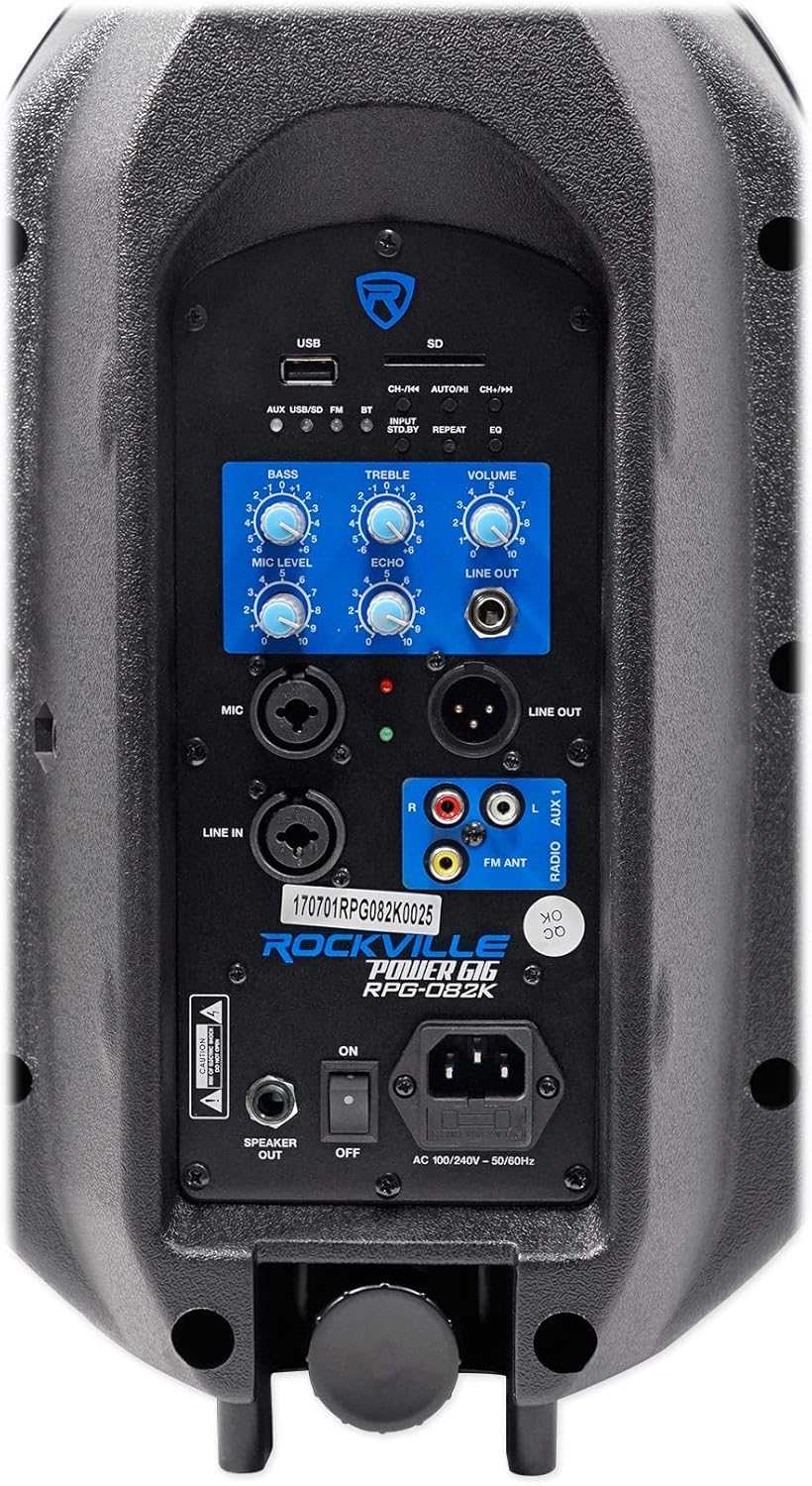
Gambar 4.1: Detil view of the active speaker's control panel.
- Slot Kartu USB/SD: Pikeun muterkeun audio MP3 files langsung.
- Tombol Pamilih Input: Cycles through AUX, USB/SD, FM, and Bluetooth modes.
- Tombol Siaga: Puts the speaker into standby mode, muting all output.
- Tombol Ulang: Ngulang lagu atawa daptar puter ayeuna dina modeu USB/SD.
- Tombol EQ: Cycles through built-in EQ presets for USB/SD playback (Pop, Rock, Jazz, Classic, Country, Normal).
- Kenop Bass/Treble: Adjust the low and high frequencies of the overall sound.
- Jilid Kenop: Controls the master output volume of the system.
- Mic Level Knob: Saluyukeun volume mikropon nu disambungkeun.
- Kenop Gema: Nambahkeun éfék gema kana input mikropon.
- Line Out Jack (1/4" & XLR): Sends the mixed audio signal to additional powered speakers or subwoofers.
- Mic Input (XLR/1/4" Combo): Nyambungkeun mikropon.
- Line In (XLR/1/4" Combo): Connects external audio sources like mixers or instruments.
- AUX 1 Input (RCA): Connects devices like MP3 players, record players, or DVD/CD players.
- FM ANT: Nyambungkeun anteneu FM anu kalebet pikeun panarimaan radio.
Video 4.1: Inputs Outputs & Controls Explained on Your RPG082K
4.2 USB / SD Playback
Insert a USB drive or SD card containing MP3 files into the respective slot. The system will automatically switch to USB/SD mode. Use the control panel buttons (CH-/<<, AUTO/II, CH+/>>) or the remote control to navigate tracks, play/pause, and repeat. Press the EQ button to select different sound presets.
4.3 Konektipitas Bluetooth
- Pencét éta Pamilih Input button until the Bluetooth (BT) indicator light blinks, indicating pairing mode.
- On your smartphone or tablet, enable Bluetooth and search for "ROCKVILLE RPG082K". Select it to pair.
- The BT indicator light will stop blinking once successfully paired. You can now stream audio wirelessly.
4.4 Radio FM
Sambungkeun anteneu FM anu kalebet kana FM ANTÉ jack. Press the Pamilih Input button to switch to FM mode. Use the CH-/<< and CH+/>> buttons to tune to radio stations.
4.5 Microphone Usage (Karaoke Setup)
- Connect the wired microphone to the MIC input using the provided XLR to 1/4" cable.
- Saluyukeun TINGKAT MIC knob to control the microphone's volume.
- Hurungkeun ECHO knob to add a vocal echo effect, enhancing karaoke performances.
- For karaoke, pair a tablet via Bluetooth (as described in 4.3) and use a karaoke app or YouTube to display lyrics and play instrumental tracks.

Gambar 4.2: Mikropon kabel anu kalebet.
Video 4.2: How To Set Up Your RPG082K for Karaoke
4.6 Line Input & Output
- Baris Dina: Use the XLR/1/4" combo jack or RCA (AUX 1) inputs to connect external audio sources such as mixers, instruments (e.g., guitar), or other playback devices. Adjust the master VOLUME knob for overall output.
- Jalur Kaluar: Use the 1/4" or XLR GARINGAN jacks to send the mixed audio signal from the RPG082K to additional powered speakers, subwoofers, or recording devices. This allows for system expansion.
4.7 Jauh Jauh
The included wireless remote control provides convenient access to various functions, including input selection, track navigation, play/pause, volume adjustment, and EQ presets.

Gambar 4.3: Remote Control Nirkabel.
5. Pangropéa
To ensure the longevity and optimal performance of your Rockville RPG082K system, follow these maintenance guidelines:
- beberesih: Use a soft, dry cloth to clean the speaker cabinets. Avoid abrasive cleaners or solvents that could damage the finish.
- Panyimpenan: When not in use, store the speakers in a cool, dry place away from direct sunlight and extreme temperatures.
- Penanganan: Always use the integrated top handles for lifting and transporting the speakers. Avoid dropping or subjecting them to strong impacts.
- Kabel: Regularly inspect all cables for signs of wear or damage. Replace any damaged cables immediately to prevent electrical hazards or signal loss.
- Ventilasi: Pastikeun liang ventilasi speaker henteu katutup pikeun nyegah panas teuing.
6. Cara ngungkulan
If you encounter any issues with your RPG082K system, refer to the following troubleshooting tips:
- Henteu aya kakuatan: Ensure the power cable is securely connected to both the speaker and a working power outlet. Check the power switch is in the ON position.
- Henteu aya sora: Verify that the master VOLUME knob is turned up. Check all input connections. Ensure the speaker is not in standby mode (press the Pamilih Input button to cycle modes). Confirm the correct input source is selected.
- Mikropon Teu Gawé: Check microphone cable connections. Ensure the microphone's power switch (if applicable) is ON. Adjust the TINGKAT MIC kenop.
- Masalah Nyapasangkeun Bluetooth: Ensure the speaker is in Bluetooth pairing mode (BT light blinking). Turn off and on Bluetooth on your device, then try pairing again. Ensure no other devices are currently paired to the speaker.
- Sora distort: Reduce the input volume from your source device. Lower the master VOLUME knob. Check for damaged cables.
7. Spésifikasi
| Fitur | Spésifikasi |
|---|---|
| Nomer modél | RPG082K |
| merek | Rockville |
| Kaluaran Wattage | 500 Watt puncak / 125 Watt RMS |
| Ukuran Speaker | 8" Woofer, 1" Tweeter |
| Jumlah Saluran | 2 |
| Input Audio | XLR, 1/4" (TS), RCA, Bluetooth |
| Tipe Panyambung | XLR, 1/4" |
| Téhnologi konektipitas | Bluetooth, USB, SD, FM Radio, Wired |
| Sumber Daya | Corded Electric (AC100-240V 50Hz/60Hz) |
| Tipe Pamasangan | Tiang Gunung |
| Item Beurat | 32.2 pon |
| Dimensi produk | 26.1 x 11 x 25.39 inci |
| Bahan | Metal, Plastic (ABS) |
| Warna | Hideung |
8. Garansi
For detailed warranty information regarding your Rockville RPG082K PA Speaker System, please refer to the warranty card included in your product packaging or visit the official Rockville websitus. Simpen bukti pameseran anjeun pikeun klaim garansi.
9. Rojongan
If you have any questions, comments, or concerns regarding your Rockville RPG082K system, please do not hesitate to contact our customer support team:
- Telepon: 1-646-758-0144 (Open 24/7)
- Surélék: sales@rockvilleaudio.com


