Bubuka
The Akuvox SP-R50 is a business IP phone designed to provide high-quality, cost-effective communication solutions. It features HD Voice, a 2.3-inch 132x64 graphical LCD with backlight, and supports 3-way conferencing. This manual provides essential information for setting up, operating, maintaining, and troubleshooting your SP-R50 IP phone.
Eusi pakét
Sateuacan ngamimitian, mangga pastikeun sadaya barang aya dina pakét:
- IP Phone (Akuvox SP-R50) x 1
- Nangtung x 1
- Handset with Cord x 1
- Kabel Ethernet x 1
- Adaptor kakuatan x 1
Disetél
Follow these steps to set up your Akuvox SP-R50 IP Phone:
- Pasang Stand: Securely attach the stand to the back of the IP phone.
- Sambungkeun Handset: Colokkeun hiji tungtung kabel handset anu digulung kana handset sareng tungtung anu sanésna kana port handset dina dasar telepon.
- Nyambung kana Jaringan:
- Upami nganggo Power over Ethernet (PoE), sambungkeun hiji tungtung kabel Ethernet kana port LAN dina telepon sareng tungtung anu sanésna kana saklar jaringan atanapi router anu diaktipkeun PoE.
- If not using PoE, connect one end of the Ethernet cable to the LAN port on the phone and the other end to your network switch or router. Then, connect the power adapter to the phone's power port and plug it into a power outlet.
- Boot-up mimiti: The phone will power on automatically. The LCD screen will display the boot-up sequence. Once complete, it will attempt to obtain an IP address and register with your SIP server.
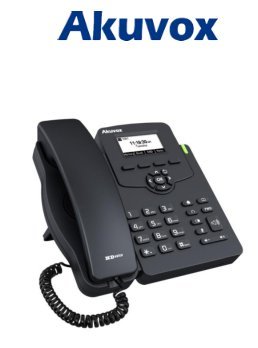
Image: Akuvox SP-R50 Business IP Phone, showing the main unit with the handset resting on its cradle and the stand attached, ready for setup.
Parentah Operasi
This section covers the basic operation of your Akuvox SP-R50 IP Phone.
Nelepon jeung Narima Telepon
- Pikeun nelepon: Pick up the handset or press the Speaker button. Dial the desired number and press the Telepon or # konci.
- Pikeun Nampa Telepon: Angkat héndsét atanapi pencét éta Speaker tombol nalika telepon hurung.
- Pikeun ngeureunkeun telepon: Tutup héndsét atanapi pencét tombol Speaker kancing.
Fitur Telepon
- Telepon Tungguan: Allows you to answer a second incoming call while on an active call.
- Nelepon ka hareup: Redirects incoming calls to another number.
- Mindahkeun Telepon: Mindahkeun telepon aktip ka pihak séjén.
- Telepon ditahan: Puts an active call on hold.
- Jempé: Ngareureuhkeun mikropon anjeun nalika nelepon.
- Jawab otomatis: Configures the phone to automatically answer incoming calls.
- Daptar ulang: Dipencét nomer panungtungan disebut.
- Entong Ngaganggu (DND): Blocks all incoming calls.
- Local 3-Way Conference: Allows you to conduct a three-way conference call.
Phonebook and Settings
- Buku telepon: The phone supports a phonebook of up to 500 groups and 5 remote phone book URLs. Access and manage contacts through the menu.
- Penyesuaian volume: Use the volume keys on the phone to adjust the handset, speaker, or ringer volume.
- Nada dering: Select from various ring tones through the phone's settings menu.
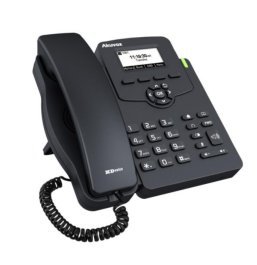
Image: Akuvox SP-R50 Business IP Phone, showcasing its ergonomic design and key layout from a slightly elevated angle, highlighting the display and navigation buttons.
Pangropéa
Pangropéa anu leres mastikeun umur panjang sareng kinerja optimal telepon IP anjeun.
- beberesih: Use a soft, dry cloth to clean the phone's surface. For stubborn marks, slightly dampBilas lawon ku cai. Ulah nganggo bahan kimia anu kasar, pembersih anu abrasif, atanapi pangleyur.
- Lingkungan: Keep the phone away from direct sunlight, excessive heat sources, and moisture. Ensure it is placed on a stable surface to prevent accidental falls.
- Kabel: Pariksa sacara berkala sadaya kabel anu nyambung (handset, Ethernet, daya) pikeun tanda-tanda karusakan atanapi karusakan. Ganti kabel anu ruksak langsung.
Pamérésan masalah
If you encounter issues with your Akuvox SP-R50, refer to the following common problems and solutions:
| Masalah | Mungkin Cukang lantaranana | Solusi |
|---|---|---|
| Telepon teu hurung. | Taya sambungan kakuatan atawa adaptor kakuatan faulty / PoE. | Check if the power adapter is securely plugged in or if the Ethernet cable is connected to a PoE-enabled port. Try a different power outlet or PoE port. |
| Taya nada dial. | Network connection issue or SIP registration failure. | Verify the Ethernet cable is properly connected. Check the network status on the phone's display. Contact your network administrator or SIP service provider if the issue persists. |
| Teu tiasa nelepon atanapi nampi telepon. | SIP registration failed, DND enabled, or network problem. | Ensure the phone is registered (check display). Disable DND if active. Confirm network connectivity. |
| Kualitas panggero goréng (gema, statik). | Kamacetan atanapi gangguan jaringan. | Ensure your network has sufficient bandwidth. Avoid placing the phone near other electronic devices that may cause interference. |
spésifikasi
Key technical specifications for the Akuvox SP-R50 Business IP Phone:
| Fitur | Katerangan |
|---|---|
| merek | Akuvox |
| Modél | Akuvox SP-R50 |
| tampilan | 2.3'' 132*64 Graphical LCD with Backlight |
| Akun SIP | 1 Line (Support 1 SIP account) |
| Fitur sora | HD Voice, 3-Way Conference |
| Kapasitas Buku Telepon | 500 groups, 5 Remote Phone Book URL Dirojong |
| Log Telepon | 100 éntri |
| Kakuatan | PoE Support, Power Adapter (included) |
| Fitur husus | Call Waiting, Call Forward, Call Transfer, Call on Hold, Mute, Auto-answer, Redial, DND, Speed Dial, Hotline, Direct IP call, Music on hold, Intercom, Call Pickup, Group Call Pickup, Anonymous Call, Anonymous Call Rejection |
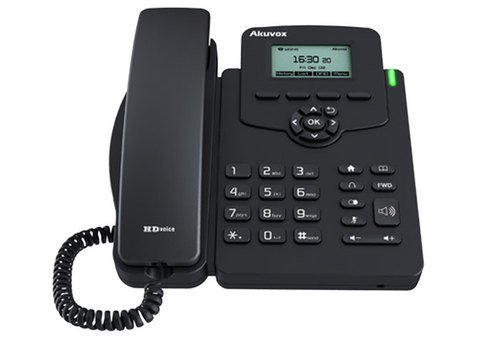
Gambar: Hareupeun view of the Akuvox SP-R50 Business IP Phone, clearly showing the display, navigation keys, and numeric keypad.
Émbaran jaminan
The Akuvox SP-R50 Business IP Phone comes with a Garansi 2 Taun from the date of purchase. This warranty covers manufacturing defects and malfunctions under normal use. Please retain your proof of purchase for warranty claims. For detailed terms and conditions, refer to the warranty card included with your product or contact Akuvox customer support.
Ngarojong
If you require further assistance or have questions not covered in this manual, please contact your vendor or Akuvox customer support. You may also visit the official Akuvox website for additional resources and frequently asked questions.


