1. Bubuka
This manual provides comprehensive instructions for the setup, operation, and maintenance of your RCA OEM 228892 TV/VCR Combo Remote Control. This remote is designed to control various functions of compatible RCA, Mitsubishi, and Sharp TV/VCR combo units. Please read this manual thoroughly to ensure proper use and to maximize the functionality of your remote control.
2. Produk Langkungview
The RCA OEM 228892 remote control features a standard layout for TV and VCR functions. Familiarize yourself with the button layout as shown in the image below.
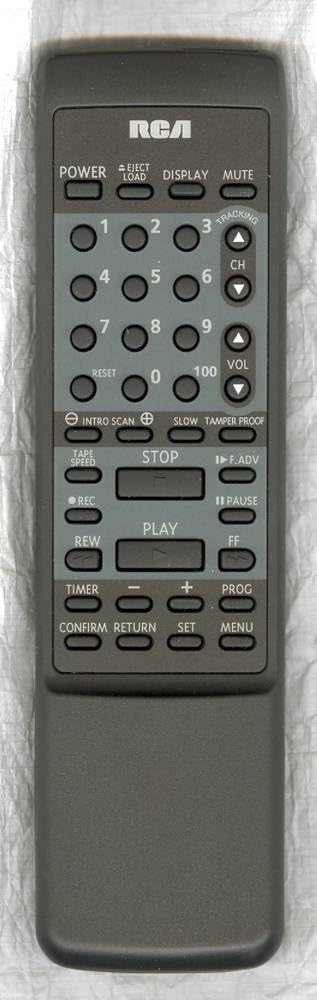
Fungsi Tombol:
- kakuatan: Turns the TV/VCR combo unit on or off.
- EJECT/LOAD: Ejects or loads a VCR tape.
- TAMPILAN: Shows on-screen information such as channel number, time, or VCR status.
- Bisu: Ngajempékeun kaluaran audio.
- Tombol Jumlah (0-9, 100): Used to directly select channels or input numerical values.
- ResET: Resets certain settings or counters, often for VCR functions.
- CH (Saluran Luhur/Handap): Ngarobah saluran TV kaluhur atanapi kahandap.
- VOL (Volume Naék/Turun): Adjusts the audio volume up or down.
- INTRO SCAN: Scans the beginning of each recorded program on a tape.
- LAMUN: Activates slow-motion playback for VCR.
- TAMPER PROOF: A security feature, often related to VCR recording.
- Laju pita: Adjusts the VCR tape playback or recording speed.
- EUREUN: Stops VCR playback or recording.
- F.ADV (Frame Advance): Advances the VCR playback frame by frame.
- REC (Rékam): Initiates VCR recording.
- REUREUH SAKEUDEUNG: Pauses VCR playback or recording.
- ULIN: Starts VCR playback.
- REW (Mundur): Rewinds the VCR tape.
- FF (Fast Forward): Fast forwards the VCR tape.
- TIMER: Accesses timer settings for recording or power on/off.
- MINUS (-): Decreases a value or navigates backward in menus.
- TAMBAHAN (+): Increases a value or navigates forward in menus.
- PROG (Program): Accesses programming functions, often for VCR recording or channel setup.
- KONFIRMASI: Ngonfirmasi pilihan atanapi setélan.
- PULIH: Mulih ka ménu atawa layar saméméhna.
- SET: Enters setup mode or confirms a setting.
- MENU: Opens the on-screen menu for TV or VCR settings.
3. Setélan
3.1 Pamasangan batré
The remote control requires two (2) AA batteries for operation.
- Teangan tempat panutup kompartemen batré dina tonggong kadali jauh.
- Geser panutup ka handap atawa pencét kancing jeung angkat pikeun muka.
- Selapkeun dua batré AA, mastikeun terminal positif (+) jeung négatip (-) align bener jeung markings jero kompartemen nu.
- Ganti panutup kompartemen batré, geser deui kana tempatna nepi ka klik aman.
Catetan: Always replace both batteries at the same time. Do not mix old and new batteries or different types of batteries. Remove batteries if the remote will not be used for an extended period.
4. Operasi dasar
4.1 Daya Hurung/Pareuman
- Pencét éta POWER button to turn your TV/VCR combo unit on or off.
4.2 Pamilihan Saluran
- To change channels sequentially, press the CH ▲ (Channel Up) or CH ▼ (Channel Down) buttons.
- To directly select a channel, use the Tombol Nomer (0-9). For two-digit channels, enter both digits. For channel 100, press the 100 kancing.
4.3 Volume Control
- Pencét éta JILID ▲ (Volume Up) or VOL ▼ (Volume Down) buttons to adjust the audio level.
4.4 Fungsi Jempé
- Pencét éta BISA button to temporarily silence the audio. Press it again to restore the sound.
5. VCR Operation
5.1 Tape Playback
- Insert a VHS tape into the VCR.
- Pencét éta ulin tombol pikeun ngamimitian playback.
- Pikeun ngareureuhkeun playback, pencét Reureuh. Pencét ulin deui teraskeun deui.
- Pikeun ngeureunkeun playback, pencét EUREUN.
- To rewind the tape, press REW.
- To fast forward the tape, press FF.
- Pikeun ngaluarkeun pita, pencét EJECT/LOAD.
5.2 Ngarékam
- Lebetkeun pita VHS anu tiasa direkam.
- Select the desired input source or channel.
- Pencét éta REC tombol pikeun ngamimitian ngarékam.
- Pencét EUREUN pikeun ngeureunkeun rékaman.
5.3 Special VCR Functions
- INTRO SCAN: Press this button to play the first few seconds of each recorded program on a tape, allowing you to quickly find specific content.
- Laju pita: Use this button to cycle through available tape speeds (e.g., SP, LP, EP) for recording or playback, if supported by your VCR.
- LAMUN: During playback, press this button to activate slow-motion.
- F.ADV (Frame Advance): During pause or slow-motion, press to advance the video one frame at a time.
- TAMPER PROOF: This function is typically used to prevent accidental recording or erasure on certain VCR models. Refer to your VCR's specific manual for details on its use.
6. Fungsi Maju
- TAMPILAN: Press to show on-screen information such as current channel, time, or VCR status.
- ResET: Used to reset the VCR's tape counter or other temporary settings.
- TIMER: Accesses the VCR's timer programming menu to set up future recordings.
- PROG (Program): Used in conjunction with the Timer function to program recording events or to access channel programming menus.
- MENU: Opens the main on-screen menu for your TV/VCR combo unit, allowing access to various settings (picture, sound, VCR options, etc.).
- SET: Used to confirm selections within menus or to enter setup modes.
- KONFIRMASI: Confirms a selection or action, similar to 'Enter'.
- PULIH: Navigates back to the previous menu screen or exits a current menu without saving changes.
7. Kasaluyuan
The RCA OEM 228892 remote control is compatible with a range of TV/VCR combo units. Below is a list of known compatible models and any specific feature limitations:
7.1 OEM Compatibility:
- RCA: T25004BC, T25204BC
7.2 Full Feature Support:
- RCA: 221359, RRMCG1139PESA, T25001, T25001GY, T25003, T25003BC
- MITSUBISHI: RRMCG1166PESA, G1166PESA, CV-20125, RRMCG1166PESB, CV-20126
- SHARP: RRMCG1103PESA, G1103PESA, 13VT-G60, 20VT-G60, 25VT-G60, RRMCG1242PESA, G1242PESA, 13VT-CH6, 13VT-H60, 20VT-CH6, 20VT-H60, 25VT-H60
7.3 Partial Feature Support:
- Supports all features except CH GUIDE and VIEW LIMIT for:
SHARP: RRMCG1144PESA, G1144PESA, 20VT-G200, 25VT-G200, 25VT-G50, 27VS-G300, RRMCG1113PESA, G1113PESA, 13VT-G100, 13VT-G120, 20VT-G100, 25TV-G100, 25VT-G100, RRMCG1112PESA, G1112PESA, 13VT-G80, 25VT-G80 - Supports all features except CATV for:
SHARP: RRMCG1244PESA, G1244SA, 13VT-H100, 13VT-H150, 20VT-H200, 25VT-H80 - Supports all features except WAKE-UP TIMER and SLEEP TIMER for:
SHARP: RRMCG1032PESA, G1032PESA, 13VT-F40, 20VT-F40 - Supports all features except INPUT and FLASHBACK for:
SHARP: RRMCG1330PESB, G1330SB, 13VT-J150, 13VT-K150, 13VT-L150, 13VT-N150, 13VT-R150, RRMCG1330PESA, G1330SA, 13VT-CJ10, 13VT-CK10, 13VT-CL10, 13VT-CN10, 13VT-CR10, 13VT-J100, 13VT-K100, 13VT-L100, 13VT-N100, 13VT-R100, 20VT-J100, 25VS-J250, 25VT-CJ10, 25VT-CK10, 25VT-J100, 25VT-K100, RRMCG1331PESA, G1331SA, 13VT-L200, 13VT-N200
8. Cara ngungkulan
If you encounter issues with your remote control, please refer to the following common troubleshooting steps:
- Jauh teu ngabales:
- Ensure the remote has fresh AA batteries installed correctly (check polarity).
- Make sure there is a clear line of sight between the remote control and the TV/VCR combo unit's infrared sensor. Obstructions can block the signal.
- Confirm that the remote is pointed directly at the unit. - Tombol husus teu jalan:
- Some buttons may only function with specific models or modes (e.g., VCR buttons only work when the unit is in VCR mode). Refer to the compatibility section and your unit's manual.
- Clean the remote control buttons and surface to remove any dirt or debris that might be interfering with button presses. - Operasi intermittent:
- Weak batteries can cause inconsistent performance. Replace them.
- Strong ambient light (like direct sunlight) can sometimes interfere with infrared signals. Try operating the remote in different lighting conditions.
If problems persist after trying these steps, consult the user manual for your specific TV/VCR combo unit or contact customer support.
9. Spésifikasi
- Jumlah modél: 228892 (also T25004BC, T25204BC)
- merek: RCA
- Téknologi konektipitas: Infrabeureum
- Jenis Controller: Tombol Control
- Alat anu cocog: TV/VCR Combo Units (refer to compatibility list)
- Batré diperlukeun: 2 batré AA
- Fitur husus: Desain ergonomis
- Pabrikan: Suku Cadang RCA
- Titimangsa munggaran sadia: 12 April 2018
10. Pangropéa
- beberesih: Anggo lawon anu lemes sareng garing pikeun ngabersihkeun remot kontrol. Pikeun kokotor anu bandel, radaampen the cloth with water or a mild cleaning solution, then wipe dry immediately. Do not use abrasive cleaners or immerse the remote in liquid.
- Perawatan batré: Remove batteries if the remote will not be used for an extended period (e.g., one month or more) to prevent leakage and damage.
- Panyimpenan: Simpen kadali jauh di tempat anu tiis sareng garing jauh tina sinar panonpoé langsung sareng suhu anu ekstrim.
11. Émbaran Rojongan
For further assistance or inquiries regarding your RCA OEM 228892 TV/VCR Combo Remote Control, please refer to the support resources provided by your retailer or the manufacturer, RCA. You may also consult the user manual specific to your TV/VCR combo unit for detailed operational instructions related to your device.
Sumberdaya Online: For general information about RCA products, you may visit the official RCA websitus atanapi ngahubungan departemén layanan palanggan maranéhna.


