Bubuka
This manual provides essential information for the safe and efficient operation of your Behringer EUROPORT MPA200BT portable PA system. Please read these instructions thoroughly before using the device to ensure proper setup, usage, and maintenance. Retain this manual for future reference.
The Behringer EUROPORT MPA200BT is an all-in-one portable PA system designed for various applications, featuring 200 watts of power, Bluetooth connectivity for audio streaming, and a wireless microphone for vocal performances or presentations. Its battery operation allows for use in locations without direct power access.
Parentah Kasalametan penting
Salawasna turutan pancegahan kaamanan dasar ieu nalika nganggo alat listrik:
- Baca sagala parentah saméméh operasi produk.
- Do not use this product near water or in wet environments.
- Ngabersihan ngan ku kaén garing.
- Ulah meungpeuk sagala bukaan ventilasi. Pasang saluyu sareng parentah produsén.
- Entong dipasang di deukeut sumber panas sapertos radiator, register panas, kompor, atanapi aparat sanésna (kalebet ampLiifiers) anu ngahasilkeun panas.
- Ulah eleh tujuan kaamanan colokan polarized atawa grounding-tipe. A colokan polarized boga dua wilah jeung hiji leuwih lega ti lianna. A colokan tipe grounding boga dua wilah jeung prong grounding katilu. Agul lega atawa prong katilu disadiakeun pikeun kaamanan Anjeun. Upami colokan anu disayogikeun henteu pas kana stop kontak anjeun, konsultasi ka tukang listrik pikeun ngagantian stop kontak anu tos lami.
- Nangtayungan kabel listrik tina leumpang atawa diciwit, utamana dina colokan, wadah merenah, jeung titik dimana aranjeunna kaluar tina aparat.
- Ngan anggo kantétan/aksésori anu ditunjuk ku produsén.
- Cabut colokan alat ieu nalika badai kilat atanapi nalika henteu dianggo kanggo waktos anu lami.
- Rujuk sadayana jasa ka tanaga jasa anu mumpuni. Diperlukeun ngalayanan nalika aparatur ruksak ku cara naon waé, sapertos kabel catu daya atanapi colokan rusak, cairan tumpah atanapi barang murag kana aparatur, aparatur parantos kakeunaan hujan atanapi lembab, henteu beroperasi normal. , atawa geus turun.
Eusi pakét
Upon unpacking your Behringer EUROPORT MPA200BT, please verify that all components are present and in good condition:
- Behringer EUROPORT MPA200BT Portable PA System
- Wireless Microphone (ULM300M)
- USB Receiver for Wireless Microphone (ULM300USB)
- Kabel Daya
- Manual pangguna (dokumén ieu)

Image: The Behringer EUROPORT MPA200BT portable PA system shown with its accompanying wireless microphone.
Produk Leuwihview: Kontrol sareng Sambungan
Familiarize yourself with the various controls and connection points on your MPA200BT unit.

Image: Rear panel of the MPA200BT, highlighting the main control interface, inputs, and outputs.

Gambar: Detil view of the MPA200BT's control panel, including display, rotary encoder, and buttons.
Fitur Panel Kontrol:
- Layar tampilan: Shows current settings, input levels, and Bluetooth status.
- Encoder Rotary: Used to navigate menus and adjust parameters. Press to confirm selections.
- Tombol PROSES: Activates or deactivates sound processing effects.
- Tombol SETUP: Enters the system setup menu.
- Tombol EXIT: Exits current menu or setting.
- Tombol ENTER: Ngonfirmasi pilihan dina ménu.
- Tombol Bluetooth: Mimitian mode papasangan Bluetooth.
Sambungan Input/Output:
- INPUT 1 & 2 (XLR/TRS Combo Jacks): For connecting microphones or line-level instruments.
- WIRELESS SYSTEM (USB Port): For connecting the ULM300USB wireless microphone receiver.
- MP3 Input (3.5mm Stereo Jack): Pikeun nyambungkeun pamaén audio éksternal.
- MIX OUTPUT (XLR): For sending the mixed audio signal to another PA system or recording device.
- Inlet Daya AC: Pikeun nyambungkeun kabel kakuatan.
Disetél
- Sambungan Daya:
Connect the supplied power cable to the AC Power Inlet on the rear of the MPA200BT and then to a suitable power outlet. The unit can also operate on its internal battery.
- Daya mimiti Hurung:
Pencét saklar daya pikeun ngahurungkeun unit. Layar bakal hurung.
- Posisi:
Place the MPA200BT on a stable, flat surface or mount it on a speaker stand (sold separately). Ensure proper ventilation around the unit.
- Nyambungkeun Input:
- Wired Microphones/Instruments: Connect to INPUT 1 or INPUT 2 using XLR or 1/4" TRS cables.
- External Audio Players: Connect to the MP3 Input using a 3.5mm stereo cable.
Parentah Operasi
Streaming Audio Bluetooth

Image: The Bluetooth logo, representing wireless audio streaming capability.
- Ensure the MPA200BT is powered on.
- Pencét éta Bluetooth button on the control panel. The Bluetooth icon on the display will flash, indicating pairing mode.
- On your smartphone or Bluetooth-enabled device, navigate to the Bluetooth settings and select "BEHRINGER MPA200BT" from the list of available devices.
- Once paired, the Bluetooth icon on the MPA200BT display will stop flashing and remain solid.
- You can now stream audio from your device to the MPA200BT. Adjust the volume using your device's controls and the MPA200BT's master volume.
Wireless Microphone Usage (ULM300M/ULM300USB)
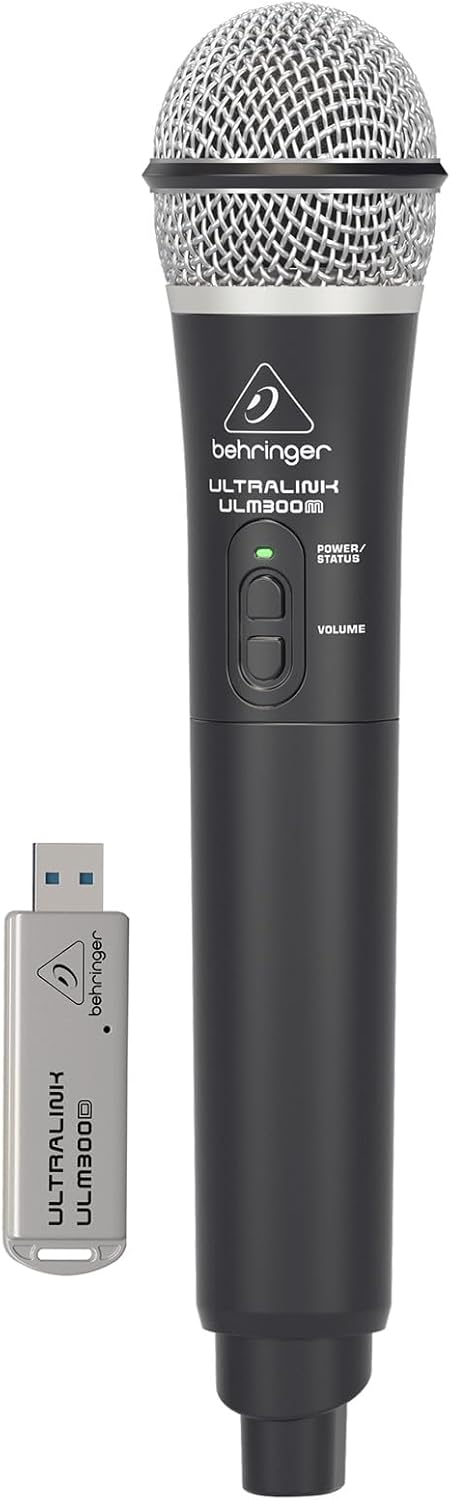
Image: The Behringer ULM300M wireless microphone shown with its USB receiver, the ULM300USB.
- Insert the ULM300USB receiver into the SISTEM KAIRAN USB port on the MPA200BT.
- Ensure the ULM300M wireless microphone has fresh batteries installed.
- Power on the wireless microphone. The status LED on both the microphone and the receiver should indicate a successful connection (usually a solid green light).
- Adjust the microphone's volume using the controls on the microphone itself and the MPA200BT's input gain settings.
Remote Control via Smartphone App

Image: A smartphone screen showing the graphical user interface of the Behringer remote control application, used to manage the PA system settings.
The MPA200BT can be controlled remotely using a dedicated smartphone application. This allows for adjustments to volume, EQ, and effects from a distance.
- Download the official Behringer MPA200BT control app from your device's app store (iOS/Android).
- Ensure your smartphone is connected to the MPA200BT via Bluetooth (as described in the "Bluetooth Audio Streaming" section).
- Open the app. It should automatically detect and connect to your MPA200BT unit.
- Use the app's interface to control various parameters of the PA system.
Operasi batré
The MPA200BT features an internal rechargeable battery for portable use.
- The battery charges automatically when the unit is connected to AC power.
- A battery level indicator on the display shows the remaining charge.
- For optimal battery life, fully charge the unit before its first use and periodically when not in use for extended periods.
Pangropéa
- beberesih: Anggo kaén anu garing sareng lemes pikeun ngabersihan bagian luar unit. Ulah make cleaners abrasive atawa pangleyur.
- Panyimpenan: When not in use, store the MPA200BT in a cool, dry place, away from direct sunlight and extreme temperatures.
- Perawatan batré: If storing for extended periods, ensure the battery is partially charged (around 50%) and recharge it every few months to prevent deep discharge.
- Ventilasi: Ensure that the ventilation openings are not obstructed during operation to prevent overheating.
Pamérésan masalah
| Masalah | Mungkin Cukang lantaranana | Solusi |
|---|---|---|
| Taya kakuatan | Power cable not connected; unit not switched on; battery depleted. | Check power cable connection; ensure power switch is ON; charge battery. |
| Taya kaluaran sora | Volume too low; input source not connected or selected; faulty cable; microphone off. | Increase master volume and input gain; check input connections; test cables; ensure microphone is powered on and paired. |
| Nyapasangkeun Bluetooth gagal | MPA200BT not in pairing mode; device too far; interference. | Press Bluetooth button to enter pairing mode; move device closer; restart both devices. |
| Mikropon nirkabel henteu jalan | USB receiver not connected; microphone off; depleted batteries in microphone; interference. | Ensure ULM300USB is fully inserted; power on microphone; replace microphone batteries; ensure clear line of sight. |
| Squealing/Feedback | Microphone too close to speaker; microphone gain too high. | Move microphone further from speaker; reduce microphone input gain. |
spésifikasi
| Fitur | Rincian |
|---|---|
| Modél | EUROPORT MPA200BT |
| Kaluaran Wattage | 200 Watt |
| Sumber Daya | Battery Powered / AC Power |
| Téhnologi konektipitas | Bluetooth |
| Jumlah Saluran | 2 |
| Item Beurat | 12.1 kg (26.6 lbs) |
| Ukuran produk (L x W x H) | 11.02 x 10.11 x 16.53 inci |
| Tipe Pamasangan | Tabletop |
| Alat nu cocog | Smartphone |
| Produsén | Suku Musik AS |
Garansi sareng Rojongan
Kanggo inpormasi garansi anu lengkep sareng dukungan téknis, mangga tingal Behringer resmi websitus atanapi ngahubungan layanan palanggan maranéhna. Simpen resi pameseran anjeun salaku bukti pameseran.
Sumberdaya Online: www.behringer.com
Pabrikan: Suku Musik AS
Video Produk Resmi
No relevant official product videos from the seller were found in the provided data for embedding.


