1. Bubuka
Thank you for choosing the WARSUN Y36 Rechargeable COB LED Work Light. This portable and versatile lighting solution is designed for various applications, from professional work environments to outdoor activities and emergency situations. Please read this manual carefully to ensure proper use, maintenance, and longevity of your device.

Image 1: WARSUN Y36 Rechargeable COB LED Work Light (Front and Back)
This image displays the compact, yellow and black design of the WARSUN Y36 work light, showing both its illuminated front panel and its versatile back panel featuring a magnetic base and a foldable hook.
2. Fitur Produk
- Caang luhur: Equipped with a COB LED, providing up to 1200 lumens of bright illumination.
- Sababaraha Modeu Pencahayaan: Features three adjustable brightness levels (High, Medium, Low) to suit different needs.
- Batré anu tiasa dicas deui: Integrated 3600mAh Lithium-Ion battery for extended use.
- Fungsi Power Bank: Includes a USB output port (DC 5V) to charge other devices like smartphones.
- Pamasangan serbaguna: Built-in super-strong magnetic base, foldable hanging hook, and a rotation bracket for hands-free operation.
- Konstruksi awét: Crafted from durable ABS material with rubberized corners for enhanced drop resistance (up to 4.9ft).
- Kompak sareng Portabel: Lightweight and small, making it easy to carry and store.
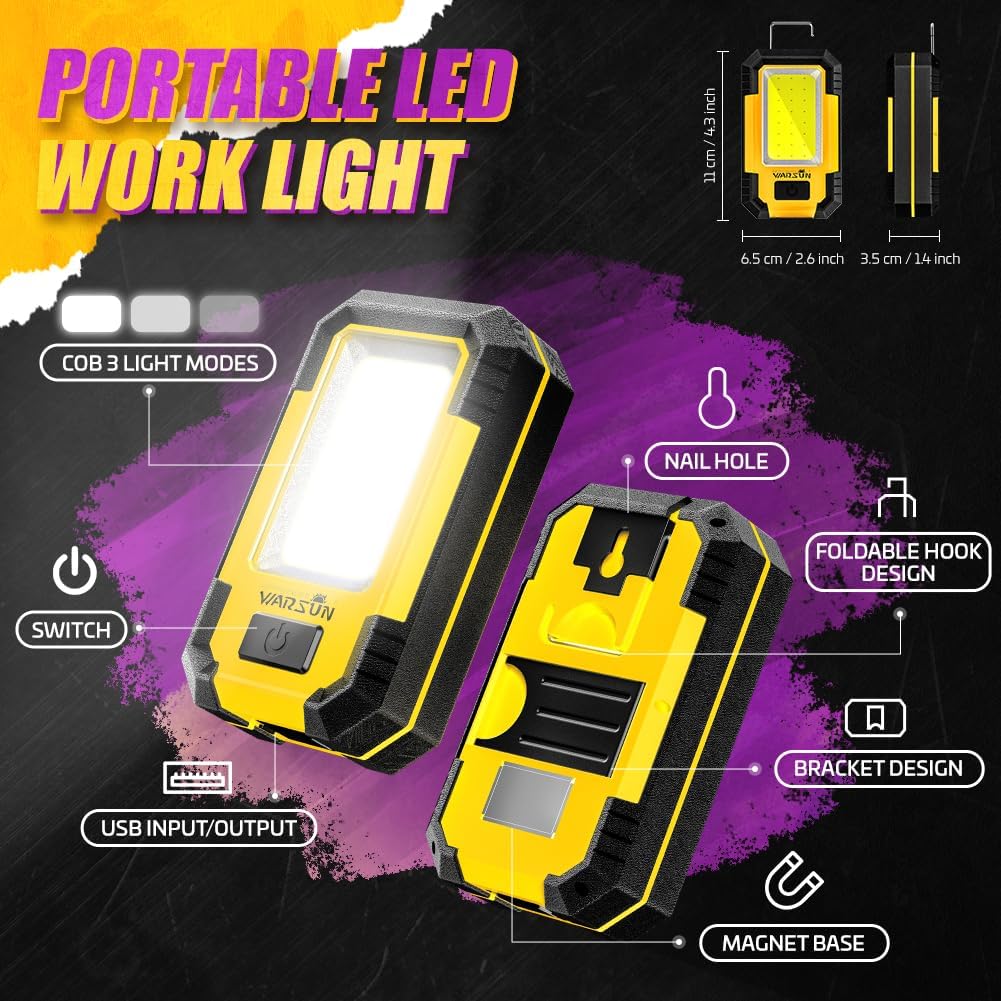
Image 2: Detailed Features Diagram
This diagram highlights the key components of the WARSUN Y36, including the COB light, power switch, USB input/output ports, foldable hook, bracket design, and magnetic base.
3. Setélan
3.1 Ngecas Awal
Before first use, fully charge the WARSUN Y36 work light. Connect the provided USB charging cable to the micro-USB input port (DC 5V) on the side of the device and plug the other end into a compatible USB power source (e.g., wall adapter, computer USB port). The charging indicator will illuminate during charging and change color or turn off when fully charged.
Note: To prolong battery life, avoid leaving the device plugged in indefinitely after it is fully charged.
4. Parentah Operasi
4.1 Daya Hurung / Pareum sareng adjustment Caang
The WARSUN Y36 features a single power button for easy operation:
- Pikeun Ngahurungkeun: Press the power button once. The light will turn on in High brightness mode.
- Pikeun Saluyukeun Kacaangan: While the light is on, press the power button repeatedly to cycle through the modes: High → Medium → Low.
- Pikeun mareuman: After cycling through all brightness modes, pressing the button one more time will turn the light off. Alternatively, press and hold the power button for approximately 2-3 seconds to turn it off from any mode.

Image 3: Three Light Modes
This image illustrates the three distinct brightness levels (High, Medium, Low) available on the WARSUN Y36 work light.
5. Fungsi Ngecas sareng Power Bank
5.1 Charging the Work Light
To charge the internal 3600mAh battery, open the protective cover on the side of the device to reveal the micro-USB input port. Connect the provided USB cable to this port and a suitable power adapter. The charging indicator will show the charging status.
5.2 Ngagunakeun salaku Power Bank
The WARSUN Y36 can also function as a portable power bank. To charge external devices, open the protective cover on the side of the device and connect your device's USB cable to the standard USB output port (DC 5V). This feature is useful for charging smartphones or other small electronics in emergency situations.

Image 4: Charging and Power Bank Functionality
This image demonstrates the WARSUN Y36 being charged via its micro-USB input and simultaneously charging a smartphone via its USB output port, highlighting its dual functionality.
6. Pilihan Pamasangan
The WARSUN Y36 offers multiple ways to position the light for hands-free operation:
- Dasar Magnét: The strong magnetic base allows the light to be securely attached to any metallic surface, such as car hoods, metal shelves, or toolboxes.
- Kait Gantung: A foldable hook is integrated into the design, enabling you to hang the light from tents, branches, or other suitable fixtures.
- Rotation Bracket/Stand: The adjustable bracket on the back can be extended to prop up the light on a flat surface, allowing you to angle the illumination as needed.
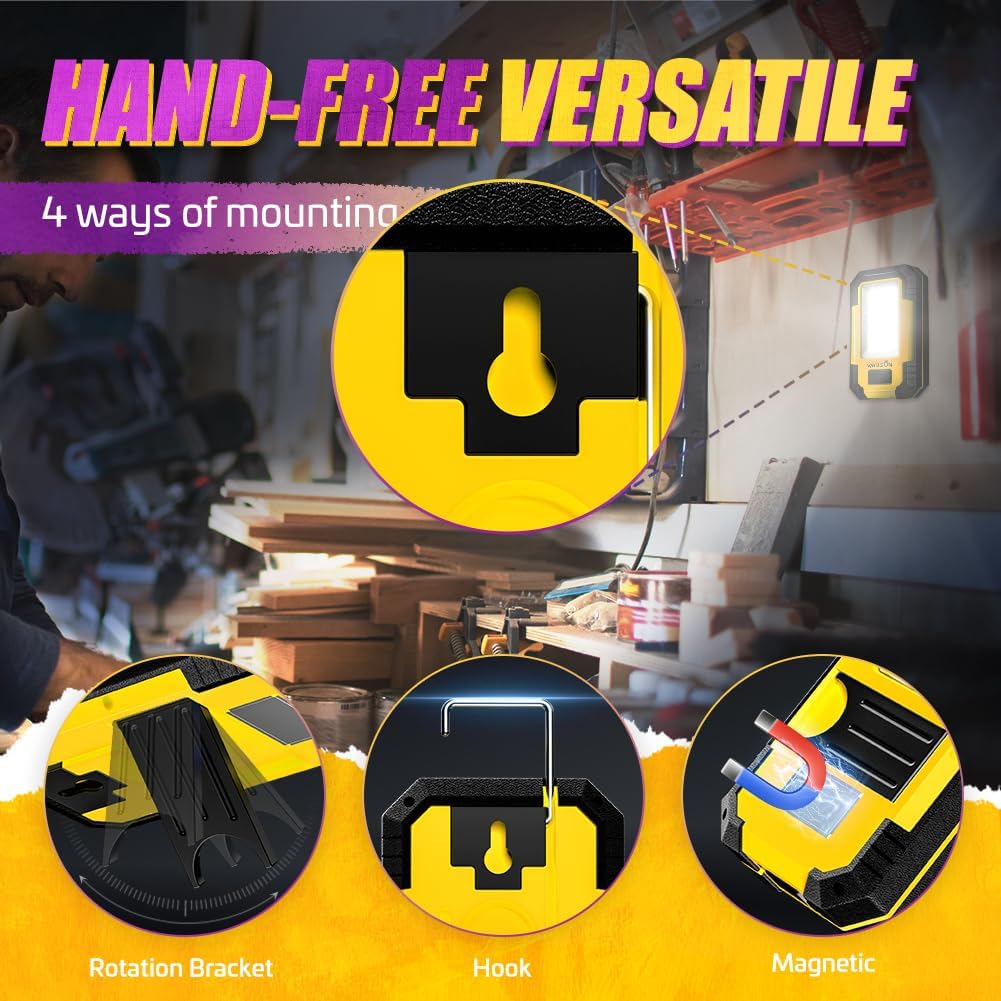
Image 5: Versatile Mounting Options
This image displays the WARSUN Y36 utilizing its rotation bracket, hanging hook, and magnetic base for flexible positioning in various work and outdoor scenarios.
7. Media Resources
7.1 Produk Leuwihview Video
Video 1: WARSUN Portable LED Rechargeable Work Light Overview
video ieu nyadiakeun leuwih komprehensifview of the WARSUN Y36 work light, demonstrating its features, brightness levels, and various applications.
7.2 WARSUN Y36 LED Work Light Demonstration
Video 2: WARSUN Y36 LED Work Light in Use
This video showcases the WARSUN Y36 LED work light in action, highlighting its illumination capabilities and practical use in different settings.
7.3 WARSUN Y36 LED Work Light Unboxing
Video 3: WARSUN Y36 LED Work Light Unboxing
This video provides an unboxing experience for the WARSUN Y36, showing the contents of the package and initial impressions of the product.
8. Pangropéa
- beberesih: Ngusap alat ku lemes, damp lawon. Ulah make bahan kimia kasar atawa cleaners abrasive.
- Panyimpenan: Simpen lampu kerja di tempat anu tiis sareng garing, jauh tina sinar panonpoé langsung sareng suhu anu ekstrim.
- Perawatan batré: For optimal battery health, avoid fully discharging the battery frequently. If storing for long periods, charge the battery to about 50-70% every few months.
Image 6: WARSUN Y36 in a Workshop Setting
This image shows the WARSUN Y36 providing illumination in a workshop, demonstrating its practical application in a demanding environment.
9. Cara ngungkulan
- Lampu teu hurung: Ensure the battery is charged. If the battery is low, connect the device to a power source using the USB cable.
- Lampu teu ngecas: Check the USB cable and power adapter for damage. Ensure the cable is securely connected to both the light and the power source. Try a different cable or adapter if necessary.
- Tombol teu ngaréspon: If the power button feels stuck or unresponsive, gently try to free it. If the issue persists, contact customer support.
- Kacaangan anu ngurangan atanapi waktos operasi anu pondok: This may indicate a low battery charge or an aging battery. Fully charge the device. If the issue continues after a full charge, the battery may need replacement.
10. Spésifikasi
| Fitur | Spésifikasi |
|---|---|
| Nomer modél | Y36 |
| Tipe Sumber Cahaya | COB LED |
| Caang | 1200 Lumén |
| Kapasitas batré | 3600mAh (Lithium-Ion) |
| Voltage | 5 volt |
| Sumber Daya | Batré Powered |
| Bahan | Acrylonitrile Butadiene Styrene (ABS) |
| Dimensi produk | 4.3 "L x 2.6" W x 1.4" H |
| Item Beurat | 8.5 ons |
| Suhu Warna | 5000 Kelvin |
| Tipe Pamasangan | Dudukan Méja, Magnét |
| Fitur husus | 3-way switching, USB input/output, Magnetic base, Hanging hook |
11. Garansi jeung Rojongan
The WARSUN Y36 Rechargeable COB LED Work Light comes with a garansi 1 taun ti tanggal dibeuli. Garansi ieu nyertakeun cacad manufaktur sareng gangguan dina panggunaan normal. Punten tahan bukti pameseran anjeun pikeun klaim garansi.
For technical support, warranty inquiries, or any questions regarding your product, please contact WARSUN customer service through the retailer's platform or visit the official WARSUN websitus.


