1. Bubuka
Thank you for choosing the Pro Breeze 2500W Digital Oil-Filled Radiator. This manual provides essential information for the safe and efficient operation of your new heater. Please read all instructions carefully before use and retain this manual for future reference.

Image: Pro Breeze 2500W Digital Oil-Filled Radiator, showcasing its modern design and digital display.
2. Parentah Kasalametan penting
Nalika nganggo alat listrik, pancegahan kaamanan dasar kedah diturutan pikeun ngirangan résiko kahuruan, kejutan listrik, sareng tatu pikeun jalma, kalebet ieu:
- Baca sadaya parentah sateuacan nganggo manaskeun ieu.
- Pemanas ieu panas nalika dianggo. Pikeun nyegah kaduruk, ulah ngantep kulit bulistir noél surfaces panas.
- Awas pisan diperlukeun nalika manaskeun mana wae dipaké ku atawa deukeut barudak atawa invalids sarta iraha wae manaskeun ieu ditinggalkeun operasi unattended.
- Salawasna cabut pamanas nalika henteu dianggo.
- Entong beroperasi manaskeun naon waé ku kabel anu rusak atanapi colokkeun atanapi saatos panéangna rusak, parantos lungsur atanapi ruksak sagala cara.
- Ulah make di luar.
- Pikeun megatkeun sambungan manaskeun, mareuman kadali, teras cabut colokan tina stop kontak.
- Entong nyelapkeun atanapi ngantepkeun barang asing asup kana ventilasi atanapi bukaan knalpot sabab ieu tiasa nyababkeun shock listrik atanapi seuneu, atanapi ngaruksak manaskeun.
- Pikeun nyegah kamungkinan seuneu, ulah meungpeuk asupan hawa atanapi knalpot dina cara naon waé. Ulah dipaké dina surfaces lemes, kawas ranjang, dimana bukaan bisa jadi diblokir.
- A manaskeun boga panas tur arcing atawa sparking bagian jero. Entong dianggo di daérah dimana béngsin, cét, atanapi uap atanapi cairan anu gampang kaduruk dianggo atanapi disimpen.
- Paké manaskeun ieu ngan sakumaha ditétélakeun dina manual ieu. Pamakéan sanés anu henteu disarankeun ku produsén tiasa nyababkeun kahuruan, kejutan listrik, atanapi cilaka ka jalma.
- This heater includes an Perlindungan overheat feature and an Anti Tip-Over Switch for enhanced safety. The unit will automatically shut off if it overheats or tips over.

Image: The radiator features advanced safety functions including overheat protection and an anti-tip over switch, ensuring safe use around children and pets.
3. Komponén produk
Familiarize yourself with the main parts of your Pro Breeze Digital Oil-Filled Radiator:
- Panel Kontrol Digital: For setting temperature, mode, and timer.
- Témbong LED: Shows current temperature, timer settings, and mode.
- 10 Oil-Filled Elements: Efficiently heat the surrounding air.
- Mawa cecekelan: Terintegrasi pikeun gampang portability.
- Roda kastor: Allow for smooth movement between rooms.
- Kadali jauh: Wireless control of all functions.
- Hurungkeun/Pareuman Saklar Daya: Located on the side of the unit.

Image: The digital control panel and remote control offer convenient operation of the radiator.
4. Setélan
Before first use, ensure the radiator is placed on a stable, level surface and is at least 1 meter away from any walls, furniture, or curtains. The caster wheels should be attached if not already installed. Simply push the wheel assemblies into the designated slots at the base of the radiator until they click securely into place.
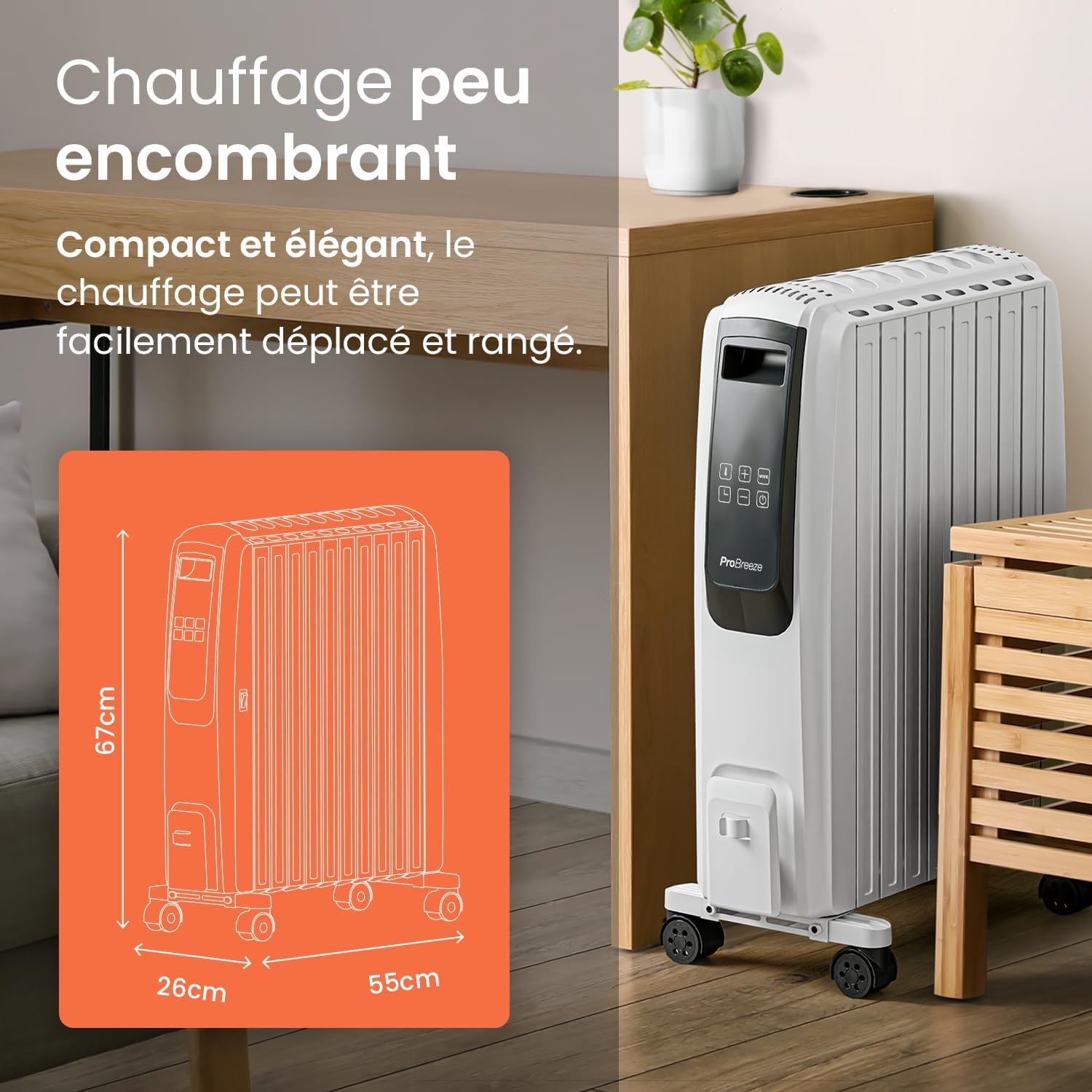
Image: The compact design, integrated carry handles, and caster wheels make the radiator easy to move and store.
5. Parentah Operasi
5.1 Daya Hurung/Pareuman
- Plug the radiator into a suitable power outlet.
- Turn on the main power switch located on the side of the unit.
- Pencét éta Antosan tombol (
 ) on the control panel or remote control to activate the display and turn on the heater.
 - Pikeun mareuman, pencét éta Antosan button again. For complete power off, switch off the main power switch and unplug the unit.
5.2 Nyetel Suhu
The desired temperature can be set between 5°C and 35°C.
- With the heater on, press the Suhu tombol () on the control panel. The temperature digits will blink.
- Ngagunakeun éta + jeung - tombol pikeun nyaluyukeun suhu nu dipikahoyong.
- The display will stop blinking after a few seconds, and the new temperature setting will be saved.
5.3 Modeu Kakuatan
The radiator offers 4 power settings: Eco, Low, Medium, and High.
- Pencét éta Modus tombol (
 ) repeatedly to cycle through the available power modes.
 - The selected mode will be indicated on the LED display.

Image: Choose from 4 power levels for a customized heating experience.
5.4 Timer Function (Auto-On / Auto-Off)
The integrated 24-hour timer allows you to program the radiator to turn on or off automatically.
Setting the Auto-On Timer:
- Ensure the radiator is plugged in and the main power switch is ON, but do not press the standby button.
- Pencét éta Timer tombol (). The time digits (H) will begin to blink.
- Ngagunakeun éta + jeung - buttons to set how much time you would like to elapse (1-24 hours) before the radiator automatically turns on. Time increments are 30 minutes for the first 5 hours, then 1 hour up to 24 hours.
- The time digits will stop blinking after a few seconds and show the remaining time until auto-on.
- Immediately after the time digits stop blinking, set the desired temperature and mode you would like the radiator to turn on in by pressing the Modus button. If no mode or temperature is set, the radiator will start on the 'low' power setting.
Video: Detailed instructions on how to set the auto-on timer for the Pro Breeze 2500W Oil-Filled Radiator.
Setting the Auto-Off Timer:
- Ensure the radiator is switched on and operating in your desired mode and temperature.
- Pencét éta Timer tombol (). The time digits (H) will begin to blink.
- Ngagunakeun éta + jeung - buttons to set how much time you would like to elapse (1-24 hours) before the radiator automatically turns off. Time increments are 30 minutes for the first 5 hours, then 1 hour up to 24 hours.
- The time digits will stop blinking after a few seconds and show the remaining time until auto-off. The radiator will automatically shut off when the set time elapses.
Video: Detailed instructions on how to set the auto-off timer for the Pro Breeze 2500W Oil-Filled Radiator.

Image: Program the 24-hour timer to suit your schedule for convenient heating.
5.5 Jauh Jauh
The included remote control allows you to operate all functions of the radiator from a distance. Ensure the remote control has a working battery (1 CR5 battery required, not included) and is pointed towards the radiator's control panel.
6. Pangropéa
6.1 beberesih
Always unplug the heater from the wall outlet and allow it to cool down completely before cleaning. Use a soft, damp cloth to wipe the exterior surfaces of the heater. Do not use harsh detergents or abrasive cleaners. Do not immerse the heater in water or allow water to drip into the interior of the heater.
6.2 Panyimpenan
When storing the heater, ensure it is cool and dry. Wrap the power cord neatly and store the heater in a cool, dry place. It is recommended to store the heater in its original packaging to protect it from dust and damage.
7. Cara ngungkulan
If your radiator is not functioning correctly, please refer to the following common issues and solutions:
| Masalah | Mungkin Cukang lantaranana | Solusi |
|---|---|---|
| Pemanas teu hurung. | Taya catu daya. | Check if the power cord is securely plugged in and the main power switch is ON. Test the outlet with another device. |
| Pemanas eureun jalan sacara teu disangka-sangka. | Perlindungan overheat diaktipkeun. | Unplug the heater, let it cool down for 30 minutes, and clear any obstructions from air vents. Plug it back in and restart. |
| Heater tips over. | Anti Tip-Over Switch activated. | Place the heater on a stable, level surface. The unit will resume operation once upright. |
| Kadali jauh teu jalan. | Battery low or incorrectly inserted. | Replace the CR5 battery. Ensure it is inserted with correct polarity. Point the remote directly at the control panel. |
| tampilan suhu teu akurat. | Sensor reading ambient temperature. | The internal sensor measures the temperature near the unit. For precise room temperature, use an external thermometer. Adjust the heater's set temperature accordingly. |
8. Spésifikasi
- merek: Pro angin ngahiliwir
- Jumlah modél: PB-H06
- kakuatan: 2500 Watt
- Voltage: 240 volt
- Jumlah Kagancangan/Tingkat Kakuatan: 4
- Ukuran produk (L x W x H): 50 x 24.5 x 66 cm (16 kg)
- Fitur husus: Rapid heating, Portable, Adjustable temperature, Electronic thermostat, Remote control
- Métode pemanasan: Padumukan
- Dianjurkeun pamakéan: Indoor, Home
- Battery for Remote: 1 CR5 (not included)
9. Garansi jeung Rojongan
For warranty information or technical support, please refer to the contact details provided with your purchase or visit the official Pro Breeze websitus. Simpen bukti pameseran anjeun pikeun klaim garansi.


