Bubuka
This manual provides detailed instructions for the proper use and maintenance of your iCarsoft VOL V2.0 Auto Diagnostic Scanner. This device is designed to perform comprehensive diagnostics on Volvo and SAAB vehicles, offering a range of functions from reading and clearing trouble codes to performing specialized service resets. Please read this manual thoroughly before operating the device to ensure safe and effective use.
Produk Leuwihview jeung Fitur
The iCarsoft VOL V2.0 is a multi-system diagnostic scanner engineered for Volvo and SAAB vehicles. It offers extensive diagnostic capabilities across various vehicle systems.
- Diagnostik Sistim lengkep: Reads and clears trouble codes for all major systems including engine, transmission, ABS, and airbag.
- OBD II/EOBD Support: Supports all ten modes of OBD II/EOBD operations for complete ECU diagnosis.
- Oil Light/Service Reset: Resets the oil service light and performs other service resets.
- Electronic Parking Brake (EPB) System Maintenance: Facilitates safe and easy replacement of brake pads by retracting and engaging the electronic parking brake calipers.
- Steering Angle Sensor (SAS) Calibration: Calibrates the steering angle sensor after replacement or maintenance.
- Reset Sistem Manajemen Batré (BMS): Resets the battery management system to register new batteries.
- Perdarahan ABS: Releases air from the ABS system to restore brake sensitivity or relearn after ABS replacement.
- Injector Coding: Relearns injector control parameters when injectors are renewed or replaced.
- Nyitak Data: Allows printing of diagnostic data recorded by the scan tool or customized test reports.

Gambar 1: Hareupeun view of the iCarsoft VOL V2.0 Diagnostic Scanner, showing the display and control buttons.
Naon dina Box
Saatos muka bungkusan, anjeun kedah mendakan barang-barang ieu:
- iCarsoft VOL V2.0 Diagnostic Device
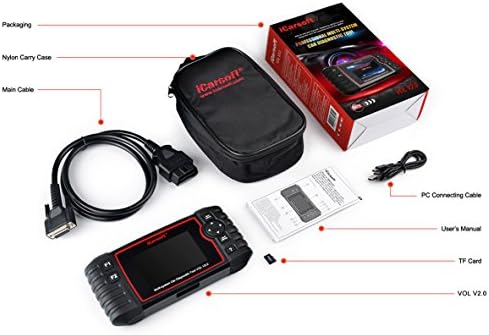
Figure 2: The iCarsoft VOL V2.0 package contents, including the diagnostic device, cables, and user manual.
Disetél
- Manggihan Port OBD-II: Port OBD-II biasana aya di handapeun dasbor di sisi supir kendaraan anjeun.
- Sambungkeun Alat: Plug the diagnostic device's cable firmly into the vehicle's OBD-II port.
- Daya Hurung: The device will automatically power on once connected to the vehicle's OBD-II port. Ensure the vehicle's ignition is in the ON position (engine off) for most diagnostic functions.
Parentah Operasi
The iCarsoft VOL V2.0 features an intuitive interface for easy navigation. Use the directional buttons and 'OK'/'ESC' buttons to move through menus and confirm selections.
1. Maca sareng Ngabersihan Kode Masalah
- From the main menu, select 'OBDII/EOBD' or 'For Volvo/SAAB' depending on the desired diagnostic depth.
- Choose 'Read Codes' to display current, pending, and permanent diagnostic trouble codes (DTCs).
- Select 'Clear Codes' to erase DTCs from the vehicle's ECU. Ensure you have addressed the underlying issue before clearing codes.
2. Fungsi Husus
The device offers several specialized functions for vehicle maintenance:
- Reset minyak: Navigate to 'Oil Reset' from the main menu and follow the on-screen prompts to reset the oil service light.
- Reset EPB: For Electronic Parking Brake maintenance, select 'EPB Reset'. The device will guide you through the steps to safely retract and engage the brake calipers for pad replacement.
- Kalibrasi SAS: Access 'SAS Reset' to perform steering angle sensor calibration.
- BMS Reset: Use 'BMS Reset' to register a new battery with the vehicle's system.
- Perdarahan ABS: Select 'ABS Bleeding' to perform the necessary procedures for bleeding the ABS system.
- Injector Coding: Choose 'Injector Coding' to relearn injector parameters after replacement.
3. Live Data Stream
- Pilih 'Aliran Data' pikeun view real-time data parameters from the vehicle's sensors. This can help in diagnosing intermittent issues.
Pangropéa
To ensure optimal performance and compatibility, it is recommended to regularly update the device's software. iCarsoft provides free lifetime updates for the VOL V2.0 scanner. Visit the official iCarsoft website for instructions on how to download and install the latest software updates.
Pamérésan masalah
If you encounter issues with your iCarsoft VOL V2.0 scanner, consider the following:
- Alat Teu Dihurungkeun: Ensure the device is securely connected to the vehicle's OBD-II port and the vehicle's ignition is in the ON position. Check the vehicle's battery voltage.
- Kasalahan Komunikasi: Verify that the vehicle is OBD-II compliant. Ensure the cable connection is secure. Try turning the ignition off, waiting 10 seconds, and then turning it back on.
- Bacaan/Fungsi Anu Salah: Ensure the device software is up to date. Some advanced functions may not be supported on all vehicle models or years.
For further assistance, please visit the official iCarsoft website for detailed FAQs and technical support.
spésifikasi
| Spésifikasi | Rincian |
|---|---|
| Produsén | iCarsoft |
| Modél | VOL V2.0 |
| Item Beurat | 1.54 pon |
| Dimensi produk | 2.8 x 9.2 x 5.5 inci |
| Ukuran layar | 1.4 inci |
| Sistem operasi | MAC OS or Windows |
| Sumber Daya | Kabel Listrik |
Garansi sareng Rojongan
The iCarsoft VOL V2.0 comes with a 1-year seller assurance. For any questions, technical support, or warranty claims, please visit the official iCarsoft websitus di www.icarsoft.com. It is recommended to check the official websitus pikeun inpormasi sareng sumber daya dukungan anu pangénggalna.


