Bubuka
This manual provides comprehensive instructions for the safe and effective use of your Motic BA310E Series Elite LED Binocular Compound Microscope. The BA310E is an advanced upright microscope designed for routine work in educational, clinical, and laboratory settings, offering quality optical performance for various life science and medical applications. It features a full Koehler configuration for optimal illumination and supports additional contrast methods such as Phase contrast, Polarization, and Dark field.
Émbaran Kasalametan
- Salawasna ati-ati dina ngagunakeun mikroskop. Hindarkeun gerakan atanapi tabrakan anu ujug-ujug.
- Ensure the microscope is placed on a stable, level surface to prevent tipping.
- Use only the specified power adapter and connect to a grounded outlet.
- Do not expose the microscope to direct sunlight, high temperatures, or excessive humidity.
- Unplug the microscope before cleaning or performing any maintenance.
- Keep liquids away from the electrical components.
- Ulah nyobian ngabongkar atanapi ngalereskeun mikroskop nyalira. Hubungi petugas servis anu mumpuni.
Eusi pakét
Saatos ngabongkar bungkusan, pariksa yén sadaya komponén aya:
- Motic BA310E Series Elite LED Binocular Compound Microscope (Main Unit)
- Kabel listrik
- Panutup lebu
- Manual pangguna (dokumén ieu)
- (Additional accessories may vary by specific package)
Disetél
- Ngabongkar bungkusan: Carefully remove the microscope and all accessories from the packaging. Retain the original packaging for future transport or storage.
- panempatan: Place the microscope on a stable, vibration-free surface away from direct sunlight and heat sources. Ensure adequate ventilation.
- Pemasangan Lensa Mata: Insert the eyepieces into the binocular head tubes. Secure them if necessary according to the head's design.
- Instalasi Tujuan: Rotate the revolving nosepiece to allow space for objective installation. Carefully screw each objective lens into the nosepiece in ascending order of magnification (e.g., 4x, 10x, 40x, 100x).
- Sambungan Daya: Connect the power cord to the microscope's power input and then to a grounded electrical outlet.
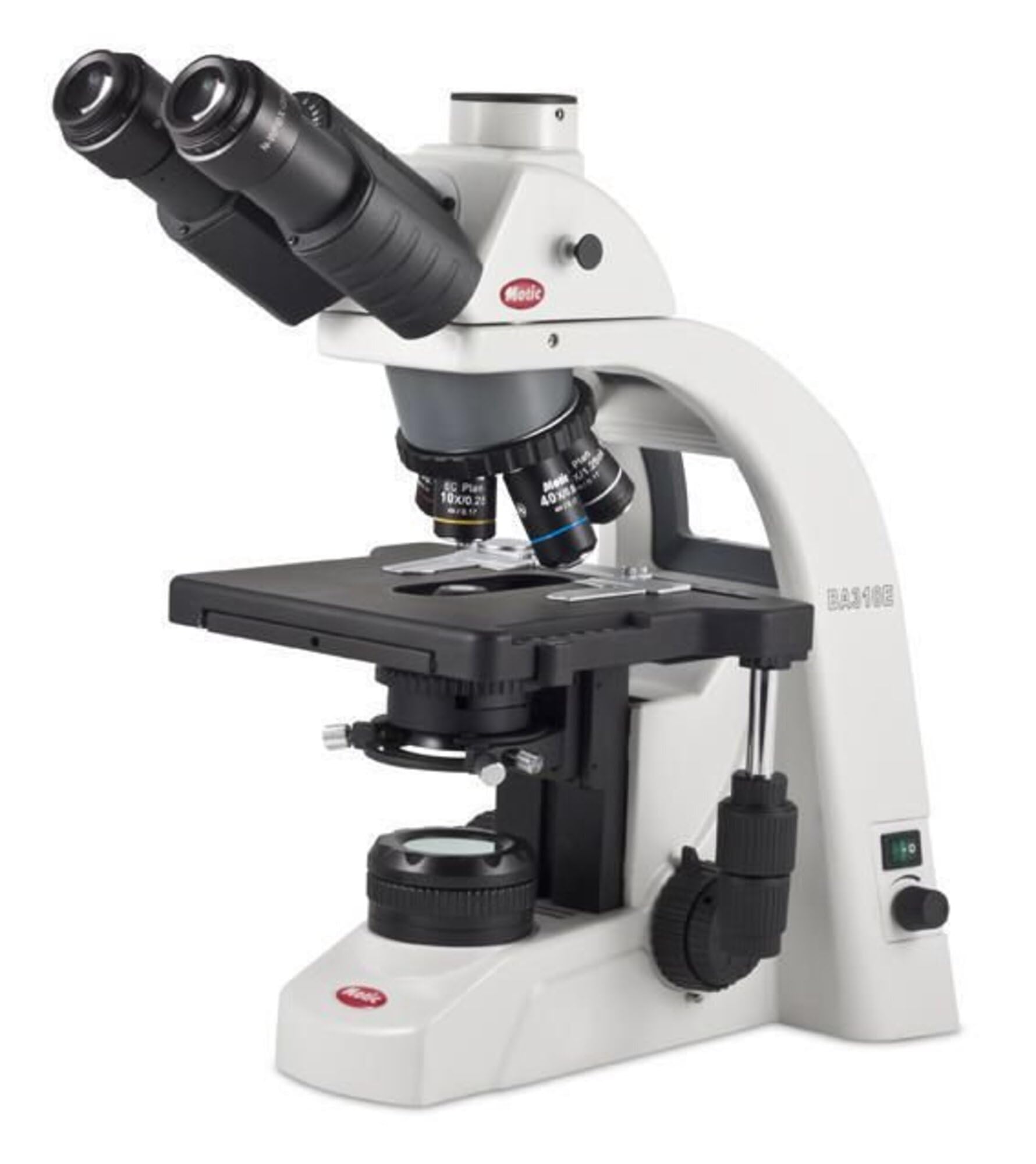
Gambar 1: The Motic BA310E Series Elite LED Binocular Compound Microscope. This image displays the complete microscope unit, highlighting the binocular head, revolving nosepiece with objective lenses, mechanical stage, and illumination system.
Parentah Operasi
- Daya Hurung: Flip the power switch located on the side of the microscope to the 'ON' position. The LED illumination should light up.
- Saluyukeun iluminasi: Use the intensity control knob to adjust the brightness of the LED light source to a comfortable level.
- Place Specimen: Pasangkeun slide spesimen anu tos disiapkeun kana alat mékanistage, ngamankeunana ku stage klip.
- Select Objective: Rotate the revolving nosepiece to select the lowest power objective lens (e.g., 4x or 10x). Ensure it clicks firmly into place.
- Fokus:
- Look through the eyepieces.
- Anggo kenop fokus kasar pikeun ngarahkeun spésimén kana fokus anu kira-kira.
- Use the fine focus knob for precise focusing and to achieve a sharp image.
- Stage Gerakan: Paké XY stage control knobs to move the specimen slide horizontally and vertically across the field of view.
- Adjusting Interpupillary Distance and Diopter:
- Adjust the distance between the eyepieces until you see a single, circular field of view.
- If one eyepiece has a diopter adjustment ring, focus with the non-adjustable eyepiece first, then adjust the diopter ring on the other eyepiece until both eyes see a sharp image.
- Ngarobah Pembesaran: Rotate the nosepiece to a higher power objective. Use only the fine focus knob to refocus. The BA310E features Infinity Corrected CCIS Plan Achromatic objectives, minimizing the need for extensive refocusing when changing objectives.
- Koehler Illumination: The BA310E's full Koehler configuration allows for optimal illumination. Adjust the field diaphragm and aperture diaphragm for even illumination and maximum contrast. Refer to advanced microscopy texts for detailed Koehler setup.
- Pareum listrik: When finished, turn off the illumination, remove the specimen slide, and cover the microscope with the dust cover.
Pangropéa
- Optik beberesih: Use a soft, lint-free cloth or lens paper specifically designed for optics. For stubborn smudges, use a small amount of lens cleaning solution. Avoid touching optical surfaces with bare fingers.
- Ngabersihkeun Awak: Lap awak mikroskop ku kaén nu lemes,amp lawon. Ulah make bahan kimia kasar atawa cleaners abrasive.
- Panyimpenan: Always cover the microscope with the provided dust cover when not in use. Store in a cool, dry place.
- Lubrication: Moving parts are factory-lubricated. Do not attempt to lubricate them yourself.
Pamérésan masalah
| Masalah | Mungkin Cukang lantaranana | Solusi |
|---|---|---|
| Taya katerangan | Power cord disconnected, power switch off, intensity knob set to minimum. | Check power connection, turn on switch, increase intensity. |
| Image blurry or out of focus | Incorrect focus, objective not fully engaged, dirty objective/eyepiece. | Adjust fine focus, rotate nosepiece until objective clicks, clean optics. |
| Widang anu poék atanapi henteu rata view | Condenser or diaphragm incorrectly adjusted, objective not aligned. | Adjust condenser and diaphragms, ensure objective is clicked into place. |
| Dust or spots in field of view | Dust on eyepiece, objective, or condenser. | Clean eyepieces, objectives, and condenser surfaces. |
spésifikasi
| Fitur | Rincian |
|---|---|
| Nomer modél | 1100100402632 |
| merek | MOTIC |
| Microscope Type | Mikroskop Sanyawa Binokular |
| Sirah | 30° inclined Binocular head with 360° Swiveling eyepiece tubes (light split 100:0/20:80) |
| Tujuan | Infinity Corrected CCIS Plan Achromatic objectives |
| Nosepiece | Quintuple reverse-mounted nosepiece |
| Fokus | Coaxial coarse and fine focusing |
| Paneangan | LED, Koehler illumination |
| Tipe Sumber Cahaya | LED |
| Bahan | Metal and Optical-grade Glass |
| Warna | Hideung |
| Sumber Daya | Kabel Listrik |
| Ukuran Paket | 25 x 17 x 13 inci |
| Item Beurat | 26 pon |
Garansi sareng Rojongan
For warranty information, technical support, or service inquiries, please contact Motic customer service or your authorized Motic dealer. Keep your purchase receipt and model number (1100100402632) readily available when contacting support.
Pabrikan: Motik
Titimangsa munggaran sadia: 15 Juni 2017


