1. Bubuka
This manual provides essential information for the safe and correct operation of your Shinco SO3A 32-inch HD Ready LED TV. Please read all instructions carefully before using the television and retain this manual for future reference.
The Shinco SO3A offers a 32-inch HD Ready display with a resolution of 1366x768p, a 60Hz refresh rate, and a 178-degree viewing angle. It features an A+ Grade Panel, 16.7 million colors, noise reduction, and multiple picture modes. Connectivity options include 2 HDMI ports, 2 USB ports, and 1 VGA port. Audio is delivered through 20W speakers with surround sound capability. Additional features include USB to USB copy, Dynamic Light Control, Eco Vision, and Eye Safe Feature.
2. Émbaran Kasalametan
Always observe the following safety precautions to prevent electric shock, fire, or damage to the television.
- Sumber Daya: Sambungkeun TV ngan ka stop kontak listrik AC jeung vol nu benertage sakumaha anu dituduhkeun dina labél TV.
- Ventilasi: Pastikeun ventilasi nyukupan sabudeureun TV. Ulah meungpeuk bukaan ventilasi.
- Cai sareng Uap: Ulah ngalaan TV ka hujan atawa beueus. Ulah nempatkeun barang-barang anu dieusi cairan, sapertos vas, dina TV.
- beberesih: Cabut TV sateuacan beberesih. Paké lawon lemes, garing. Ulah make cleaners cair atawa cleaners aerosol.
- panempatan: Teundeun TV dina permukaan anu stabil, datar atawa pasangkeun kana témbok. Hindarkeun nempatkeunna dina sinar panonpoé langsung atanapi caket sumber panas.
- kilat: During lightning storms or when unused for long periods, unplug the TV from the wall outlet.
3. Eusi Paket
Pastikeun yén sadaya item aya dina bungkusan:
- 1 x Shinco SO3A LED TV Unit
- 1 x Table Stand Pair
- 1 x Kadali Jauh
- 1 x Kartu Garansi
- 1 x Manual Pamaké (dokumén ieu)
- 1 x Wall Mount Kit (includes screws and anchors)

4. Setélan
4.1 Ngabongkar bungkusan
Carefully remove the TV from its packaging. It is recommended to keep the original packaging for future transport or service needs.
4.2 Stand Installation (Table Mount)
- Teundeun TV nyanghareupan handap dina permukaan lemes, beresih pikeun nyegah karuksakan layar.
- Align the table stand legs with the corresponding screw holes on the bottom of the TV.
- Ngamankeun suku nangtung ngagunakeun screws disadiakeun. Pastikeun aranjeunna tightened pageuh.

4.3 Pamasangan témbok Gunung
If you choose to wall mount your TV, ensure you use the included wall mount kit and follow the instructions provided with the kit. Professional installation is recommended for wall mounting.

4.4 Nyambungkeun périferal
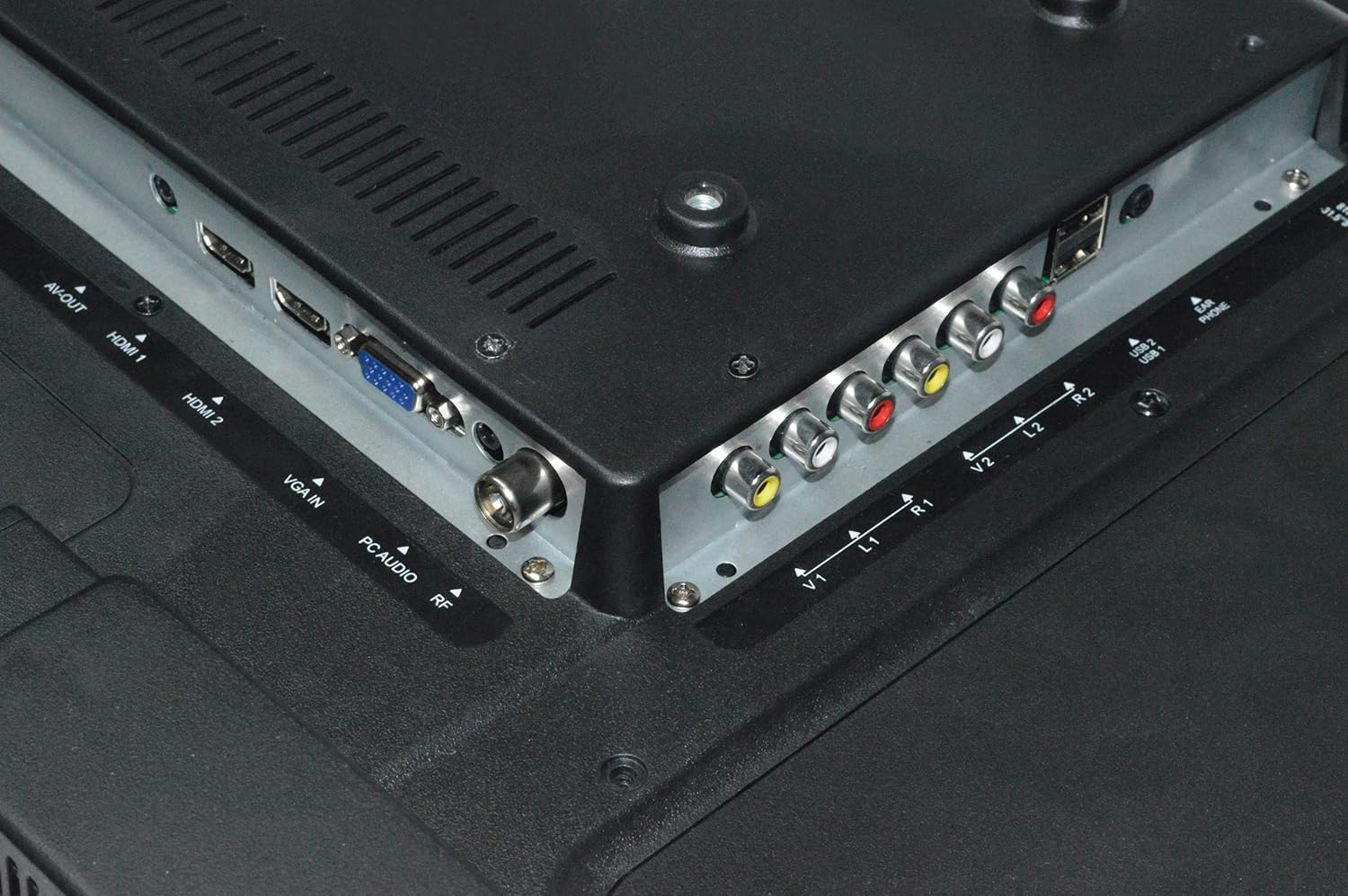
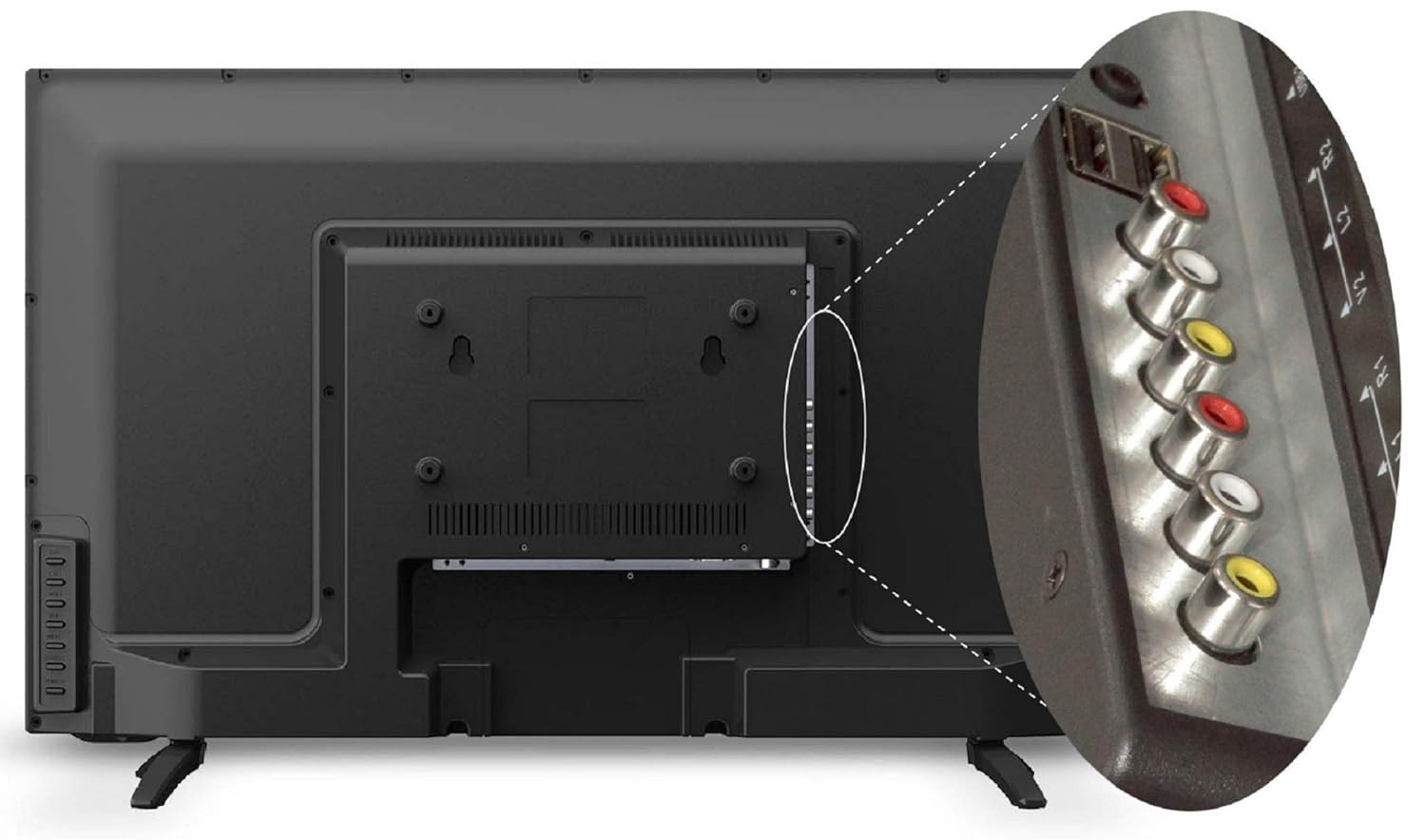
TV ieu nawiskeun sababaraha port pikeun nyambungkeun alat éksternal:
- Port HDMI (x2): Sambungkeun kotak set-top, pamaén Blu-ray, konsol kaulinan, atawa alat-alat HDMI-diaktipkeun séjén.
- Port USB (x2): Connect USB storage devices for media playback or USB to USB copy function.
- Port VGA (x1): Sambungkeun komputer atanapi laptop.
- Input AV: Sambungkeun alat anu langkung lami nganggo kabel video komposit sareng audio stereo.
- Input RF: Sambungkeun anteneu atawa kabel pikeun siaran TV.
4.5 Sambungan Daya
After connecting all necessary cables, plug the power cord into a wall outlet. The TV will enter standby mode.
5. Parentah Operasi
5.1 Fungsi Remote Control
The remote control allows you to operate all TV functions. Insert two AAA batteries (not included) into the remote control, ensuring correct polarity.

- kakuatan: Ngahurungkeun atanapi mareuman TV (mode sayaga).
- SUMBER: Selects input source (HDMI1, HDMI2, AV, VGA, USB, TV).
- VOL +/-: Saluyukeun tingkat polumeu.
- CH +/-: Robah saluran.
- MENU: Ngaksés ménu utama.
- OKÉ: Konfirmasi pilihan dina ménu.
- Tombol Navigasi (Kaluhur/Turun/Kénca/Katuhu): Navigates ngaliwatan ménu jeung pilihan.
- Bisu: Mutes or restores sound.
- ECO: Activates Eco Vision mode for power saving.
- Aspék: Changes the screen aspect ratio.
5.2 Mimitian Time Setup
Upon first power-on, the TV will guide you through initial setup steps:
- Pilihan Basa: Pilih basa anu anjeun pikaresep.
- Pilihan Nagara: Pilih daérah anjeun.
- Scan Channel: The TV will automatically scan for available channels if an antenna or cable is connected.
5.3 Fungsi TV Dasar
- Hurungkeun/Pareuman: Press the POWER button on the remote or the TV's control panel.
- Pilihan Sumber Input: Press the SOURCE button to cycle through available inputs (HDMI, AV, USB, TV, VGA).
- Penyesuaian volume: Anggo tombol VOL +/-.
- Robah Saluran: Use CH +/- buttons for sequential change or number buttons for direct input.
5.4 Setélan Gambar
Access the Picture menu to adjust display settings:
- Modeu Gambar: Select from Standard, Dynamic, Mild, or User to suit your viewpreferensi.
- Caang: Saluyukeun luminance sakabéh layar.
- Kontras: Saluyukeun bédana antara daérah anu caang sareng poék.
- warna: Adjust color saturation.
- Seukeutna: Atur kajelasan sisi gambar.
- Dynamic Light Control: Automatically adjusts backlight based on content.
- Ngurangan Noise: Reduces visual noise in the picture.
- Eye Safe Feature: Ngurangan émisi cahaya biru pikeun nyaman viewing.
5.5 Setélan Sora
Access the Sound menu to adjust audio settings:
- Modeu Sora: Select from Standard, Music, Movie, or User.
- Ékualiser: Customize audio frequencies in User mode.
- Sora Sakuliling: Enable or disable virtual surround sound.
- Kasaimbangan: Saluyukeun kasaimbangan speaker kénca/katuhu.
5.6 USB Media Playback
Insert a USB storage device into one of the USB ports. The TV will detect the device and prompt you to open the media browser. You can play supported audio (MP3), image (JPEG), and video files.
- USB to USB Copy: This feature allows direct copying of files between two USB devices connected to the TV.
6. Pangropéa
6.1 Ngabersihan TV
- Sok cabut TV samemeh beberesih.
- Paké lawon lemes, garing, lint bébas ngusap layar tur kabinet.
- Pikeun tanda pengkuh, enteng dampen lawon jeung cai atawa hampang, non-abrasive cleaner layar. Ulah nyemprot cairan langsung kana TV.
- Avoid using chemical cleaners, as they may damage the TV's finish.
6.2 Perawatan Kadali Jarak Jauh
- Tetep kadali jauh garing.
- Hindarkeun ragrag atanapi tunduk kana dampak anu kuat.
- Ganti batréna nalika jarak remot ngirang atanapi lirén ngaréspon.
7. Cara ngungkulan
Upami anjeun ngalaman masalah sareng TV anjeun, tingal masalah sareng solusi umum ieu:
| Masalah | Solusi anu mungkin |
|---|---|
| Taya kakuatan | Pariksa naha kabel listrik dicolokkeun aman kana TV sareng stop kontak témbok. Pastikeun stop kontak témbok boga kakuatan. |
| Henteu aya gambar, tapi aya sora | Check the input source. Ensure the external device (set-top box, DVD player) is turned on and connected correctly. |
| Henteu aya sora, tapi aya gambar | Check the volume level and ensure the TV is not muted. Check audio settings in the menu. |
| Kadali jauh teu jalan | Pariksa sareng gentos batréna. Pastikeun teu aya halangan antara remot sareng sénsor IR TV. |
| Kualitas gambar henteu saé | Adjust picture settings (brightness, contrast, sharpness). Check antenna connection for broadcast TV. Ensure the source device is outputting a high-quality signal. |
8. Spésifikasi
Key technical specifications for the Shinco SO3A 32-inch HD Ready LED TV:
| Fitur | Spésifikasi |
|---|---|
| merek | Shinco |
| Modél | SO3A |
| Ukuran layar | 32 Inci (80 cm) |
| Téknologi tampilan | LED |
| Resolusi | HD Ready (1366x768 Pixels) |
| Refresh Laju | 60 Hz |
| Viewdina Angle | 178 darajat |
| Tipe tampilan | A + Kelas Panel |
| Palabuhan HDMI | 2 |
| palabuhan USB | 2 |
| Palabuhan VGA | 1 |
| Kaluaran Audio | 20 Watt |
| Ukuran produk (L x W x H) | 73.6 x 19 x 47.4 cm |
| Item Beurat | 6.35 kg |
| Sumber Daya | AC |
| Model Taun | 2019 |


9. Émbaran jaminan
Your Shinco SO3A LED TV comes with a 1-year standard manufacturer warranty ti tanggal beuli. Garansi ieu nyertakeun cacad manufaktur dina panggunaan normal.
For any product defects, damage, or features not matching the description provided, this product is eligible for replacement within 10 poé pangiriman. Please contact customer support for assistance.
10. Rojongan
For technical assistance, service, or warranty claims, please contact the manufacturer:
Pabrikan: Videotex International Pvt Ltd
Alamat: 347-C, Ecotech-3, Udyog Kendra -2, Greater, Noida - 201306, Uttar Pradesh, India
Nomer Kontak: 8882569569


