1. Bubuka
Thank you for choosing the SKIL SR250801 Corded Detail Sander. This manual provides essential information for the safe operation, maintenance, and troubleshooting of your new tool. Please read this manual thoroughly before using the sander and keep it for future reference.
The SKIL SR250801 is a compact and powerful detail sander designed for fine finishes and intricate sanding tasks. It features a 1-amp motor, delivering 12,000 orbits per minute (OPM) for smooth performance. Its micro-filtration system and ergonomic design ensure comfortable use and efficient dust management.
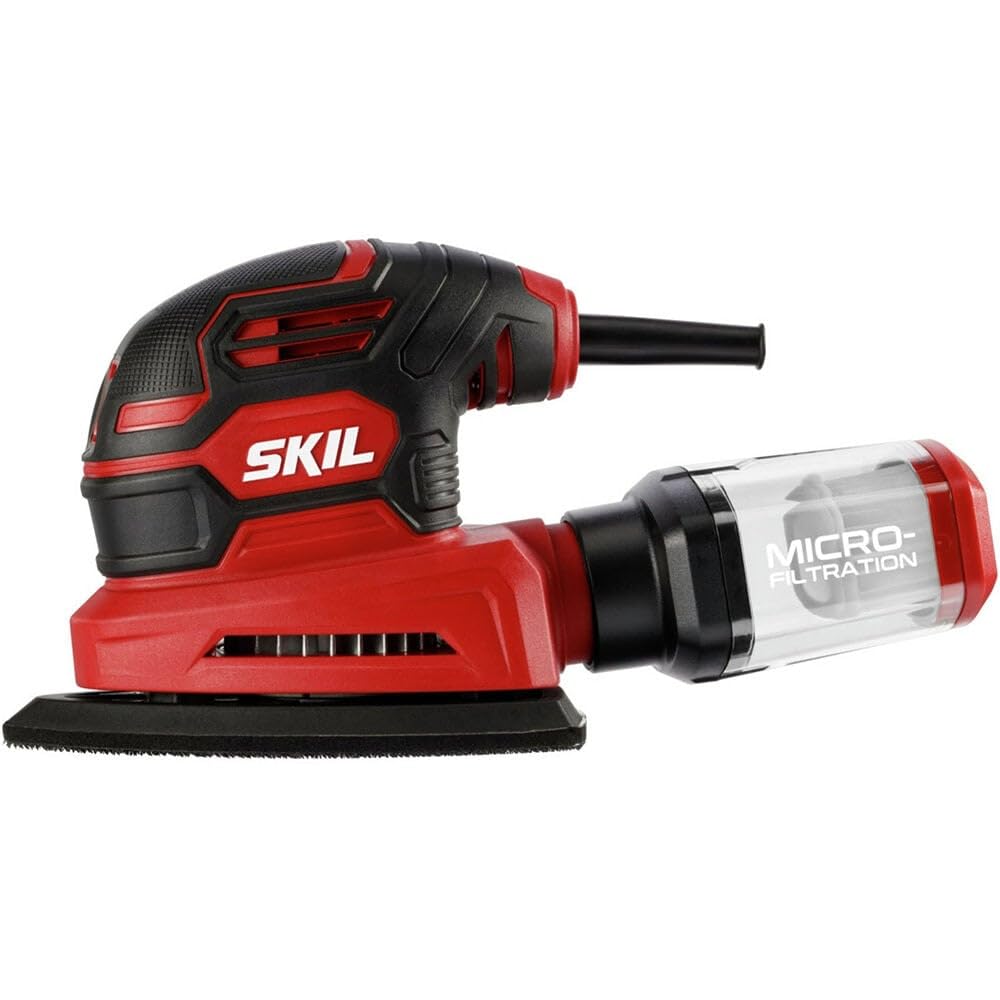
Figure 1: SKIL SR250801 Corded Detail Sander
2. Émbaran Kasalametan
Always follow basic safety precautions when using power tools to reduce the risk of fire, electric shock, and personal injury. Failure to follow these instructions may result in serious injury.
Peringatan Kasalametan Umum:
- Nganggo panyalindungan panon: Salawasna maké kacasoca kaamanan atawa kacasoca kaamanan kalawan shields samping.
- Anggo Masker Kekebul: Sanding operations can create significant dust. Use a dust mask or respirator to prevent inhalation of harmful particles.
- Workpiece Aman: Salawasna clamp or otherwise secure the workpiece to a stable surface. Holding the workpiece by hand may result in loss of control and injury.
- Jaga Wewengkon Gawé Bersih: Wewengkon jeung bangku-bangku nu pabalatak ngondang tatu.
- Hindarkeun Awal Kahaja: Pastikeun saklar dina posisi OFF sateuacan nyolokkeun alatna.
- Unplug Tool When Not in Use: Always unplug the sander from the power source before making adjustments, changing accessories, or storing the tool.
- Ulah Overreach: Tetep footing ditangtoskeun jeung kasaimbangan sepanjang waktos.
- Anggo Alat anu Katuhu: Entong maksakeun alat atanapi kantétan pikeun ngalakukeun padamelan anu henteu dirancang.
3. Naon dina Box
Your SKIL SR250801 Corded Detail Sander package should include the following items:
- 1A Mouse Sander (SKIL SR250801)
- 3 Sanding Papers (120 grit)
- Dust box with Micro-filtration

Figure 2: Included items: Sander and sanding papers
4. Setélan
4.1 Attaching Sanding Paper
- Pastikeun sander dicabut tina sumber listrik.
- Align the holes on the sanding paper with the holes on the sander's base plate. These holes are crucial for efficient dust collection.
- Press the sanding paper firmly onto the hook-and-loop base plate. The hook-and-loop system ensures a secure attachment and easy replacement.
4.2 Attaching the Dust Box
- Pastikeun sander parantos dicabut tina stop kontakna.
- Slide the dust box onto the dust port at the rear of the sander until it clicks securely into place.
- Verify that the dust box is firmly attached to prevent dust leakage during operation.
Video 1: Produk Leuwihview - Demonstrates attaching sanding paper and dust box.
5. Parentah Operasi
5.1 Powering on / Pareum
- To turn the sander ON, slide the dust-sealed ON/OFF switch to the 'I' position.
- To turn the sander OFF, slide the switch to the 'O' position.
5.2 Téhnik Sanding
- Hold the sander firmly with both hands. The ergonomic design and soft rubber grip are intended to reduce hand fatigue.
- Apply light, even pressure to the workpiece. Excessive pressure will not speed up sanding and may damage the surface or the tool.
- Pindahkeun sander dina gerakan anu lemes sareng tumpang tindih di sakumna permukaan.
- For corners and tight spaces, utilize the pointed tip of the sander's base plate.

Figure 3: Proper sanding technique with the detail sander
5.3 Koléksi lebu
The sander is equipped with a micro-filtration dust box to collect sanding debris. For enhanced dust collection, a 1-1/4 inch dust port allows for attachment to a vacuum system (not included).
Video 2: Demonstrates the sander's performance and dust collection.
6. Pangropéa
Pangropéa rutin ngajamin kinerja optimal sareng manjangkeun umur alat anjeun. Salawasna cabut sander sateuacan ngalakukeun pangropéa.
6.1 Emptying and Cleaning the Dust Box
- Detach the dust box from the sander by pulling it away from the dust port.
- Kosongkeun lebu anu dikumpulkeun kana wadah runtah.
- Clean the micro-filtration filter inside the dust box by tapping it gently or using compressed air to remove fine dust particles.
- Reattach the clean dust box securely to the sander.

Figure 4: Detachable dust box for easy cleaning
6.2 Replacing Sanding Sheets
- When sanding paper becomes worn or ineffective, peel it off the hook-and-loop base plate.
- Attach a new sanding sheet as described in Section 4.1.
6.3 beberesih umum
- Lap bagian luar amplas ku kaén nu bersih,amp lawon. Ulah make bahan kimia kasar atawa cleaners abrasive.
- Periodically inspect the power cord for any damage. If damaged, have it repaired by a qualified service technician.
7. Cara ngungkulan
If you encounter issues with your SKIL SR250801 Corded Detail Sander, refer to the following common problems and solutions:
| Masalah | Mungkin Cukang lantaranana | Solusi |
|---|---|---|
| Sander teu hurung | No power supply; Switch in OFF position; Damaged cord | Check power outlet; Ensure switch is ON; Inspect cord for damage and seek professional repair if needed. |
| Koléksi lebu goréng | Dust box full or improperly attached; Sanding paper holes not aligned; Clogged filter | Empty and reattach dust box; Align sanding paper correctly; Clean the micro-filtration filter. |
| Geter kaleuleuwihi | Worn sanding paper; Improperly attached sanding paper; Internal issue | Replace sanding paper; Reattach sanding paper correctly; If problem persists, contact customer support. |
| Sander not sanding effectively | Worn sanding paper; Incorrect grit for task; Insufficient pressure | Replace sanding paper; Use appropriate grit for the material; Apply light, even pressure. |
If you encounter a problem not listed here or if the suggested solutions do not resolve the issue, please contact SKIL customer support.
8. Spésifikasi
| Fitur | Spésifikasi |
|---|---|
| Nomer modél | SR250801 |
| Motor | 1 Amp |
| Orbit Per Menit (OPM) | 12,000 OPM |
| Koléksi lebu | Micro-filtration dust box, 1-1/4" vacuum port |
| Sanding Sheet Attachment | Hook jeung Loop |
| Item Beurat | 2.31 pon |
| Dimensi produk | 6.77 x 4.06 x 5.2 inci |
| Jenis Pasir (Kalebet) | Sedeng (120 grit) |
| Bahan | Nyampur |
9. Garansi jeung Rojongan
For detailed warranty information, please refer to the warranty card included with your product or visit the official SKIL website. If you require technical assistance, replacement parts, or have any questions regarding your SKIL SR250801 Corded Detail Sander, please contact SKIL customer support.
SKIL Customer Support:
Websitus: www.skil.com
Phone: Refer to your product documentation for regional contact numbers.


