1. Bubuka
This manual provides comprehensive instructions for the setup, operation, maintenance, and troubleshooting of your Xiaomi AI Translator. Please read this manual carefully before using the device to ensure optimal performance and longevity.

Gambar 1: Xiaomi AI Translator device. This image shows the front of the translator, highlighting its minimalist design, central control buttons, and speaker grille at the bottom.
2. Fitur Produk
- Rojongan Multi-Basa: Translates between 14 languages, covering over 170 countries and districts. Supported languages include Chinese, English, Japanese, Korean, French, German, Spanish, Russian, Portuguese, Italian, Dutch, Danish, Finnish, and Swedish.
- Advanced AI Technology: Utilizes Microsoft voice technology for natural language understanding and accurate mechanical translation, with self-correction capabilities.
- Versatile Assistant Functions: Beyond translation, it acts as a personal assistant for tasks such as music playback, weather updates, time checks, news broadcasts, calculator functions, voice reading, item explanations, story telling, exchange rate conversions, encryption, and relative salutations.
- Ngurangan Noise: Equipped with technology for clearer audio reception and more precise voice recognition in various environments.
- Desain portabel: Features a pocket-sized, lightweight (approximately 63g), and durable aluminum alloy body with a curved design.

Gambar 2: Language coverage map. This image illustrates the global reach of the 14 supported languages, indicating the extensive usability of the translator across various regions.

Gambar 3: AI Translator technology. This image highlights the core technologies, including Microsoft voice and translation services, that power the device's accurate translation capabilities.

Gambar 4: Assistant functions. This image displays a range of additional features, demonstrating the device's utility beyond simple translation, acting as a comprehensive personal assistant.
3. Bagian sareng Kadali
Familiarize yourself with the various parts and controls of your Xiaomi AI Translator:
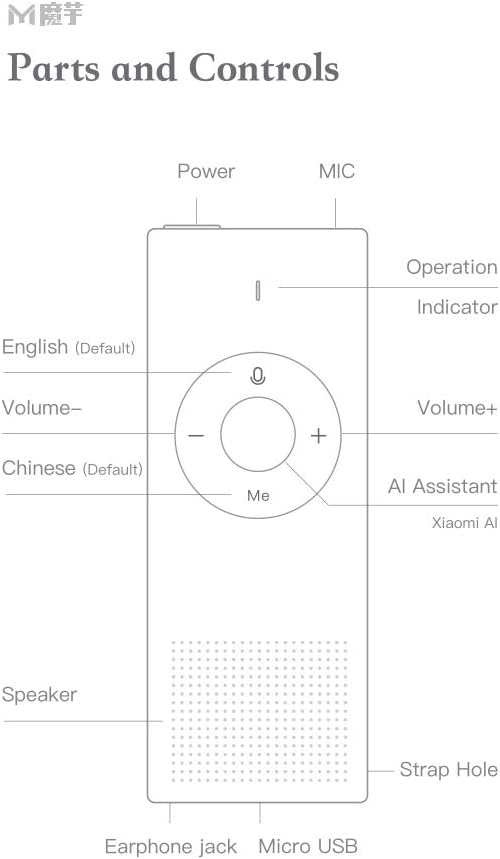
Gambar 5: Parts and Controls. This diagram labels all external components and buttons of the Xiaomi AI Translator, essential for understanding its operation.
- Tombol Daya: Located at the top, used to turn the device on/off and for screen wake/sleep.
- MIC (Mikropon): Located at the top, for voice input.
- Indikator Operasi: Light indicator for device status.
- English (Default) Button: Press and hold to speak in English (or the currently selected left-side language).
- Volume - Tombol: Ngurangan polumeu.
- Chinese (Default) Button: Press and hold to speak in Chinese (or the currently selected right-side language).
- Tombol Jilid +: Ngaronjatkeun polumeu.
- AI Assistant (Xiaomi AI) Button: Activates the AI assistant for various functions.
- Speaker: Located at the bottom, for audio output.
- Liang Tali: Pikeun ngaitkeun tali pigeulang atawa lanyard.
- Jack Earphone: Pikeun nyambungkeun headphone.
- Port USB Mikro: Pikeun ngecas alat.
4. Setélan
4.1 Ngecas Awal
Before first use, fully charge the Xiaomi AI Translator. Connect the device to a power source using the provided Micro USB cable. The operation indicator will show charging status.
4.2 Powering on / Pareum
- Pikeun Ngahurungkeun: Pencét jeung tahan tombol Daya nepi ka alat hurung.
- Pikeun mareuman: Press and hold the Power button until a power-off prompt appears, then confirm.
- Screen Wake/Sleep: Briefly press the Power button to wake or put the screen to sleep.
4.3 Language Selection and Network Connection
Upon first power-on, you may be prompted to select your preferred interface language and connect to a Wi-Fi network. A stable internet connection is required for translation functions.
- Follow the on-screen instructions to select the device's operating language.
- Navigate to the Wi-Fi settings and connect to an available network.
- Ensure the device's firmware is up to date for optimal performance. Check for updates in the settings menu.
5. Parentah Operasi
5.1 Basic Translation
The Xiaomi AI Translator supports two-way translation between selected languages.
- Select Languages: On the device screen, select the two languages you wish to translate between. For example, set the left-side language to English and the right-side language to Chinese.
- Speak in Left-Side Language: Pencét jeung tahan tombol Inggris (Default) button (left button on the control panel) and speak clearly into the MIC. Release the button when you finish speaking. The device will translate and speak the text in the right-side language.
- Speak in Right-Side Language: Pencét jeung tahan tombol Chinese (Default) button (right button on the control panel) and speak clearly into the MIC. Release the button when you finish speaking. The device will translate and speak the text in the left-side language.
5.2 Using the AI Assistant
Pencét éta AI Assistant (Xiaomi AI) button (central button labeled "Me") to activate the AI assistant. You can then ask questions or issue commands for various functions:
- "Maén musik."
- "What's the weather like today?"
- "Tell me the time."
- "Read the news."
- "Open calculator."
- "Explain [item name]."
- "Tell me a story."
- "What's the exchange rate for USD to EUR?"
5.3 Volume adjustment
Ngagunakeun éta Jilid + jeung Volume - buttons on the control panel to adjust the playback volume.
5.4 Skenario Pamakéan
The Xiaomi AI Translator is designed for various situations:

Gambar 6: Multiple usage purposes. This image illustrates diverse applications of the translator, from travel and business to academic use and daily interactions like ordering food or checking into a hotel.
6. Pangropéa
- beberesih: Lap alatna ku lawon anu lemes sareng garing. Ulah nganggo pembersih cair atanapi bahan anu kasar.
- Panyimpenan: Store the translator in a cool, dry place away from direct sunlight and extreme temperatures.
- Perawatan batré: Pikeun manjangkeun umur batré, ulah sering ngosongkeun batré alat sacara total. Cas alat sacara rutin, sanaos henteu dianggo kanggo waktos anu lami.
- Apdet parangkat lunak: Periodically check for and install software updates to ensure optimal performance, new features, and security enhancements.
7. Cara ngungkulan
| Masalah | Mungkin Cukang lantaranana | Solusi |
|---|---|---|
| Alat teu hurung. | Batré lemah atawa gangguan alat. | Charge the device for at least 30 minutes. If it still doesn't power on, contact customer support. |
| Tarjamahan teu akurat atanapi laun. | Poor internet connection, unclear speech, or outdated software. | Ensure a stable Wi-Fi connection. Speak clearly and at a moderate pace. Check for and install software updates. |
| Taya sora tina speaker. | Volume too low or speaker malfunction. | Increase the volume using the Volume + button. Ensure no headphones are connected if you expect sound from the speaker. |
| Alat macet atanapi teu ngaréspon. | Kasalahan software. | Laksanakeun restart anu kapaksa ku mencét terus tombol Daya salami kurang leuwih 10-15 detik dugi ka alat hurung deui. |
8. Spésifikasi
| merek | XIAOMI |
| Modél | Panarjamah AI |
| Nomer Bagian | ART4847267255513BP |
| Jenis produk | Éléktronik |
| Basa anu Dirojong | 14 (Chinese, English, Japanese, Korean, French, German, Spanish, Russian, Portuguese, Italian, Dutch, Danish, Finnish, Swedish) |
| Beurat | Kira-kira 63 g (2.22 oz) |
| Ukuran (L x W x H) | Kira-kira 150 mm x 40 mm x 10 mm (5.91 inci x 1.57 inci x 0.39 inci) |
| Konektipitas | Wi-Fi (for translation), Micro USB (for charging) |
| Bahan | Aluminum Alloy Cover |

Gambar 7: Portable design and dimensions. This image demonstrates the compact size of the translator, fitting easily into a pocket, and provides key physical specifications.
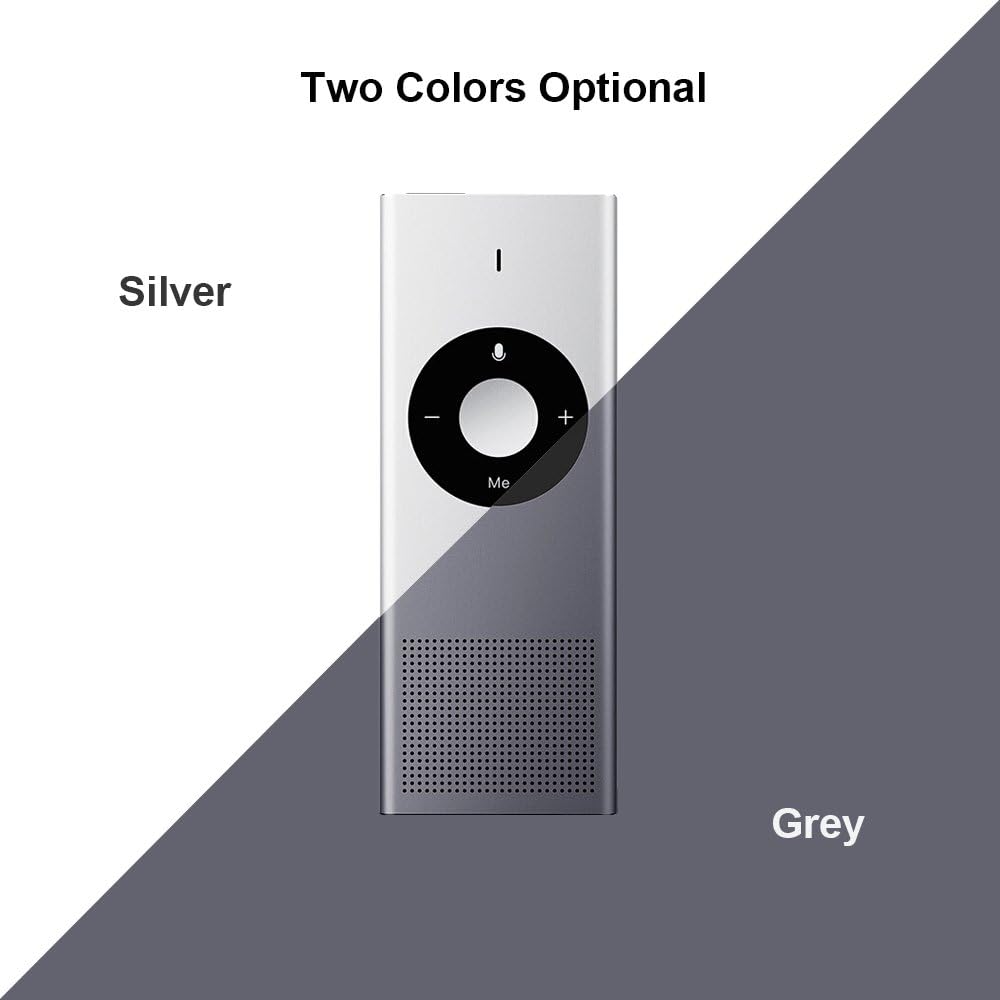
Gambar 8: Available colors. This image displays the two color options for the Xiaomi AI Translator: Silver and Grey.
9. Garansi jeung Rojongan
Kanggo inpormasi garansi, dukungan téknis, atanapi patarosan jasa, mangga tingal Xiaomi resmi websitus atanapi hubungi dealer resmi lokal anjeun. Simpen resi pameseran anjeun salaku bukti pameseran pikeun klaim garansi.
Pabrikan: Xiaomi
ASIN: B07FX88LFZ
Available for purchase since: 20 Agustus 2018