1. Bubuka
This manual provides detailed instructions for the setup, operation, and maintenance of your DIERYA DK68 60% Wireless Mechanical Gaming Keyboard. Please read this manual thoroughly before using the product to ensure proper functionality and to maximize your user experience.

Image 1.1: DIERYA DK68 keyboard highlighting its main features.
2. Eusi Paket
Pastikeun yén sadaya item aya dina bungkusan:
- DIERYA DK68 60% Wireless Mechanical Gaming Keyboard
- USB-C ka USB-A Cable
- Keycap Puller
- Manual pangguna (dokumén ieu)
3. Produk Langkungview
The DIERYA DK68 is a compact 60% mechanical keyboard designed for versatility and performance. It features a 68-key layout, tri-mode connectivity, RGB backlighting, and durable mechanical switches.
Fitur konci:
- Konektipitas Tri-Mode: Supports Bluetooth 5.0, 2.4GHz wireless, and USB-C wired connections.
- 68-Layout Kompak konci: Saves desk space while retaining essential keys.
- Clicky Blue Mechanical Switches: Provide tactile feedback and an audible click, ideal for typing and gaming.
- Lampu tukang RGB: Customizable lighting with multiple modes and brightness levels.
- N-Key Rollover & Anti-Ghosting: Ensures accurate registration of multiple simultaneous key presses.
- Batré 3000 mAh: Long-lasting rechargeable battery for extended wireless use.
- Dobel-shot Keycaps: Durable and fade-resistant keycaps.
- Desain ergonomis: Features two-stage adjustable feet and anti-slip pads for comfortable and stable use.

Image 3.1: Details of the Clicky Blue Mechanical Switches.

Image 3.2: Ergonomic features including double-shot keycaps, adjustable feet, and anti-slip pads.
4. Setélan
The DK68 keyboard offers three connection modes: wired, 2.4GHz wireless, and Bluetooth. Choose the mode that best suits your device and needs.
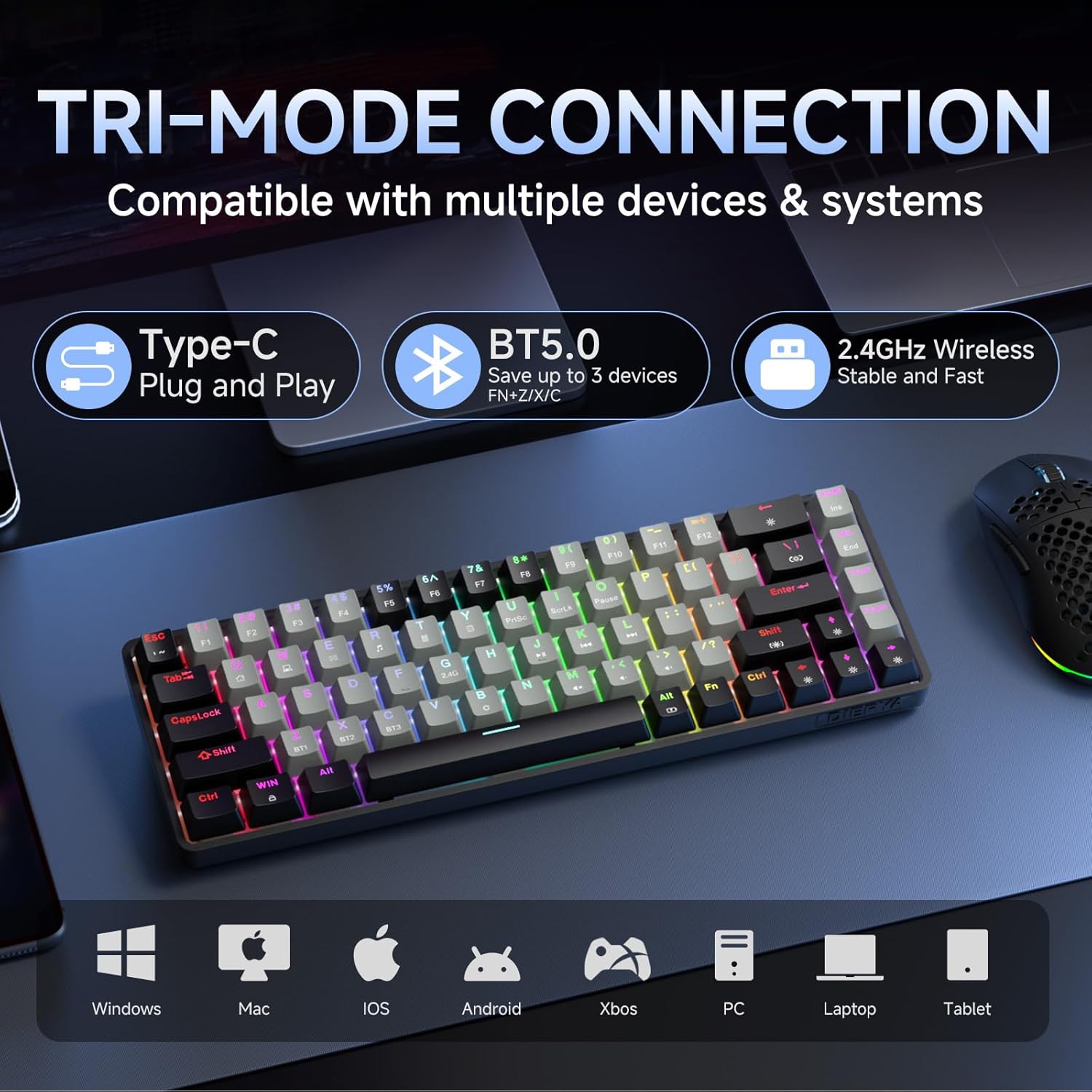
Image 4.1: Tri-mode connectivity and device compatibility.
4.1 Sambungan Kabel (USB-C)
- Sambungkeun kabel USB-C anu disayogikeun kana port USB-C kibor.
- Sambungkeun USB-A tungtung kabel ka port USB sadia dina komputer Anjeun.
- Kibor bakal otomatis dikenal sareng siap dianggo. Kibor ogé bakal ngecas dina modeu ieu.
4.2 2.4GHz Sambungan Wireless
- Locate the 2.4GHz USB receiver (usually stored in a compartment on the keyboard or included separately).
- Colokkeun panarima USB 2.4GHz ka port USB nu sadia dina komputer Anjeun.
- Hurungkeun keyboard. Kibor kedah otomatis nyambung ka panarima.
- If connection is not established, press Fn + 2.4G (usually indicated by a specific keycap legend) to activate 2.4GHz pairing mode.
4.3 Sambungan Bluetooth
Kibor ieu ngadukung sambungan ka nepi ka tilu alat Bluetooth.
- Pastikeun keyboard diaktipkeun.
- Pencét jeung tahan Fn + BT1, Fn + BT2, atawa Fn + BT3 for 3-5 seconds until the corresponding key (BT1, BT2, or BT3) flashes rapidly. This indicates pairing mode.
- On your device (computer, tablet, smartphone), open Bluetooth settings and search for new devices.
- Select "DIERYA DK68" (or similar name) from the list of available devices to pair.
- Once paired, the BT key will stop flashing and remain steadily lit.
- Pikeun pindah antara alat Bluetooth anu dipasangkeun, pencét waé Fn + BT1/BT2/BT3.
5. Parentah Operasi
5.1 RGB Backlighting Control
The DK68 features dynamic RGB backlighting with multiple modes and customization options.
- Fn + Spasi Mundur: Turn backlighting on/off.
- Fn + Shift: Switch between different lighting colors (for static modes).
- Fn + \|: Cycle through 20 different lighting modes.
- Fn + ↓: Turunkeun kacaangan.
- Fn + ↑: Ningkatkeun kacaangan.
- Fn + ←: Decrease lighting speed (for dynamic modes).
- Fn + →: Increase lighting speed (for dynamic modes).

Image 5.1: RGB Backlighting control key combinations.
5.2 Kombinasi Tombol Fungsi
Due to its compact 60% layout, many functions are accessed via the Fn key combined with other keys.
- Fn + F1-F12: Access multimedia and system functions (e.g., volume, media control). Specific functions are often indicated by secondary legends on the keycaps.
- Fn + Meunang: Konci/Buka konci Windows.
- Fn + P: Print Screen.
- Fn + [: Imah.
- Fn +]: Tungtung.
- Fn +;: Page Up.
- Fn + ': Kaca Turun.
- Fn + Lebetkeun: Lebetkeun.
- Fn + Pupus: Hapus.
- Fn + Spasi: Check battery indicator (when wired, it pulsates blue while charging).
5.3 Ngecas
The keyboard is equipped with a 3000mAh rechargeable lithium battery.
- Connect the keyboard to a USB power source using the provided USB-C cable.
- The spacebar will typically indicate charging status (e.g., pulsating blue).
- A full charge provides approximately 12 hours of use with backlighting on, or up to 333 hours with backlighting off.
- The keyboard features an auto-stop function after 3 minutes of inactivity to conserve battery.

Image 5.2: Battery life and charging information.
6. Pangropéa
Pangropéa anu leres mastikeun umur panjang sareng kinerja keyboard anjeun.
- Ngabersihan Keycaps: Anggo alat panyabutan konci anu disayogikeun pikeun nyabut konci sacara saksama. Bersihkeun nganggo lap anu lemesamp lawon jeung sabun hampang lamun perlu. Pastikeun aranjeunna tos rengse garing saméméh reattaching.
- Ngabersihan awak keyboard: Use a soft, dry cloth to wipe down the keyboard body. For dust between keys, use compressed air.
- Hindarkeun Cairan: Do not expose the keyboard to excessive moisture or liquids. If spills occur, immediately disconnect the keyboard and allow it to dry completely before reuse.
- Panyimpenan: Simpen kibor di tempat anu tiis sareng garing jauh tina sinar panonpoé langsung sareng suhu anu ekstrim.
7. Cara ngungkulan
If you encounter issues with your DIERYA DK68 keyboard, refer to the following common solutions:
- Keyboard teu ngabales:
- Ensure the keyboard is charged. Connect it via USB-C cable to check if it works in wired mode.
- For wireless modes, ensure the keyboard is powered on and correctly paired (2.4GHz receiver plugged in, or Bluetooth paired to the correct channel).
- Coba hurungkeun deui komputer atanapi alat anjeun.
- Masalah sambungan Bluetooth:
- Pastikeun Bluetooth diaktipkeun dina alat Anjeun.
- Forget the keyboard in your device's Bluetooth settings and re-pair it.
- Pastikeun teu aya alat séjén anu ngaganggu sinyal Bluetooth.
- 2.4GHz wireless lag or disconnection:
- Ensure the 2.4GHz receiver is plugged into a direct USB port, not a hub.
- Move the keyboard closer to the receiver.
- Avoid placing large metal objects between the keyboard and receiver.
- RGB backlighting not working:
- Pencét Fn + Backspace to ensure backlighting is turned on.
- Ningkatkeun kacaangan ngagunakeun Fn + ↑.
- Keys not registering correctly (ghosting):
- The keyboard features N-Key rollover, so this should be rare. Ensure no debris is under the keycap.
- If the issue persists, try resetting the keyboard (refer to manufacturer's website for specific reset procedures if available).
8. Spésifikasi
| Fitur | Spésifikasi |
|---|---|
| Modél | DK68 |
| Tata perenah | 68-Key (60% Compact) |
| Pindah Tipe | Clicky Blue Mechanical Switches |
| Angkatan Aktuasi | 60gf (±15gf) |
| Keystroke Travel | 2.3mm (±0.6mm) |
| Ganti Umur Umur | 50 Juta Pencét |
| Konektipitas | Bluetooth 5.0, Nirkabel 2.4GHz, Kabel USB-C |
| Lampu tukang | RGB (20 Modes) |
| Kapasitas batré | 3000mAh Litium Polimér |
| Daya Tahan Batré (Lampu Hurung) | Kira-kira. 12 jam |
| Daya Tahan Batré (Lampu Pareum) | Kira-kira. 333 jam |
| Otomatis Saré | 3 menit teu aktip |
| Rollover konci | N-Konci Rollover |
| Ukuran (L x W x H) | 372 x 115 x 51 mm (14.65 x 4.53 x 2.01 inci) |
| Beurat | 820 g (1.79 pon) |
| OS cocog | Windows, macOS, Linux, iOS, Android |

Image 8.1: Keyboard dimensions.
9. Garansi jeung Rojongan
DIERYA products are designed for reliability and performance. For warranty information and technical support, please refer to the official DIERYA websitus atanapi ngahubungan layanan palanggan maranéhanana langsung.
- Resmi Websitus: Visit the DIERYA Store on Amazon
- Palayanan palanggan: Tingal inpormasi kontak anu disayogikeun dina bungkusan produk atanapi resmi websitus pikeun rojongan.
Punten tahan bukti pameseran anjeun pikeun klaim garansi.