1. Bubuka
The Optex ORT 8930-HD is a digital terrestrial receiver designed to receive free-to-air digital programs broadcast in MPEG2/MPEG4 format, compatible with DVB-T2 and HEVC/H.265 standards. This device connects to your television via HDMI or SCART. It features a USB input for future software updates, multimedia file playback (photos, music, videos), and direct recording to an external USB storage device (not included).
This manual provides detailed instructions for the proper installation, operation, and maintenance of your Optex ORT 8930-HD receiver. Please read it thoroughly before use to ensure optimal performance and to prevent damage.
2. Émbaran Kasalametan
- Pastikeun ventilasi ditangtoskeun sabudeureun alat pikeun nyegah overheating.
- Do not expose the receiver to rain, moisture, or extreme temperatures.
- Hindarkeun nempatkeun alat caket sumber panas sapertos radiator atanapi kompor.
- Paké ngan adaptor kakuatan disadiakeun kalawan unit.
- Ulah muka casing; ngarujuk sadaya jasa ka tanaga anu mumpuni.
- Cabut colokan listrik tina stop kontak nalika aya hujan badag atawa nalika teu dianggo dina waktu anu lila.
3. Eusi Paket
Pastikeun yén sadaya item aya dina bungkusan:
- 1 x Optex ORT 8930-HD Digital Receiver
- 1 x Kadali Jauh
- 1 x Manual Pamaké
4. Produk Langkungview
4.1 Panel payun

Gambar 1: Hareupeun view of the Optex ORT 8930-HD receiver, showing the display, USB port, and control buttons.
The front panel includes a digital display for channel numbers, a USB 2.0 port for external storage, and basic control buttons (CH+, CH-, Power).
4.2 Panel tukang
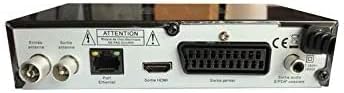
Gambar 2: Tukangeun view of the Optex ORT 8930-HD receiver, displaying various connectivity ports.
Panel tukang nyadiakeun sambungan ieu:
- Anteneu Asup/Kaluar: IEC 9.52 mm connectors for terrestrial antenna.
- Kaluaran HDMI: For connecting to an HD television.
- SCART Connector: For connecting to older televisions.
- S/PDIF Coaxial Audio: kaluaran audio digital.
- Input kakuatan: For the external power adapter.
4.3 Jauh Jauh

Gambar 3: The remote control unit for the Optex ORT 8930-HD receiver.
The remote control allows full operation of the receiver, including power, channel selection, volume, menu navigation, recording functions, and multimedia playback controls.
5. Setélan
5.1 Nyambungkeun anteneu
- Connect your terrestrial antenna cable to the "Antenna In" port on the rear panel of the receiver.
- If you wish to loop the antenna signal to another device, connect a coaxial cable from the "Antenna Out" port to the input of the next device.
5.2 Nyambungkeun ka Télévisi Anjeun
Pilih salah sahiji metodeu sambungan ieu:
- HDMI (Disarankeun pikeun HD): Connect an HDMI cable from the "HDMI Output" port on the receiver to an available HDMI input on your television.
- SKART: Connect a SCART cable from the "SCART Connector" on the receiver to the SCART input on your television.
5.3 Sambungan Daya
- Connect the power adapter to the power input port on the receiver.
- Colokkeun adaptor kakuatan kana stop kontak témbok nu cocog.
5.4 Pindai Saluran Awal
- Hurungkeun televisi anjeun teras pilih sumber input anu leres (HDMI atanapi SCART) anu cocog sareng sambungan anjeun.
- Power on the Optex ORT 8930-HD receiver.
- The first-time setup wizard should appear. Follow the on-screen instructions to perform an automatic channel search. This will scan for all available digital terrestrial channels in your area.
- If the wizard does not appear, navigate to the "Menu" > "Installation" > "Automatic Search" using the remote control.
6. Parentah Operasi
6.1 Operasi Dasar
- Hurungkeun/Pareuman: Pencét éta POWER tombol dina kadali jauh atanapi panel hareup.
- Pilihan Saluran: Ngagunakeun éta CH+ / CH- tombol atawa asupkeun nomer saluran langsung nganggo keypad numerik.
- Kontrol volume: Ngagunakeun éta VOL+ / VOL- kancing.
- Jempé: Pencét éta BISA tombol pikeun ngajempékeun samentara audio.
6.2 Manajemén saluran
- Automatic/Manual Search: Aksés ngaliwatan ménu > Pamasangan to rescan for channels.
- Fungsi LCN: The Logical Channel Numbering (LCN) function automatically sorts channels into a logical order. This can usually be enabled/disabled in the installation menu.
- Daptar Karesep: Create personalized lists of your preferred channels for quick access. Refer to the on-screen menu for instructions on adding and managing favorite channels.
6.3 Ngarekam jeung Playback
To use recording and multimedia playback features, connect a USB storage device (e.g., USB flash drive or external hard drive) to the USB port on the front panel.
- Ngarékam USB: Pencét éta REC button on the remote control to start recording the current program. Press EUREUN pikeun ngeureunkeun rékaman.
- Timeshift Function: This allows you to pause live TV and resume watching later. Activate Timeshift via the remote control (usually a dedicated button or through the menu).
- Puteran Multimédia: Access the multimedia player via the ménu. You can browse and play music, photo, and video files stored on your connected USB device.
6.4 Pituduh Program Éléktronik (EPG)
Pencét éta EPG tombol dina kadali jauh ka view the Electronic Program Guide, which displays program schedules for upcoming broadcasts.
6.5 Konci kolot
Set up a parental lock to restrict access to certain channels or programs. This feature is typically found in the ménu > Setélan Sistim > Kadali kolot bagian.
6.6 Fungsi Timer
The timer function allows you to schedule the receiver to turn on/off or record a specific program at a set time. Access this feature through the ménu.
6.7 Software Update via USB
périodik pariksa produsén urang website for available software updates. Download the update file to a USB drive and follow the instructions in the ménu > Setélan Sistim > Software Update section to install it.
7. Pangropéa
- beberesih: Use a soft, dry cloth to clean the exterior of the receiver. Do not use liquid or aerosol cleaners.
- Ventilasi: Pastikeun slot ventilasi dina alat henteu katutup pikeun nyegah panas teuing.
- Parangkat lunak: Keep the receiver's software updated to ensure optimal performance and access to the latest features.
8. Cara ngungkulan
| Masalah | Mungkin Cukang lantaranana | Solusi |
|---|---|---|
| Taya kakuatan | Kabel listrik pegat; stop kontak rusak. | Pariksa sambungan kabel kakuatan; coba outlet béda. |
| No signal / No channels | Antenna not connected; incorrect input source on TV; no channel scan performed. | Check antenna connection; select correct TV input; perform an automatic channel scan. |
| Kadali jauh teu jalan | Batteries depleted; obstruction between remote and receiver. | Ganti batré; mastikeun garis jelas tina tetempoan ka sensor IR panarima. |
| Rekaman USB teu jalan | USB device not connected or formatted incorrectly; insufficient storage space. | Ensure USB device is properly connected; format USB device (FAT32/NTFS); check available space. |
| Alat macet atanapi teu ngaréspon | glitch software samentara. | Disconnect power for a few seconds, then reconnect. If problem persists, check for software updates. |
9. Spésifikasi
| Fitur | Rincian |
|---|---|
| Modél | ORT 8930-HD |
| merek | Optex |
| Tipe Tuner | Terestrial (DVB-T2) |
| Video Decoding | HEVC/H.265, MPEG-2.5 |
| Konektipitas | 1x HDMI, 1x SCART, 1x USB 2.0, 1x S/PDIF Coaxial Audio, Antenna In/Out |
| Kapasitas saluran | Over 1000 channels |
| Ngarékam | External USB media (PVR function) |
| Puterkeun Multimedia | Music, Photos, Videos |
| Fitur husus | Timeshift, EPG, Parental Lock, Favorite List, Multi-language Menu, LCN, 5V Antenna Power, Timer Function, Dolby Digital+ compatible |
| Mode Kaluaran Audio | [SOM] |
| Konfigurasi Sora Sakuliling Spiker | 5.1 |
| Kaluaran kakuatan | 5 Watt |
| Beurat produk | 600 g |
10. Garansi jeung Rojongan
Specific warranty information is not provided within this manual. Please refer to the warranty card included with your purchase, contact your retailer, or visit the official Optex websitus pikeun istilah jeung kaayaan jaminan lengkep.
For technical support or service inquiries, please contact your local Optex distributor or the customer service department as indicated on the product packaging or manufacturer's websitus.


