1. Bubuka
This manual provides detailed instructions for the safe installation, operation, and maintenance of your Utilitech 100-CFM Bathroom Ventilation Fan with 13-Watt LED Light. This ENERGY STAR compliant fan is designed to provide efficient ventilation and illumination for your bathroom. Please read this manual thoroughly before beginning installation or operation and retain it for future reference.
2. Émbaran Kasalametan penting
PERHATOSAN: Pikeun ngurangan résiko kahuruan, shock listrik, atawa tatu pikeun jalma, perhatikeun ieu di handap:
- Karya pamasangan sareng kabel listrik kedah dilakukeun ku jalma anu mumpuni saluyu sareng sadaya kodeu sareng standar anu berlaku, kalebet kode sareng standar konstruksi anu dipeunteun seuneu.
- Anggo unit ieu ngan ku cara anu dimaksud ku produsén. Upami Anjeun gaduh patarosan, kontak produsén.
- Sateuacan ngalayanan atanapi ngabersihkeun unit, pareuman listrik di panel jasa sareng konci jasa sambungan sambungan hartosna pikeun nyegah listrik tina hurung ngahaja. Nalika cara ngaleupaskeun jasa teu tiasa dikonci, aman kencengkeun alat peringatan anu menonjol, sapertos a tag, ka panel layanan.
- Entong nganggo kipas ieu sareng alat kontrol laju solid-state kecuali disatujuan khusus pikeun dianggo sareng modél ieu.
- Unit ieu dimaksudkeun pikeun pamakéan ventilasi umum wungkul. Entong dianggo pikeun ngaleungitkeun bahan sareng uap anu ngabahayakeun atanapi ngabeledug.
- Duct work must always be vented to the outdoors.
- To prevent motor bearing damage and noisy and/or unbalanced impellers, keep drywall spray, construction dust, etc., off power unit.
- Salawasna nganggo kacamata kaamanan sareng sarung tangan salami instalasi.
- Ensure the fan housing is securely mounted to structural framing.
3. Eusi Paket
Carefully unpack your ventilation fan and check that all components are present and undamaged. If any parts are missing or damaged, do not attempt to install the product. Contact customer support.
- Ventilation Fan Housing Assembly
- Motor and Blower Wheel Assembly
- LED Light Grille Assembly
- Instalasi Hardware (screws, mur kawat)
- Manual pamaké
4. Parentah instalasi
This fan is designed for easy fit installation, often replacing common bath fan housing sizes without extensive drywall modification. However, careful attention to detail is required for proper mounting and wiring.
4.1 Pakakas Diperlukeun
- Obeng (Phillips sareng Flathead)
- Bor
- Kawat Strippers
- Tang
- Pita Ukur
- péso Utiliti
- Kacamata Kasalametan jeung Sarung Tangan
4.2 Pasang Fan Perumahan
- Pareuman Daya: Before starting, ensure power is OFF at the circuit breaker or fuse box to avoid electrical shock.
- Nyiapkeun bubuka: If replacing an existing fan, remove the old unit. The new housing may be smaller, requiring additional wood blocking between joists for secure mounting.
- Position Housing: Place the fan housing between ceiling joists. The housing should be positioned so that its bottom edge is flush with the finished drywall surface, not the bottom of the joist. This is crucial for the LED light/cover to sit properly.
- Perumahan Aman: The fan housing has pre-drilled mounting holes. Secure the housing to the joists using appropriate screws. It is recommended to add additional mounting screws on all sides for stability. Before drilling new holes, temporarily install the fan motor housing to identify locations where screws will not interfere with its installation.
- Connect Duct Work: Attach the appropriate size duct (typically 4-inch round) to the fan's duct connector. Secure with duct tape or clamps to ensure an airtight seal. Ensure the duct work vents directly to the outdoors.
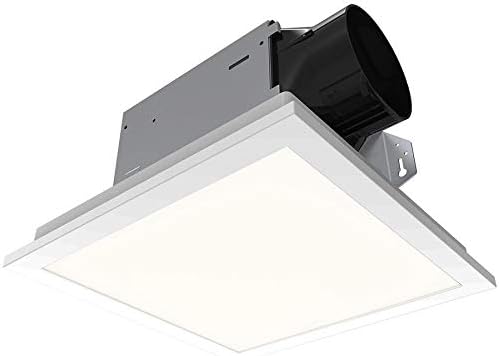
Gambar 1: Underside view of the fan housing, showing the duct connector and internal components.
4.3 Kabel Listrik
PERHATOSAN: All wiring must comply with local electrical codes. If you are unsure, consult a qualified electrician.
- Kompartemen Wiring Akses: Open the wiring compartment cover on the fan housing. Note that the wiring compartment is compact.
- Jalur Kawat: Route the electrical supply wires (typically black, white, and ground) into the wiring compartment through an appropriate knockout hole. Use a strain relief clamp to prevent wire chaffing.
- Jieun sambungan:
- Nyambungkeun black (hot) wire from the power supply to the hideung fan wire.
- Nyambungkeun white (neutral) wire from the power supply to the bodas fan wire.
- Nyambungkeun bare copper (ground) wire from the power supply to the tambaga héjo atanapi bulistir fan ground wire.
- If connecting to separate switches for fan and light, ensure correct connections for each circuit. The fan may come with quick-connect fittings; if your wiring requires multiple incoming wires per connection, use appropriate wire nuts.
- Wiring Aman: Carefully tuck all wires into the wiring compartment and secure the cover. Ensure no wires are pinched.
4.4 Installing Motor and Grille
- Install Motor Assembly: Slide the motor and blower wheel assembly into the fan housing. Ensure it clicks securely into place or is fastened with provided screws.
- Nyambungkeun Lampu LED: Plug the LED light connector from the grille assembly into the receptacle on the fan motor assembly.
- Pasang grille: Squeeze the mounting springs on the grille assembly and insert them into the slots in the fan housing. Push the grille firmly against the ceiling until it is flush.
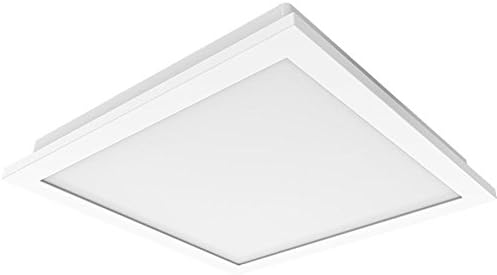
Figure 2: The LED light grille assembly, which covers the fan housing.
5. Parentah Operasi
Your Utilitech ventilation fan is designed for quiet and efficient operation, providing both air circulation and illumination.
- Operasi Kipas: Turn on the wall switch connected to the fan. The DC brushless motor may start slightly slower than traditional AC motors, but it will quickly reach its full 100 CFM capacity.
- Operasi Lampu LED: Turn on the wall switch connected to the LED light. The integrated 13-watt LED light provides bright illumination. This light is dimmable; if you wish to adjust its brightness, ensure it is connected to a compatible dimmer switch (sold separately).
- Kinerja optimal: For best ventilation, operate the fan during and after showering or bathing to effectively remove moisture and odors from the bathroom.
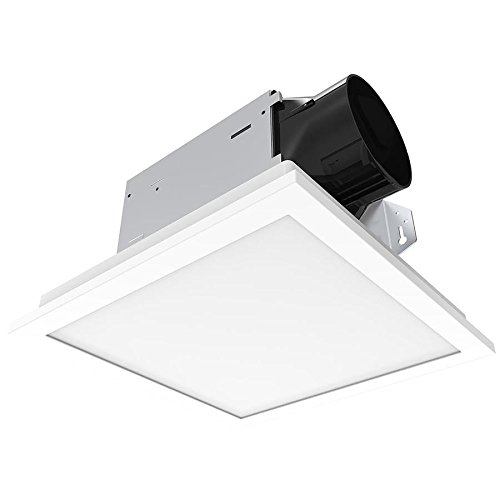
Figure 3: The Utilitech fan and LED light integrated into a bathroom ceiling.
6. Pangropéa
Regular maintenance ensures optimal performance and extends the life of your ventilation fan.
- Pegatkeun daya: Always disconnect power at the service panel before performing any maintenance.
- Ngabersihan grille: Remove the LED light grille by gently pulling down on the sides to release the mounting springs. Wipe the grille with a soft, damp lawon. Ulah make cleaners abrasive.
- Fan Housing and Blower Cleaning: With the grille removed, carefully vacuum or wipe away any dust or debris from the fan housing interior and the blower wheel. Avoid bending or damaging the blower blades.
- LED Light Module: The integrated LED light module is designed for long life (up to 30,000 hours) and is not user-replaceable. If the LED light fails or malfunctions, the entire unit may need to be replaced. Contact customer support for assistance.
- Reassembly: Once clean, reattach the grille by squeezing the mounting springs and inserting them back into the housing slots. Restore power.
7. Guide ngungkulan
Sateuacan ngahubungi layanan palanggan, tingali pituduh ngungkulan masalah ieu pikeun masalah umum.
| Masalah | Mungkin Cukang lantaranana | Solusi |
|---|---|---|
| Kipas angin teu beroperasi. | Taya catu daya; kabel leupas; switch lepat. | Check circuit breaker/fuse. Ensure all wire connections are secure. Test wall switch. |
| LED light does not turn on or flickers. | No power supply; loose wiring; faulty LED module. | Check circuit breaker/fuse. Ensure light connector is fully plugged in. If module is faulty, the unit may require replacement. |
| Kipasna ribut atanapi ngageter kaleuleuwihi. | Loose mounting; debris in blower; damaged blower wheel. | Ensure fan housing is securely mounted. Disconnect power and clean blower wheel. Inspect for damage. |
| Gerakan hawa goréng. | Blocked duct work; improper duct size; fan motor issue. | Check duct work for obstructions or kinks. Ensure duct size matches fan outlet. Clean blower wheel. |
8. Spésifikasi produk
| Fitur | Rincian |
|---|---|
| merek | Utilitech |
| Nomer modél | B07JZXNRRN |
| Kapasitas Aliran Udara | 100 Kaki Kubik Per Menit (CFM) |
| Sone Rating | 1.5 Sora |
| Tipe Lampu | Integrated 13 Watt Dimmable LED |
| Tipe Motor | DC Brushless |
| Énergi Énergi | ENERGY STAR Compliant |
| Bahan | Galvanized Steel, Plastic |
| Tipe Kamar | Kamar mandi |
| Sumber Daya | Kabel Listrik |
| Item Beurat | 8.87 pon |
| Ukuran Paket | 13.59 x 13.55 x 8.63 inci |
9. Garansi sarta Rojongan Palanggan
For warranty information or technical assistance, please contact Utilitech customer support. Keep your purchase receipt as proof of purchase.
Catetan: The integrated LED light module is not user-replaceable. If the LED light fails, the entire unit may need to be exchanged under warranty, if applicable.
Contact information for Utilitech can typically be found on their official websitus atanapi dina bungkusan produk.


