Bubuka
This manual provides detailed instructions for the installation, operation, and maintenance of your Defiant Electronic Deadbolt Door Lock. Please read this manual thoroughly before installation and use to ensure proper function and safety.
The Defiant Electronic Deadbolt offers convenient keyless access with a touch keypad, along with the security of a traditional mechanical key. It is designed for use on garage, entry, home office, computer room, or utility room doors.
Émbaran Kasalametan
Salawasna turutan pancegahan kaamanan dasar nalika masang sareng ngoperasikeun produk ieu pikeun ngirangan résiko tatu atanapi karusakan.
- Do not attempt to disassemble or modify the lock beyond the instructions provided in this manual.
- Use only the specified battery type (not included).
- Keep keys in a secure location away from the lock.
- Pastikeun sadaya komponén dipasang kalayan pageuh nalika dipasang.
Eusi pakét
Pariksa yén sadaya bagian aya sateuacan ngamimitian pamasangan:
- Majelis Keypad Exterior
- Interior Assembly with Thumb Turn
- Kancing Deadbolt
- Piring neunggeul
- Pamasangan screws
- Konci (2)
- Citakan Instalasi (upami aya)

Image: Included components such as keys, strike plate, and the cylinder housing.
Guide instalasi
Alat anu diperyogikeun: Philips screwdriver (included), measuring tape, pencil.
- Nyiapkeun lawang: Ensure your door has the standard bore holes for a deadbolt. If not, use the provided template (if applicable) to drill necessary holes.
- Pasang Latch: Insert the deadbolt latch into the edge of the door. Ensure the "UP" arrow on the latch is pointing upwards. Secure with screws.
- Pasang Keypad Éksterior: Feed the cable from the exterior keypad through the cross bore hole. Align the keypad with the latch and press it firmly against the door.
- Pasang Majelis Interior: Connect the cable from the exterior keypad to the interior assembly. Align the interior assembly with the mounting posts from the exterior keypad and secure with screws. Ensure the thumb turn operates smoothly.
- Pasang Strike Plate: Install the strike plate on the door frame, aligning it with the deadbolt latch. Secure with screws.
- Selapkeun Batré: Open the battery cover on the interior assembly and insert 4 AA batteries (not included), observing polarity.
- Operasi tés: Test the lock with the mechanical key and by entering a default code (if any) or a newly programmed code.
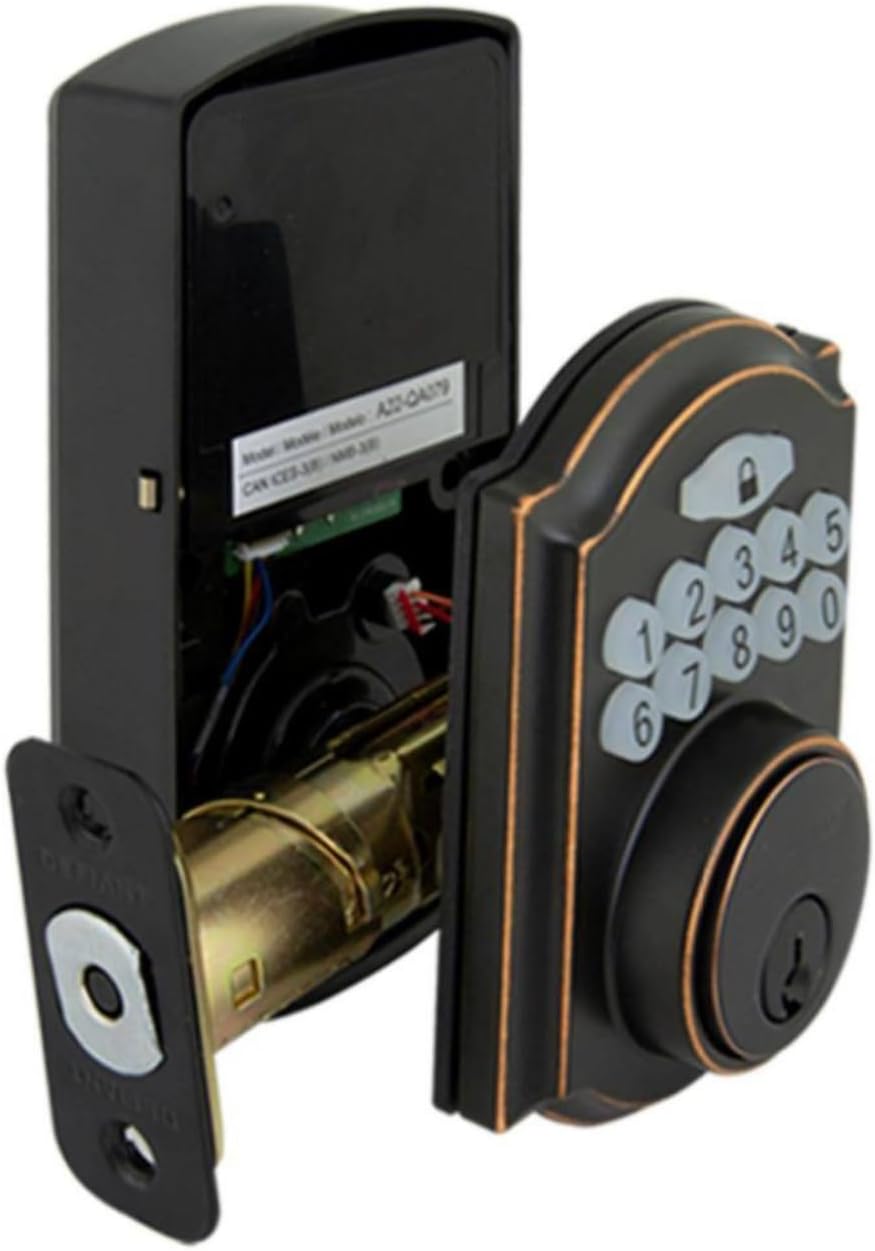
Image: The electronic deadbolt assembly, showing the interior mechanism and exterior keypad.

Gambar: Éksterior view of the electronic deadbolt installed on a door, showcasing the keypad.
Parentah Operasi
Kodeu Pamaké Programming
The lock can hold up to 10 user codes and 5 single-entry codes.
- Lebetkeun Mode Programming: Locate the program button on the interior assembly (usually on the battery cover or near the battery compartment). Press it once. The keypad will illuminate.
- Tambahkeun Kodeu Pamaké Anyar: Enter your desired 4-digit user code. Press the Lock button (padlock icon) to confirm. The lock will beep to confirm successful programming.
- Hapus Kodeu Pamaké: Enter programming mode. Enter the 4-digit user code you wish to delete. Press the Lock button. The lock will beep to confirm deletion.
Ngonci sareng Muka konci
- Pikeun muka konci: Enter your 4-digit user code on the keypad. The keypad will illuminate, and the deadbolt will retract after a few seconds.
- To Lock (from outside): Press the Lock button (padlock icon) on the keypad. The deadbolt will extend after a few seconds.
- To Lock (from inside): Turn the thumb turn on the interior assembly to the locked position.
Fitur Otomatis-Konci
The lock features an auto-lock function with an adjustable delay from 10 to 99 seconds. Refer to the full programming guide (usually a separate sheet or detailed section in the manual) for instructions on enabling and adjusting this feature.

Image: Close-up of the electronic keypad for code entry.
Pangropéa
- beberesih: Bersihkeun konci nganggo sabun anu lemes,amp lawon. Hindarkeun cleaners abrasive atawa pangleyur nu bisa ngaruksak finish atawa komponén éléktronik.
- Ngagantian batré: When the battery indicator light flashes or the lock makes a low battery warning sound, replace all four AA batteries. Use only new, high-quality alkaline batteries.
- Lubrication: Periodically lubricate the deadbolt mechanism with a silicone-based lubricant to ensure smooth operation. Do not lubricate the keypad.
Pamérésan masalah
| Masalah | Mungkin Cukang lantaranana | Solusi |
|---|---|---|
| Keypad teu hurung. | Batré pareum atanapi pamasangan batré anu teu leres. | Ganti batré, mastikeun polaritasna bener. |
| Lock does not respond to code. | Incorrect code entered, code not programmed, or lock is jammed. | Verify code, reprogram code, check for obstructions in door frame or latch. |
| Deadbolt teu manjang/mundur sapinuhna. | Misalignment of strike plate or latch, low battery. | Adjust strike plate, replace batteries. |
| Konci bip terus-terusan. | Peringatan batré lemah. | Ganti batré langsung. |
spésifikasi
- merek: Nangtang
- Jumlah modél: 9a843b7d-eaac-472e-b6d2-4b1006f6f6a5
- Jenis konci: Deadbolt éléktronik
- Bahan: Perunggu
- Gaya: Modern
- Fitur husus: Keyless Entry, Back-up Mechanical Key
- Kodeu pamaké: Nepi ka 10
- Single Entry Codes: Nepi ka 5
- Tunda Otomatis-Konci: 10-99 detik (bisa diatur)
- Sumber Daya: 4 Batré AA (teu kalebet)
- Beurat barang: 2.26 pon
- Ukuran Paket: 7.48 x 5.51 x 4.61 inci
- UPC: 050134991163
Garansi sareng Rojongan
For warranty information or technical support, please refer to the official Defiant websitus atanapi ngahubungan layanan palanggan maranéhna. Simpen resi pameseran anjeun pikeun klaim jaminan.
Sumberdaya Online: Visit the Defiant websitus kanggo FAQ, pituduh tambahan, sareng pendaptaran produk.
Palayanan palanggan: Contact Defiant customer support for assistance with installation, programming, or troubleshooting issues.


