1. Bubuka
This manual provides essential information for setting up, operating, and maintaining your VIZIO V-Series 50-inch Class 4K HDR Smart TV. Please read these instructions thoroughly before using your television to ensure proper functionality and safety.

Gambar 1: Hareupeun view of the VIZIO V-Series 50-inch 4K HDR Smart TV.
2. Naon dina Box
Pastikeun yén sadaya barang aya dina bungkusan:
- VIZIO V-Series 50-inch Class 4K HDR Smart TV
- Kabel Daya
- Kadali jauh
- Stand (2 lembar)
3. Setélan
3.1 Ngagantelkeun Stand
- Teundeun layar TV sacara saksama dina permukaan anu lemes sareng bersih pikeun nyegah karuksakan.
- Sejajarkeun unggal potongan nangtung sareng slot anu cocog dina handapeun TV.
- Ngamankeun nangtung ngagunakeun screws disadiakeun. Pastikeun aranjeunna napel pageuh.

Figure 2: VIZIO V-Series TV with its two-piece stand attached.
3.2 Nyambungkeun Power jeung Alat éksternal
- Sambungkeun kabel kakuatan ka input kakuatan TV lajeng ka stop kontak témbok.
- For external devices (e.g., cable box, gaming console, Blu-ray player), use HDMI ports. The TV features multiple HDMI inputs.
- For internet connectivity, connect an Ethernet cable to the LAN port or connect wirelessly via Wi-Fi during the initial setup.
- USB devices can be connected to the USB port for media playback.
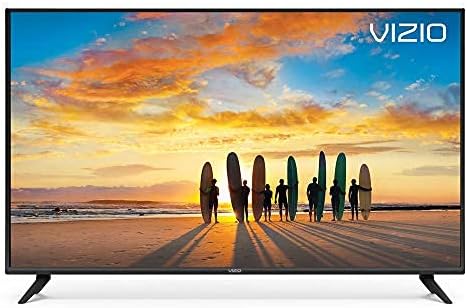
Figure 3: Close-up of the rear input ports, including HDMI, USB, Ethernet, and audio outputs.
3.3 Wizard Setup Awal
Upon first power-on, the TV will guide you through an on-screen setup wizard to configure language, network settings, and channel scanning.
4. Ngoperasikeun TV
4.1 Fungsi Remote Control
The included remote control provides access to all TV functions. It features dedicated buttons for popular streaming apps and navigation controls.
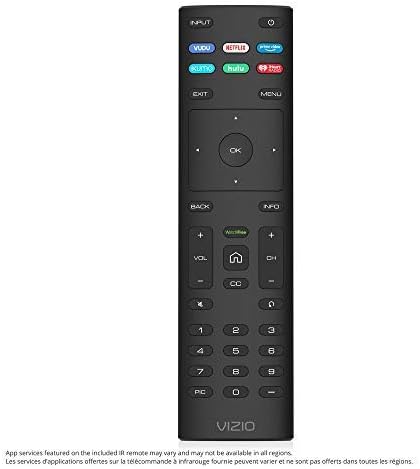
Figure 4: The VIZIO Smart TV remote control with quick access buttons for streaming services.
4.2 SmartCast 3.0
VIZIO SmartCast 3.0 provides an intuitive interface to access streaming apps, live TV, and inputs. Navigate using the remote's directional pad and the 'Home' button.
4.3 Kontrol sora
The TV supports hands-free voice control through compatible devices like Amazon Alexa or Google Assistant. Follow the on-screen instructions to link your voice assistant device.
4.4 VIZIO Watch Free
Access over 100 free streaming channels, including news, movies, and sports, directly through the VIZIO Watch Free+ app.
4.5 Chromecast Built-in and Screen Mirroring
Utilize Chromecast built-in to stream content from thousands of compatible apps on your smartphone or tablet directly to the TV. Screen mirroring allows you to display your device's screen on the TV.

Gambar 5: Kelample of screen mirroring from a smartphone to the VIZIO Smart TV.
5. Fitur konci
- Dolby Visi HDR: Capable of displaying a wider spectrum of colors and detail, including HDR10 and HLG content support.
- Lampu tukang LED Array pinuh: Evenly distributes LEDs across the screen's backlight for superior light uniformity and picture performance.
- 4K Ultra HD: Offers four times the resolution of 1080p with over 8 million pixels for enhanced clarity.
- Octal-Core Processor: A high-powered processor ensures less lag in smart home apps and during activity switching.
6. Spésifikasi
| Fitur | Spésifikasi |
|---|---|
| merek | VIZIO |
| Nomer modél | V505-G9 |
| Ukuran layar | 50 Inches (49.5" Diag.) |
| Resolusi | 4K Ultra HD (3840x2160) |
| Téknologi tampilan | LED |
| Refresh Laju | 120 Hz |
| Fitur husus | Datar |
| Rasio Aspék | 16:9 |
| Dimensi produk | 44.13 x 2.42 x 25.59 inci |
| Item Beurat | 21.2 pon (9600 gram) |
| Voltage | 120 Volt (AC) |
| Wattage | 135 watt |
| Téhnologi konektipitas | Ethernet, HDMI, USB |

Figure 6: Energy Guide label for the VIZIO V505-G9 TV, showing estimated yearly energy cost.
7. Pangropéa
7.1 Ngabersihan Layar
Pikeun ngabersihkeun layar, usap lembut nganggo kaen anu lemes sareng teu aya serat. Pikeun tanda pengkuh, enteng dampen lawon jeung cai atawa cleaner layar husus. Ulah make bahan kimia kasar atawa bahan abrasive.
7.2 Perawatan Umum
Keep the TV in a well-ventilated area. Avoid blocking ventilation openings. Do not expose the TV to direct sunlight, extreme temperatures, or high humidity.
8. Cara ngungkulan
- Henteu aya kakuatan: Pastikeun kabel daya disambungkeun sacara aman ka TV sareng stop kontak témbok. Coba outlet béda.
- Taya Gambar/Sora: Pastikeun yén sumber input anu leres dipilih. Pariksa sadaya sambungan kabel ka alat éksternal.
- Masalah Sambungan Jaringan: Restart your router and modem. Re-enter your Wi-Fi password in the TV's network settings. For wired connections, ensure the Ethernet cable is properly connected.
- Jauh Teu Ngabales: Ganti batré dina kadali jauh. Pastikeun teu aya halangan antara jauh sareng sénsor TV.
9. Garansi jeung Rojongan
For warranty information, product registration, and technical support, please refer to the official VIZIO website or contact VIZIO customer service. Keep your purchase receipt for warranty claims.


