1. Produk Langkungview
The AmpliFi Gamer's Edition Wi-Fi System is a comprehensive whole-home wireless internet solution designed to provide robust and seamless connectivity. It includes a central Wi-Fi router and two MeshPoints, engineered to extend coverage and eliminate dead zones throughout your home. This system leverages 802.11ac technology for fast and reliable performance, making it suitable for demanding applications like online gaming and high-definition streaming.
The router features an intuitive touchscreen display for easy management, while the MeshPoints offer adjustable super antennas for optimal signal placement. With four Gigabit Ethernet ports and a WAN port on the router, the system provides flexible connectivity options for wired devices.
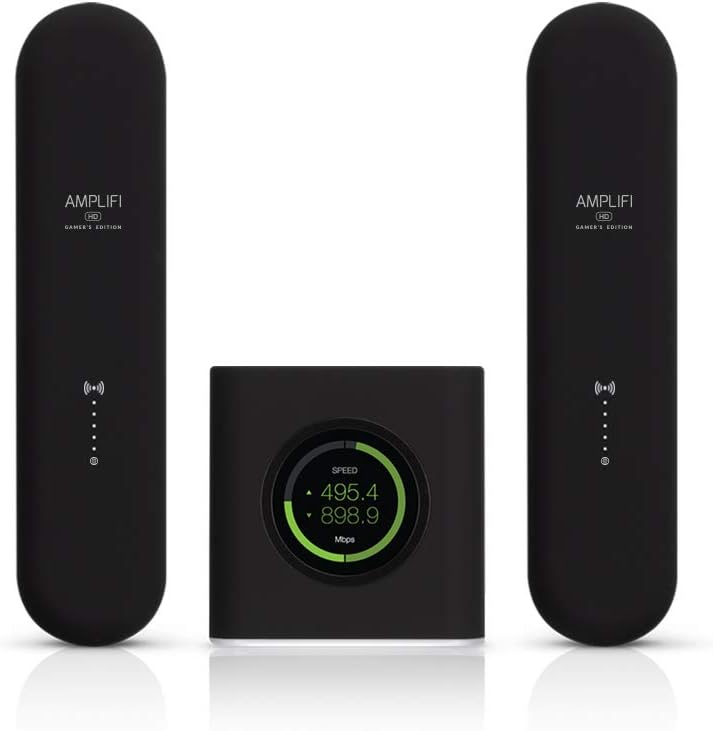
Gambar 1.1: The AmpliFi Gamer's Edition Wi-Fi System, showing the central router and two MeshPoint extenders.
2. Eusi Paket
Pastikeun yén sadaya item aya dina pakét anjeun:
- AmpliFi HD Gamer's Edition Wi-Fi Router
- dua (2) AmpliFi HD MeshPoints
- Kabel Ethernet
- Power Adapter for Router
- Pituduh Mimitian Gancang (upami kalebet)

Gambar 2.1: The AmpliFi Gamer's Edition Wi-Fi System box, displaying the router and MeshPoints.
3. Parentah Setup
Turutan léngkah-léngkah ieu pikeun nyetél anjeun AmpliFi Gamer's Edition Wi-Fi System:
3.1. Router Placement and Connection
- Bongkarkeun Routerna: Leupaskeun nu AmpliFi HD Gamer's Edition Router from its packaging.
- Nyambung ka Sumber Internét: Connect one end of the provided Ethernet cable to the WAN port (typically marked with a globe icon or distinct color) on the back of the AmpliFi router. Connect the other end to your modem or existing internet gateway.
- Daya Hurung: Plug the router's power adapter into the power port on the router, then into an electrical outlet. The router's touchscreen display should power on.
- Setup Awal: Follow the on-screen instructions on the router's touchscreen display to complete the initial setup, including setting up your Wi-Fi network name (SSID) and password.
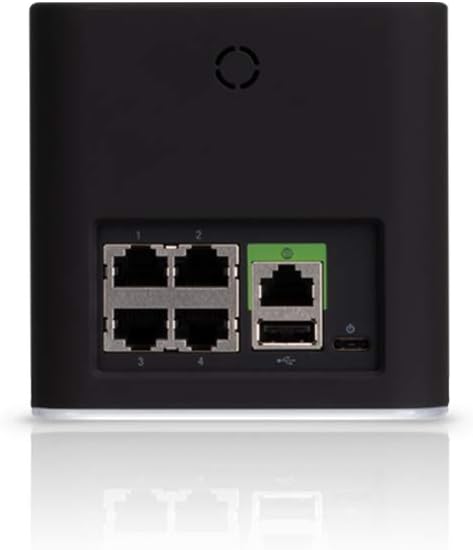
Gambar 3.1: Tukangeun view tina AmpliFi router, highlighting the four Gigabit Ethernet ports and the WAN port.
3.2. MeshPoint Installation
- Choose Locations: Select locations for your two MeshPoints where Wi-Fi coverage needs improvement. Ideally, place them roughly halfway between the router and the areas with weak signals. Avoid placing them in enclosed spaces or near large metal objects.
- Plug In MeshPoints: Plug each MeshPoint directly into a standard electrical outlet. The MeshPoint's indicator lights will illuminate.
- Papasangan otomatis: The MeshPoints are designed to automatically pair with your AmpliFi router. Once connected, the signal strength LEDs on the MeshPoints will provide visual feedback on their connection quality. Adjust their position if necessary to achieve optimal signal strength (typically indicated by more illuminated LEDs).
- Pariksa sambungan: Ngagunakeun éta AmpliFi mobile app (available for iOS and Android) to verify the connection status and signal strength of your MeshPoints.

Image 3.2: A single AmpliFi MeshPoint, showing its compact design and adjustable antenna.
4. Parentah Operasi
The AmpliFi Gamer's Edition Wi-Fi System offers several features for managing your home network.
4.1. Using the Touchscreen Display
The router's front display provides real-time information and quick access to settings.
- Tampilan laju: Shows current upload and download speeds.
- Status jaringan: Indicates internet connectivity and system health.
- Settings Access: Tap the screen to navigate through basic settings and information.
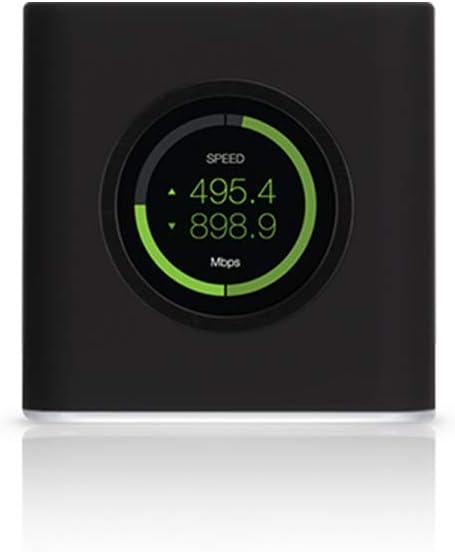
Gambar 4.1: Hareupeun view tina AmpliFi router, displaying network speed on its touchscreen.
4.2. AmpliFi Wi-Fi App
For advanced control and monitoring, download the AmpliFi Wi-Fi app from your device's app store. The app allows you to:
- Manage network settings, including Wi-Fi name and password.
- Monitor connected devices and their bandwidth usage.
- Prioritize specific devices for gaming or streaming (Gaming Mode).
- Pause internet access for individual devices or groups.
- Nyetél jaringan tamu.
- Utilize the Teleport VPN feature for secure remote access to your home network.
- Ngajalankeun apdet firmware.
4.3. modeu kaulinan
The Gamer's Edition features a dedicated Gaming Mode, accessible via the mobile app or router touchscreen. This mode optimizes network traffic to reduce latency and improve performance for online gaming.
5. Pangropéa
Pangropéa rutin ngajamin kinerja optimal sareng umur panjang anjeun AmpliFi Wi-Fi System.
- Pembaruan firmware: Pariksa sacara rutin sareng pasang apdet firmware ngalangkungan AmpliFi mobile app. Updates often include performance improvements, security patches, and new features.
- beberesih: Keep the router and MeshPoints clean and free of dust. Use a soft, dry cloth. Do not use liquid cleaners or aerosols.
- Ventilasi: Ensure the router and MeshPoints have adequate ventilation. Do not cover ventilation openings or place them in enclosed spaces that can trap heat.
- Ngahurungkeun deui: If you experience network issues, a simple restart of the router and MeshPoints can often resolve them. Unplug the power, wait 10 seconds, then plug back in.
6. Cara ngungkulan
Bagian ieu ngabahas masalah umum anu anjeun tingali.
6.1. Taya Konéksi Internét
- Pariksa Modem: Ensure your internet modem is working correctly and has an active internet connection.
- Sambungan kabel: Verify that the Ethernet cable from your modem is securely connected to the WAN port on the AmpliFi router.
- Balikan deui Alat: Power cycle your modem, then your AmpliFi router. Wait a few minutes for each device to fully boot up.
6.2. Sinyal Wi-Fi Lemah atanapi Zona Paéh
- MeshPoint Placement: Adjust the position of your MeshPoints. The signal strength LEDs on the MeshPoints provide feedback; aim for locations where more LEDs are lit.
- Halangan: Large objects, thick walls, and electronic devices can interfere with Wi-Fi signals. Try to minimize obstructions between your router, MeshPoints, and devices.
- gangguan: Other Wi-Fi networks or devices operating on similar frequencies can cause interference. The AmpliFi app can help identify optimal Wi-Fi channels.
6.3. Laju Leutik
- Internet Plan: Confirm your internet service provider (ISP) plan speed.
- Kabel vs. Nirkabel: Test speeds with a wired connection to the router to determine if the issue is with your internet service or the Wi-Fi network.
- Prioritas Alat: Ngagunakeun éta AmpliFi app to ensure critical devices (e.g., gaming console) are prioritized, especially during high network usage.
- Firmware: Pastikeun sadayana AmpliFi devices have the latest firmware.
7. Spésifikasi
| merek | AmpliFi |
| Ngaran modél | AFi-G |
| Nomer Modél Item | AFI-G-UK |
| Tanpa kabel | 802.11ac |
| Frékuénsi Band Kelas | Dual-Band |
| Téhnologi konektipitas | Ethernet, Wi-Fi |
| palabuhan Ethernet | 4 Gigabit Ethernet, 1 WAN Port |
| Fitur husus | WPS |
| Warna | Hideung |
| Jenis anteneu | Fixed (MeshPoints have adjustable super antennas) |
| Dianjurkeun Paké | Kaulinan |
| Produsén | Ubiquiti Networks, Inc. |
| Item Beurat | 5.52 pon |
| Ukuran Paket | 12.09 x 11.54 x 5.28 inci |
| Tanggal Kahiji Sadia | 19 Nopémber 2018 |
8. Garansi jeung Rojongan
8.1. Émbaran jaminan
Specific warranty terms and conditions for the AmpliFi Gamer's Edition Wi-Fi System are provided by Ubiquiti Networks, Inc. Please refer to the warranty card included with your product or visit the official AmpliFi websitus pikeun inpormasi lengkep ngeunaan cakupan jaminan, durasi, sareng prosedur klaim.
8.2. Rojongan Téknis
For technical assistance, troubleshooting beyond this manual, or to access additional resources, please visit the official AmpliFi support websitus atanapi ngahubungan layanan palanggan maranéhna.
- AmpliFi Support Websitus: amplifi.com/support (Kelample link, mangga pariksa resmi URL)
- Ubiquiti Networks: The manufacturer, Ubiquiti Networks, Inc., provides comprehensive support for their products.


