1. Bubuka
Welcome to the user manual for your new Bissell EV675 Robot Vacuum Cleaner. This document provides essential information for the safe and efficient operation, maintenance, and troubleshooting of your robotic vacuum. Please read this manual thoroughly before using your device.
2. Parentah Kasalametan penting
To reduce the risk of fire, electric shock, or injury, always follow basic precautions, including the following:
- Baca sadaya parentah sateuacan nganggo alat.
- Ulah make di luar atawa dina surfaces baseuh.
- Ulah ngantep dipaké salaku cocooan. Perhatian caket diperyogikeun nalika dianggo ku atanapi caket barudak.
- Anggo ngan sakumaha anu dijelaskeun dina manual ieu. Paké ngan kantétan dianjurkeun produsén urang.
- Entong dianggo nganggo kabel atanapi colokan anu rusak. Upami alat henteu jalan sakumaha sakuduna, parantos turun, ruksak, ditinggalkeun di luar, atanapi turun kana cai, balikkeun deui ka pusat layanan.
- Ulah narik atawa mawa ku ari, make ari salaku cecekelan, nutup panto dina ari, atawa narik ari sabudeureun ujung seukeut atawa juru. Ulah ngajalankeun alat ngaliwatan kabel. Tetep ari jauh ti surfaces dipanaskeun.
- Ulah cabut colokan ku cara narik kana kabel. Pikeun cabut colokan, keupeul colokan, teu ari.
- Ulah nanganan colokan atawa alat ku leungeun baseuh.
- Ulah nempatkeun obyék nanaon kana bukaan. Entong nganggo sareng bukaan anu diblokir; tetep bébas tina lebu, serat, rambut, sareng naon waé anu tiasa ngirangan aliran hawa.
- Jauhkeun buuk, pakean longgar, ramo, sareng sadaya bagian awak tina bukaan sareng bagian anu obah.
- Ulah nyokot naon bae anu kaduruk atawa ngaroko, kayaning roko, korek api, atawa lebu panas.
- Paké perawatan tambahan nalika meresihan dina tangga.
- Entong dianggo pikeun nyandak cairan anu gampang kaduruk atanapi kaduruk, sapertos béngsin, atanapi dianggo di daérah anu aya.
- Ulah nyokot bahan toksik (pemutih klorin, amonia, solokan cleaner, jsb).
- Ulah dianggo dina rohangan katutup anu aya uap tina cet dasar minyak, pengencer cet, sababaraha zat anti ngengat, lebu anu gampang kaduruk, atanapi uap anu ngabeledug atanapi toksik anu sanés.
- Ulah dipaké pikeun nyokot barang teuas atawa seukeut kayaning kaca, paku, screws, koin, jsb.
- Ulah make tanpa cangkir lebu jeung/atawa saringan di tempat.
- Pareuman sadaya kadali sateuacan cabut colokan.
- Cabut colokan tina stop kontak nalika henteu dianggo sareng sateuacan ngalayanan.
3. Eusi Paket
Your Bissell EV675 Robot Vacuum Cleaner package includes the following items:
- Bissell EV675 Robot Vacuum Cleaner
- Self-Charging Dock
- Adaptor kakuatan
- Kadali jauh
- Bonus Filter
- Bonus Edge Cleaning Brushes (2 sets)
- Alat beberesih

This image displays the additional filter and two sets of edge cleaning brushes that come with your robot vacuum, ensuring you have spare parts for maintenance.
4. Produk Langkungview
The Bissell EV675 is a robotic vacuum designed for efficient floor cleaning, especially effective on pet hair. It features a low-profile design to clean hard-to-reach spaces and a self-charging dock for convenience.
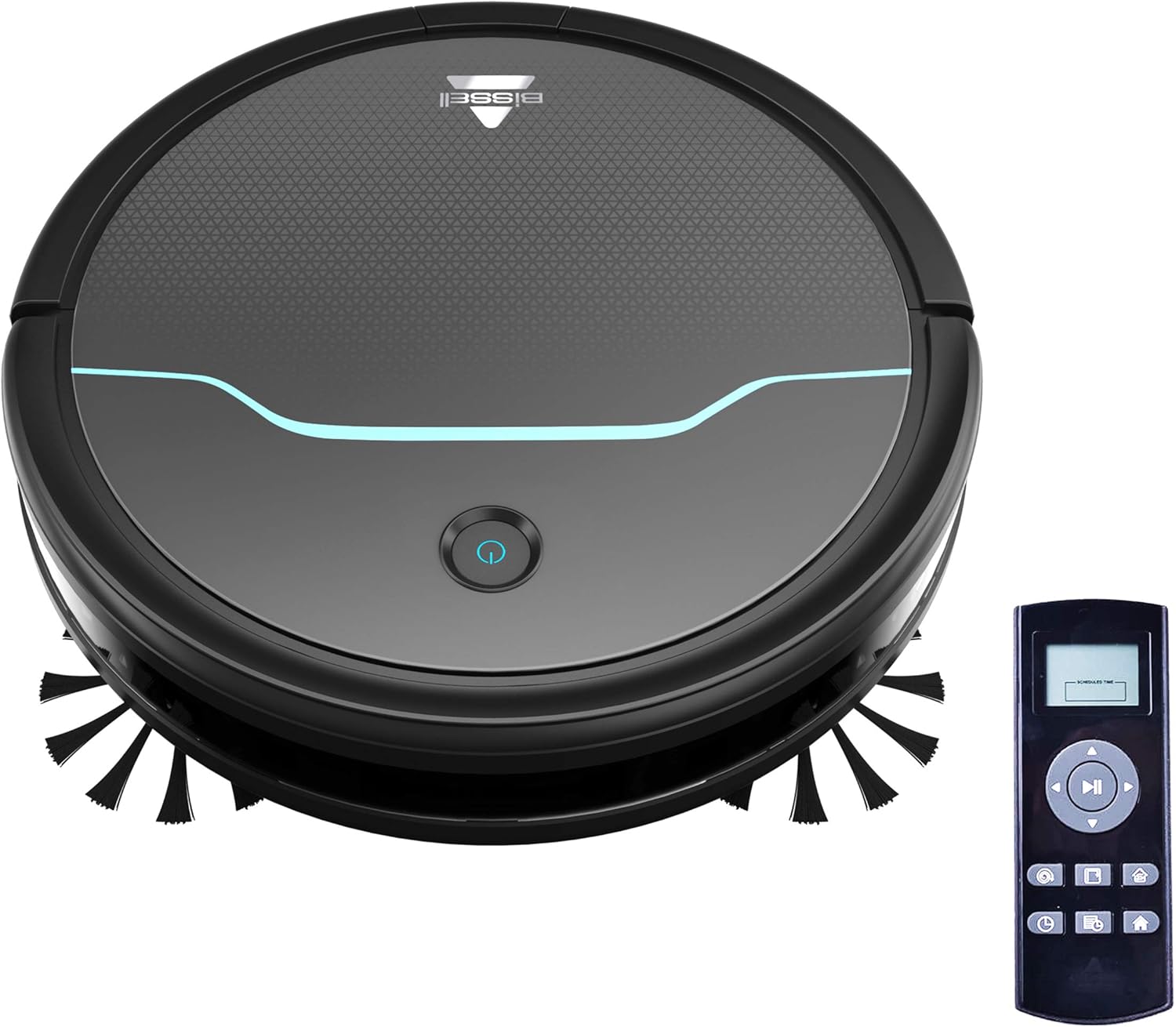
This image shows the main unit of the robot vacuum and its accompanying remote control, highlighting its compact, circular design.

This image illustrates the vacuum's ability to clean under furniture, reaching areas that are typically difficult to access.
5. Setélan
5.1 Ngecas Dock Nempatkeun
Place the self-charging dock against a wall in an open, uncluttered area. Ensure there is at least 0.5 meters (1.6 feet) of clear space on either side of the dock and 1.5 meters (4.9 feet) in front of it for optimal navigation and docking.
5.2 Ngecas Awal
Connect the power adapter to the charging dock and plug it into a wall outlet. Place the robot vacuum onto the charging contacts of the dock. Ensure the indicator light on the robot illuminates, indicating it is charging. Allow the robot to fully charge before its first use (approximately 4-5 hours).
5.3 Masang Sikat Sikat
Gently press the side brushes onto the square posts on the underside of the robot until they click into place. Ensure they are securely attached.
6. Operasi
6.1 Powering on / Pareum
To power on the robot, press and hold the power button on the top of the robot until the indicator light turns blue. To power off, press and hold the power button until the light turns off.
6.2 Ngamimitian siklus beberesih
Press the power button once to start a cleaning cycle. The robot will automatically begin cleaning in a systematic pattern. Alternatively, use the remote control to select a cleaning mode or start cleaning.

This image shows the robot vacuum in action, effectively picking up debris from the floor.
6.3 Modeu beberesih
The remote control allows you to select various cleaning modes:
- Ngabersihan Otomatis: The robot automatically cleans based on its environment.
- Bersihan titik: The robot intensely cleans a specific small area.
- Bersihan tepi: Robot cleans sapanjang tembok jeung edges jati.
- Kontrol Manual: Use the directional buttons on the remote to guide the robot.

This image highlights the vacuum's versatility in cleaning different floor types, including carpets.
6.4 Ngajadwalkeun
Use the remote control to set a cleaning schedule for your robot vacuum. Refer to the remote control section in the full manual for detailed instructions on setting daily or weekly cleaning times.

This image depicts the robot vacuum in a typical home setting, ready to execute its programmed cleaning schedule.
7. Pangropéa
Regular maintenance ensures your Bissell EV675 operates efficiently and prolongs its lifespan. Always power off the robot before performing any maintenance.
7.1 Ngosongkeun Lebu Bin
It is recommended to empty the dust bin after each cleaning cycle, especially if you have pets. Press the release button on the dust bin, pull it out, open the lid, and discard the collected debris.
7.2 Ngabersihkeun/Ngaganti Filter
Remove the filter from the dust bin. Tap off loose dirt. Rinse the filter under running water if necessary, ensuring it is completely dry before reinserting. Replace the filter every 3-6 months, or as needed, to maintain optimal suction.
7.3 Sikat beberesih
Remove the main brush and side brushes. Use the included cleaning tool to cut and remove any hair or debris tangled around the brushes. Ensure the brushes spin freely after cleaning.
7.4 Ngabersihan Sénsor sareng Ngecas Kontak
Wipe the cliff sensors, anti-collision sensors, and charging contacts on both the robot and the dock with a clean, dry cloth. This prevents dust buildup from affecting performance.
7.5 Maintenance Video
This video offers a visual demonstration of the Bissell EV675 Robot Vacuum Cleaner, covering its key functionalities and how it operates.
This short video clip showcases the Bissell EV675 Robotic Vacuum Cleaner performing a cleaning task, illustrating its mobility and cleaning path.
8. Cara ngungkulan
If your Bissell EV675 is not operating as expected, refer to the common issues and solutions below:
| Masalah | Mungkin Cukang lantaranana | Solusi |
|---|---|---|
| Robot henteu hurung atanapi ngecas. | Battery drained; charging contacts dirty; power adapter not connected. | Ensure robot is properly docked; clean charging contacts; check power adapter connection. |
| Robot sering macét. | Obstacles (cords, rugs with tassels); low-hanging furniture. | Clear obstacles; use virtual barriers if available; ensure charging dock has sufficient clearance. |
| Nyeuseup goréng atawa henteu nyokot lebu. | Dust bin full; filters clogged; main brush tangled. | Empty dust bin; clean or replace filters; clean main brush. |
| Side brushes not spinning. | Brushes tangled with hair/debris; brushes not installed correctly. | Remove and clean side brushes; ensure they are clicked into place. |
| Robot ngaluarkeun sora anu teu biasa. | Debris in main brush; foreign object in wheels. | Inspect and clean main brush and wheels for obstructions. |
9. Spésifikasi
- merek: Bissell
- Ngaran modél: BISSELL EV675 Robot Vacuum Cleaner for Pet Hair with Self Charging Dock, Bonus Filter, Bonus Edge Cleaning Brushes, 2503
- Jumlah modél: 2503
- Fitur husus: Koléksi Debu otomatis, tiasa diprogram, Brushroll ngabersihan diri
- warna: Black With Disco Teal Accents
- Jenis saringan: Disk
- Kahirupan batré: 100 menit
- Kapasitas: 0.4 liter
- Sumber Daya: Tanpa kabel Rechargeable
- Métode kontrol: Jauh
- Faktor Bentuk: Robotik
- Ukuran produk: 12.75 x 12.75 x 3.5 inci
- Beurat barang: 6.62 pon
- Saran permukaan: Floors, Carpet, Floor
10. Garansi jeung Rojongan
For warranty information, product registration, or customer support, please visit the official Bissell websitus atanapi ngahubungan departemén layanan palanggan maranéhna. Simpen resi pameseran anjeun pikeun klaim jaminan.


