1. Bubuka
This manual provides detailed instructions for the TRACER GAMEZONE IGNIS AVAGO 3050 4000DPI USB Gaming Mouse. Please read this manual thoroughly before using the product to ensure proper operation and to maximize your gaming experience.
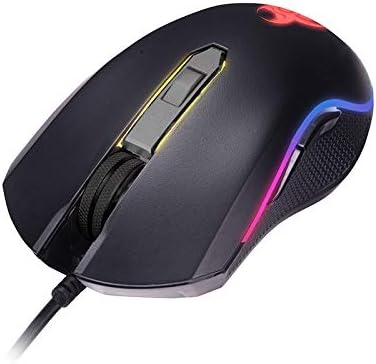
Gambar 1.1: Leuwihview of the TRACER GAMEZONE IGNIS AVAGO 3050 Gaming Mouse. This image shows the mouse from a slightly elevated angle, highlighting its ergonomic design, scroll wheel, and the integrated RGB lighting along its sides.
2. Eusi Paket
Pastikeun sadaya item aya dina bungkusan:
- TRACER GAMEZONE IGNIS AVAGO 3050 4000DPI USB Gaming Mouse
- Manual pangguna (dokumén ieu)
3. Fitur Produk
- High Precision Optical Laser: Equipped with an AVAGO 3050 optical sensor for superior tracking accuracy.
- DPI adjustable: Supports DPI switching up to 4000 DPI for customizable sensitivity.
- 6 Customizable Buttons: Provides six programmable buttons for enhanced control during gameplay.
- Lampu RGB: Integrated internal RGB lighting for a modern and aggressive aesthetic.
- Konektipitas USB: Standard USB connection for wide compatibility with PC and Mac platforms.
- Sliding Base: Designed for smooth operation on various surfaces, including mouse mats.

Gambar 3.1: Sisi view of the gaming mouse, showcasing the ergonomic shape, textured grip on the side, and the vibrant RGB light strip running along the edge.
4. Setélan
Follow these steps to set up your TRACER GAMEZONE IGNIS AVAGO 3050 Gaming Mouse:
- Buka bungkus Beurit: Taliti miceun beurit tina bungkusanna.
- Nyambung ka Komputer: Plug the USB connector of the mouse into an available USB port on your PC or Mac.
- Pamasangan supir: The mouse is plug-and-play. Your operating system will automatically detect and install the necessary drivers. No additional software installation is typically required for basic functionality.
- panempatan: Teundeun beurit dina tempat anu datar, bersih atawa alas beurit pikeun pagelaran optimal.

Gambar 4.1: Hareupeun view of the gaming mouse, showing the USB cable extending from the front, the scroll wheel, and the primary left and right click buttons.
5. Parentah Operasi
The TRACER GAMEZONE IGNIS AVAGO 3050 Gaming Mouse is designed for intuitive use. Here are the basic operating principles:
5.1. Fungsi Mouse Dasar
- Klik Kénca: Tombol aksi primér.
- Klik katuhu: Secondary action button, often used for context menus.
- Gulung kabayang: Used for vertical scrolling. Can also be pressed as a middle button.
5.2. Adjustment DPI
The mouse features a dedicated DPI button (usually located behind the scroll wheel) to cycle through different sensitivity settings. Press this button to instantly change the DPI (Dots Per Inch) to match your preference or game requirements. The mouse supports multiple DPI levels up to 4000 DPI.
5.3. Kustomisasi Tombol
The TRACER GAMEZONE IGNIS AVAGO 3050 mouse has 6 customizable buttons. While basic functionality is plug-and-play, advanced customization (such as remapping buttons or creating macros) typically requires third-party software compatible with generic gaming mice, as Tracer may not provide proprietary software for this model. Refer to your operating system's mouse settings or third-party utility software for advanced configuration options.
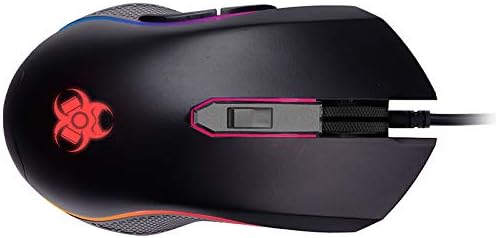
Gambar 5.1: Luhur-handap view of the gaming mouse, clearly showing the scroll wheel, the DPI adjustment button behind it, and the left and right click buttons. The Tracer logo with RGB lighting is visible at the rear.
6. Pangropéa
To ensure the longevity and optimal performance of your gaming mouse, follow these maintenance guidelines:
- beberesih: Anggo kaén anu lembut sareng garing pikeun ngusap permukaan beurit. Keur kokotor bandel, rada dampen lawon ku cai atawa solusi beberesih hampang. Hindarkeun bahan kimia anu kasar atanapi bahan abrasive.
- Sensor beberesih: Periodically clean the optical sensor on the underside of the mouse with a cotton swab lightly dampened with rubbing alcohol. Ensure no lint is left behind.
- Perawatan kabel: Hindarkeun tikungan seukeut atawa tarik kaleuleuwihan dina kabel USB pikeun nyegah karuksakan.
- Panyimpenan: Simpen beurit di lingkungan anu bersih sareng garing, jauh tina suhu anu ekstrim sareng sinar panonpoé langsung nalika henteu dianggo.
7. Cara ngungkulan
If you encounter issues with your TRACER GAMEZONE IGNIS AVAGO 3050 Gaming Mouse, refer to the following common problems and solutions:
| Masalah | Mungkin Cukang lantaranana | Solusi |
|---|---|---|
| Beurit teu ngabales | Sambungan USB leupas, port USB lepat, masalah supir. |
|
| Kursor erratic atanapi henteu lancar | Sensor optik kotor, permukaan teu cocog, gangguan software. |
|
| Tombol DPI henteu ngarobih sensitivitas | Button malfunction, software conflict. |
|
8. Spésifikasi
| Fitur | Rincian |
|---|---|
| Ngaran modél | GAMEZONE IGNIS AVAGO 3050 4000DPI |
| Nomer Modél Item | TRAMYS46085 |
| merek | Pelacak |
| Téhnologi konektipitas | USB |
| Téhnologi Deteksi Gerakan | Laser, Optical (AVAGO 3050) |
| Rentang DPI | Nepi ka 4000 DPI (bisa diatur) |
| Jumlah Kancing | 6 |
| Platform hardware | Mac, PC |
| Item Beurat | 12.3 ons (kira-kira 348.7 gram) |
| Ukuran Paket | 7.87 x 5.91 x 1.97 inci |
| Produsén | TRACER |
| Tanggal Sadia munggaran | Pébruari 4, 2019 |
9. Garansi jeung Rojongan
For warranty information and technical support, please refer to the official Tracer websitus atanapi hubungi pangecér lokal anjeun dimana produk éta dipésér. Simpen bukti pameseran anjeun pikeun klaim garansi.
Pabrikan: TRACER


