1. Bubuka
Thank you for choosing the ORIA 4-Digit Combination Padlock. This manual provides detailed instructions for setting up, operating, and maintaining your new combination lock. Please read these instructions carefully before use to ensure proper function and security.

Image 1.1: Two ORIA 4-Digit Combination Padlocks, black with silver shackles, displaying the default combination '0000'.
2. Fitur Produk
- Kombinasi 4-Digit: Offers 10,000 unique combinations for enhanced security.
- Konstruksi awét: Made from zinc alloy with a steel shackle for cut resistance and longevity.
- Tahan Cuaca: Designed to be anti-rust and weather-proof for both indoor and outdoor use.
- Desain kompak: Small volume and lightweight, suitable for various applications.
- Gampang dianggo: Simple combination setting and clear side window for alignment.

Image 2.1: Diagram illustrating the material composition of the ORIA combination lock, highlighting the steel shackle for cut resistance and the zinc diecast metal body.

Gambar 2.2: Deukeut view of the ORIA 4-digit combination lock, pointing out the "Code Line" for combination alignment and the "Combo Side Window" for easy viewing of the numbers.
3. Eusi Paket
- 2 x ORIA 4-Digit Combination Locks
- 1 x Manual Pamaké (dokumén ieu)
4. Setting Your Combination Code
The default combination for your new lock is 0-0-0-0. Follow these steps to set your personalized 4-digit code:
- Set the lock to the default code (0-0-0-0) and pull up the shackle.
- Rotate the shackle 90 degrees counter-clockwise until it aligns with the "Code Setting Gap" (a small notch on the lock body).
- Push the shackle down firmly until the tiny pin is completely inside the gap.
- While holding the shackle down, rotate it another 90 degrees counter-clockwise to the "Code Line" position.
- Scroll the numbers on the dials to set your desired 4-digit combination. Ensure the numbers are clearly aligned with the code line.
- Rotate the shackle back 90 degrees clockwise to the "Code Setting Gap" position. The shackle should pop up automatically.
- Close the shackle and scramble the numbers. Your new combination is now set.
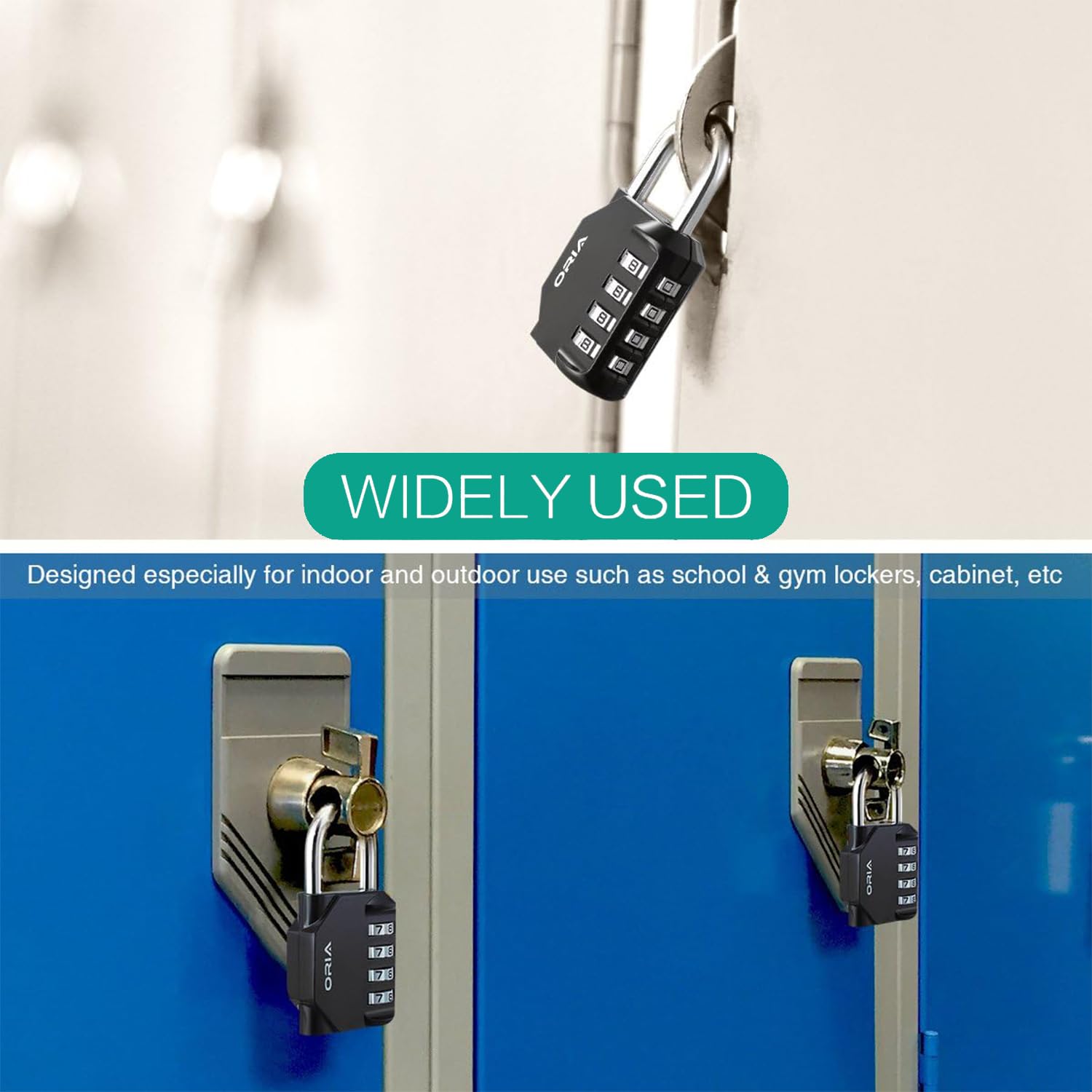
Image 4.1: Step-by-step visual guide demonstrating how to set the 4-digit combination code on the ORIA padlock, including shackle rotation and dial adjustment.
5. Parentah Operasi
To open the lock:
- Align your set 4-digit combination with the code line on the lock.
- Tarik belenggu pikeun muka konci.
To close the lock:
- Push the shackle down into the lock body.
- Scramble the numbers on the dials to secure the lock.
The ORIA combination padlock is suitable for a wide range of applications:
- School and employee lockers
- Gym and sports lockers
- Toolboxes and cases
- Fences and gates
- Hasp cabinets and general storage
- Travel luggage
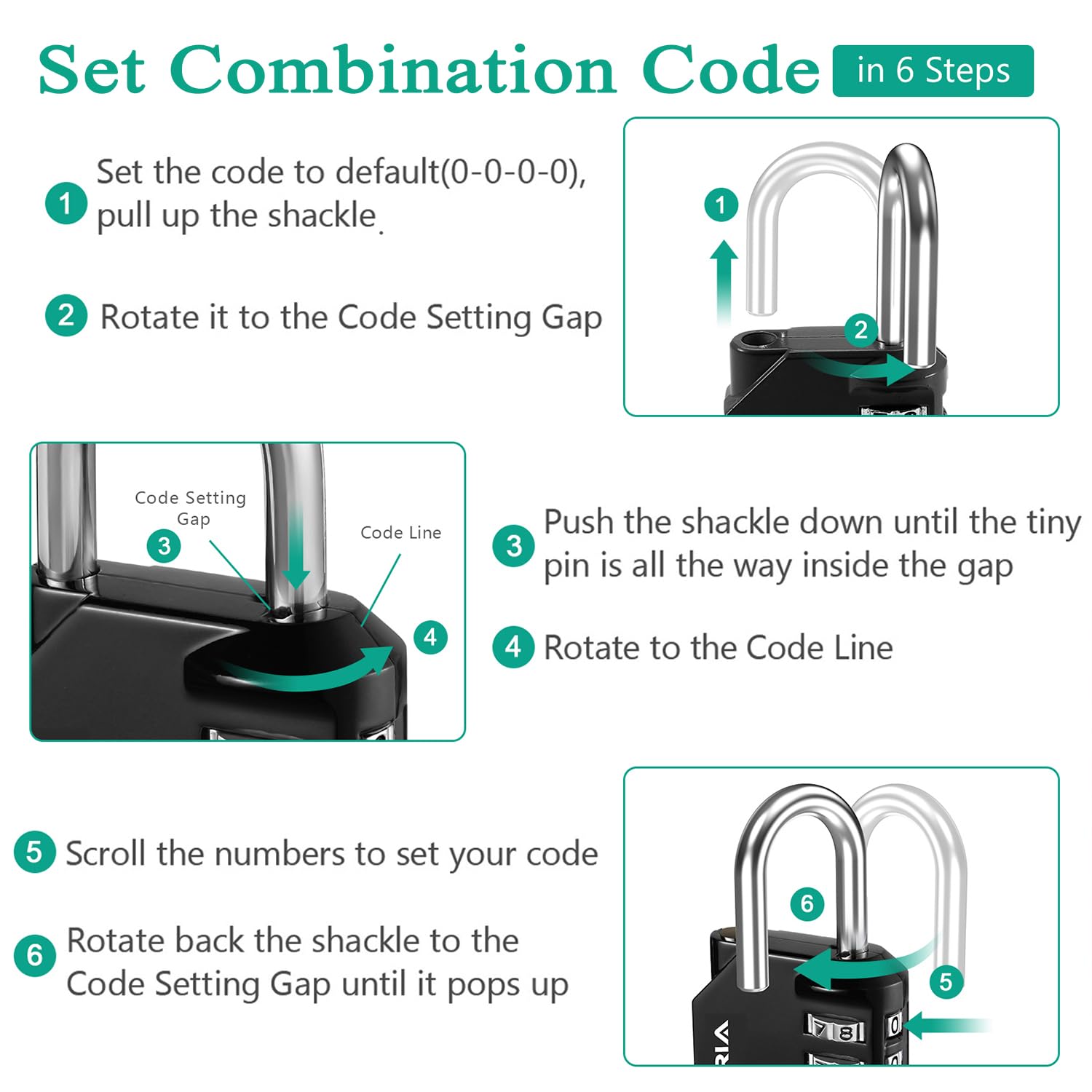
Image 5.1: Collage showing the ORIA combination lock used on a backpack, a fence, a bicycle chain, and multiple gym lockers, demonstrating its versatility.

Image 5.2: The ORIA combination lock securing a blue locker door, illustrating its common application in school and gym environments.
6. Catetan Penting
- Always remember your set combination code. There is no master key or reset button if the code is forgotten.
- When opening the lock, ensure the numbers are precisely aligned with the scale line for smooth operation.
- During the combination setting process, the shackle must be pressed down completely into the gap. Failure to do so may result in a disordered password, preventing the lock from being opened.
7. Spésifikasi
| Atribut | Rincian |
|---|---|
| Ukuran (L x W x H) | 82 x 42 x 22 mm (3.2 x 1.7 x 0.9 inci) |
| Diaméter Shackle | 6 mm (0.24 inci) |
| Bahan | Steel (shackle) and Zinc Alloy (body) |
| Beurat per unit | 147 g (kira-kira 0.32 lbs) |
| Tipe Konci | Konci Kombinasi 4-Angka |
| Fitur husus | Anti-rust, Weather-proof, Small volume |
| Nomer modél | OR-OUS-HA9_2PCS |
| UPC | 712190823566 |

Image 7.1: Diagram illustrating the physical dimensions of the ORIA combination padlock, including overall height, width, and shackle diameter.
8. Pangropéa
The ORIA combination padlock is designed for durability and minimal maintenance. To ensure its longevity:
- Keep the lock clean from dirt and debris, especially around the dials and shackle mechanism.
- Periodically apply a small amount of lubricant (e.g., silicone spray) to the shackle and dialing mechanism to maintain smooth operation, particularly if used in harsh outdoor conditions.
- Avoid exposing the lock to extreme force or corrosive chemicals.
9. Cara ngungkulan
Lock will not open with the correct combination:
- Ensure all four numbers are perfectly aligned with the code line. Slight misalignment can prevent opening.
- Verify that you are using the correct combination. If you recently changed the combination, ensure you remember the new one.
- If the combination was recently changed, confirm that the shackle was pressed down completely during step 3 of the setting process. Incomplete depression can lead to an incorrect or disordered new password.
Shackle is stiff or difficult to operate:
- Clean any dirt or grime from around the shackle and the opening.
- Apply a small amount of lubricant to the shackle where it enters the lock body.
10. Garansi jeung Rojongan
ORIA provides the following guarantees for your product:
- Garansi Panggantian 12 Bulan: Ngandung cacat produksi salami sataun ti tanggal pameseran.
- Jaminan Duit Balik 60 Dinten: Mun anjeun teu puas ku pameseran Anjeun, Anjeun bisa balik deui dina 60 poé pikeun ngabalikeun duit pinuh.
- Layanan Pelanggan 24/7: For any assistance, questions, or warranty claims, please contact ORIA customer service directly.
Please refer to your purchase documentation or the ORIA websitus pikeun detil kontak husus.


