Bubuka
This manual provides essential information for the safe and effective use of your Canon PowerShot SX420 IS digital camera. Please read this manual thoroughly before using the camera and retain it for future reference. The Canon PowerShot SX420 IS is a compact digital camera featuring a powerful 42x optical zoom, 20.0 Megapixel sensor, and built-in Wi-Fi and NFC connectivity.

Gambar: Hareupeun view of the Canon PowerShot SX420 IS digital camera.
Disetél
1. Ngabongkar jeung Mariksa Eusi
Pastikeun yén sadaya komponén aya:
- Canon PowerShot SX420 IS Camera Body
- Pek batré
- Carjer batré
- Tali pigeulang
- Cap Lénsa

Image: Canon PowerShot SX420 IS camera with included battery, charger, wrist strap, and lens cap.
2. Ngecas Batré
- Lebetkeun bungkus batréna kana carjer batré.
- Colokkeun carjer ka colokan listrik. Lampu indikator ngecas bakal hurung.
- Once charging is complete, the indicator light will change or turn off (refer to charger specific instructions).
3. Nyelapkeun Batré sareng Kartu Mémori
- Buka panutup kompartemen batré/kartu di handapeun kaméra.
- Lebetkeun batré anu tos dieusi, pastikeun orientasina leres.
- Insert an SDHC or SDXC memory card into the card slot until it clicks into place.
- Tutup panutup kompartemen aman.
4. Daya Awal Hurung sareng Setélan Dasar
- Pencét éta ON/OFF tombol pikeun kakuatan dina kaméra.
- Turutan pitunjuk dina layar pikeun nyetel tanggal, waktos, sareng basa.
Ngoperasikeun kaméra
1. Kadali dasar
- Tombol ON/OFF: Ngahurungkeun atanapi mareuman kaméra.
- Tombol jepret: Pencét satengahna pikeun pokus, pinuh pikeun nyandak gambar.
- Lever zum: Controls the 42x optical zoom for telephoto and wide-angle shots.
- Mode Dial: Selects shooting modes such as Auto, Program, Portrait, Landscape, and Movie.
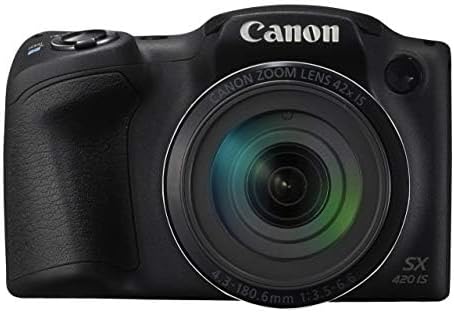
Gambar: Hareupeun view of the Canon PowerShot SX420 IS, highlighting the lens and zoom capabilities.
2. Nyokot Poto
- Turn on the camera and select your desired shooting mode using the mode dial. For general use, select Otomatis modus.
- Pigura shot anjeun nganggo layar LCD 3.0 inci.
- Use the zoom lever to adjust the focal length.
- Pencét tombol jepret satengahna ka handap pikeun ngamungkinkeun kaméra fokus. Pigura pokus bakal héjo nalika pokus kahontal.
- Press the shutter button fully to capture the image. The camera's optical image stabilizer helps reduce blur from camera shake.
3. Ngarékam Pidéo
- Setel mode dial ka Pilem modus.
- Press the dedicated movie button to start recording. The camera records in HD 720p resolution in MP4 format.
- Pencét tombol pilem deui pikeun eureun ngarékam.
4. ReviewGambar sareng Pidéo
- Pencét éta Playback button (usually indicated by a play icon).
- Anggo tombol arah pikeun napigasi gambar sareng pidéo anu anjeun candak.
- Pencét éta MENU button to access playback options.
5. Konektipitas Wi-Fi sareng NFC
The camera features built-in Wi-Fi and NFC for easy sharing and transferring of images and videos.
- Enable Wi-Fi or NFC from the camera's menu.
- Follow the on-screen instructions to connect to a compatible smartphone, tablet, or computer.
- Use the Canon Camera Connect app (available for iOS and Android) for remote shooting and image transfer.
Pangropéa
1. Ngabersihan Kaméra
- Awak kaméra: Lap ku lawon anu lemes sareng garing. Pikeun kokotor anu bandel, anggo sakedikamp lawon lajeng garing tuntas.
- Lensa: Use a lens brush to remove dust, then gently wipe with a lens cleaning cloth and lens cleaning solution. Avoid touching the lens surface with your fingers.
- Layar LCD: Use a soft, dry cloth. For smudges, use a screen cleaner specifically designed for electronics.
2. Kaperawatan batré
- Always use genuine Canon battery packs and chargers.
- Ulah ngalaan batré ka suhu ekstrim.
- Upami teu nganggo kaméra kanggo waktos anu panjang, cabut batréna teras simpen di tempat anu tiis sareng garing.
3. Panyimpenan
Store the camera in a dry, well-ventilated area, away from direct sunlight, high temperatures, and humidity. Use a camera bag or case to protect it from dust and physical damage.
Pamérésan masalah
Upami anjeun mendakan masalah sareng kaméra anjeun, tingal solusi umum ieu:
| Masalah | Solusi |
|---|---|
| Kaméra teu hurung. | Pastikeun batréna tos dicas pinuh sareng dipasang kalayan leres. Cobi nganggo batré anu sanés anu tos dicas upami sayogi. |
| Gambar blur. | Check that the lens is clean. Ensure the camera is focusing correctly (press shutter halfway). Use the optical image stabilizer and hold the camera steady. Consider using a tripod in low light. |
| Cannot connect via Wi-Fi/NFC. | Ensure Wi-Fi/NFC is enabled on both the camera and the connecting device. Check network settings and password. Restart both devices. |
| Kasalahan kartu mémori. | Ensure the memory card is inserted correctly. Try formatting the card (this will erase all data). Use a different compatible memory card. |
| Flash teu seuneu. | Check flash mode settings. Ensure the flash is not set to 'Off'. The flash may not fire if the battery is low or in certain shooting modes. |
spésifikasi
| Fitur | Rincian |
|---|---|
| Ngaran modél | PSSX420IS |
| Resolusi Masih Éféktif | 20 MP |
| Zoom optik | 42x |
| Stabilisasi Gambar | Optik |
| Téhnologi Sénsor Poto | CMOS |
| Ukuran layar | 3 inci |
| Tipe tampilan | LCD |
| Téhnologi konektipitas | NFC, WiFi |
| Dirojong File Formatna | JPEG, RAW |
| Resolusi Video | HD 720p |
| Format Capture Video | MP4 |
| Tipe Mémori Flash | SDHC or SDXC |
| Aperture maksimum | 3.5 f |
| Ngalegaan Rentang ISO | 100 - 1600 |
| Item Beurat | 1.5 pon |
| Warna | Hideung |
Émbaran jaminan
This Canon PowerShot SX420 IS camera comes with a 90 poé jaminan kawates. Please retain your proof of purchase for warranty claims. For detailed terms and conditions, refer to the warranty documentation provided with your product or visit the official Canon websitus.
Rojongan Palanggan
Kanggo bantosan salajengna, dukungan téknis, atanapi patarosan layanan, mangga buka dukungan resmi Canon. websitus atanapi ngahubungi layanan palangganna. Anjeun biasana tiasa mendakan inpormasi kontak sareng FAQ dina produsén websitus.
Kanon Resmi Websitus: www.usa.canon.com


