1. Bubuka
This manual provides detailed instructions for the installation, operation, and maintenance of your SEBSON Motion Sensor with Alarm and Chime. Please read this manual thoroughly before using the device to ensure proper function and safety.
The SEBSON Motion Sensor is designed to detect movement of people, large animals, and vehicles within its detection field. It can function as either an alarm or a chime, making it suitable for various applications such as entry alerts or security notifications.
2. Parentah Kasalametan
- Ensure the device is installed in a dry, indoor environment. Avoid exposure to moisture or extreme temperatures.
- Use only 9V alkaline batteries. Do not mix old and new batteries, or different types of batteries.
- Buang batré anu dipaké nurutkeun peraturan lokal.
- Do not attempt to open or modify the device. This may void the warranty and pose a safety risk.
- Jauhkeun alat tina jangkauan barudak.
3. Eusi Paket
Pastikeun yén sadaya item aya dina bungkusan:
- 2 x SEBSON Motion Sensor units
- 4 x Pamasangan screws
- 4 x Wall Plugs (Ø6mm)
Note: 9V batteries are not included and must be purchased separately.
4. Produk Langkungview
The SEBSON Motion Sensor consists of the main sensor unit and a rotatable mounting bracket. Key components include the motion detection lens, the speaker grille, and the mode selection switch.

Image: Two SEBSON Motion Sensor units, showing their compact design and white casing.
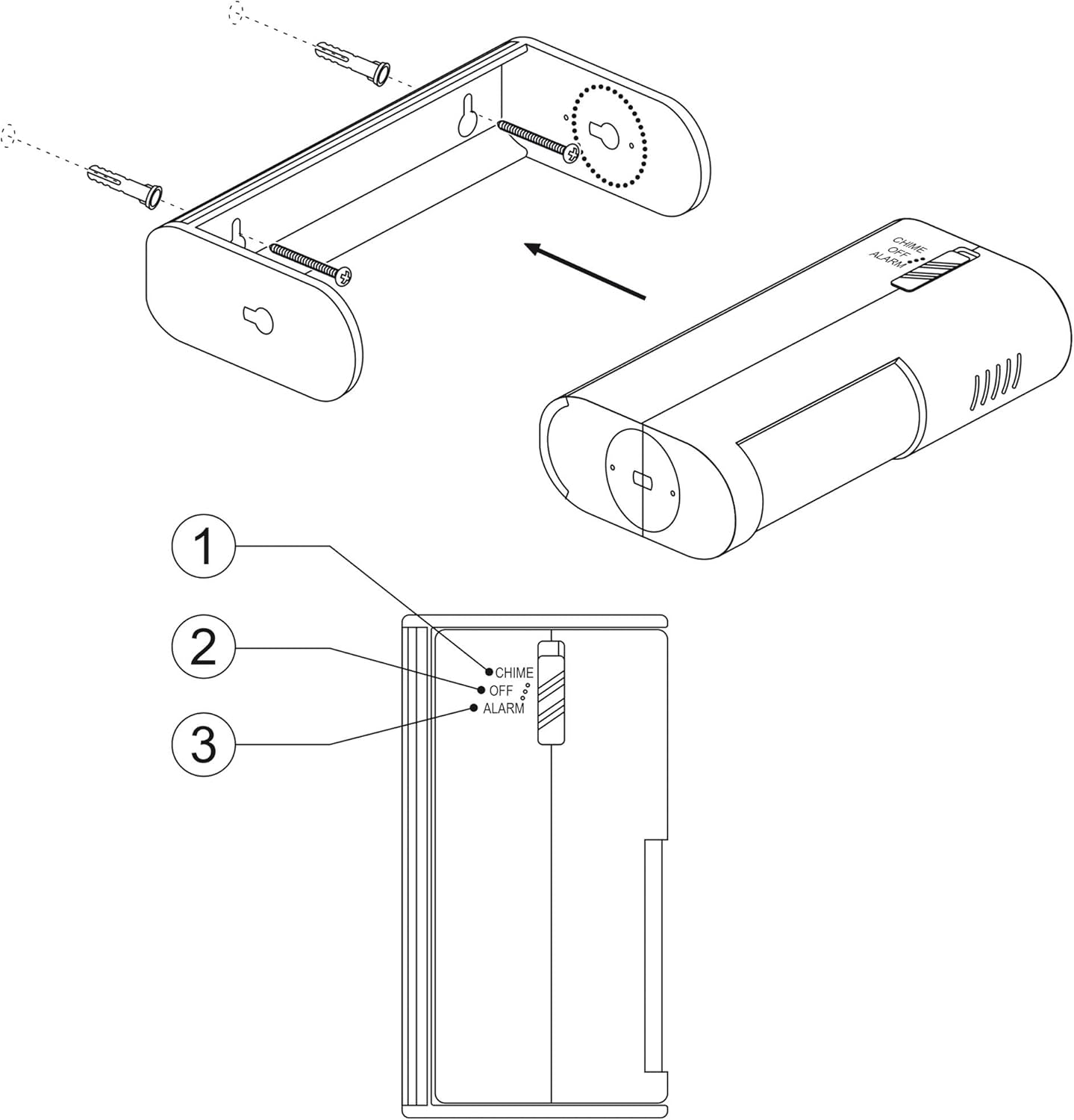
Gambar: Detil view of the motion sensor, highlighting the mode switch with 'CHIME', 'OFF', and 'ALARM' settings.
5. Setélan
5.1 Pamasangan batré
- Gently slide open the battery compartment cover located on the back of the sensor unit.
- Insert two 9V alkaline batteries, ensuring correct polarity (+/-).
- Tutup panutup kompartemen batré aman.
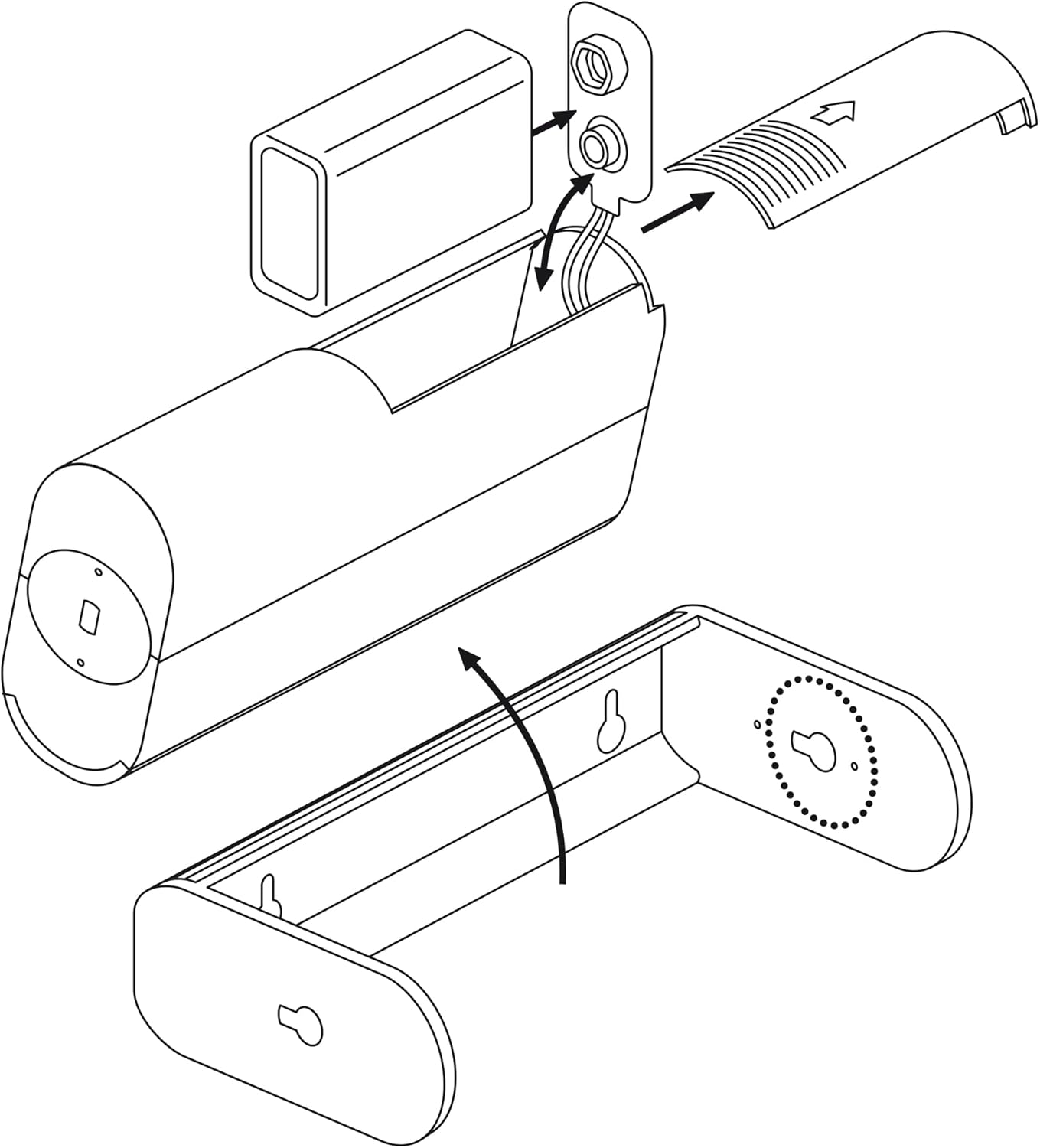
Image: Exploded diagram illustrating how to open the battery compartment and insert batteries, along with the separate mounting bracket.
5.2 Pasang Sénsor
- Choose a suitable location for the sensor. The detection range is 8 meters with a 60° angle. Consider areas where movement needs to be monitored.
- Mark the positions for the mounting screws on the wall using the mounting bracket as a template.
- Drill two holes (Ø6mm) at the marked positions.
- Selapkeun colokan témbok anu disayogikeun kana liang anu dibor.
- Ngamankeun bracket ningkatna kana témbok ngagunakeun screws disadiakeun.
- Slide the motion sensor unit onto the mounted bracket. The sensor housing can be rotated 360° within the bracket to adjust the detection area.

Image: Technical diagram showing the sensor's 8-meter detection range, 60-degree detection angle, and the 360-degree rotation feature of the sensor unit within its bracket.
6. Parentah Operasi
The SEBSON Motion Sensor features a three-position switch to select its operating mode:
- CHIME Mode: When movement is detected, the sensor will emit a short, pleasant chime sound. This mode is ideal for entry alerts in shops or offices.
- Mode OFF: The sensor is powered off and will not detect movement or emit any sound.
- ALARM Mode: When movement is detected, the sensor will emit a loud alarm sound. This mode is suitable for security purposes.
To select a mode, slide the switch on the side of the sensor to the desired position (CHIME, OFF, or ALARM).
Gambar: Detil view of the sensor's side, clearly showing the three-position switch for selecting between Chime, Off, and Alarm modes.
7. Pangropéa
- beberesih: Wipe the sensor's exterior with a soft, dry cloth. Do not use abrasive cleaners or solvents.
- Ngagantian batré: If the sound becomes weak or the sensor stops responding, replace the 9V batteries. Follow the battery installation steps in Section 5.1.
- Perawatan lensa: Keep the motion detection lens clean and free from obstructions to ensure optimal performance.
8. Cara ngungkulan
| Masalah | Mungkin Cukang lantaranana | Solusi |
|---|---|---|
| Sénsor henteu ngadeteksi gerakan. |
|
|
| Sound is too low or distorted. |
|
|
| Alarm palsu. |
|
|
9. Spésifikasi
| Fitur | Rincian |
|---|---|
| merek | SEBSON |
| Nomer modél | 2_X_BWM_ALARM_B |
| Sumber Daya | Battery Powered (2x 9V batteries, not included) |
| Battery Type Recommended | Alkali |
| Rentang deteksi | Nepi ka 8 méter |
| Sudut deteksi | 60 derajat |
| Kamampuh Rotasi | 360 degrees (within bracket) |
| Tipe Pamasangan | Tembok Gunung |
| Warna | Bodas |
| Dimensi (Pakét) | 12 x 9 x 8 cm |
| Beurat (Item) | 280 g |
10. Garansi jeung Rojongan
SEBSON products are designed and manufactured to high-quality standards. This product comes with a standard manufacturer's warranty. For specific warranty details, technical support, or assistance with your device, please contact SEBSON customer service through their official websitus atanapi pangecér dimana produkna dibeuli.
Punten tahan bukti pameseran anjeun pikeun klaim garansi.


