Parentah Kasalametan penting
Please read this manual carefully before using the appliance and keep it for future reference. Incorrect use may result in electric shock, fire, or serious injury.
- Pastikeun catu daya voltage cocog sareng labél rating dina alat.
- Entong neuleumkeun alat, kabel listrik, atanapi nyolok kana cai atanapi cairan sanés.
- Unplug the appliance from the power outlet when not in use, before filling water, or before cleaning.
- Entong ngajalankeun alat nganggo kabel atanapi colokan anu ruksak, atanapi saatos alatna teu tiasa dianggo atanapi rusak dina cara naon waé.
- Jauhkeun alat tina jangkauan barudak.
- Ulah meungpeuk inlets hawa atawa outlet.
- Teundeun alat dina permukaan datar anu stabil.
- Ngan ukur nganggo cai bersih dina tangki cai.
Produk Leuwihview
Fitur konci
- Fungsi 3-in-1: Air Cooler, Humidifier, and Purifier.
- Kapasitas Tangki Cai: 4 Liter.
- Laju kipas: 3 adjustable speeds.
- Osilasi: Oscillating ventilation grille for wide air distribution.
- Timer: 7-jam timer programmable.
- Kontrol: Operable via control panel and remote control.
- Mobilitas: Equipped with 4 wheels for easy movement.
Komponén produk
Familiarize yourself with the main parts of your LIVOO Mobile Air Cooler.

Gambar: Hareupeun view of the LIVOO Mobile Air Cooler, displaying the air outlet grille and the transparent water level indicator at the bottom.

Gambar: Samping view of the LIVOO Mobile Air Cooler, highlighting its compact design and the four castor wheels for portability.
Disetél
Ngabongkar bungkusan
- Kaluarkeun pendingin hawa tina bungkusna kalayan ati-ati.
- Remove all packaging materials and ensure no parts are missing or damaged.
- Tetep bahan bungkusan jauh ti barudak.
Tangki cai ngeusian
- Pastikeun alat dicabut tina colokan listrik.
- Locate the water tank. For this model, the tank is typically accessed from the rear or bottom.
- Fill the tank with clean, cool water. Do not exceed the maximum fill line indicated on the tank. The capacity is 4 liters.
- For enhanced cooling, you may add ice packs (not included) to the water tank if a dedicated compartment is available.
- Securely close the water tank cover.
Posisi Unit
Place the air cooler on a firm, level surface. Ensure there is adequate space around the unit (at least 20 cm) for proper air circulation. The integrated wheels allow for easy repositioning.
Operasi
Once the unit is set up and the water tank is filled, plug the power cord into a suitable electrical outlet.
Kontrol Panel Langkungview
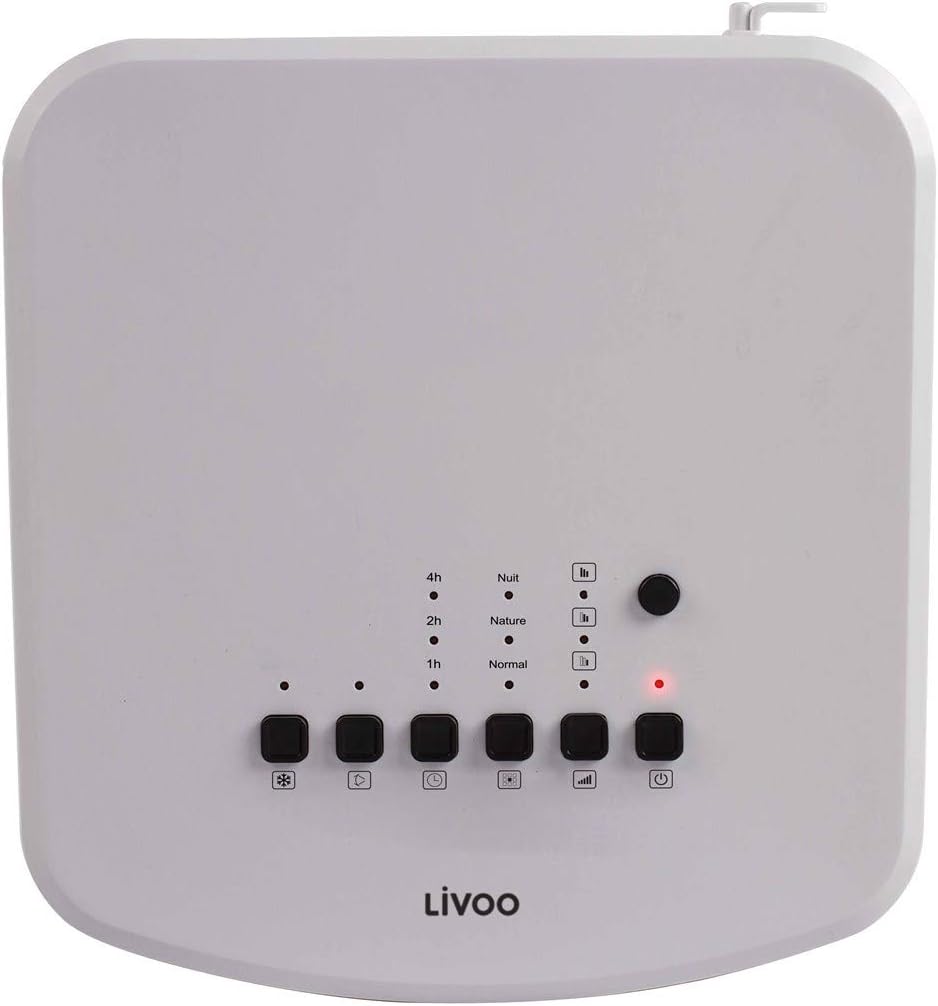
Gambar: Top-mounted control panel of the air cooler, featuring buttons for power, mode, speed, oscillation, and cooling function, along with indicator lights for timer and mode settings.
- Tombol Daya (⏻): Hurungkeun unit ON atawa OFF.
- Tombol Mode (□□□): Cycles through Normal, Nature, and Night modes.
- Tombol Laju (|||): Saluyukeun laju kipas (Rendah, Sedeng, Luhur).
- Tombol Osilasi (⟳): Activates or deactivates the oscillating grille.
- Cooling/Humidifier Button (❄): Engages the cooling and humidifying function.
- Tombol Timer (L): Sets the operating timer (1h, 2h, 4h, up to 7 hours).
Jauh Jauh Controlview

Gambar: The remote control for the air cooler, featuring buttons for power, mode, speed, oscillation, cooling, and timer functions, mirroring the main control panel.
The remote control provides the same functionality as the control panel for convenient operation from a distance. Ensure batteries are correctly inserted.
Fungsi
- Cooler hawa: Uses water evaporation to cool the air. Activate by pressing the 'Cooling' button.
- Palembab hawa: Adds moisture to the air, beneficial in dry environments. This function is integrated with the cooling feature.
- Pembersih: Filters dust and other particles from the air as it passes through the unit. This function operates whenever the fan is on.
Setélan speed
Press the 'Speed' button to cycle through Low, Medium, and High fan speeds to adjust airflow intensity.
Fungsi Osilasi
Press the 'Oscillation' button to activate the automatic swing of the vertical louvers, distributing cool air over a wider area. Press again to stop oscillation.
Fungsi Timer
Press the 'Timer' button repeatedly to set the desired operating time (1, 2, 4 hours, or combinations up to 7 hours). The unit will automatically turn off after the set time.
Modeu
- Modeu Normal: Aliran hawa anu konstan dina kecepatan anu dipilih.
- Mode alam: Simulasi angin alami ku cara ngarobah-robah kecepatan kipas.
- Modeu wengi: Beroperasi dina kecepatan anu langkung handap sareng langkung sepi pikeun bobo anu teu kaganggu.
Pangropéa
Regular maintenance ensures optimal performance and extends the lifespan of your air cooler. Always unplug the unit before cleaning.
Ngabersihkeun Unit
- Ngusap permukaan luar kalayan lemes, damp lawon. Ulah make cleaners abrasive atawa pangleyur.
- Clean the air inlet and outlet grilles with a soft brush or vacuum cleaner to remove dust accumulation.
Ngabersihan Cai bak
To prevent mold and mildew growth, clean the water tank regularly, especially if the unit is used frequently.
- Solokan cai sésana tina bak.
- Remove the water tank (if detachable) and wash it with mild soap and water. Rinse thoroughly.
- For stubborn deposits, use a solution of white vinegar and water, let it sit for 30 minutes, then scrub and rinse.
- Keunkeun tankna nepi ka garing sagemblengna sateuacan dipasang deui.
Filter beberesih
The air cooler includes a filter for air purification. This filter should be cleaned periodically.
- Locate the air filter, usually at the back of the unit.
- Taliti miceun saringan.
- Rinse the filter under running water to remove dust and debris. For deeper cleaning, use a soft brush.
- Allow the filter to air dry completely before placing it back into the unit. Do not use the unit with a wet filter.
Panyimpenan
Nalika nyimpen unit kanggo waktos anu panjang:
- Ensure the water tank is empty and clean.
- Clean the entire unit as described above.
- Store the appliance in a cool, dry place, away from direct sunlight and extreme temperatures.
Pamérésan masalah
Upami anjeun mendakan masalah sareng cooler hawa anjeun, tingal masalah sareng solusi umum ieu:
| Masalah | Mungkin Cukang lantaranana | Solusi |
|---|---|---|
| Unit teu hurung | Taya catu daya Tombol daya teu dipencet | Check if the power cord is securely plugged in. Check the power outlet. Pencét tombol Daya (⏻) dina panel kontrol atanapi remot. |
| Taya pangaruh cooling | Tangki cai kosong Cooling function not activated Suhu kamar luhur teuing | Eusian bak cai. Press the Cooling/Humidifier button (❄). Evaporative coolers are most effective in dry climates. For very hot and humid conditions, cooling effect may be limited. |
| Aliran hawa lemah | Laju kipas handap teuing Air inlets/outlets blocked Nyaring kotor | Increase fan speed using the Speed button (|||). Ensure nothing is obstructing the grilles. Bersihkeun saringan hawa numutkeun parentah pangropéa. |
| Bau anu teu pikaresepeun | Stagcai nant dina tank Saringan kotor | Drain and clean the water tank thoroughly. Use fresh water. Ngabersihan saringan hawa. |
| Kadali jauh teu jalan | Batré béak atanapi teu leres diselapkeun Halangan antara remot sareng unit | Ganti batré sareng pastikeun polaritasna leres. Cabut objék anu ngahalangan jalur sinyal. |
spésifikasi
Technical details for the LIVOO Mobile Air Cooler DOM389.
| Fitur | Rincian |
|---|---|
| merek | Livoo |
| Nomer modél | DOM389 |
| Warna | Hideung jeung Bodas |
| Ukuran produk (L x W x H) | 26 x 24 x 57 cm |
| Item Beurat | 5.3 kg |
| Kapasitas (Tangki Cai) | 4 liter |
| Tingkat Noise | 65 desibel |
| Tipe Kontrol | Kadali Jarak Jauh, Panel Kontrol |
| Fitur husus | Air Cooler, Humidifier, Purifier |
| Tipe Pamasangan | Lantai Gunung |
| Bahan | Metal (and plastic components) |

Gambar: Dimensional diagram of the air cooler, indicating a height of 57cm, width of 24cm, and depth of 26cm.
Garansi sareng Rojongan
This product is covered by a manufacturer's warranty. For specific warranty terms and conditions, please refer to the warranty card included with your purchase or contact your retailer.
For technical support, spare parts, or service inquiries, please contact the Livoo customer service department or your local distributor. Contact information can typically be found on the Livoo official websitus atanapi dokuméntasi pameseran Anjeun.


