Bubuka
The Bose Home Speaker 300 delivers rich, 360-degree sound and powerful bass in a compact design. It features built-in voice assistants like Amazon Alexa and Google Assistant, allowing for hands-free control of music, radio stations, playlists, and more. The speaker also offers superior voice pickup through a custom-designed six-microphone array and visual indicators for voice assistant activity. Control is available via integrated touch presets on the speaker's top panel or through the Bose Music app, providing a personalized audio experience. This manual provides essential information for setting up, operating, and maintaining your Bose Home Speaker 300.

Image: The Bose Home Speaker 300 in Silver, showcasing desainna anu ringkes sareng elegan.
Naon dina Box
- Speaker Imah Bose 300
- adaptor kakuatan
- Quickstart sheets
- Lambaran kaamanan
Disetél
Setup Awal
- Buka bungkus Speaker: Carefully remove the Bose Home Speaker 300 and all accessories from its packaging.
- Sambungkeun Kakuatan: Plug the power adapter into the speaker and then into a wall outlet. The speaker will power on automatically.
- Download the Bose Music App: For full functionality and setup, download the Bose Music app on your mobile device (smartphone or tablet).
- Nyambung ka Wi-Fi: Follow the in-app instructions to connect your speaker to your home Wi-Fi network. A stable Wi-Fi connection is essential for smart features and voice assistants.
- Set Up Voice Assistant: Within the Bose Music app, navigate to the settings for your speaker, select "Voice Assistant," and choose either Amazon Alexa or Google Assistant. Follow the on-screen prompts to link your Amazon or Google account.
Video: This video demonstrates the process of setting up Alexa on your Bose Home Speaker 300 using the Bose Music app and linking your Amazon account.
Sambungan Bluetooth
To connect a device via Bluetooth:
- Pencét jeung tahan tombol Tombol Bluetooth on the top of the speaker until the light bar pulses blue.
- On your mobile device, go to Bluetooth settings and select "Bose Home Speaker 300" from the list of available devices.
- Once connected, the light bar will glow solid blue.
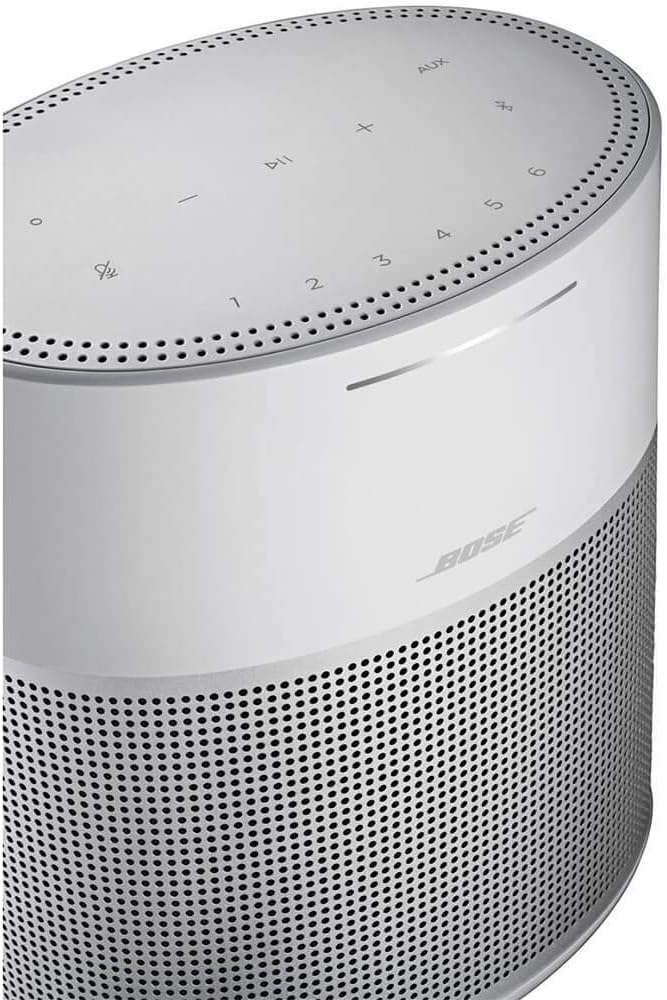
Gambar: A close-up view of the top panel of the Bose Home Speaker 300, showing the touch-sensitive control buttons including volume, play/pause, microphone mute, Bluetooth, AUX, and preset numbers.
Ngoperasikeun Speaker
Controls on the Speaker
- Mikropon bisu: Tap the microphone icon to mute or unmute the voice assistant.
- Volume: Anggo tombol '+' sareng '-' pikeun nyaluyukeun polumeu.
- Puter / Reureuh: Tap the play/pause button to control media playback.
- Preset (1-6): Customize these buttons in the Bose Music app to quickly access your favorite playlists, radio stations, or albums.
- AUX: Select to switch to an auxiliary input source.
- Bluetooth: Tap to switch to Bluetooth mode or initiate pairing.
Kontrol sora
With Amazon Alexa or Google Assistant built-in, you can control your speaker and smart home devices using voice commands. Simply say the wake word ("Alexa" or "Hey Google") followed by your command. Examples ngawengku:
- "Alexa, play jazz music."
- "Hey Google, what's the weather today?"
- "Alexa, atur timer salami 10 menit."
Aplikasi Musik Bose
Aplikasi Bose Music nyayogikeun kontrol anu lengkep kana spiker anjeun, kalebet:
- Adjusting volume and playback.
- Managing music services (Spotify, Pandora, iHeartRadio, SiriusXM, Deezer, TuneIn).
- Customizing presets.
- Ngagolongkeun sababaraha spiker pinter Bose pikeun audio multi-ruangan.
- Accessing product settings and updates.
Video: Hiji leuwihview of the Bose Home Speaker 300's features, including its compact size, 360-degree audio, built-in voice assistants, and control options via touch or the Bose Music app.
Pangropéa
To ensure optimal performance and longevity of your Bose Home Speaker 300, follow these maintenance guidelines:
- beberesih: Gently wipe the speaker's surfaces with a soft, dry cloth. Avoid using abrasive cleaners, solvents, or sprays.
- panempatan: Place the speaker on a stable, flat surface away from direct sunlight, heat sources, and moisture. Ensure adequate ventilation around the speaker.
- Apdet parangkat lunak: Regularly check for and install software updates via the Bose Music app to ensure your speaker has the latest features and performance enhancements.
Pamérésan masalah
If you encounter issues with your Bose Home Speaker 300, try the following steps:
- Henteu aya kakuatan: Pastikeun adaptor daya disambungkeun sacara aman boh ka spiker sareng stop kontak témbok anu tiasa dianggo.
- Henteu aya sora:
- Pariksa tingkat polumeu boh dina speaker sareng alat Anjeun nu disambungkeun.
- Verify the correct input source (Wi-Fi, Bluetooth, AUX) is selected.
- If using Bluetooth, ensure the device is paired and within range.
- Asisten Sora Teu Ngabales:
- Ensure the microphone is not muted (check the microphone mute button on top).
- Verify the speaker is connected to Wi-Fi.
- Pariksa sambungan internét anjeun.
- Confirm your Amazon or Google account is properly linked in the Bose Music app.
- Masalah Konektipitas (Wi-Fi/Bluetooth):
- Restart your speaker by unplugging it for 30 seconds and then plugging it back in.
- Balikan deui router sareng modem anjeun.
- Ensure your mobile device and speaker are within range of your Wi-Fi router or Bluetooth device.
- If issues persist, try re-establishing the connection through the Bose Music app or your device's Bluetooth settings.
spésifikasi
| Fitur | Rincian |
|---|---|
| merek | Bose |
| Ngaran modél | Speaker Bumi 300 |
| Nomer modél | 808429-1300 |
| Téhnologi konektipitas | Bluetooth, WiFi |
| Fitur husus | Built-in Amazon Alexa, Built-in Google Assistant, 360-degree sound |
| Tipe Speaker | Multi Room |
| Métode kontrol | Voice, Touch, Bose Music App |
| Dimensi produk | 4.02 "D x 5.59" W x 6.34" H |
| Item Beurat | 2.09 pon |
| Sumber Daya | Kabel Listrik |
| Warna | Silver (as per current product variant) |

Image: A diagram illustrating the dimensions of the Bose Home Speaker 300: 4.02 inches deep, 5.59 inches wide, and 6.34 inches high.
Garansi sareng Rojongan
Bose Home Speaker 300 dilengkepan ku Garansi kawates. For specific details regarding warranty coverage, duration, and terms, please refer to the warranty information included in your product packaging or visit the official Bose support websitus.
For further assistance, technical support, or service inquiries, please contact Bose customer support through their official channels. You can typically find contact information on the Bose website or within the Bose Music app.


