Bubuka
Welcome to the Ipega PG-9033 Bluetooth Gamepad user manual. This guide provides detailed instructions for setting up, operating, maintaining, and troubleshooting your new wireless controller. Please read this manual carefully before use to ensure optimal performance and longevity of your device.
Produk Leuwihview
The Ipega PG-9033 is a versatile Bluetooth gamepad designed for an enhanced gaming experience across multiple platforms, including Android, iOS, and PC. It features an adjustable phone holder, dual analog sticks, a D-pad, and action buttons.

Figure 1: The Ipega PG-9033 Bluetooth Gamepad with a smartphone securely mounted in its adjustable holder, actively displaying a racing game. This illustrates the controller's primary use for mobile gaming.
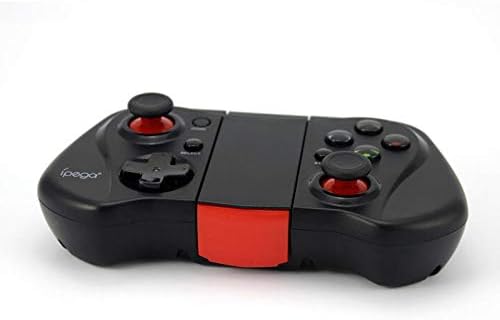
Gambar 2: Hiji sisi view of the Ipega PG-9033 Bluetooth Gamepad, showcasing its ergonomic design and compact form factor when not in use. The red accent on the central hinge is visible.
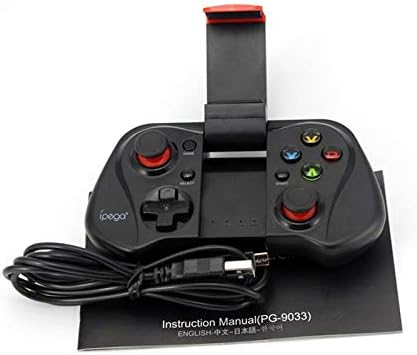
Figure 3: The Ipega PG-9033 Bluetooth Gamepad displayed alongside its USB charging cable and the included instruction manual, which clearly indicates the model number PG-9033.

Gambar 4: Bagian tukang view of the Ipega PG-9033 Bluetooth Gamepad, featuring a label with technical details such as "BLUETOOTH CONTROLLER," working voltage, working current, and input specifications.
Disetél
Ngecas Gamepad
Before first use, fully charge the gamepad using the provided USB cable.
- Connect the micro-USB end of the charging cable to the gamepad's charging port.
- Connect the USB-A end to a USB power source (e.g., computer, USB wall adapter).
- The charging indicator light will illuminate. It will typically turn off or change color when fully charged.
Masangkeun sareng Alat
The PG-9033 supports different pairing modes for various operating systems.
Papasangan Android
- Ensure the gamepad is off.
- Pencét jeung tahan tombol RUMAH tombol jeung X button simultaneously until the indicator light flashes rapidly. This puts the gamepad into Android pairing mode.
- Dina alat Android anjeun, buka setélan Bluetooth teras milarian alat anu sayogi.
- Select "PG-9033" from the list to pair. The indicator light will become solid when connected.
iOS Pairing (iCade Mode)
- Ensure the gamepad is off.
- Pencét jeung tahan tombol RUMAH tombol jeung B button simultaneously until the indicator light flashes rapidly. This puts the gamepad into iOS iCade pairing mode.
- On your iOS device, go to Bluetooth settings and search for available devices.
- Select "PG-9033" from the list to pair. The indicator light will become solid when connected.
Note: iCade mode has limited game compatibility. For broader iOS compatibility, check specific game requirements.
Papasangan PC
- Ensure the gamepad is off.
- Pencét jeung tahan tombol RUMAH tombol jeung A button simultaneously until the indicator light flashes rapidly. This puts the gamepad into PC pairing mode.
- On your PC, go to Bluetooth settings and search for available devices.
- Select "PG-9033" from the list to pair. The indicator light will become solid when connected.
Note: A Bluetooth adapter may be required for PCs without built-in Bluetooth.
Parentah Operasi
Ngahubungkeun Smartphone Anjeun
- Gently extend the adjustable phone holder located on the top of the gamepad.
- Carefully place your smartphone into the holder, ensuring it is securely gripped and centered.
- Saluyukeun sudut pikeun optimal viewing.
Game Mode Selection
The gamepad automatically enters the last used mode upon reconnection. To switch modes, disconnect the gamepad and re-pair using the desired mode's button combination (HOME + X for Android, HOME + B for iOS, HOME + A for PC).
Daya Hurung/Pareuman
Pikeun ngaktipkeun, pencét tombol RUMAH kancing. Pikeun mareuman, pencét jeung tahan tombol RUMAH button for approximately 5 seconds until the indicator light turns off. The gamepad will automatically power off after a period of inactivity.
Pangropéa
To ensure the longevity and proper functioning of your Ipega PG-9033 gamepad, follow these maintenance guidelines:
- Tetep alat tetep garing. Hindarkeun paparan ka Uap atanapi cair.
- Clean the gamepad with a soft, dry cloth. Do not use harsh chemicals or abrasive cleaners.
- Simpen gamepad di tempat anu tiis sareng garing jauh tina sinar panonpoé langsung sareng suhu anu ekstrim.
- Hindarkeun leupaskeun atanapi tundukkeun gamepad kana dampak anu kuat.
- Ngeusi batre rutin, sanajan teu dipake, pikeun ngajaga kaséhatan batré.
Do not attempt to disassemble the gamepad. This will void the warranty and may cause damage.
Pamérésan masalah
Gamepad not connecting or pairing:
- Pastikeun gamepad dicas pinuh.
- Pariksa yen Bluetooth diaktipkeun dina alat Anjeun.
- Make sure the gamepad is in the correct pairing mode for your device (Android, iOS, or PC).
- Coba hilap alat dina setélan Bluetooth anjeun sareng pasangkeun deui.
- Balikan deui gamepad sareng alat anjeun.
Tombol atanapi joystick henteu ngaréspon:
- Pariksa naha gamepad parantos nyambung kalayan leres.
- Pastikeun kaulinan anu anjeun maén ngadukung pangendali éksternal.
- Some games may require specific controller mapping or settings adjustments within the game.
- If the issue persists, try resetting the gamepad (if a reset button is available, typically a small pinhole).
Lag atanapi reureuh input:
- Ensure your device is not too far from the gamepad. Maintain a clear line of sight.
- Ngurangan gangguan tina alat nirkabel anu sanés.
- Tutup aplikasi latar tukang nu teu perlu dina alat Anjeun.
Telepon teu pas dina wadahna:
- The holder is designed for most smartphones. Ensure your phone's dimensions are within the supported range.
- Cabut wadah telepon anu kandel anu tiasa ngahalangan pasna.
spésifikasi
| Fitur | Rincian |
|---|---|
| Modél | PG-9033 |
| merek | Ipega |
| Konektipitas | Bluetooth |
| Kasaluyuan | Android, iOS (iCade), PC |
| Gawé Voltage | DC 3.7V |
| Gawé Ayeuna | 30mA |
| Masukan Voltage | DC 5V 500mA |
| ASIN | B07P52YH7M |
Garansi sareng Rojongan
For warranty information and technical support, please refer to the official Ipega websitus atanapi ngahubungan pangecér Anjeun. Simpen resi pameseran anjeun salaku bukti pameseran.
Manual ieu kanggo tujuan inpormasi wungkul. Spésifikasi tiasa robih tanpa aya bewara.


