1. Bubuka
The myTouchSmart In-Wall Push-Button Countdown Timer Switch (Model 40953) is designed to simplify your routine by providing convenient automation for indoor or outdoor lighting and various appliances. This timer replaces any standard single-pole light switch and offers preset countdown times to automatically turn off connected devices. It is compatible with LED, CFL, incandescent, and halogen bulbs.

The product packaging displays the in-wall digital countdown timer switch, highlighting its key features such as preset countdown times and compatibility with various bulb types.
2. Émbaran Kasalametan
Before beginning installation, read all instructions carefully. Improper installation can result in electrical shock or fire. Always consult a qualified electrician if you are unsure about any part of the installation process.
- PAreuman kakuatan at the circuit breaker or fuse box before wiring.
- Alat ieu dimaksudkeun pikeun pamasangan saluyu sareng Kode Listrik Nasional sareng peraturan lokal.
- Paké ngan kawat tambaga.
- NEUTRAL WIRE REQUIRED pikeun operasi.
3. Pamasangan
3.1 Pakakas Diperlukeun
- Obeng (Phillips sareng Flathead)
- Kawat Strippers
- Pita listrik
- Voltage Tester (disarankeun)
3.2 Parentah Wiring
- Pareuman kakuatan to the switch location at the circuit breaker or fuse box. Verify power is off using a voltage panguji.
- Remove the existing wall plate and switch from the wall box.
- Carefully disconnect the wires from the old switch. Identify and label the LINE (hot), LOAD, NEUTRAL, and GROUND wires. The timer requires a neutral wire for proper operation.
- Connect the wires to the myTouchSmart timer using the screw terminals:
- Nyambungkeun GARIS (hot) wire to the terminal labeled 'LINE'.
- Nyambungkeun MUAT wire (to the light/appliance) to the terminal labeled 'LOAD'.
- Nyambungkeun nétral wire (typically white) to the terminal labeled 'NEUTRAL'.
- Nyambungkeun TANAH wire (typically bare copper or green) to the terminal labeled 'GROUND'.
- Pastikeun sadaya sambungan kabel aman.
- Carefully push the wired timer into the wall box.
- Mount the timer to the wall box using the provided screws.
- Attach the desired color faceplate (White or Light Almond included, wallplate not included).
- Balikkeun kakuatan dina circuit breaker.

Tukangeun view of the timer, displaying the screw terminals for Line, Load, Neutral, and Ground connections, essential for proper installation.

Hiji sisi profile of the timer, showing its depth and how it fits into a standard electrical wall box, with wiring connections visible.
4. Parentah Operasi
The myTouchSmart timer features an ON/OFF door panel that conceals preset buttons and LEDs when closed. Opening the door provides access to all countdown options.
4.1 Activating a Countdown
- Open the front door panel to reveal the preset buttons.
- Press the desired countdown button: 5 Min, 10 Min, 30 Min, 60 Min, 2 Hour, or 4 jam.
- A blue LED indicator light next to the selected button will illuminate, confirming the countdown is active. The connected device will turn on and remain on for the selected duration, then automatically turn off.
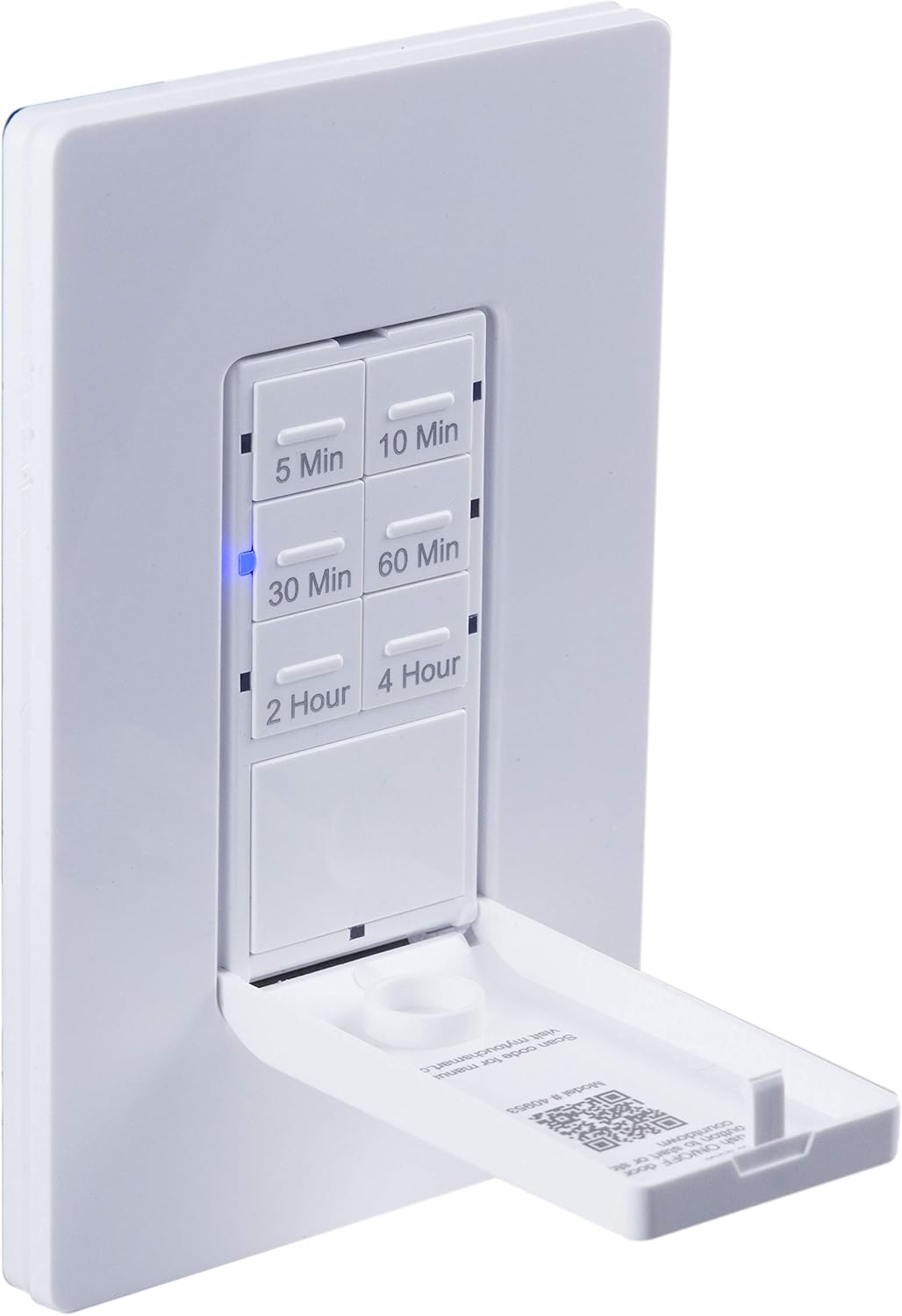
A nutup-up view of the timer with its front door panel open, exposing the six preset countdown buttons (5, 10, 30, 60 minutes, 2, and 4 hours) and the manual ON/OFF button.

The in-wall timer with its door open, showing the preset buttons and a blue LED illuminated next to the '30 Min' button, indicating an active countdown.

A hand pressing one of the preset countdown buttons on the timer, demonstrating user interaction.
4.2 Manual ON/OFF Override
- To manually turn the connected device ON or OFF at any time, press the large ON/OFF button located at the bottom of the timer (this button is also the door panel when closed).
- Pressing this button will override any active countdown. If no countdown is active, it functions as a standard ON/OFF switch.
4.3 Aplikasi
This timer is suitable for a variety of applications, including:
- cahaya indoor jeung outdoor
- kipas knalpot
- Pamanas
- Other compatible appliances

An image illustrating various applications for the timer, including controlling indoor/outdoor lights, ceiling fans, and exhaust fans.
5. Pangropéa
The myTouchSmart timer requires minimal maintenance. Follow these guidelines:
- beberesih: Disconnect power at the circuit breaker before cleaning. Wipe the surface with a soft, damp lawon. Ulah make bahan kimia kasar atawa cleaners abrasive.
- Pamariksaan: Periodically check for any loose connections or damage to the switch. If any damage is observed, discontinue use and consult a qualified electrician.
6. Cara ngungkulan
If you experience issues with your myTouchSmart timer, refer to the following common problems and solutions:
| Masalah | Mungkin Cukang lantaranana | Solusi |
|---|---|---|
| Timer does not turn on/off. | No power to the switch; Incorrect wiring (Line/Load reversed); Loose connections. | Check circuit breaker. Verify wiring connections (Line to Line, Load to Load, Neutral, Ground). Ensure all wires are securely fastened. |
| Countdown does not activate. | Button not fully pressed; Faulty unit. | Ensure the desired countdown button is pressed firmly until the blue LED illuminates. If issue persists, contact customer support. |
| Indikator LED teu jalan. | No power; Unit malfunction. | Check power supply. If the timer functions but LEDs do not, contact customer support. |
| Operasi intermittent. | Loose wiring; Overload. | Check all wiring connections for tightness. Ensure the connected load does not exceed the timer's electrical ratings. |
Upami léngkah ngungkulan henteu ngabéréskeun masalah, mangga ngahubungi dukungan palanggan.
7. Spésifikasi
| Fitur | Spésifikasi |
|---|---|
| Nomer modél | 40953 |
| Modeu Operasi | Automatically, Off, Push Button |
| Peunteun ayeuna | 15 Amps |
| Operasi Voltage | 120 VAC, 60 Hz |
| Beban résistif | 15A |
| Beban Tungsten | 1200W |
| Peunteun Motor | 1 / 2 HP |
| Bulbs cocog | LED, CFL, Pijar, Halogén |
| Tipe Pamasangan | Tembok Gunung |
| Ukuran (L x W x H) | 2.75 x 4.85 x 6.85 inci |
| Item Beurat | 5.9 ons |
| Kawat Netral | Dibutuhkeun |
| Komponén Kaasup | In-Wall Timer, White/Light Almond Door Panels |
8. Garansi jeung Rojongan
Kanggo inpormasi garansi sareng dukungan téknis, mangga tingal resmi produsén websitus atanapi ngahubungan departemén layanan palanggan maranéhna. Simpen resi pameseran anjeun salaku bukti pameseran.
Pabrikan: myTouchSmart
UPC: 030878409537
Websitus: www.mytouchsmart.com (Mangga pariksa resmi websitus pikeun inpormasi dukungan pangénggalna.)


