1. Bubuka
This manual provides detailed instructions for the operation and maintenance of your Trexonic TRX-68B-AMZ 3-Speed Turntable System. Please read this manual thoroughly before using the product to ensure proper function and to prevent damage.
2. Parentah Kasalametan
- Ulah ngalaan unit ka hujan atawa Uap.
- Ulah meungpeuk sagala bukaan ventilasi.
- Pastikeun kabel listrik henteu diciwit atanapi dijalankeun.
- Cabut colokan unit nalika badai kilat atanapi nalika henteu dianggo kanggo waktos anu lami.
- Rujuk sadayana jasa ka tanaga jasa anu mumpuni.
3. Eusi Paket
Pastikeun yén sadaya barang aya dina bungkusan:
- Trexonic TRX-68B-AMZ Main Unit
- Wired Shelf Speakers (2)
- Kadali jauh
- Manual pangguna (dokumén ieu)
- Adaptor kakuatan

Figure 3.1: Trexonic TRX-68B-AMZ Turntable System with included wired shelf speakers.
4. Produk Langkungview: Kontrol sareng Fitur
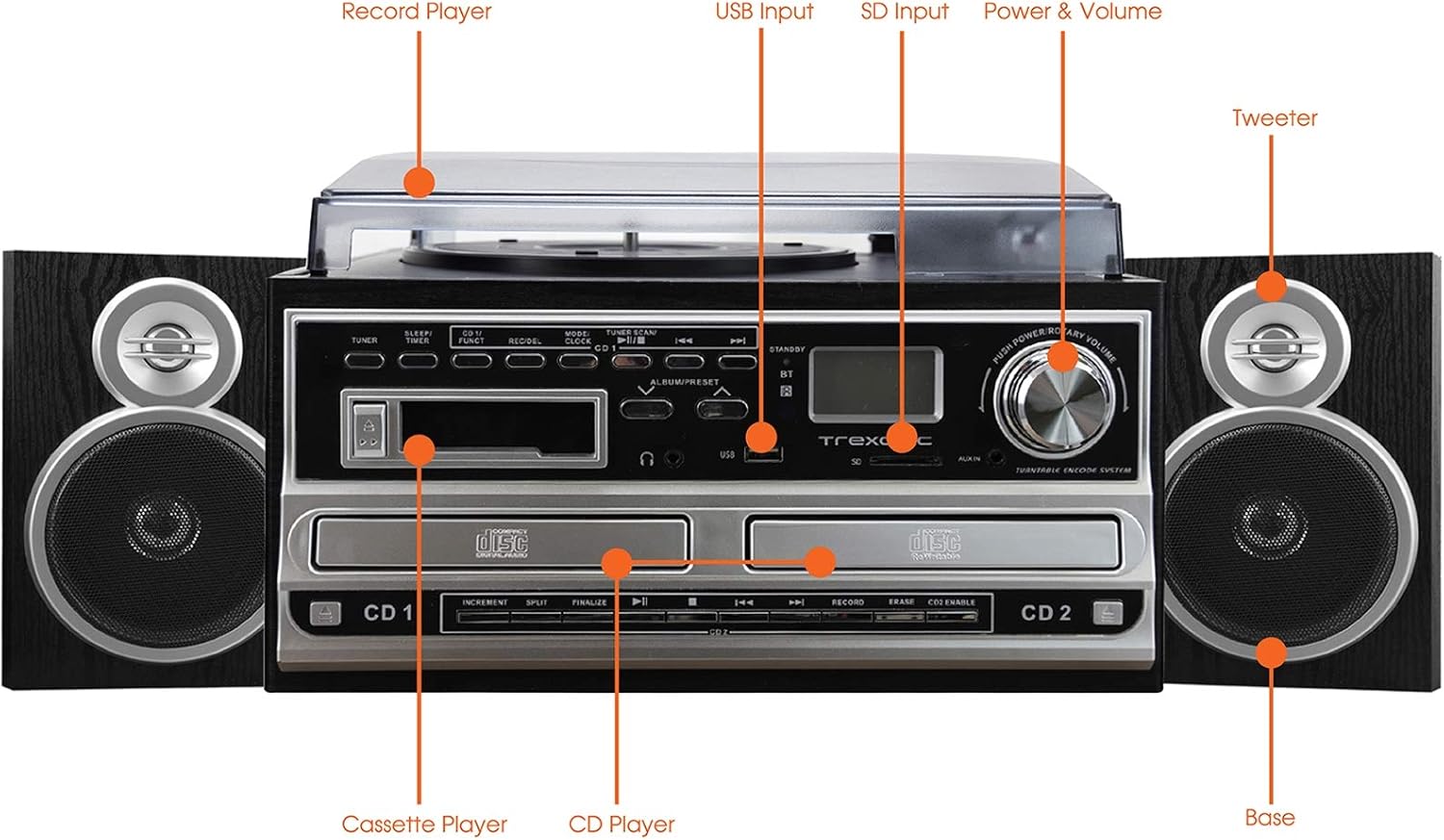
Figure 4.1: Front panel and top view of the Trexonic TRX-68B-AMZ with key components labeled.
- Record Player: Pikeun muterkeun piringan hitam.
- Input USB: Connect USB drives for playback or recording.
- Input SD: Insert SD cards for playback or recording.
- Power & Volume Knob: Ngatur hurung/pareumna daya sareng volume audio.
- Tweeter: High-frequency speaker component.
- Base (Woofer): Low-frequency speaker component.
- Pamuter CD: For playing audio CDs and CD recording.
- Pamuter Kaset: Pikeun muterkeun sareng ngarékam kaset.
5. Setélan
5.1 Ngabongkar bungkusan
Sacara saksama miceun sadaya komponén tina bungkusan. Simpen bahan bungkusan pikeun transportasi atanapi neundeun ka hareup.
5.2 Sambungan Speaker
Connect the wired shelf speakers to the speaker output terminals on the rear of the main unit. Ensure correct polarity (positive to positive, negative to negative) for optimal sound quality.
5.3 Sambungan Daya
Plug the power adapter into the DC IN jack on the back of the unit, then plug the other end into a standard wall outlet (AC 100-240V, 50/60Hz).
6. Parentah Operasi
6.1 Kadali umum
- Kenop Daya/Volume: Rotate to turn the unit on/off and adjust volume.
- Mode/Function Button: Press to cycle through different modes (Turntable, CD, Cassette, FM, USB, SD, AUX, Bluetooth).
6.2 Operasi Meja Putar

angka 6.1: Tutup-up view of the turntable platter and tonearm.
- Angkat panutup lebu.
- Teundeun catetan dina piring.
- Pilih laju anu pas (33, 45, atanapi 78 RPM) nganggo saklar pamilih laju.
- Move the tonearm to the desired position on the record. The platter will begin to spin automatically.
- Lower the tonearm gently onto the record.
- To stop playback, lift the tonearm and return it to its rest.
6.3 Operasi CD Player
- Press the Mode/Function button to select CD mode.
- Pencét tombol OPEN/CLOSE pikeun muka baki CD.
- Teundeun CD kalawan sisi labél nyanghareup ka luhur.
- Press the OPEN/CLOSE button to close the tray. The CD will begin playing automatically.
- Use the PLAY/PAUSE, STOP, SKIP FORWARD, and SKIP BACKWARD buttons for control.
6.4 Operasi Pamuter Kaset

angka 6.2: Tutup-up view of the cassette player slot.
- Press the Mode/Function button to select Cassette mode.
- Selapkeun pita kaset kana liang kaset.
- Use the PLAY, PAUSE, FAST FORWARD, REWIND, and STOP buttons for control.
6.5 Operasi Radio FM
- Press the Mode/Function button to select FM Radio mode.
- Use the TUNER knob or SEEK buttons to find radio stations.
- Press the PRESET button to save or recall favorite stations.
6.6 USB / SD Playback
- Insert a USB drive into the USB port or an SD card into the SD slot.
- Press the Mode/Function button to select USB or SD mode.
- Unit ieu bakal otomatis ngadeteksi sareng muterkeun audio anu cocog files.
- Use the PLAY/PAUSE, STOP, SKIP FORWARD, and SKIP BACKWARD buttons for control.
6.7 Fungsi Ngarékam
The Trexonic TRX-68B-AMZ allows recording from various sources to USB or SD card.
- Recording from Vinyl, CD, Cassette, or AUX to USB/SD:
- Insert a USB drive or SD card into the respective slot.
- Select the desired source mode (Turntable, CD, Cassette, or AUX).
- Begin playback of the source material.
- Press the RECORD button. The recording indicator will illuminate.
- Pencét tombol STOP pikeun mungkas rékaman.
7. Pangropéa
7.1 Ngabersihan Unit
Wipe the unit with a soft, dry cloth. Do not use abrasive cleaners or solvents. For the dust cover, use a soft cloth and a mild detergent solution if necessary, then wipe dry.
7.2 Perawatan sareng Panggantian Stylus
The turntable stylus (needle) is a delicate component. Clean it periodically with a soft brush, brushing from back to front. A worn stylus can damage records and degrade sound quality. Replace the stylus approximately every 300-500 hours of playback, or if you notice a decrease in sound quality or increased record wear.
8. Cara ngungkulan
| Masalah | Mungkin Cukang lantaranana | Solusi |
|---|---|---|
| Taya kakuatan | ari kakuatan teu disambungkeun; stop kontak listrik lepat | Ensure power cord is securely connected; Try a different outlet. |
| Taya sora | Volume too low; Speakers not connected; Incorrect mode selected | Ningkatkeun volume; Pariksa sambungan speaker; Pilih modeu input anu leres. |
| Turntable teu spinning | Unit not powered on; Tonearm not moved over platter | Turn on unit; Move tonearm over the record to activate platter. |
| CD teu diputer | CD inserted incorrectly; CD scratched/dirty; Incorrect mode | Reinsert CD correctly; Clean or replace CD; Select CD mode. |
| Masalah ngarékam | USB/SD full or incompatible; Source not playing | Check USB/SD capacity and format; Ensure source is playing during recording. |
9. Spésifikasi
| Fitur | Spésifikasi |
|---|---|
| merek | Trexonic |
| Nomer modél | TRX-68B-AMZ |
| Speeds Turntable | 33 / 45 / 78 RPM |
| Format Rekaman | MP3 (to USB/SD) |
| Média Playback | Vinyl, CD, Cassette, FM Radio, USB, SD, AUX, Bluetooth |
| Komponén Kaasup | Remote Control, Wired Shelf Speakers |
| Sumber Daya | Kabel Listrik |
| Dimensi (Pakét) | 56.64 x 35.56 x 26.67 cm |
| Beurat (Pakét) | 6.89 kg |
10. Émbaran jaminan
Trexonic products are designed and manufactured to the highest quality standards. For specific warranty details, please refer to the warranty card included with your product or contact Trexonic customer support. Keep your purchase receipt as proof of purchase.
11. Rojongan Palanggan
If you encounter any issues not covered in this manual or require further assistance, please contact Trexonic customer support. Contact information can typically be found on the manufacturer's official websitus atanapi dina bungkusan produk.


