1. Bubuka
The Douk Audio Nobsound MC103 Pro is a passive 1-input, 3-output stereo XLR audio switch designed for managing multiple audio outputs from a single source. This device allows users to connect one stereo XLR audio source to three different amplifiers or audio systems, facilitating easy comparison or selection between them without reconnecting cables. Its passive design ensures no impact on sound quality, making it suitable for high-fidelity audio setups.
2. Fitur Produk
- 1-Input, 3-Konfigurasi Kaluaran: Supports one stereo XLR input and three stereo XLR outputs, allowing connection to multiple audio devices.
- Desain Pasif: Operates without power, ensuring no signal degradation or introduction of noise, preserving the original audio quality.
- Konstruksi kualitas luhur: Features an all-aluminum shell for effective shielding against external noise and enhanced durability.
- Gold-Plated XLR Ports: Provides reliable electrical connections and minimizes signal attenuation.
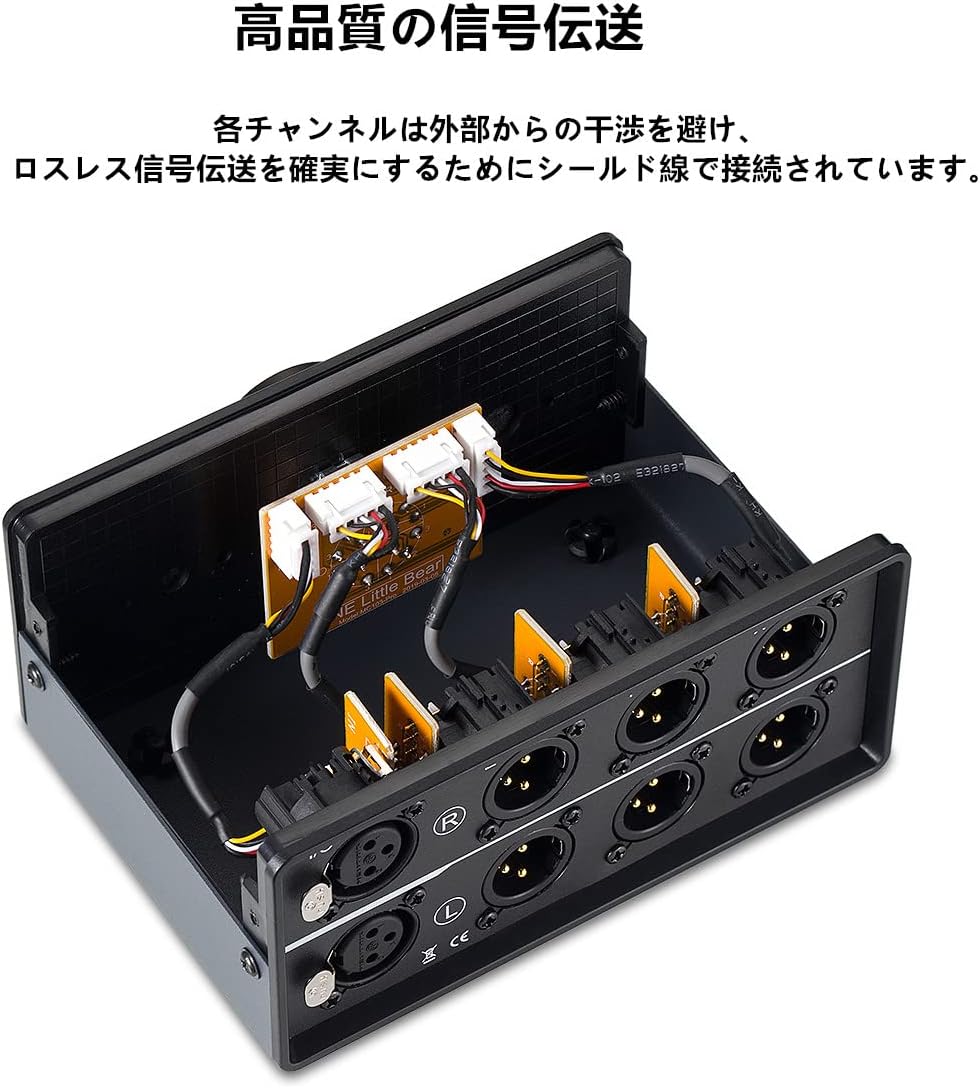
- Shielded Internal Wiring: Each channel is connected with shielded wire to prevent interference and ensure lossless signal transmission.
- Ukuran kompak: Exquisite and mini-sized design for easy placement and portability.
- Smooth Selector Knob: Equipped with silver-plated contacts for smooth and precise switching between outputs.
3. Parentah Setup
Follow these steps to correctly set up your Nobsound MC103 Pro audio switch:
- Identipikasi sambungan: Locate the 'I/O' (Input/Output) ports on the rear panel for your single audio source and the 'X', 'Y', 'Z' output ports for your three destination devices.
- Sambungkeun Sumber Audio: Connect your stereo XLR audio source (e.g., DAC, CD player) to the 'I/O' input ports on the rear of the MC103 Pro. Ensure correct left (L) and right (R) channel connections.
- Sambungkeun Alat Kaluaran: Connect your three stereo XLR output devices (e.g., amplifiers, powered speakers) to the 'X', 'Y', and 'Z' output ports. Maintain correct left (L) and right (R) channel orientation for each output.
- panempatan: Place the MC103 Pro on a stable, flat surface. Its compact size allows for flexible placement within your audio setup.


4. Parentah Operasi
Operating the Nobsound MC103 Pro is straightforward:
- Power On Alat: Ensure all connected audio source and output devices are powered on and functioning correctly.
- Select Output: Use the large rotary knob on the front panel to select your desired output channel. The knob is labeled 'X', 'Y', and 'Z' corresponding to the output ports. Rotate the knob to align the indicator with the chosen output.
- Puteran Audio: Once an output is selected, audio from your source will be routed to the corresponding connected device.

5. Pangropéa
To ensure the longevity and optimal performance of your MC103 Pro:
- beberesih: Paké kaen lemes, garing pikeun ngabersihan exterior. Hindarkeun pembersih abrasive atanapi pangleyur.
- Lingkungan: Keep the device in a dry, dust-free environment. Avoid exposure to extreme temperatures, humidity, or direct sunlight.
- Sambungan: Periodically check all XLR cable connections to ensure they are secure and free from corrosion.
- Penanganan: Handle the unit with care. While robust, dropping or subjecting it to strong impacts can cause internal damage.
6. Cara ngungkulan
If you encounter issues with your MC103 Pro, consider the following:
- Henteu aya sora:
- Ensure all XLR cables are securely connected to both the source, the MC103 Pro, and the output devices.
- Verify that the selector knob is correctly pointing to the desired output (X, Y, or Z).
- Check the power and volume levels of your audio source and output devices.
- Test with different cables to rule out faulty wiring.
- Sora distort:
- Ensure all connections are firm and free from loose contacts.
- Verify that the audio source is providing a clean signal.
- Check for any external interference sources near the unit or cables.
- Audio Intermittent:
- Inspect XLR cables for damage or loose pins.
- Ensure the selector knob is fully engaged in one position.
7. Spésifikasi
| Nomer modél | GFJ721-3M |
| Dimensi produk | 4.13 x 5.83 x 2.72 inci (105 x 148 x 69 mm) |
| Item Beurat | 1.46 pon (662 gram) |
| Tipe Panyambung | XLR |
| Alat nu cocog | Mikropon Praamps, Powered Speakers with XLR input, Professional Audio Mixers |
| Warna | Hideung |
| Produsén | Nobsound |

8. Video Produk Resmi
9. Garansi jeung Rojongan
Douk Audio products typically come with a standard manufacturer's warranty covering defects in materials and workmanship. For specific warranty details, duration, and to initiate a support request, please refer to the warranty card included with your product or visit the official Douk Audio websitus. Simpen resi pameseran anjeun salaku bukti pameseran.
For technical assistance, troubleshooting beyond this manual, or general inquiries, please contact Douk Audio customer support through their official channels.


