1. Bubuka
Hatur nuhun pikeun meuliasing the Denon AVR-X2600 7.2ch AV Surround Receiver. This receiver is designed to deliver an immersive home theater experience with support for advanced audio and video technologies, including Dolby Atmos, DTS:X, 4K Ultra HD passthrough, and eARC. This manual will guide you through the setup, operation, and maintenance of your new receiver, ensuring you get the most out of its features.
2. Émbaran Kasalametan penting
Please read all safety instructions carefully before using the receiver. Keep this manual for future reference. Always ensure proper ventilation, avoid exposing the unit to moisture or extreme temperatures, and use only specified power sources and accessories. Do not attempt to open or service the unit yourself; refer all servicing to qualified personnel.
3. Naon dina Box
Pastikeun yén sadaya item kalebet dina pakét:
- Denon AVR-X2600 AV Surround Receiver
- Kadali Jauh (RC-1228)
- Batré AAA (x2)
- Mikropon Setelan Audyssey
- Anteneu FM/AM
- Kabel listrik
- Gancang Mimitian Guide
- Parentah Kasalametan
4. Setélan
4.1 Nyambungkeun Spiker Anjeun
Connect your speakers to the appropriate terminals on the rear panel of the receiver. Ensure correct polarity (+ to + and - to -) for each speaker. The AVR-X2600 supports a 7.2 channel setup.

4.2 Nyambungkeun Alat Audio/Video
Use HDMI cables to connect your source devices (e.g., Blu-ray player, game console, streaming device) to the HDMI input ports on the receiver. Connect the receiver's HDMI OUT (ARC/eARC) port to your TV's HDMI input that supports ARC/eARC.
4.3 Initial Setup and Audyssey Calibration
After connecting all components, power on the receiver and your TV. Follow the on-screen setup assistant for initial configuration. The Audyssey MultEQ XT system will guide you through speaker calibration to optimize sound for your room. Connect the supplied Audyssey microphone to the YPAO MIC jack on the front panel and place it at your primary listening position, ideally at ear height.

4.4 YPAO Function Introduction Video
Watch this video for a detailed explanation of the YPAO (Yamaha Parametric Room Acoustic Optimizer) function, which automatically analyzes room acoustics and adjusts audio parameters for optimal sound quality. Note: While the video shows a Yamaha product, the YPAO concept is similar to Audyssey in Denon receivers for room calibration.
5. Parentah Operasi
5.1 Operasi Dasar
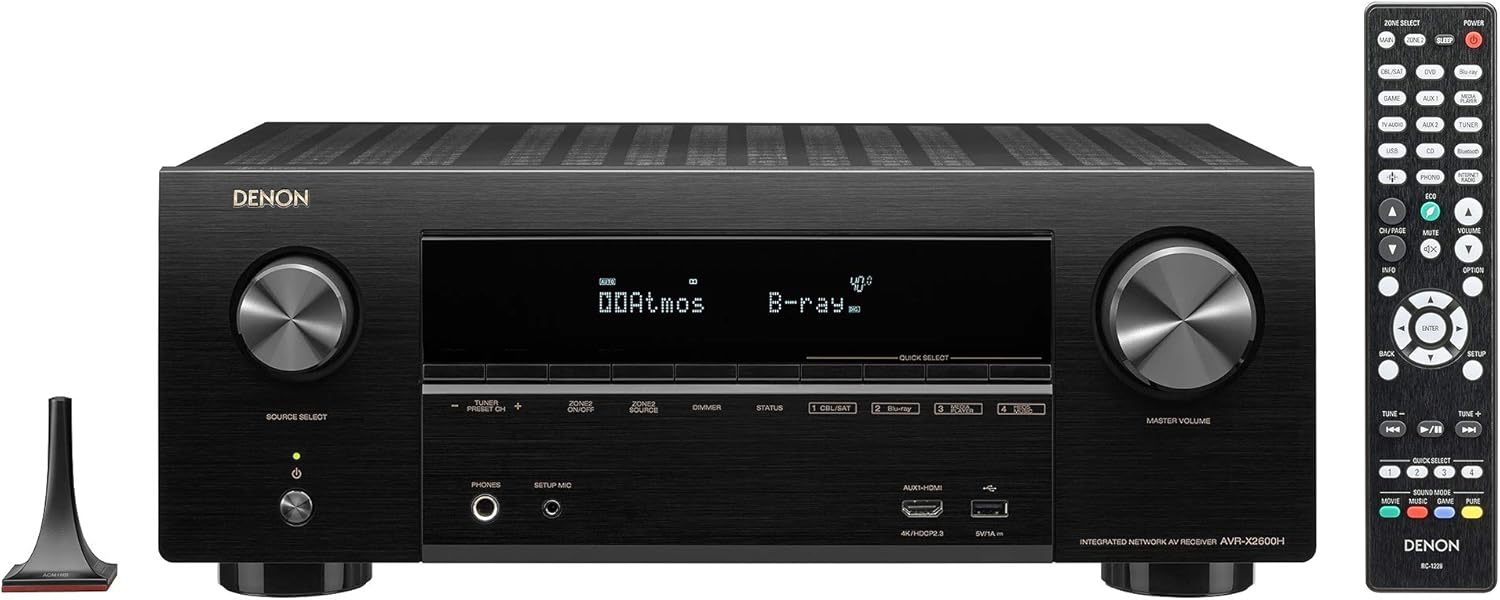
To power on the receiver, press the POWER button on the front panel or the remote control. Use the INPUT SELECTOR knob or the input buttons on the remote to choose your desired audio/video source.
5.2 Ngagunakeun Remote Control
The supplied remote control (RC-1228) provides full control over the receiver's functions. Use the Quick Select buttons (1-4) to instantly recall your favorite settings for different activities like watching movies, listening to music, or gaming. The dedicated Sound Mode buttons allow you to switch between various audio processing modes.

5.3 SCENE Function Introduction Video
This video explains the 'SCENE' function, which allows you to register and recall multiple settings (input source, sound mode, volume level, etc.) with a single button press. This feature simplifies operation for all family members. Note: While the video shows a Yamaha product, the SCENE function concept is similar to the Quick Select buttons on the Denon AVR-X2600.
5.4 Using the Denon AVR Remote App
Download the Denon AVR Remote app on your smartphone or tablet to control the receiver over your home network. The app provides an intuitive graphical interface for managing inputs, sound modes, volume, and network features like music streaming services.
5.5 Supported Audio and Video Formats
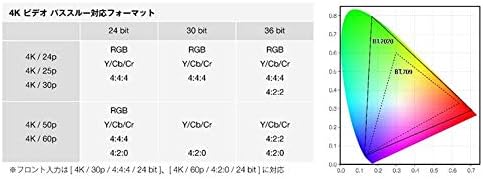
The AVR-X2600 supports a wide range of audio and video formats. For audio, it handles high-resolution formats like DSD and FLAC via network or USB. For video, it supports 4K Ultra HD passthrough with HDR10, Dolby Vision, HLG, and HDCP 2.3.

6. Pangropéa
6.1 Ngabersihan Unit
To maintain the appearance of your receiver, wipe the cabinet and front panel with a soft, dry cloth. Do not use abrasive cleaners, waxes, or solvents. For stubborn stains, lightly dampen the cloth with water or a mild detergent solution, then wipe dry.
6.2 Ventilasi
Ensure adequate ventilation around the receiver to prevent overheating. Do not block ventilation openings. Avoid placing the unit in an enclosed cabinet without proper airflow.
7. Cara ngungkulan
If you experience issues with your receiver, refer to the following common problems and solutions:
- Henteu aya kakuatan: Pariksa naha kabel listrik disambungkeun sacara aman ka panarima sareng stopkontak. Pastikeun stop kontak listrik fungsina.
- Henteu aya sora: Verify that the correct input source is selected. Check all speaker connections for proper wiring and polarity. Ensure the volume is not muted or set too low. Confirm that your TV's audio output is correctly configured for the receiver.
- Taya Video: Ensure the correct HDMI input is selected on the receiver and your TV. Check all HDMI cable connections. Try a different HDMI cable or input port.
- Remote Control Teu Gawé: Pasang deui batréna dina remot kontrol. Pastikeun teu aya halangan antara remot sareng sénsor IR panarima.
- Masalah Sambungan Jaringan: Check your network cable connection or Wi-Fi settings. Restart your router and the receiver.
For more complex issues, consult the full owner's manual available on the Denon websitus atanapi ngahubungan rojongan customer.
8. Spésifikasi
| merek | Denon |
| Nomer modél | AVR-X2600HK |
| Saluran | 7.2 |
| Daya Kaluaran | 185W per channel (6Ω, 1kHz, THD 10%, 1ch driven, JEITA) |
| HDMI Input / Kaluaran | 8 Di / 2 Kaluar |
| Video Passthrough | 4K Ultra HD (60p / HDCP 2.3 / BT.2020 / HDR10 / Dolby Vision / HLG / eARC / ALLM) |
| Audio Decoding | Dolby Atmos, DTS:X, Dolby Atmos Height Virtualizer, DTS Virtual:X |
| Konektipitas | Bluetooth, HDMI, USB, Wi-Fi, Ethernet |
| Kontrol sora | Amazon Alexa |
| Dukungan Audio Hi-Res | 5.6 MHz DSD, FLAC, WAV, ALAC (via music server & USB) |
| Beurat | 9.5 kg |
| Warna | Hideung |
9. Émbaran jaminan
This Denon product is covered by a limited warranty. The duration and terms of the warranty may vary by region. Please refer to the warranty card included with your product or visit the official Denon website for detailed warranty information specific to your country of purchase. Keep your proof of purchase for warranty claims.
10. Rojongan Palanggan
For technical assistance, product inquiries, or service requests, please contact Denon customer support. You can find contact information, FAQs, and additional resources on the official Denon website. Please have your model number (AVR-X2600HK) and serial number ready when contacting support.
Denon Resmi Websitus: www.denon.com


