Bubuka
This manual provides instructions for the safe and efficient operation and maintenance of your Tchibo Bean-to-Cup Coffee Machine, model 366580. Please read this manual thoroughly before first use and keep it for future reference.
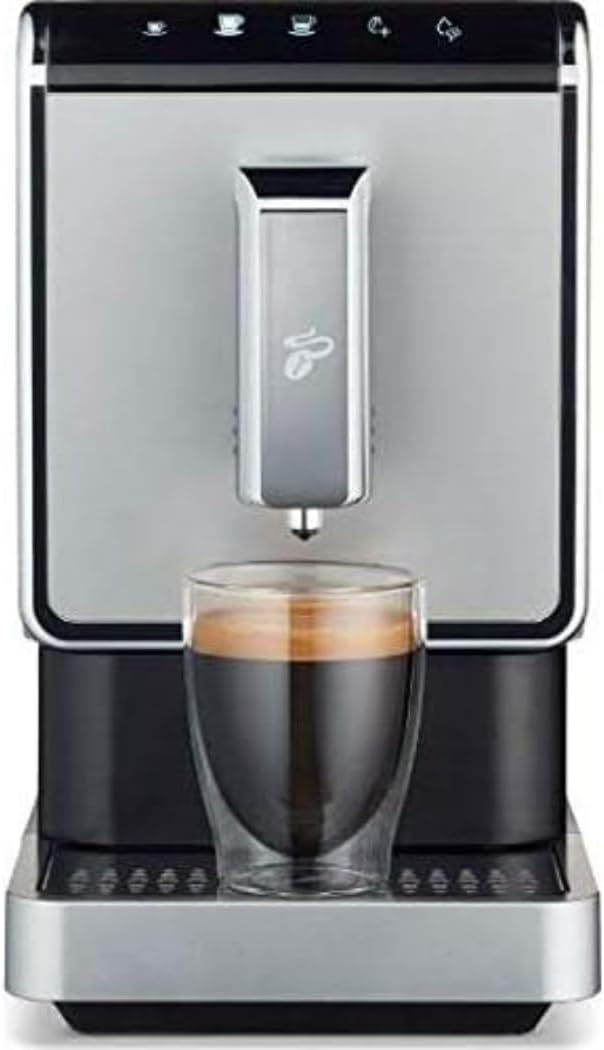
Image: Tchibo Bean-to-Cup Coffee Machine, model 366580, dispensing coffee into a double-walled glass cup. The machine features a sleek silver and black design with a control panel at the top.
Disetél
- Ngabongkar bungkusan: Carefully remove the coffee machine from its packaging. Retain all packaging materials for potential future transport.
- panempatan: Tempatkeun mesin dina permukaan anu stabil, rata, sareng tahan panas. Pastikeun ventilasi anu cekap di sakitar mesin.
- Tangki cai: Remove the water tank (removable from the top) and fill it with fresh, cold water up to the MAX mark. Reinsert the tank securely.
- Wadah Kacang: Open the coffee bean container and fill it with whole coffee beans. The container has a capacity of 160g, expandable up to 300g. Ensure the aroma-protecting seal is properly closed.
- Sambungan Daya: Connect the power cable (approximately 80 cm length) to the machine and then to a grounded power outlet (220-240V, 50-60Hz).
- Siklus bilas munggaran: Before first use, perform a rinse cycle as described in the "Operating Instructions" section to clean the internal system.
Parentah Operasi
Operasi Dasar
- Daya Hurung: Press the ON/OFF button on the touch screen. The machine will perform a brief self-check.
- Beverage Selection: Select your desired beverage (Espresso, Caffè Crema, Americano) using the direct selection buttons on the touch screen.
- Adjusting Beverage Quantity: The machine allows programming beverage quantities from 25 ml to 250 ml. Refer to the detailed instructions in the full manual for specific programming steps. Predefined quantities are approximately 40 ml for Espresso, 125 ml for Caffè Crema, and 125 ml for Americano.
- Intense+ Function: For a stronger coffee, activate the Intense+ function via its dedicated button.
- Coffee Spout Adjustment: Adjust the height of the coffee spout to fit your cup (maximum cup height 15.5 cm). The spout features cup backlighting.
- Gelar grinding: The high-quality stainless steel conical grinder allows for adjustable grinding degree. Adjust as desired for optimal flavor extraction.
- Pareum listrik: Press the ON/OFF button to turn off the machine. The machine also features automatic shutdown functions (10, 20, or 30 minutes) which can be programmed.
Pangropéa jeung beberesih
Pangropéa rutin ngajamin umur panjang sareng kinerja optimal mesin kopi anjeun.
- Rinse Function: Use the dedicated Rinse button for quick cleaning of the coffee system.
- Unit Brewing: The brewing unit is removable from the side for thorough cleaning. Clean it regularly under running water.
- Tangki cai: The water tank is removable from the top. Clean it periodically with mild detergent and rinse thoroughly.
- Wadah taneuh: The grounds container is removable from the front. Empty and clean it regularly. It has a capacity for approximately 10 portions.
- Baki netes: Kosongkeun sareng bersihkeun baki netes sacara teratur.
- Turun: The machine will display an automatic descaling message when necessary. Follow the instructions provided in the full manual for the descaling process.
- Catetan penting: Individual components are not suitable for dishwasher cleaning. Always clean by hand.
Pamérésan masalah
This section addresses common issues you might encounter. For more complex problems, please refer to the complete user manual or contact customer support.
| Masalah | Mungkin Cukang lantaranana | Solusi |
|---|---|---|
| Mesin henteu hurung. | Taya catu daya. | Check if the power cable is securely plugged into the machine and the wall outlet. Ensure the outlet is functional. |
| Henteu aya kopi anu dikaluarkeun. | tank cai kosong; Biji kopi kosong; Unit brewing diblokir. | Refill water tank. Refill coffee bean container. Clean the brewing unit. |
| Kopi lemah teuing/kuat. | Incorrect grinding degree; Incorrect beverage quantity setting; Intense+ not activated/deactivated. | Adjust the grinding degree. Adjust the programmed beverage quantity. Activate/deactivate Intense+ function as desired. |
| Descaling message appears. | Mesin merlukeun descaling. | Perform the descaling procedure as outlined in the full manual. |
Spésifikasi teknis
- Jumlah modél: 366580
- merek: Tchibo
- Ukuran (L x W x H): 18 x 40 x 31.5 cm
- beurat: 9.48 kg
- kakuatan: 1235 - 1470 W
- Frékuénsi: 50 - 60 Hz
- Voltage: 220 - 240 V
- Tekanan: Maximum 19 bars
- Panjang kabel: Kira-kira 80 cm
- Kapasitas Tangki Cai: 1.1 liter
- Kapasitas Wadah Biji Kopi: 160 g (expandable up to 300 g)
- Grounds Container Capacity: Approximately 10 portions
- Max Cup Height: 15.5 cm
- Bahan: Stainless steel and Plastic
- warna: Hideung / Pérak
- Fitur husus: Timer, Programmable, Integrated coffee grinder, Water filter, Cup warmer
Garansi sareng Rojongan
Information regarding warranty coverage and duration is typically provided with your purchase documentation. Please refer to the warranty card or contact your retailer for details.
For technical support or service inquiries, please visit the official Tchibo website or contact their customer service department. Keep your model number (366580) and proof of purchase handy when contacting support.