1. Bubuka
This manual provides detailed instructions for the assembly, operation, and maintenance of your Celestron Nexstar 5SLT Telescope. The Nexstar 5SLT is a 5-inch (127mm) Schmidt-Cassegrain catadioptric telescope featuring a computerized Go-To alt-azimuth single-arm mount. Its advanced optics deliver sharp images across a wide field of view, suitable for both astronomical and terrestrial observations.
The telescope is equipped with high-efficiency XLT optical coatings for enhanced light transmission. The NexStar+ hand control offers easy SkyAlign functionality and access to a database of over 40,000 celestial objects. For additional functionality, the Celestron Starry Night Special Edition Software and the Celestron SkyPortal App are available.
2. Komponén Kaasup
Your Celestron Nexstar 5SLT package includes the following items:
- Nexstar 5SLT Optical Tube Assembly (Schmidt-Cassegrain, 127mm aperture)
- Computerized Alt-Azimuth Mount
- Adjustable Stainless Steel Tripod
- NexStar + Kontrol leungeun
- 25mm Eyepiece (51x magnification)
- 9mm Eyepiece (141x magnification)
- Star Diagonal (31.8mm / 1.25-inch)
- Reflex Finderscope
- Dulang aksésori
- Kompartemen Batré (merlukeun 8 batré AA, teu kalebet)

Gambar 2.1: The Celestron Nexstar 5SLT Telescope fully assembled, showing the optical tube, mount, tripod, and hand control unit.

Gambar 2.2: Key accessories for the Nexstar 5SLT, including the NexStar+ hand control, 25mm and 9mm eyepieces, and the star diagonal.
3. Parentah Setup
Follow these steps to set up your Nexstar 5SLT telescope:
- Ngabongkar komponén: Carefully remove all components from the packaging. Keep the packaging for future transport or storage.
- Ngarakit Tripod: Extend the tripod legs to a suitable height and secure them. Attach the accessory tray to the center brace of the tripod.
- Pasang Gunung: Place the computerized alt-azimuth mount onto the tripod head and secure it using the provided screw. Ensure it is stable.
- Install Optical Tube: Attach the Nexstar 5SLT optical tube to the mount's dovetail saddle. Tighten the locking screw to ensure the tube is securely fastened.
- Pasang Finderscope: Slide the reflex finderscope into its bracket on the optical tube and tighten the retaining screws.
- Selapkeun Diagonal Béntang sareng Eyepiece: Insert the star diagonal into the visual back of the telescope. Then, insert the 25mm eyepiece into the star diagonal and secure it with the thumbscrew.
- Pasang Batré: Open the battery compartment on the mount and insert 8 AA batteries (not included), ensuring correct polarity. Alternatively, connect an external 12V DC power supply (sold separately) to the power input port.
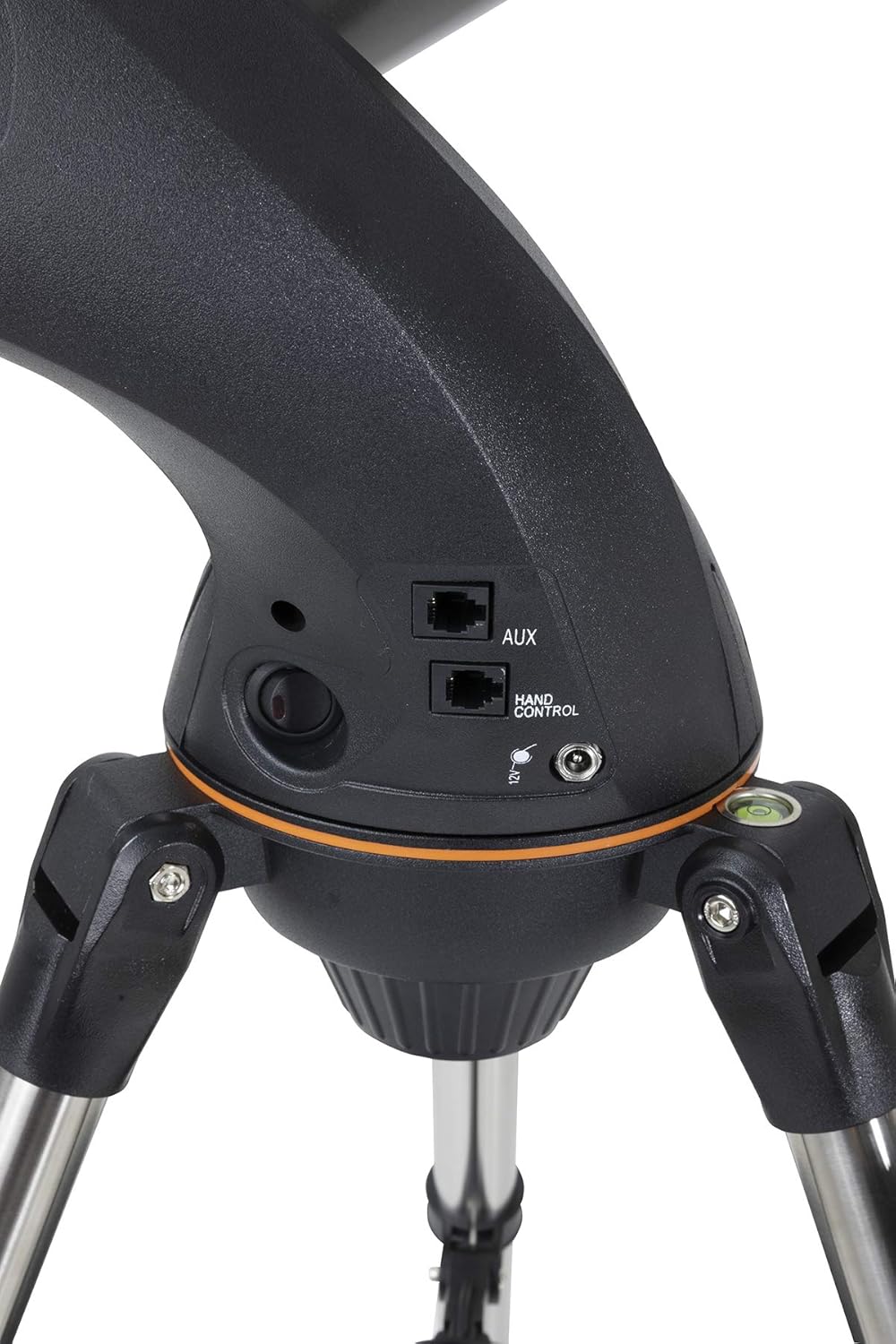
Gambar 3.1: Detail of the mount's connection panel, showing the auxiliary (AUX) and hand control ports, and the power input.
4. Ngoperasikeun Teleskop
The Nexstar 5SLT features a user-friendly computerized system for locating celestial objects.
4.1 Powering On and Initial Alignment
- Sambungkeun Kontrol Leungeun: Plug the NexStar+ hand control into the 'HAND CONTROL' port on the mount.
- Daya Hurung: Flip the power switch on the mount to the 'ON' position. The hand control display will illuminate.
- Prosedur SkyAlign: The telescope will prompt you to perform an alignment. The SkyAlign method is recommended for its simplicity. Follow the on-screen instructions to select three bright stars or planets. The telescope will automatically identify them and align itself.
- Fokus: Use the focus knob on the optical tube to achieve a sharp image.
4.2 Locating Objects
Once aligned, you can use the NexStar+ hand control to navigate the night sky:
- Object Database: The hand control contains a database of over 40,000 celestial objects, including stars, galaxies, nebulae, and planets.
- Go-To Function: Select an object from the menu, press 'ENTER', and the telescope will automatically slew to its position.
- nyukcruk: After locating an object, the mount will automatically track it as it moves across the sky, keeping it centered in your eyepiece.
4.3 Software and Apps
Enhance your experience with:
- Celestron Starry Night Special Edition Software: Provides a comprehensive planetarium program for planning observations.
- Celestron SkyPortal App: Available for download on App Store and Google Play, this app allows you to control your telescope wirelessly (with optional Wi-Fi module) and explore the night sky from your smartphone or tablet.
5. Pangropéa
Proper care will ensure the longevity and optimal performance of your telescope.
- Optik beberesih: Use a soft brush to remove loose dust from the optical surfaces. For smudges, use a specialized optical cleaning solution and a microfiber cloth. Avoid touching optical surfaces with bare hands.
- beberesih umum: Wipe down the telescope body, mount, and tripod with a soft, damp lawon. Hindarkeun bahan kimia anu kasar.
- Panyimpenan: When not in use, store the telescope in a dry, dust-free environment. Use dust caps for the optical tube and eyepieces.
- Perawatan batré: Remove AA batteries if the telescope will not be used for an extended period to prevent leakage.
6. Cara ngungkulan
Upami anjeun mendakan masalah sareng teleskop anjeun, pertimbangkeun solusi umum ieu:
- Teleskop Teu Nyala: Check battery installation and ensure they are fresh. If using an external power supply, verify the connection and power source.
- Alignment Failure: Pastikeun anjeun gaduh jelas view of the sky and are selecting bright, easily identifiable alignment stars. Double-check your entered location and time settings.
- Go-To Accuracy Issues: A precise initial alignment is crucial for accurate Go-To performance. Ensure the tripod is level and stable.
- Gambar kabur: Adjust the focus knob carefully. Ensure eyepieces and star diagonal are clean and securely seated. Allow the telescope to equalize to ambient temperature for optimal viewing.
- Bising motor: Some motor noise during slewing is normal. Excessive or unusual noise may indicate a mechanical issue; contact support if persistent.
7. Spésifikasi
| Fitur | Spésifikasi |
|---|---|
| Desain optik | Schmidt-Cassegrain |
| aperture | 127 mm (5 inci) |
| Panjang fokus | 1250 mm |
| Rasio fokus | f/9.8 |
| Tipe Gunung | Computerized Alt-Azimuth Single Fork Arm |
| Kontrol leungeun | NexStar+ with 40,000+ object database |
| Prosedur alignment | SkyAlign, 3-Star Align, Solar System Align |
| Eyepieces Kaasup | 25 mm (51x), 9 mm (141x) - 1.25" |
| Finderscope | Reflex Finderscope |
| Sumber Daya | 8 AA batteries (not included) or optional 12V DC adapter |
| Optical Tube Dimensions (L x W x H) | 46.5 x 46.5 x 99.5 cm (parantos dirakit) |
| Beurat Teleskop | 7.3 kg |
| Beurat pakét | 13.22 kg |
| Alat nu cocog | Camera, Smartphone, Tablet (with appropriate accessories) |
| Nomer modél | CE22084-DS |
8. Garansi jeung Rojongan
For information regarding warranty coverage, technical support, and service, please refer to the official Celestron website or contact Celestron customer service directly. Software updates for the NexStar+ hand control are available via the Celestron websitus.


