Bubuka
Thank you for choosing the NEDIS Wi-Fi Smart Fan Heater. This manual provides essential information for the safe and efficient operation of your new device. Please read these instructions carefully before use and retain them for future reference. Proper use and maintenance will ensure optimal performance and longevity of the product.
Parentah Kasalametan
Pikeun ngurangan résiko seuneu, shock listrik, atawa tatu, salawasna turutan pancegahan kaamanan dasar ieu:
- Baca sadaya parentah sateuacan nganggo manaskeun ieu.
- Entong nganggo pamanas ieu di lingkungan tempat mandi, pancuran, atanapi kolam renang.
- Ulah nutupan manaskeun. Panutup manaskeun bisa ngabalukarkeun overheating sarta seuneu.
- Keep combustible materials such as furniture, pillows, bedding, papers, clothes, and curtains at least 1 meter (3 feet) from the front of the heater and keep them away from the sides and rear.
- Salawasna cabut pamanas nalika henteu dianggo.
- Entong beroperasi manaskeun naon waé ku kabel anu rusak atanapi colokkeun atanapi saatos heureuy pungsi manaskeun, parantos lungsur, atanapi ruksak sagala cara.
- Ulah ngajalankeun ari handapeun karpét. Ulah nutupan ari ku karpet lémparan, runners, atawa panutup sarupa. Atur tali jauh ti wewengkon lalulintas sarta dimana eta moal tripped leuwih.
- Awas pisan diperlukeun nalika manaskeun mana wae anu dipaké ku atawa deukeut barudak atawa invalids sarta iraha wae manaskeun ieu ditinggalkeun operasi sarta unattended.
- This heater is equipped with a tip-over protection switch that automatically shuts off the heater if it is accidentally knocked over.
- Pastikeun manaskeun disimpen dina permukaan anu stabil.
- Pikeun pamakéan indoor wungkul.
Produk Leuwihview
Familiarize yourself with the main components of your NEDIS Wi-Fi Smart Fan Heater.
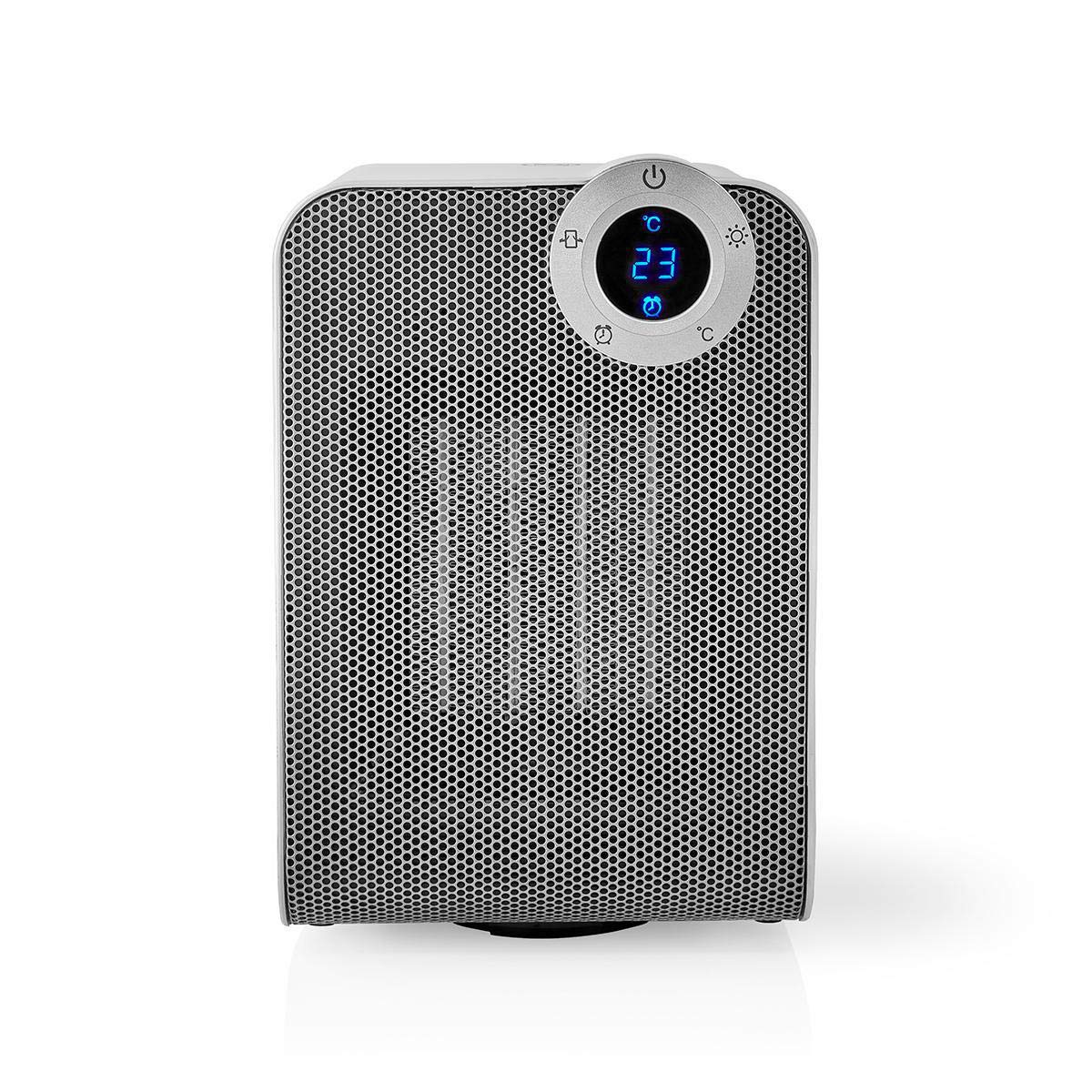
The front panel features a digital display that shows the current temperature and settings. Surrounding the display are touch-sensitive buttons for power, mode selection, oscillation, and timer functions.

The rear of the heater includes the main power switch (often a rocker switch) and the air intake grille. Ensure this area is not obstructed for proper airflow.

The compact design of the heater allows for easy placement in various indoor settings.
Disetél
Ngabongkar bungkusan
- Taliti cabut manaskeun tina bungkusan na.
- Pariksa heula bisi aya karusakan nalika pangiriman. Upami ruksak, ulah dioperasikeun sareng hubungi layanan palanggan.
- Simpen bungkusan pikeun neundeun atanapi transportasi ka hareup.
panempatan
- Teundeun manaskeun dina permukaan datar, teguh.
- Ensure there is at least 1 meter (3 feet) of clear space around the heater to allow for proper air circulation and to prevent fire hazards.
- Do not place the heater near curtains, drapes, or other loose fabrics that could block the air intake or outlet.
- Pastikeun kabel listrik teu kajepit atawa disimpen di handapeun barang beurat.
Daya Awal Hurung
- Plug the heater into a suitable electrical outlet (220-240V AC, 50/60Hz).
- Flip the main power switch on the back of the unit to the 'ON' position.
- The digital display on the front will illuminate, indicating the heater is in standby mode.
Wi-Fi Connection & App Setup
The NEDIS Wi-Fi Smart Fan Heater can be controlled via the Nedis SmartLife app, offering advanced features and remote control.
- Unduh Nedis SmartLife aplikasi ti App Store (ios) atawa Google Play Store (Android).
- Ngadaptarkeun akun anyar atanapi log in upami anjeun parantos gaduh.
- Pastikeun yén smartphone anjeun disambungkeun ka jaringan Wi-Fi 2.4 GHz.
- Dina aplikasi, ketok ikon '+' pikeun nambahkeun alat anyar.
- Follow the on-screen instructions in the app to connect your heater to your Wi-Fi network. This usually involves putting the heater into pairing mode (refer to the app for specific instructions, often by pressing and holding a button on the heater).
- Once connected, you can control the heater from anywhere using the app.
Parentah Operasi
Kontrol Manual
The heater can be operated directly using the touch buttons on the front panel:
- Tombol Daya: Pencét pikeun ngahurungkeun manaskeun ON atawa OFF.
- Tombol Mode: Cycle through heating modes (e.g., High Heat 1800W, Low Heat 900W, Fan Only).
- Penyesuaian Suhu: Use the '+' and '-' buttons (or similar) to set the desired temperature. The heater will operate at 1800W for rapid heating and automatically switch to 900W once the set temperature is approached.
- Tombol Osilasi: Press to activate or deactivate the horizontal oscillation feature, distributing heat across a wider area.
- Tombol Timer: Set a timer for the heater to automatically turn off after a specified duration.
SmartLife App Control
Once connected to the Nedis SmartLife app, you can access advanced control features:
- Nyala/Pareum Jarak Jauh: Kontrol pemanas ti mana waé.
- Penyesuaian Suhu: Precisely set and monitor the room temperature.
- Pilihan Mode: Choose between different heating levels or fan-only mode.
- Kontrol osilasi: Hurungkeun atawa pareumkeun fitur osilasi.
- Jadwal: Create custom heating schedules for different times of the day or week.
- Fungsi Timer: Set a countdown timer for automatic shutdown.
Kontrol sora
The heater supports voice control through popular smart assistants. To enable this, link your Nedis SmartLife account with your preferred voice assistant (Google Home or Amazon Alexa) via their respective apps. Once linked, you can use voice commands such as:
- "Hey Google, turn on the heater."
- "Alexa, set the heater to 22 degrees."
- "Hey Google, turn off the heater."
Pangropéa
beberesih
Regular cleaning helps maintain the heater's efficiency and extends its lifespan.
- Salawasna cabut pamanas sarta ngidinan pikeun niiskeun sagemblengna saméméh beberesih.
- Ngusap permukaan luar kalayan lemes, damp lawon. Ulah make cleaners abrasive atawa pangleyur.
- Anggo panyedot debu anu nganggo sikat pikeun miceun lebu tina kisi-kisi asupan sareng outlet hawa.
- Pastikeun teu aya cai anu asup ka jero pemanas.
Panyimpenan
Nalika henteu dianggo kanggo waktos anu berkepanjangan:
- Unplug the heater and clean it as described above.
- Store the heater in its original packaging or a suitable box to protect it from dust and damage.
- Keep it in a cool, dry place, away from direct sunlight and moisture.
Pamérésan masalah
Upami anjeun mendakan masalah sareng manaskeun anjeun, tingal masalah sareng solusi umum ieu:
| Masalah | Mungkin Cukang lantaranana | Solusi |
|---|---|---|
| Pemanas teu hurung. | No power, main switch off, tip-over switch activated. | Check power outlet, ensure main switch is ON, place heater upright on a stable surface. |
| Taya kaluaran panas. | Incorrect mode, thermostat setting too low. | Select a heating mode (High/Low), increase the thermostat setting above the current room temperature. |
| Sambungan Wi-Fi gagal. | Incorrect Wi-Fi password, 5GHz network, distance from router. | Verify Wi-Fi password, ensure you are on a 2.4GHz network, move heater closer to the router, try re-pairing. |
| Pemanas pareum teu disangka-sangka. | Overheating protection, tip-over protection, timer activated. | Ensure heater is not covered, clear obstructions, place upright, check timer settings. Allow to cool before restarting. |
spésifikasi
| Fitur | Spésifikasi |
|---|---|
| Nomer modél | WIFIFNH20CWT |
| Sumber Daya | Kabel Listrik |
| Kaluaran kakuatan | 1800W (Luhur), 900W (Rendah) |
| Métode pemanasan | Padumukan |
| Ukuran (L x W x H) | 16.5 x 14.5 x 25 cm |
| Item Beurat | 1.8 kg |
| Warna | Bodas / Pérak |
| Fitur husus | On/Off Timer, Oscillation, Tip-over Protection, Thermostat, Wi-Fi, App Control, Voice Control (Alexa, Google Home) |
| Tipe Pamasangan | Lantai Gunung |
| Dianjurkeun Paké | Jero rohangan, Imah, Kamar Diajar |
| Batré Diperlukeun | No |
Garansi sareng Rojongan
Your NEDIS Wi-Fi Smart Fan Heater is covered by a manufacturer's warranty. Please refer to the warranty card included with your purchase for specific terms and conditions, including the warranty period and coverage details.
For technical support, troubleshooting assistance, or warranty claims, please contact NEDIS customer service. Contact information can typically be found on the product packaging, the NEDIS websitus, atawa resi pameseran Anjeun.


