1. Bubuka
Thank you for choosing the Soundmaster Eliteline IR300SI Internet DAB+ FM Radio. This device offers a wide range of audio entertainment options, including Internet Radio, DAB+ digital radio, FM radio, Bluetooth connectivity, and USB playback. It also features Amazon Alexa compatibility for voice control and can be managed via the UNDOK app. This manual provides essential information for setting up, operating, and maintaining your radio.
2. Émbaran Kasalametan
- Read all instructions carefully before use and retain them for future reference.
- Ulah ngalaan alat ka hujan, beueus, atawa suhu ekstrim.
- Mastikeun ventilasi ditangtoskeun; ulah ngahalangan sagala bukaan ventilasi.
- Paké ngan adaptor kakuatan disadiakeun kalawan unit.
- Ulah nyobian muka atawa ngalereskeun unit sorangan. Rujuk sadayana jasa ka tanaga anu mumpuni.
- Jauhkeun alat tina médan magnét anu kuat.
3. Eusi Paket
Punten parios yén sadaya barang aya:
- Soundmaster Eliteline IR300SI Internet DAB+ FM Radio
- Adaptor kakuatan
- Kadali jauh
- Manual pangguna (dokumén ieu)
- Installation material (e.g., antenna, if separate)
4. Produk Langkungview
Familiarize yourself with the various parts and controls of your Soundmaster IR300SI radio.

Gambar 4.1: Hareup angled view of the Soundmaster IR300SI radio, showing the display, speakers, and control buttons.
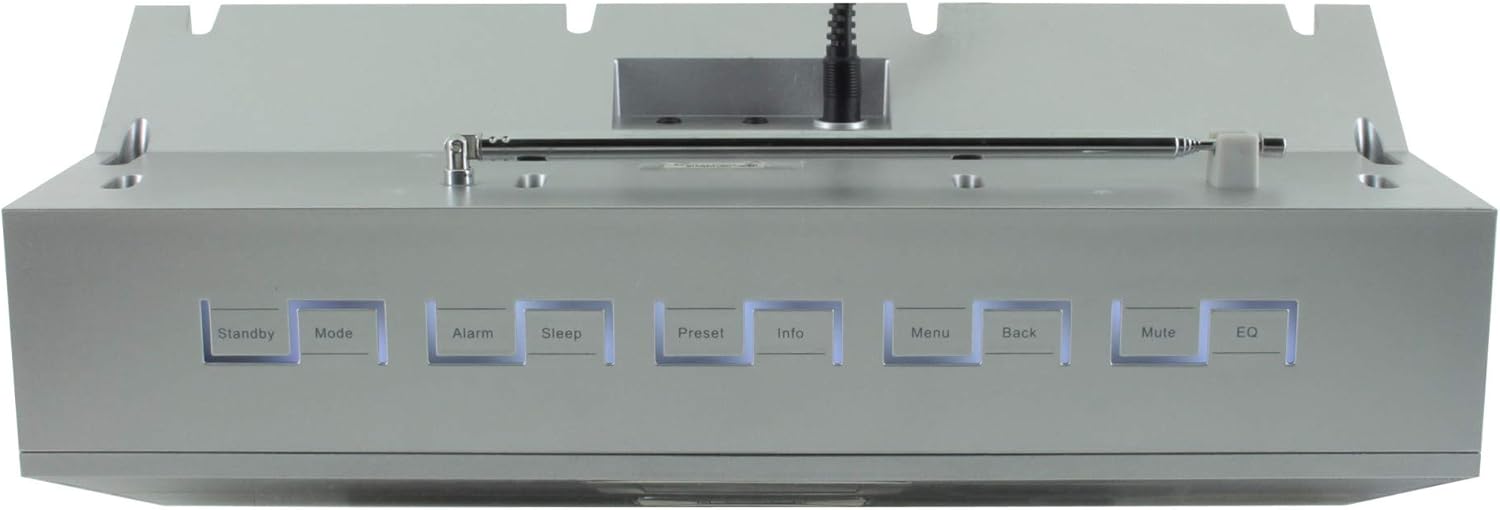
Gambar 4.2: Top view of the Soundmaster IR300SI radio, highlighting the control buttons: Standby, Mode, Alarm, Sleep, Preset, Info, Menu, Back, Mute, and EQ.
Panel hareup
- 2.4" / 6 cm TFT Color Display: Shows station information, menus, and time.
- Panyatur: Stereo sound output.
- Tombol/Dial Kontrol: Pikeun navigasi sareng pilihan.
Kadali Panel Top
- Antosan: Daya hurung / pareum.
- Mode: Switch between Internet Radio, DAB+, FM, Bluetooth, USB, AUX.
- Alarm: Setel sareng atur alarm.
- Saré: Activate sleep timer.
- Prasetél: Access and save favorite stations.
- Inpo: Display additional information about the current broadcast.
- Menu: Aksés setélan sareng pilihan sistem.
- Balik: Balik deui ka ménu saméméhna.
- Jempé: Ngajempékeun / nganonaktipkeun audio.
- EQ: Pilih prasetél ékualiser.
Rear/Side Panel Connections
- Input kakuatan: Sambungkeun adaptor listrik anu disayogikeun.
- Antena Teleskopik: For DAB+ and FM reception.
- Port USB: For MP3 playback from USB storage devices.
- 3.5mm Aux-In Port: Sambungkeun sumber audio éksternal.
- Jack headphone: Pikeun déngékeun pribadi.
5. Setélan
5.1 Sambungan Daya
- Connect the power adapter to the DC input on the rear of the radio.
- Colokkeun adaptor kakuatan kana stop kontak témbok.
- Pencét éta Antosan button on the top panel or remote control to turn on the radio.
5.2 Setup anteneu
Panjangkeun anteneu teleskopik sapinuhna pikeun panarimaan radio DAB+ sareng FM anu optimal.
5.3 Initial Wi-Fi Network Setup
Upon first power-on, the radio will guide you through the initial setup wizard:
- Select your preferred language using the control dial and confirm.
- Radio bakal nyeken jaringan Wi-Fi anu sayogi.
- Pilih jaringan anjeun tina daptar.
- Enter your Wi-Fi password using the on-screen keyboard and control dial. Confirm to connect.
- Once connected, the radio will display the main menu.
6. Parentah Operasi
Ngagunakeun éta Modus button to switch between different audio sources.
6.1 Internét Radio
- Pencét Modus to select "Internet Radio".
- Navigate through categories (e.g., Location, Genre, Popular) using the control dial.
- Pilih stasiun pikeun ngamimitian playback.
- Pikeun nyimpen stasiun salaku prasetél, pencét terus tahan tombol Prasetél button, then select a preset number.
6.2 DAB + Radio
- Pencét Modus to select "DAB+ Radio".
- Radio bakal otomatis nyeken stasiun DAB+ anu sayogi.
- Use the control dial to browse and select stations.
- Pencét jeung tahan Prasetél to save a station.
6.3 Radio FM
- Pencét Modus to select "FM Radio".
- The radio will automatically scan for available FM stations.
- Use the control dial to browse and select stations.
- Pencét jeung tahan Prasetél to save a station.
6.4 Konektipitas Bluetooth
- Pencét Modus to select "Bluetooth". The radio will enter pairing mode.
- Dina alat sélulér anjeun (smartphone, tablet), aktipkeun Bluetooth teras milarian alat anu sayogi.
- Select "Soundmaster IR300SI" from the list to pair.
- Saatos nyambung, anjeun tiasa ngalirkeun audio tina alat anjeun ka radio.
6.5 Playback USB
- Lebetkeun alat panyimpen USB (formatna FAT32) anu ngandung MP3 files kana port USB.
- Pencét Modus to select "USB".
- Navigate through folders and select tracks using the control dial.
6.6 Input AUX
- Connect an external audio device (e.g., MP3 player) to the 3.5mm Aux-In port using an audio cable (not supplied).
- Pencét Modus to select "AUX".
- Kontrol playback tina alat éksternal anjeun.
6.7 Alarm sareng Timer Sare
- Alarm: Pencét éta Alarem button to set up to two alarms. Configure time, source (buzzer, radio), and frequency (daily, weekdays, weekends).
- Timer Saré: Pencét éta Saré button to set a countdown timer (e.g., 15, 30, 60 minutes) after which the radio will automatically turn off.
6.8 Ékualiser (EQ)
Pencét éta EQ button to cycle through pre-programmed sound settings (e.g., Normal, Jazz, Rock, Classical, Pop, News) to optimize audio output for different content.
6.9 Amazon Alexa and UNDOK App Control
- Amazon Alexa: The radio is compatible with Amazon Alexa. Follow the instructions in the Alexa app to link your Soundmaster IR300SI for voice control functionalities.
- UNDOK App: Download the UNDOK app from your mobile device's app store. Ensure your mobile device and the radio are on the same Wi-Fi network. The app allows you to control the radio, browse stations, and manage settings remotely.
7. Pangropéa
7.1 beberesih
- Salawasna cabut radio tina stop kontak sateuacan beberesih.
- Anggo kaén anu lembut sareng garing pikeun ngusap permukaan luar.
- Ulah make cleaners abrasive, lilin, atawa pangleyur sabab bisa ngaruksak finish.
7.2 Panyimpenan
If you plan to store the radio for an extended period, unplug it from the power source and store it in a cool, dry place, away from direct sunlight and extreme temperatures.
8. Cara ngungkulan
Upami anjeun mendakan masalah, tingal masalah sareng solusi umum ieu:
| Masalah | Mungkin Cukang lantaranana | Solusi |
|---|---|---|
| Taya kakuatan | Adaptor daya teu nyambung atawa stop kontak faulty. | Pariksa sambungan kakuatan. Coba outlet béda. |
| Taya sora | Volume lemah teuing, diredam, atawa sumber salah dipilih. | Naékkeun volume. Pencét Ngajempékeun. Ensure correct mode (Internet Radio, DAB+, etc.) is selected. |
| Teu bisa nyambung ka Wi-Fi | Sandi salah, sinyal lemah, atawa masalah router. | Verify password. Move radio closer to router. Restart router. |
| Miskin DAB + / panarimaan FM | Antenna henteu ngalegaan atanapi daérah sinyal goréng. | Fully extend the telescopic antenna. Reposition the radio. |
| Nyapasangkeun Bluetooth gagal | Radio not in pairing mode, or device too far. | Ensure radio is in Bluetooth mode. Move devices closer. Restart Bluetooth on both devices. |
9. Spésifikasi
| Fitur | Spésifikasi |
|---|---|
| Ngaran modél | IR300SI |
| merek | Tukang sora |
| Téhnologi konektipitas | Bluetooth, USB, Wi-Fi |
| Fitur husus | Integrated Clock, Internet Radio, DAB+, FM, Bluetooth, USB MP3 Playback, AUX-In, Headphone Jack, 2 Alarms with Weekend Function, Sleep Timer, Equalizer, Amazon Alexa Compatible, UNDOK App Control, Network Music Player (DLNA) |
| Mode Kaluaran Audio | Stereo |
| Maksimum Speaker Kaluaran Power | 2 x 10 Watt RMS |
| tampilan | 2.4" / 6 cm TFT Color Display |
| Métode kontrol | Remote Control, UNDOK App, On-device Buttons |
| Sumber Daya | AC Powered (100 Volts input) |
| Ukuran produk (L x W x H) | 17 x 18 x 15 cm |
| Item Beurat | 2.3 kg |
| Warna | pérak |
| Alat nu cocog | Personal Computer, Television, Tablet, Smartphone, Laptop |
| Tipe Pamasangan | Tabletop |
10. Garansi jeung Rojongan
The Soundmaster Eliteline IR300SI comes with a spare parts availability period of 1 year from the date of purchase. For technical support, warranty claims, or further assistance, please contact your retailer or the Soundmaster customer service department. Refer to the contact information provided with your purchase documentation.


