1. Bubuka
The Symcode MJ-X5 is a versatile 3-in-1 barcode scanner designed for efficient data capture. It supports USB wired, 2.4G wireless, and Bluetooth 4.1 wireless connectivity, offering flexibility for various operating environments. Its compact and lightweight design makes it highly portable, suitable for a wide range of applications from retail to inventory management.
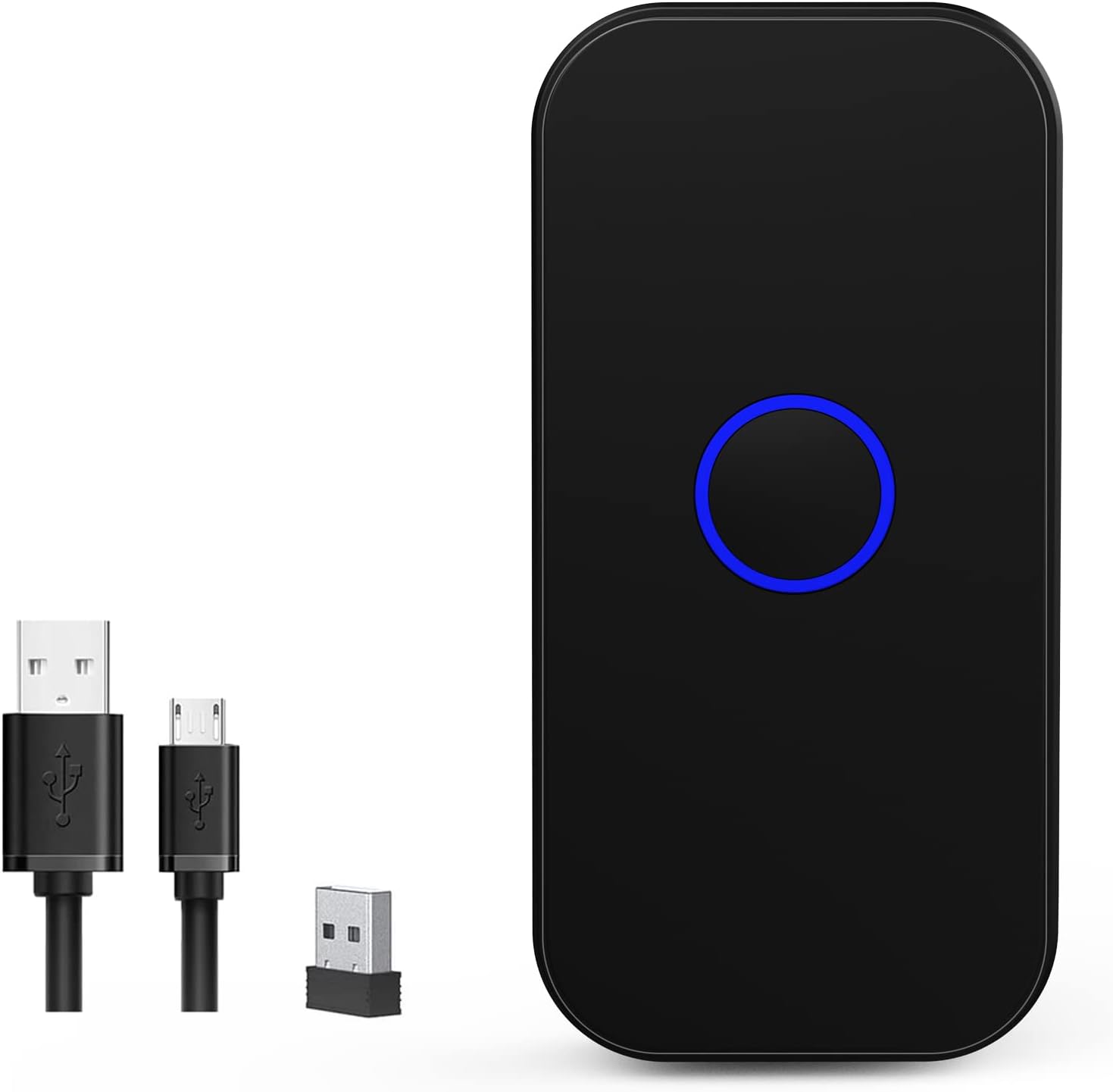
Figure 1: Symcode MJ-X5 Barcode Scanner and accessories.
Fitur konci:
- Konektipitas 3-in-1: Seamlessly switch between USB wired, 2.4G wireless, and Bluetooth 4.1 modes.
- Kompak sareng Portabel: Weighing only 35g (1.23oz), its mini size ensures easy portability.
- Eupan Balik Taktil: Provides a mild vibration upon successful scan, in addition to buzzer and LED light. The buzzer can be muted for quiet operation.
- Kasaluyuan lega: Works with Windows XP/7/8/10, Mac OS, Linux, Android, and iOS devices.
- Dua Modeu Unggah: Supports instant upload for real-time data transfer and storage mode for offline scanning (16MB capacity, over 100,000 barcodes).
- Hirup batré anu panjang: Built-in 650mAh rechargeable battery offers up to 5 hours of continuous scanning and 30 days standby time after a 2-hour charge.
- Ngalegaan Rentang Transmisi: Up to 150m (492ft) in barrier-free environments for 2.4G wireless mode, and up to 50m (164ft) for Bluetooth mode.
- Dekoding Lanjutan: Capable of reading common 1D and 2D barcodes from labels and mobile displays, including blurred or incomplete codes.
- Pilihan Kustomisasi: Allows for turning sound and vibration on/off, adding/hiding custom prefixes/suffixes, deleting characters, and adding keyboard keys.

Figure 2: The compact and portable design of the MJ-X5 scanner.
2. Eusi Paket
Punten parios yén sadaya barang aya dina pakét anjeun:
- 1x Symcode MJ-X5 2D Barcode Scanner
- 1x Kabel Ngecas USB
- 1x Dongle USB 2.4G
- 1x Manual Pamaké (dokumén ieu)
3. Setup and Connection Modes
The Symcode MJ-X5 scanner offers three distinct connection methods to suit your operational needs.

Gambar 3: Leuwihview of the 3-in-1 connection capabilities.
3.1. Sambungan Kabel USB
- Sambungkeun kabel ngecas USB kana port ngecas pamindai.
- Colokkeun tungtung kabel USB anu sanésna kana port USB anu sayogi dina komputer atanapi alat host anjeun.
- The scanner will automatically enter USB wired mode. No additional drivers are typically required.
- Open a text editor or application on your computer and begin scanning barcodes. The data will appear directly.
3.2. 2.4G Wireless Connection
- Insert the 2.4G USB dongle into an available USB port on your computer or host device.
- Hurungkeun pamindai. Éta kedahna otomatis nyambung ka dongle.
- Open a text editor or application on your computer and begin scanning barcodes. The data will appear directly.
3.3. Sambungan Wireless Bluetooth
- Pastikeun alat panyeken diaktipkeun.
- Dina alat host anjeun (smartphone, tablet, komputer), arahkeun ka setélan Bluetooth.
- Long press the scan button on the MJ-X5 scanner for approximately 8 seconds until the indicator light flashes, indicating it is in pairing mode.
- Milarian pikeun available Bluetooth devices. The scanner should appear as "BarCode Scanner HID" or similar.
- Select the scanner to pair. Once connected, the indicator light will stabilize.
- Open an application (e.g., notes app, spreadsheet) and scan a barcode to confirm the connection.

Figure 4: Demonstrating 2.4G and Bluetooth connection setups.

Gambar 5: Kamampuh jangkauan transmisi nirkabel.
Video: Symcode Barcode Scanner Function Introduction
Video 1: video ieu nyadiakeun leuwih komprehensifview of the Symcode MJ-X5 barcode scanner's functions, including demonstrations of USB, Bluetooth, and 2.4GHz wireless connections, various barcode decoding capabilities, and the instant upload and offline storage modes. It serves as a visual guide for initial setup and operation.
4. Modeu Operasi
The MJ-X5 scanner supports different modes for data handling and scanning activation.
4.1. Modeu Unggah Data
- Modeu Unggah Instan: In this mode, scanned barcode data is immediately transmitted to your connected device. This is ideal for real-time inventory updates or point-of-sale operations.
- Modeu Panyimpenan Offline: When out of range or not connected, the scanner can store up to 100,000 barcodes in its 16MB internal memory. Data can be uploaded to your device later when a connection is re-established.

Figure 6: Instant Upload Mode vs. Offline Storage Mode.
4.2. Scanning Activation Modes
The scanner can be configured for different trigger behaviors:
- Trigger Mode (Manual): The scanner will only activate and scan when the scan button is pressed.
- Modeu sensing otomatis: The scanner automatically detects a barcode within its scanning range and activates the scan without requiring a button press.
Refer to the included quick setup guide or the full manual (if provided separately) for specific barcodes to switch between these modes.
5. Kamampuh Dekoding
The Symcode MJ-X5 scanner is equipped with advanced decoding technology to read a wide array of 1D and 2D barcodes, even those that are blurred or incomplete.
Symbologi anu Dirojong:
- Kodeu 1D: JAN/EAN-13, JAN/EAN-8, UPC-A, UPC-E, Code11, Code32, Code39, Code 39 Full ASCII, Code93, Code128, Codabar (NW-7), Interleaved 2 of 5, Matrix 2 of 5, Industrial 2 of 5, Standard 2 of 5, PLESSEY, MSI, ITF14, ISBN, ISSN, GS1 Databar, GS1-128 (UCC/EAN128), ISBT-128.
- Kodeu 2D: QR Code, Data Matrix, PDF417, kode Aztec, Maxicode.
6. Pilihan kustomisasi
The scanner offers several customization features to enhance user experience and integrate seamlessly with various systems.
6.1. Sound and Vibration Control
You can enable or disable the sound and vibration feedback for successful scans according to your preference or working environment. This is particularly useful in quiet settings or when tactile feedback is preferred over audible alerts.

Figure 7: Sound and Vibration settings.
6.2. Prefix/Suffix and Keyboard Key Settings
The scanner supports advanced configurations such as adding custom prefixes or suffixes to scanned data, deleting specific characters, and embedding keyboard keys (like TAB or CR&LF for new lines) into the scanning output. These settings are typically configured by scanning specific setup barcodes found in the detailed product manual.
7. Ngecas jeung Batré
The MJ-X5 scanner is equipped with a 650mAh rechargeable Lithium-Ion battery.
- Waktu Ngecas: Kurang leuwih 2 jam pikeun ngecas pinuh.
- Waktu Gawé Terus-terusan: Up to 5 hours of continuous scanning.
- Waktu sayaga: Dugi ka 30 dinten.
To charge the scanner, connect it to a power source using the provided USB charging cable.

Gambar 8: Spésifikasi batré sareng ngecas.
8. Pangropéa
Proper maintenance ensures the longevity and optimal performance of your Symcode MJ-X5 barcode scanner.
- beberesih: Anggo lawon anu lemes sareng garing pikeun ngabersihkeun bagian luar scanner. Pikeun jandela scanning, anggo lawon anu henteu ngaganggu bulu sacara hampang.ampdibersihkeun ku pembersih anu hampang sareng henteu abrasif. Hindarkeun bahan kimia anu keras atanapi bahan abrasif.
- Panyimpenan: Simpen alat panyeken di tempat anu tiis sareng garing jauh tina sinar panonpoé langsung sareng suhu anu ekstrim.
- Penanganan: While the scanner is designed to sustain drops from up to 5ft (as shown in Figure 9), avoid unnecessary drops or impacts to prevent damage.

Figure 9: Scanner durability and drop height.
9. Cara ngungkulan
If you encounter issues with your Symcode MJ-X5 scanner, please refer to the following common problems and solutions:
- Scanner teu nyambung: Ensure the scanner is charged, powered on, and within range of the host device. For Bluetooth, verify it's in pairing mode and selected in your device's Bluetooth settings. For 2.4G, ensure the dongle is properly inserted. For USB, check the cable connection.
- Teu aya data anu dikirimkeun saatos scan: Verify the scanner is successfully connected to your device. Ensure you have an active text input field or application open to receive the data. Check if the scanner is in offline storage mode; if so, upload the stored data.
- Teu tiasa nyeken sababaraha barcode: Ensure the barcode is clean, undamaged, and within the scanner's optimal reading range and angle. Confirm that the specific barcode symbology is supported by the MJ-X5 scanner (refer to Section 5).
- Scanner beeps but no data: This often indicates a successful scan but a communication issue. Re-establish the connection or try a different connection mode.
- hirup batré pondok: Ensure the scanner is fully charged. Reduce continuous scanning time or adjust power-saving settings if available (refer to the full manual for advanced settings).
If the problem persists, please contact Symcode customer support for further assistance.
10. Spésifikasi
| Fitur | Spésifikasi |
|---|---|
| Dimensi produk | 3.15 x 1.57 x 0.79 inci |
| Item Beurat | 3.2 ons |
| Nomer Modél Item | MJ-X5 |
| Jenis Batré | 1 batré Litium Ion (kaasup) |
| Sumber Daya | Batré Powered, Corded Electric |
| merek | symcode |
| Téhnologi konektipitas | Bluetooth, USB Cable, 2.4G Wireless |
| Alat nu cocog | Smartphone, PC, POS, Laptop, Tablet, iPhone, iPad |
11. Garansi jeung Rojongan
Symcode products are designed for reliability and performance. For warranty information, please refer to the documentation included with your purchase or visit the official Symcode websitus.
For technical support, troubleshooting assistance, or any inquiries regarding your MJ-X5 barcode scanner, please contact Symcode customer service. Contact details can typically be found on the product packaging or the official brand websitus.


