1. Bubuka
1.1 Produk Leuwihview
This manual provides comprehensive instructions for the installation, operation, and maintenance of your KMC 55 Inch LED Standard TV, Model K16M55260. This television features a 55-inch Full HD LED display with a resolution of 1920x1080, offering a clear and vibrant viewing experience. It includes various input options such as USB, Component, AV, and PC/VGA for versatile connectivity.
1.2 Émbaran Kasalametan
Mangga baca sakabeh warnings kaamanan jeung parentah taliti saméméh ngagunakeun produk ieu pikeun nyegah tatu atawa karuksakan. Simpen manual ieu pikeun rujukan ka hareup.
- Ulah ngalaan TV ka hujan atawa beueus.
- Entong meungpeung lawang angin.
- Mastikeun vol catu daya ditangtoskeuntage.
- Hindarkeun nempatkeun TV dina permukaan anu teu stabil.
- Cabut colokan TV nalika badai kilat atanapi nalika henteu dianggo kanggo waktos anu lami.
- Rujuk sadayana jasa ka tanaga jasa anu mumpuni.
2. Setélan
2.1 Ngabongkar bungkusan
Cabut TV sareng sadaya asesoris tina bungkusna kalayan ati-ati. Simpen bahan bungkusna kanggo transportasi atanapi panyimpenan engké.
- KMC 55 Inch LED Standard TV
- Kadali jauh
- Batré pikeun Remote Control
- komponén TV Stand
- Manual pangguna (dokumén ieu)
2.2 Majelis nangtung
To assemble the table stand, align the stand components with the designated slots at the bottom of the TV. Secure them using the provided screws. Ensure the stand is firmly attached before placing the TV on a flat, stable surface.
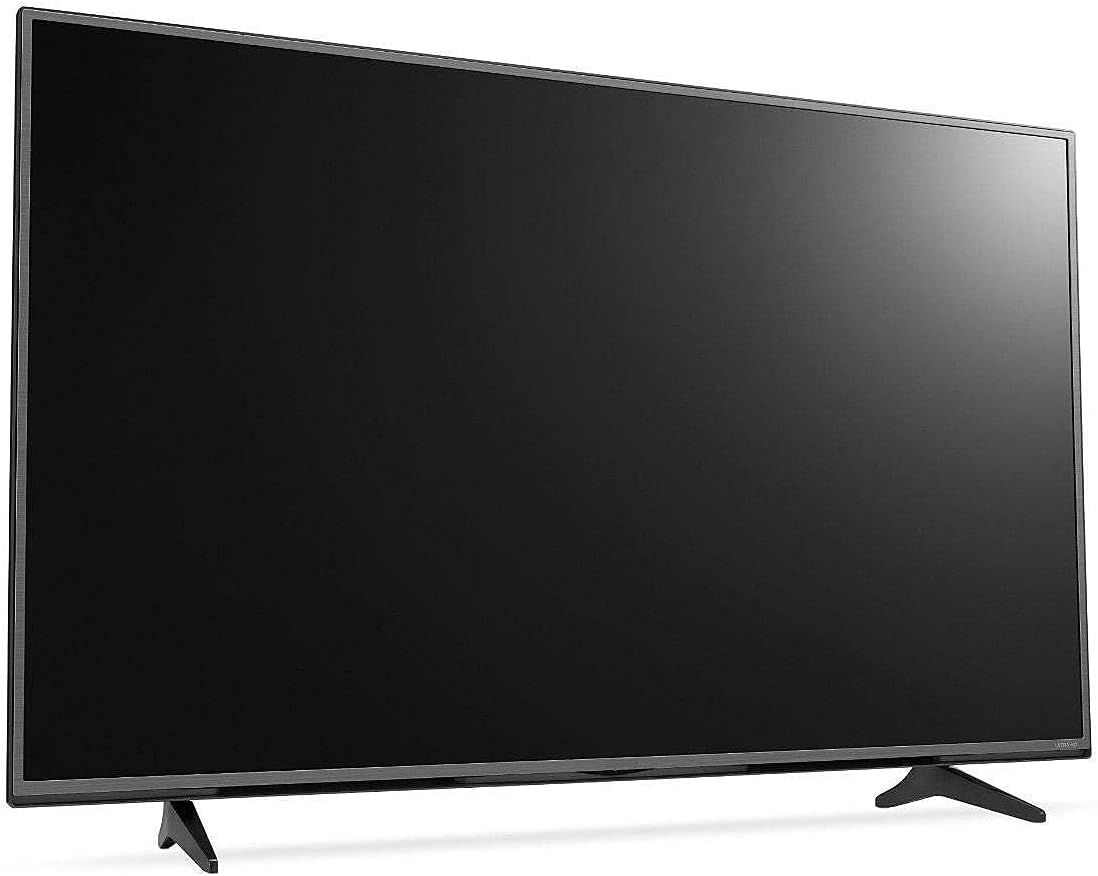
Gambar 2.1: Hareupeun view of the KMC 55 Inch LED Standard TV with its table stand assembled. The screen is black, and the slim bezels are visible.
2.3 Sambungan
Connect your external devices to the appropriate ports on the rear of the TV. The KMC K16M55260 supports USB, Component, AV, and PC/VGA inputs.
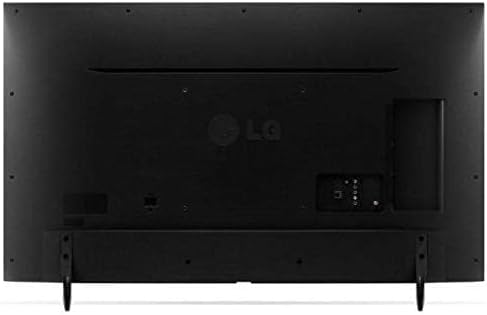
Gambar 2.2: Tukangeun view of the KMC 55 Inch LED Standard TV, displaying the various input ports including USB, Component, AV, and PC/VGA connections.
- Sambungan Daya: Sambungkeun kabel listrik ka TV teras ka stop kontak témbok.
- Input USB: Pikeun nyambungkeun alat panyimpenan USB pikeun muterkeun media.
- Component Input: For high-quality analog video and audio connections.
- Input AV: For standard definition video and stereo audio connections.
- PC/VGA Input: Pikeun nyambungkeun komputer atanapi laptop.
3. Nyuping
3.1 Operasi Dasar
After connecting the TV to power, press the Power button on the remote control or on the TV itself to turn it on. The initial setup wizard may guide you through language selection and channel scanning.
3.2 Jauh Jauh
The included remote control allows you to access all TV functions. Insert the provided batteries into the remote control, ensuring correct polarity.
- Tombol Daya: Ngahurungkeun atawa mareuman TV.
- Input/Sumber: Selects the input source (HDMI, AV, USB, etc.).
- Volume Kaluhur/Turun: Nyaluyukeun tingkat sora.
- Saluran luhur/handap: Robah saluran TV.
- Menu: Opens the main menu for settings adjustments.
- Tombol Navigasi (Kaluhur/Turun/Kénca/Katuhu): Navigates ngaliwatan pilihan ménu.
- OKÉ / Lebetkeun: Konfirmasi pilihan.
- Exit/Back: Mulih ka layar saméméhna atawa kaluar tina menu.
3.3 Navigasi Menu
Pencét éta ménu button on the remote control to access the TV's settings. Use the navigation buttons to move between categories such as Picture, Sound, Channel, Time, and Setup. Press OK to enter a sub-menu or confirm a setting. Press Kaluar pikeun nutup ménu.
4. Pangropéa
4.1 beberesih
Pikeun ngabersihkeun layar TV, usap lalaunan nganggo lawon anu lemes sareng henteu ngaganggu. Pikeun tanda anu bandel, usap sakedikampen the cloth with water or a specialized screen cleaner. Do not spray cleaner directly onto the screen. For the TV casing, make kaen anu lemes sareng garing.
- Sok cabut TV samemeh beberesih.
- Ulah make cleaners abrasive atawa pangleyur.
- Do not apply excessive pressure to the screen.
4.2 Panyimpenan
If you need to store the TV for an extended period, ensure it is unplugged and stored in a cool, dry place, away from direct sunlight and extreme temperatures. It is recommended to use the original packaging for protection during storage or transport.
5. Cara ngungkulan
This section provides solutions to common issues you might encounter with your KMC TV. If the problem persists, please contact customer support.
| Masalah | Mungkin Cukang lantaranana | Solusi |
|---|---|---|
| Taya kakuatan | Kabel listrik teu nyambung; Stop kontak teu jalan. | Pastikeun kabel listrik geus dipasang pageuh; uji stop kontakna nganggo alat séjén. |
| Henteu aya gambar, tapi aya sora | Sumber input anu dipilih salah; Masalah lampu latar. | Pencét éta Input/Sumber button to select the correct input; Contact support if backlight is suspected. |
| Henteu aya sora, tapi aya gambar | Volumena teu pati jelas atawa handap teuing; Kabel audio teu nyambung kalawan bener. | Hurungkeun bisu volume atanapi naékkeun tingkatna; Pariksa sambungan kabel audio. |
| Kadali jauh teu jalan | Batré paéh atanapi teu leres diselapkeun; Halangan antara remote jeung TV. | Ganti batré; Pastikeun garis paningal anu jelas ka sénsor IR TV. |
6. Spésifikasi
Technical specifications for the KMC 55 Inch LED Standard TV, Model K16M55260.
- merek: KMC
- Jumlah modél: K16M55260
- Ukuran layar: 55 Inci (140 cm katempo diagonal)
- Téknologi tampilan: LED
- Resolusi: 1920x1080 (Full HD, 1080p)
- warna: Hideung
- Fitur husus: Tampilan Datar
- Téknologi konektipitas: USB, VGA, Component, AV
- Komponén Kaasup: TV, Remote Control, Batteries, Stand
- Tipe Pamasangan: Méja Gunung
- Ukuran Paket: 129 x 77 x 13 cm
- Beurat pakét: 16 kg
7. Garansi jeung Rojongan
For warranty information or technical support, please contact KMC customer service. Details regarding warranty coverage and service procedures are typically provided with your purchase documentation or can be found on the official KMC websitus.
When contacting support, please have your TV's model number (K16M55260) and serial number ready.


