1. Parentah Kasalametan penting
Please read these instructions carefully before operating your Marantz SR5014 AV Receiver. Keep this manual for future reference.
- Ulah meungpeuk sagala bukaan ventilasi. Pasang saluyu sareng parentah produsén.
- Entong dipasang di deukeut sumber panas sapertos radiator, register panas, kompor, atanapi aparat sanésna (kalebet ampLiifiers) anu ngahasilkeun panas.
- Nangtayungan kabel listrik tina leumpang atawa diciwit, utamana dina colokan, wadah merenah, jeung titik dimana aranjeunna kaluar tina aparat.
- Ngan anggo kantétan/aksésori anu ditunjuk ku produsén.
- Cabut colokan alat ieu nalika badai kilat atanapi nalika henteu dianggo kanggo waktos anu lami.
- Rujuk sadayana ngalayanan ka tanaga jasa anu mumpuni. Pelayanan diperyogikeun nalika aparat parantos rusak sagala cara.
2. Produk Langkungview
The Marantz SR5014 is a high-performance 7.2 channel 4K Ultra HD AV Receiver designed to deliver immersive home theater and musical experiences. It features advanced video processing, support for the latest audio formats, and HEOS Built-in for multi-room audio streaming.
2.1 Fitur konci
- 7.2 Channel discrete power amplifier, 180 Watts per channel.
- Supports 4K Ultra HD, HDR, HLG, and Dolby Vision.
- eARC (Enhanced Audio Return Channel) support.
- Dolby Atmos, DTS:X, and DTS Virtual:X decoding.
- HEOS Built-in for multi-room audio, streaming services, and voice control.
- Audyssey MultEQ XT room acoustic correction.
- Multiple HDMI inputs and outputs.
2.2 Layout Panel hareup
The front panel provides access to essential controls and connections for convenient operation.

Gambar: Hareupeun view of the Marantz SR5014 AV Receiver, showcasing the central display, input selector, volume knob, and front panel connections.
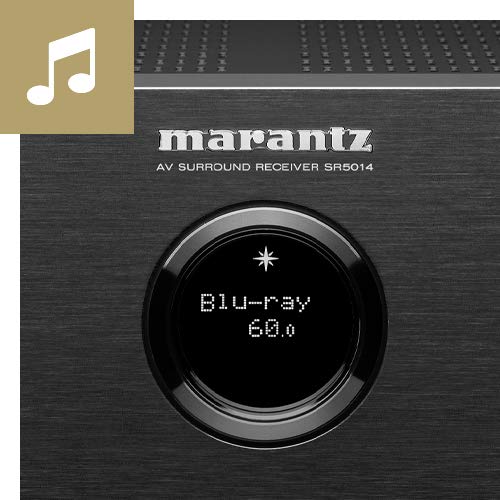
Image: Close-up of the Marantz SR5014's front panel display and controls, highlighting the input selection and volume knobs.
- Tombol Daya: Ngahurungkeun atanapi mareuman unit.
- tampilan: Shows current input, volume level, and other status information.
- Pamilih Input: Rotates to select different audio/video sources.
- Jilid Kenop: Saluyukeun tingkat volume master.
- Jack TELEPON: Pikeun nyambungkeun headphone.
- Port USB: Pikeun nyambungkeun alat panyimpenan USB.
- Masukan HDMI: Front HDMI input for quick connection of devices like cameras or game consoles.
2.3 Sambungan Panel Rear
The rear panel houses all the necessary connections for your home theater system, including HDMI, audio, and speaker terminals.
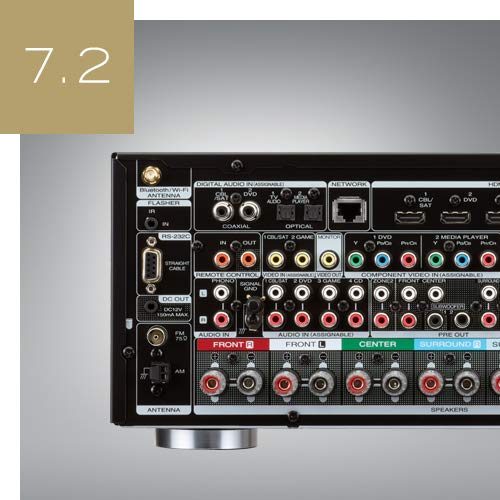
Gambar: Tukangeun view of the Marantz SR5014 AV Receiver, showing the extensive array of input and output ports, including HDMI, speaker terminals, and network connections.
- HDMI Inputs/Outputs: Connect your video sources (Blu-ray player, game console) and display (TV, projector).
- Terminal Speaker: Connect your speakers (Front, Center, Surround, Surround Back/Height).
- Network Port (Ethernet): Pikeun sambungan jaringan kabel.
- Wi-Fi/Bluetooth Antennas: For wireless network and Bluetooth connectivity.
- Digital Audio Inputs (Optical/Coaxial): Pikeun nyambungkeun sumber audio digital.
- Input Audio Analog: For connecting analog audio sources.
- Pra-Kaluar: For connecting external power amplifiers or powered subwoofers.
3. Setup Guide
3.1 Ngabongkar sareng Nempatkeun
Carefully remove the receiver from its packaging. Place the receiver on a sturdy, level surface with adequate ventilation around it. Ensure there is at least 10 cm (4 inches) of clear space above the unit and 5 cm (2 inches) on the sides and rear for proper heat dissipation.
3.2 Sambungan Speaker
The SR5014 supports 7.2 channel configurations. Connect your speakers to the corresponding terminals on the rear panel. Ensure correct polarity (+ to + and - to -) for all speakers.
- Spiker Hareup (Kiri/Katuhu): Connect to the FRONT L and FRONT R terminals.
- Panyatur Tengah: Sambungkeun ka terminal PUSAT.
- Spiker Sakuliling (Kiri/Katuhu): Connect to the SURROUND L and SURROUND R terminals.
- Surround Back / Height Speakers (L/R): Connect to the SURROUND BACK L and SURROUND BACK R terminals. These can be configured as Surround Back or Height speakers in the setup menu.
- Subwoofers: Connect powered subwoofers to the SUBWOOFER 1 and SUBWOOFER 2 PRE OUT jacks using an RCA cable.
3.3 Sambungan HDMI
Connect your video sources and display using high-speed HDMI cables.
- Connect your TV or projector to the HDMI MONITOR OUT port. For eARC functionality, ensure your TV's HDMI port also supports eARC and connect to the designated eARC HDMI output on the receiver.
- Connect your Blu-ray player, game console, or other HDMI devices to any of the available HDMI INPUT palabuhan.
3.4 Sambungan Jaringan
A network connection is required for HEOS features, firmware updates, and internet radio.
- Sambungan kabel: Connect an Ethernet cable from your router to the NETWORK port on the receiver.
- Sambungan nirkabel: Attach the two Wi-Fi/Bluetooth antennas to the rear panel. During initial setup, you will be prompted to connect to your wireless network.
3.5 Initial Setup and Audyssey Calibration
After connecting all components, power on the receiver and follow the on-screen setup assistant. This assistant will guide you through speaker configuration, network setup, and input assignments.
The included Audyssey MultEQ XT microphone should be used to perform room acoustic correction. Place the microphone at various listening positions as prompted by the on-screen guide. This process optimizes the sound for your specific room and speaker setup.
4. Parentah Operasi
4.1 Operasi Dasar
- Hurungkeun/Pareuman: Pencét tombol daya dina panel hareup atawa dina remot kontrol.
- Pilihan Input: Use the INPUT SELECTOR knob on the front panel or the dedicated input buttons on the remote control to switch between connected sources (e.g., Blu-ray, TV Audio, Game).
- Penyesuaian volume: Use the VOLUME knob on the front panel or the VOLUME +/- buttons on the remote control.
- Jempé: Press the MUTE button on the remote control to temporarily silence the audio.
4.2 HEOS Built-in
The SR5014 features HEOS Built-in technology, allowing you to stream music from various online services, network storage, and control multi-room audio.
- Unduh Aplikasi HEOS on your smartphone or tablet (available for iOS and Android).
- Open the app and follow the instructions to add your SR5014 to your HEOS system.
- Browse and play music from streaming services (e.g., Spotify, Amazon Music), internet radio, or your local music library.
- Group multiple HEOS-enabled devices to play the same music in perfect synchronization across different rooms.
4.3 Modeu Audio
The receiver automatically detects the incoming audio format and applies the appropriate decoding. You can also manually select various sound modes.
- Otomatis: Automatically selects the optimal sound mode based on the input signal.
- Pilem: Optimized for movie soundtracks (e.g., Dolby Atmos, DTS:X, Dolby Surround, DTS Neural:X).
- Musik: Optimized for music playback (e.g., Stereo, Multi-Channel Stereo).
- Kaulinan: Optimized for gaming audio.
- Pure Direct: Bypasses all processing for the purest audio signal.
5. Pangropéa
5.1 beberesih
To maintain the appearance of your receiver, wipe the cabinet and front panel with a soft, dry cloth. Do not use abrasive cleaners, waxes, or solvents as they may damage the finish.
5.2 Apdet firmware
Marantz periodically releases firmware updates to improve performance and add new features. Ensure your receiver is connected to the internet to receive these updates.
- You will typically be notified on the display when an update is available.
- Follow the on-screen prompts to initiate the update.
- Do not power off the unit during a firmware update, sabab ieu bisa ngabalukarkeun karuksakan.
6. Cara ngungkulan
If you experience issues with your Marantz SR5014, refer to the following common problems and solutions.
| Masalah | Mungkin Cukang lantaranana | Solusi |
|---|---|---|
| Taya kakuatan | Kabel listrik pegat; Listrik kaluartage | Check power cord connection; Check household circuit breaker. |
| Taya sora | Incorrect input selected; Volume too low; Mute engaged; Speaker wires disconnected | Select correct input; Increase volume; Disable mute; Check speaker connections. |
| Taya video | Incorrect input selected; HDMI cable issue; TV input not set correctly | Select correct input; Check HDMI cable connections; Ensure TV is on correct HDMI input. |
| Konéksi jaringan gagal | Incorrect network settings; Router issue; Wi-Fi signal weak | Re-run network setup; Restart router; Ensure Wi-Fi antennas are properly attached. |
| Kadali jauh teu jalan | Batré béak; Halangan antara remot sareng panarima | Ganti batré; Leupaskeun sagala halangan. |
If the problem persists after trying these solutions, please contact Marantz customer support.
7. Spésifikasi
| Fitur | Rincian |
|---|---|
| merek | Marantz |
| Modél | SR5014/N1B |
| Saluran | 7.2 |
| Daya Kaluaran | 180 Watts (Speakers Maximum Output Power) |
| Ukuran produk (L x W x H) | 44 x 33.8 x 16.11 cm |
| Item Beurat | 10 kg |
| Téhnologi konektipitas | HDMI, Ethernet, USB |
| Palabuhan HDMI | Multiple (Total HDMI Ports: 1 is listed, but typically more for AV Receiver) |
| Fitur husus | HEOS Diwangun |
| Alat nu cocog | Speaker |
| Mode Kaluaran Audio | Stereo, Sakuliling |
| Konfigurasi Saluran Sakuliling Sora | 5.1 (Note: Product title states 7.2CH, this may be a default or minimum configuration) |
| Rojongan Format Media | 4K |
| Ngawengku Jauh | Sumuhun |
8. Garansi jeung Rojongan
Marantz products are designed for reliability and performance. For information regarding your product's warranty, please refer to the warranty card included in the product packaging or visit the official Marantz websitus pikeun wewengkon Anjeun.
For technical support, troubleshooting assistance beyond this manual, or service inquiries, please contact Marantz customer support through their official websitus atawa puseur layanan otorisasi.
Anjeun tiasa mendakan langkung seueur inpormasi sareng sumber dukungan di: www.marantz.com


