Bubuka
Welcome to the user manual for your Picun Elite P80S Wireless Headset. This guide provides detailed instructions for setup, operation, maintenance, and troubleshooting to ensure you get the most out of your device. Please read this manual thoroughly before using the headset.
Eusi pakét
- Picun Elite P80S Headset
- Detachable AUX Microphone
- Kabel Ngecas USB
- AUX Cable for Wired Transmission

Image: Picun Elite P80S Wireless Headset with detachable microphone, showcasing its design and included microphone.
Produk Leuwihview
Komponen sareng Kontrol Headset
The Picun Elite P80S headset features an ergonomic design with easy-to-access media buttons for various functions. These include controls for music playback, call management, vibration mode, LED light display, and volume adjustments.

Image: The Picun Elite P80S Wireless Headset shown in its folded configuration, highlighting its portable design.

Image: The Picun Elite P80S Wireless Headset displayed on a stand, providing a clear view of its over-ear design, earcups, and adjustable headband.
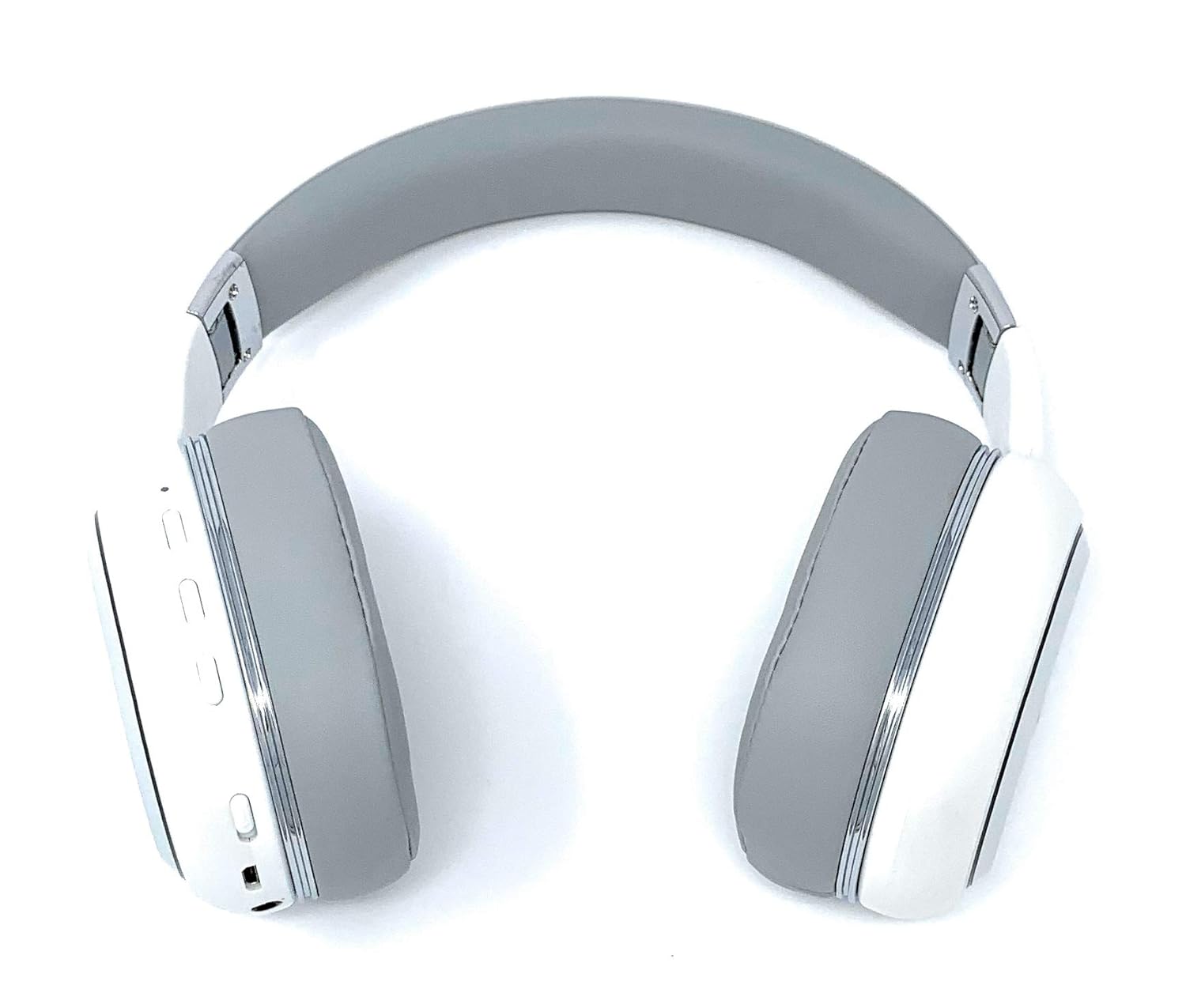
Image: A rear perspective of the Picun Elite P80S Wireless Headset, illustrating the placement of control buttons on the earcup.

Image: A detailed close-up of the right earcup hinge and the 'R' indicator on the Picun Elite P80S Wireless Headset, showing construction details.
Disetél
Ngecas Headsét
Before initial use, fully charge the headset. Use the provided USB charging cable with any compatible USB adapter or device.
- Connect the USB charging cable to the headset's charging port.
- Sambungkeun tungtung kabel USB anu sanés ka sumber listrik.
- A full charge provides approximately 40 hours of game time or 60 hours of music/media playback in wireless mode.
Papasangan Bluetooth
To connect your headset wirelessly:
- Pastikeun headset pareum.
- Pencét jeung tahan tombol daya nepi ka indikator LED hurung, nunjukkeun mode papasangan.
- Dina alat anjeun (smartphone, tablet, komputer), aktipkeun Bluetooth sareng milarian alat anu sayogi.
- Select "Picun P80S" from the list of found devices.
- Sakali nyambung, indikator LED bakal némbongkeun lampu anu ajeg atanapi kedip-kedip lalaunan.
Sambungan kabel
For a wired connection, use the provided AUX cable:
- Connect one end of the AUX cable to the headset's AUX port.
- Sambungkeun tungtung anu hiji deui kana colokan audio 3.5mm alat audio anjeun.
- The headset can be used indefinitely in wired mode, regardless of battery charge.
Ngagantelkeun Mikropon
The headset includes a detachable microphone for clear communication:
- Locate the microphone port on the headset.
- Gently insert the detachable microphone into the port until it clicks into place.
- The microphone is designed to reduce ambient noise for high-definition vocals.
Parentah Operasi
Daya Hurung/Pareuman
- Daya Hurung: Pencét jeung tahan tombol daya pikeun sababaraha detik nepi ka indikator LED hurung.
- Pareum listrik: Pencét terus tahan tombol daya salami sababaraha detik dugi ka indikator LED pareum.
Puterkeun Musik
- Puter / Reureuh: Pencét tombol Play / Reureuh sakali.
- Lagu salajengna: Press and hold the 'Volume Up' button.
- Lagu Sateuacanna: Press and hold the 'Volume Down' button.
Manajemén Telepon
- Ngajawab / mungkas Telepon: Pencét tombol Multi-fungsi sakali.
- Nolak Telepon: Pencét jeung tahan tombol Multi-fungsi salila 2 detik.
Dual Shock/Vibration Mode
This mode enhances audio with deep bass and vibrations, ideal for music, movies, and gaming.
- Aktipkeun / Nonaktipkeun: Use the dedicated 'Vibration/Dual Shock Mode On-Off toggle switch' on the headset.
Témbongkeun Lampu LED
The headset features an LED light display.
- Hurungkeun/Pareuman: Use the dedicated 'LED Light Display On-Off button' on the headset.
Volume Control
- Ningkatkeun Jilid: Pencét tombol 'Volume Naék'.
- Turunkeun Jilid: Pencét tombol 'Volume Turun'.
Pangropéa
beberesih
- Ngusap headsét nganggo kaén anu lembut sareng garing.
- Ulah make cleaners abrasive atawa pangleyur.
- Keep the charging port and audio jacks free of dust and debris.
Panyimpenan
- Simpen headset di tempat anu tiis sareng garing jauh tina sinar panonpoé langsung sareng suhu anu ekstrim.
- When not in use for extended periods, ensure the headset is fully charged before storing.
Pamérésan masalah
Taya Daya
- Pastikeun headset tos dicas pinuh.
- Verify the charging cable and power source are functioning correctly.
Taya Sora
- Pariksa tingkat polumeu boh dina headset sareng alat Anjeun nu disambungkeun.
- If using Bluetooth, ensure the headset is properly paired and connected.
- If using a wired connection, ensure the AUX cable is securely plugged into both the headset and the audio source.
- Tes nganggo sumber atanapi alat audio anu béda.
Masalah Nyapasangkeun Bluetooth
- Pastikeun headset aya dina mode papasangan (LED kedip-kedip).
- Pareuman sareng aktipkeun Bluetooth dina alat anjeun.
- Pupus sambungan Bluetooth samemehna dina alat Anjeun tur coba masangkeun deui.
- Ensure the headset is within the effective range of your Bluetooth device.
spésifikasi
| Fitur | Katerangan |
|---|---|
| Ngaran modél | Elite P80S |
| Téhnologi konektipitas | Bluetooth |
| Téknologi Komunikasi Nirkabel | Bluetooth |
| Komponén Kaasup | Headset, Detachable AUX Microphone, USB Charging Cable, AUX Cable for Wired Transmission |
| Rentang Umur (Deskripsi) | Dewasa |
| Bahan | Kulit Palsu |
| Tipe Kontrol | Volume Control, Remote |
| Fitur kabel | Bisa dicabut |
| Item Beurat | 820 g (0.82 Kilogram) |
| Jumlah Item | 1 |
| Fitur husus | Noise Cancelling |
| Produsén | Picun |
| Platform hardware | Konsol kaulinan |
| format mikropon | Built-In, Detachable AUX Microphone |
| Batré Diperlukeun | No (Internal rechargeable battery) |
| Faktor Bentuk | Leuwih Ceuli |
| Warna | Bodas |
| Kontrol bising | Pembatalan Noise aktip |
| Headphone Jack | 3.5 mm Jack |
Émbaran jaminan
The Picun Elite P80S Wireless Headset is covered by a manufacturer's warranty. For specific details regarding warranty terms, duration, and claims process, please refer to the warranty policy provided at the time of purchase or contact Picun customer support.
Rojongan Palanggan
If you encounter any issues not covered in this manual or require further assistance, please contact Picun customer support through their official website or the contact information provided with your product packaging. Please have your product model (P80S) and purchase details ready when contacting support.


