1. Bubuka
The NEDIS VEXT3470AT HDMI Audio Extractor allows you to separate audio signals from an HDMI source and output them to an audio system, while simultaneously passing the video signal to a display. This device is designed to integrate modern HDMI sources with audio systems that may not have HDMI inputs, providing both digital (Toslink) and analog (L/R stereo) audio outputs.
It supports 3D video and amplifies the digital video signal for reliable transmission.
2. Émbaran Kasalametan
- Baca paréntah ieu sacara saksama sateuacan dianggo.
- Jauhkeun alat tina cai, beueus, sareng suhu anu ekstrim.
- Ulah nyobian muka atawa ngalereskeun alat sorangan. Rujuk sadayana jasa ka tanaga anu mumpuni.
- Paké ngan adaptor kakuatan disadiakeun. Ngagunakeun adaptor anu salah tiasa ngaruksak alat sareng ngabatalkeun jaminan.
- Pastikeun ventilasi ditangtoskeun sabudeureun alat pikeun nyegah overheating.
- Cabut adaptor daya nalika hujan badag atawa nalika teu dianggo dina waktu anu lila.
3. Eusi Paket
Mangga parios eusi pakét pikeun mastikeun yén sadaya barang aya sareng dina kaayaan anu saé:
- NEDIS VEXT3470AT HDMI Audio Extractor
- Adaptor kakuatan
- Manual pangguna (dokumén ieu)
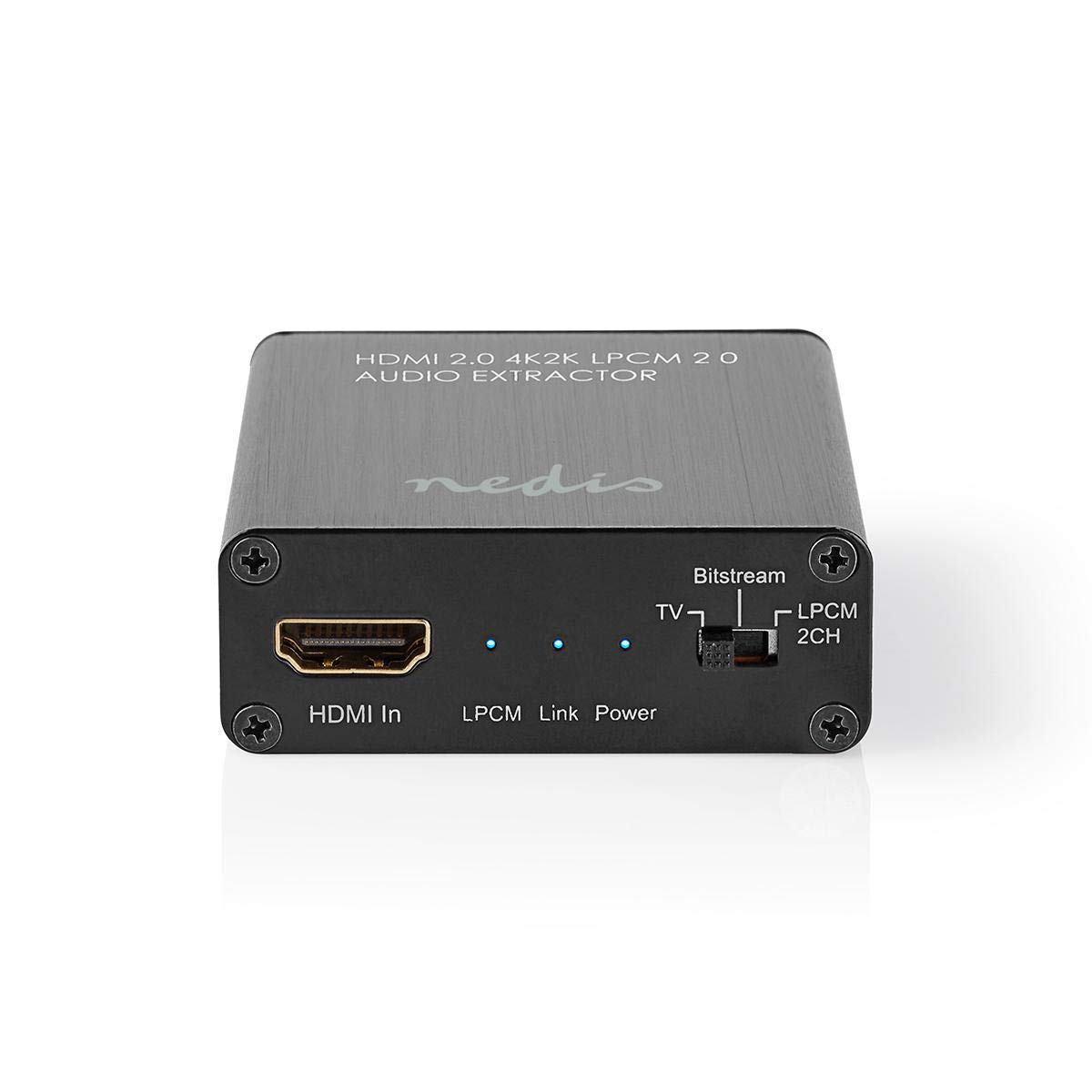
Image: The NEDIS VEXT3470AT HDMI Audio Extractor unit shown alongside its power adapter.
4. Produk Langkungview
Familiarize yourself with the ports and indicators on the HDMI Audio Extractor:
4.1 Input Side
Image: Close-up of the input side of the audio extractor, showing the HDMI In port, LPCM, Link, and Power indicator LEDs, and the Audio Mode Switch.
- HDMI Dina: Connect your HDMI source device (e.g., DVD/Blu-ray player, game console).
- LPCM LED: Indicates when LPCM audio format is detected.
- Tautan LED: Indicates an active HDMI connection.
- LED kakuatan: Nyaangan nalika alat dihurungkeun.
- Audio Mode Switch:
- Bitstream: For multi-channel audio formats like Dolby Digital or DTS.
- TV: Passes audio directly from the HDMI source to the TV.
- LPCM 2CH: For 2-channel stereo audio output via L/R analog and Toslink.
4.2 Output Side

Image: Close-up of the output side of the audio extractor, showing the 5V/DC power input, Optical (Toslink) audio output, HDMI Out port, and L/R analog audio outputs.
- 5V/DC: Power input port. Connect the provided power adapter here.
- Optik: Digital audio output (Toslink). Connect to an audio receiver or soundbar.
- HDMI Kaluar: Sambungkeun ka TV atawa layar Anjeun.
- L/R: Analog stereo audio output. Connect to an amplifier or stereo system using RCA cables.
5. Parentah Setup
Follow these steps to connect your HDMI Audio Extractor:
- Alat Pareum: Ensure all devices (HDMI source, TV, audio system) are powered off before making connections.
- Sambungkeun Sumber HDMI: Connect an HDMI cable from your source device (e.g., Blu-ray player) to the HDMI Dina port dina ekstraktor audio.
- Sambungkeun tampilan: Connect another HDMI cable from the HDMI Kaluar port on the audio extractor to your TV or display.
- Connect Audio System:
- For digital audio, connect an optical Toslink cable from the Optik port on the extractor to your audio receiver or soundbar.
- For analog stereo audio, connect RCA cables from the L/R ports on the extractor to your stereo amplifier atawa speaker aktif.
- Sambungkeun Kakuatan: Colokkeun adaptor daya anu disayogikeun kana 5V/DC port on the extractor, then plug the adapter into a power outlet. The Power LED should illuminate.
- Power On Alat: Power on your TV/display, audio system, and then your HDMI source device.
6. Parentah Operasi
Once connected, operate the device as follows:
- Pilih Modeu Audio: Ngagunakeun éta Switch Mode Audio on the input side to select the desired audio output format:
- Bitstream: For multi-channel audio (e.g., Dolby Digital, DTS) to be passed through the Optical output. Your audio receiver must support these formats.
- TV: Passes the audio directly to the TV via HDMI. Audio extraction via Optical/L/R may be limited or unavailable in this mode, depending on the source and TV capabilities.
- LPCM 2CH: Converts multi-channel audio to 2-channel LPCM for output via Optical and L/R analog ports. This is suitable for stereo systems or when your receiver does not support Bitstream formats.
- Verifikasi Indikator:
- The kakuatan LED kedah on.
- The LED link should be on when an active HDMI signal is detected from the source.
- The LPCM LED will illuminate if the audio signal is in LPCM format.
- Adjust Audio System: Ensure your audio receiver or soundbar is set to the correct input (Optical or Analog L/R) and volume.
7. Pangropéa
To ensure the longevity and optimal performance of your HDMI Audio Extractor:
- beberesih: Anggo kaén anu lemes sareng garing pikeun ngabersihan alat. Ulah make cleaners cair atawa aerosol.
- Panyimpenan: Simpen alat dina tempat anu tiis sareng garing upami henteu dianggo.
- Penanganan: Hindarkeun ragrag atanapi ngagentoskeun alat kana tabrakan anu kuat.
8. Cara ngungkulan
Upami anjeun ngalaman masalah, tingali pituduh ngungkulan masalah ieu:
| Masalah | Mungkin Cukang lantaranana / Solusi |
|---|---|
| Teu Kaluaran Pidéo |
|
| Taya Kaluaran Audio |
|
| LED Daya Pareum |
|
| Intermittent Audio/Video |
|
9. Spésifikasi
Key technical specifications for the NEDIS VEXT3470AT HDMI Audio Extractor:
- Jumlah modél: VEXT3470AT
- merek: NEDIS
- Input: 1 x HDMI
- Kaluaran: 1x HDMI, 1x Optical (Toslink), 1x L/R Stereo (RCA)
- Vérsi HDMI: Compatible with HDMI 2.0 (implied by 4K2K support in product name)
- Resolusi Video: Up to 4K (4K2K)
- Rojongan 3D: Sumuhun
- Format audio: LPCM 2.0, Bitstream (Dolby Digital, DTS pass-through)
- Sasayogian tanaga: 5V DC (ngalangkungan adaptor anu kalebet)
- Ukuran (L x W x H): Kira-kira 7.7 x 6.4 x 2.3 cm
- beurat: 240 gram
- warna: Anthracite (Black)
- Negara asal: Cina
10. Garansi jeung Rojongan
NEDIS products are manufactured to high quality standards. In the unlikely event of a defect during the warranty period, please contact your retailer for support. The warranty period is subject to local consumer laws and regulations.
For technical assistance or further inquiries, please refer to the support information provided by your retailer or visit the official NEDIS websitus.


