1. Bubuka
This manual provides detailed instructions for setting up, operating, and maintaining your Logitech MX Master 3S Wireless Performance Mouse. Designed for precision and comfort, the MX Master 3S features advanced tracking, quiet clicks, and customizable controls to enhance your workflow across various operating systems.
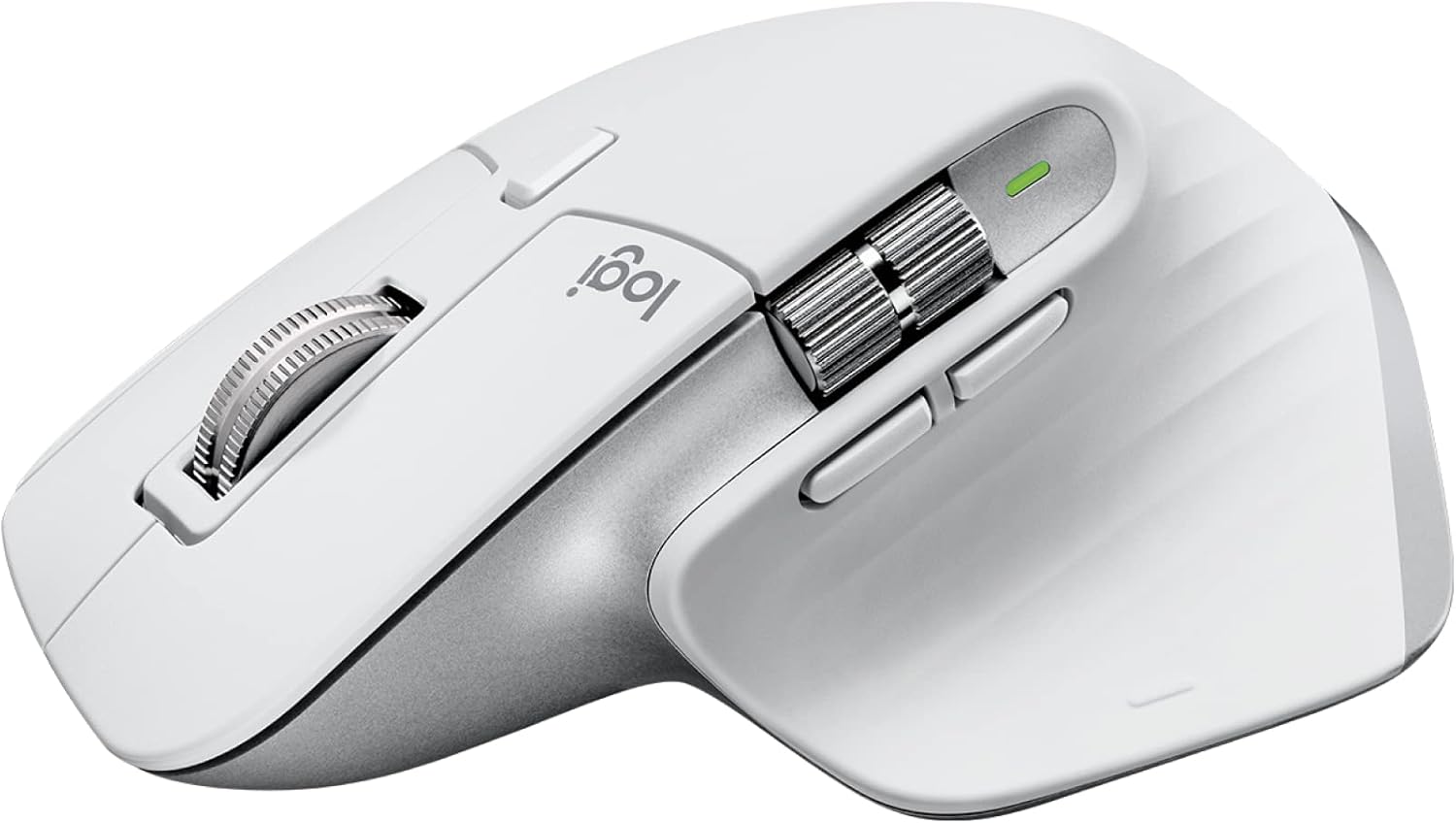
Logitech MX Master 3S Wireless Performance Mouse in Pale Grey.
2. Produk Langkungview
Familiarize yourself with the components of your MX Master 3S mouse.

Diagram of the Logitech MX Master 3S mouse with key features labeled.
- Quiet Click Buttons: Left and Right click buttons with reduced noise.
- MagSpeed Wheel: Main scroll wheel for fast, precise vertical scrolling.
- Roda jempol: Side scroll wheel for horizontal scrolling.
- 8K Track-Anywhere Sensor: High-precision sensor located on the bottom, capable of tracking on virtually any surface, including glass (minimum 4mm thickness).
- Tombol customizable: Side buttons and a gesture button for personalized functions.
- Easy-Switch Buttons: Located on the bottom, allows switching between up to three paired devices.
3. Setélan
3.1. Unboxing sareng Biaya Awal
Your MX Master 3S package includes the mouse, a Logi Bolt USB receiver, and a USB-C charging cable.
Contents of the Logitech MX Master 3S package, including the mouse, Logi Bolt USB receiver, and USB-C charging cable.
Before first use, it is recommended to fully charge the mouse using the provided USB-C cable. Connect the USB-C end to the mouse and the USB-A end to a power source (e.g., computer USB port or wall adapter). The LED indicator will show charging status.
3.2. Nyambungkeun Mouse Anjeun
The MX Master 3S offers two connection methods: Bluetooth Low Energy or the Logi Bolt USB receiver.
3.2.1. Sambungan Bluetooth
- Hurungkeun beurit nganggo saklar daya di handap.
- Press and hold one of the Easy-Switch buttons (1, 2, or 3) on the bottom of the mouse until the LED blinks rapidly. This indicates pairing mode.
- On your computer or device, open Bluetooth settings and select 'MX Master 3S' from the list of available devices to pair.
- The LED on the mouse will glow solid for 5 seconds when connected.
3.2.2. Logi Bolt USB Receiver Connection
- Colokkeun panarima USB Logi Bolt kana port USB anu sayogi dina komputer anjeun.
- Hurungkeun beurit nganggo saklar daya di handap.
- The mouse should automatically connect to the receiver. If not, press one of the Easy-Switch buttons (1, 2, or 3) to select the channel associated with the receiver.
3.3. Installing Logi Options+ Software
To unlock the full potential of your MX Master 3S, including button customization, gesture controls, and application-specific settings, download and install the Logi Options+ software from the official Logitech website. This software is available for Windows and macOS.

A computer screen displaying the Logi Options+ software interface for customizing buttons and settings of the MX Master 3S mouse.
4. Parentah Operasi
4.1. Fitur konci
- 8K DPI Any-Surface Tracking: The Darkfield high-precision sensor allows you to use the mouse on virtually any surface, including glass (minimum 4mm thickness), with adjustable sensitivity up to 8000 DPI. This provides precise control for various tasks.
- Klik sepi: Experience the same satisfying click feel with 90% less click noise compared to the MX Master 3, ideal for quiet work environments.
- MagSpeed Electromagnetic Scrolling: The main scroll wheel offers two modes: a super-fast, free-spinning mode for quickly navigating long documents (90% faster) and a precise, line-by-line mode (87% more precise). The wheel automatically shifts between modes based on scrolling speed.
- Desain ergonomis: The mouse is sculpted to fit the contours of your hand, promoting a natural wrist posture and providing comfortable use during extended periods.
- Logitech Flow: When used with Logi Options+, Flow allows you to seamlessly control multiple computers with a single MX Master 3S mouse, moving your cursor, text, and files across different operating systems.

A hand operating the Logitech MX Master 3S mouse on a glass surface, demonstrating its any-surface tracking capability.

A user working at a desk with the Logitech MX Master 3S mouse, illustrating its quiet click feature in a professional setting.

Pahareup-hareup view of the MagSpeed electromagnetic scroll wheel and thumbwheel on the Logitech MX Master 3S mouse.

A diagram showing the Logitech Flow feature, allowing seamless cursor, text, and file transfer between a laptop and a desktop computer.
4.2. Kustomisasi nganggo Pilihan Logi+
The Logi Options+ software allows you to:
- Assign custom functions to all buttons, including the gesture button and thumb wheel.
- Create application-specific profiles, so your mouse behaves differently in various programs (e.g., Photoshop, Chrome, Word).
- Adjust tracking speed (DPI) and scrolling sensitivity.
- Enable and configure Logitech Flow.
5. Pangropéa
5.1. beberesih
Pikeun ngabersihkeun beurit anjeun, anggo lawon anu lemes sareng henteu ngagangguampened with water or an alcohol-based cleaner. Avoid harsh chemicals or abrasive materials. Do not allow moisture to enter any openings.
5.2. Kaperawatan batré
The MX Master 3S uses a rechargeable Li-Po (500 mAh) battery. Battery life can vary based on usage and computing conditions. To maximize battery lifespan:
- Charge the mouse when the battery indicator is low.
- Hindarkeun suhu anu ekstrim.
- Upami nyimpen beurit kanggo waktos anu panjang, muatanana sakitar 50% sateuacan disimpen.
6. Cara ngungkulan
6.1. Masalah konektipitas
- Mouse teu nyambung: Ensure the mouse is powered on and fully charged. If using Bluetooth, verify the Easy-Switch channel is in pairing mode (blinking LED) and your device's Bluetooth is enabled. If using the Logi Bolt receiver, ensure it is securely plugged in and the correct Easy-Switch channel is selected.
- Sambungan intermiten: Move the mouse closer to your computer or receiver. Avoid placing the receiver near other wireless devices or large metal objects that might cause interference.
6.2. Tracking Problems
- Nyukcruk teu akurat: Clean the sensor lens on the bottom of the mouse with a soft cloth. Ensure the surface you are using is not excessively reflective or uneven. While the mouse tracks on glass, ensure the glass is at least 4mm thick.
- No tracking: Check if the mouse is powered on and connected. If the issue persists, try restarting your computer.
6.3. Button or Scroll Wheel Malfunction
- Tombol teu ngabales: Ensure Logi Options+ is installed and updated. Check if any custom profiles are interfering with button functions. Try resetting the mouse by turning it off and on.
- Scroll wheel issues: Clean any debris around the scroll wheels. If the MagSpeed wheel is stuck in one mode, try toggling the mode-shift button (if configured in Logi Options+).
7. Spésifikasi
| Ngaran modél | Logitech MX Master 3S Performance Wireless Mouse |
| Nomer modél | 910-006560 |
| Warna | Kulawu Pucat |
| Ukuran (H x W x D) | 124.9 mm x 84.3 mm x 51 mm |
| Beurat | 141 g |
| Téknologi Sénsor | Darkfield High Precision (Optical) |
| Rentang DPI | 200 to 8000 DPI (adjustable in 50 DPI increments) |
| Kancing | 7 buttons (Left/Right-click, Back/Forward, App-Switch, Wheel mode-shift, Middle click), Scroll Wheel, Thumbwheel, Gesture button |
| Konektipitas | Bluetooth Énergi Leutik, Panarima USB Logi Bolt |
| Jarak Operasi Nirkabel | 10 meters (may vary based on environment) |
| Batré | Li-Po anu tiasa dicas ulang (500 mAh) |
| Sistem Operasi cocog | Windows, macOS, Linux, Chrome OS, iPadOS (15 or higher), iOS (14 or higher), Android |
| Fitur husus | 8K DPI, Flow - Cross computer control, MagSpeed scrolling, Silent click, Tracks on glass |
| Eusi Plastik Daur Ulang | 22% in Pale Grey (excluding PWA, receiver, wire, FFC cable, and packaging) |
8. Garansi jeung Rojongan
For specific warranty information, please refer to the documentation included with your product or visit the official Logitech support website. Please note that for international products, manufacturer warranty terms may vary or not apply.
For further assistance, troubleshooting guides, and software downloads, please visit the official Logitech support websitus: www.logitech.com/support

An image highlighting the sustainable design of the MX Master 3S, featuring icons for recycled plastic and responsible packaging.


